sketchucation logo sketchucation
    • 登入
    Oops, your profile's looking a bit empty! To help us tailor your experience, please fill in key details like your SketchUp version, skill level, operating system, and more. Update and save your info on your profile page today!
    ⚠️ Important | Libfredo 15.6b introduces important bugfixes for Fredo's Extensions Update

    [Plugin]SOLID QUANTIFY v2.5.1 (20131215)

    已排程 已置頂 已鎖定 已移動 Plugins
    64 貼文 19 Posters 59.1k 瀏覽 19 Watching
    正在載入更多貼文
    • 從舊到新
    • 從新到舊
    • 最多點贊
    回覆
    • 在新貼文中回覆
    登入後回覆
    此主題已被刪除。只有擁有主題管理權限的使用者可以查看。
    • T 離線
      tak2hata
      最後由 編輯

      Hi,All.
      I update to version2.2.
      Add Menu ,"Change Units" for reports.
      You can select every units of length , area , volume, cost.

      Hi,camilozunga.
      I tested solid quantify on mac.
      I could not found problem you sayed.
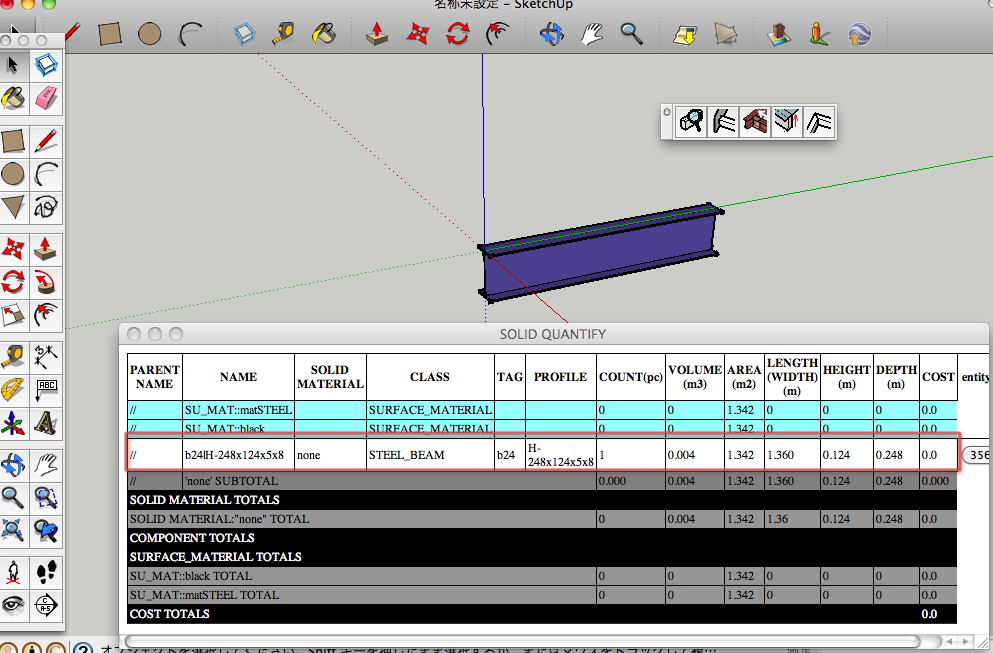
      Solid Quantify on Mac.
      Green line in this picture is Y-Axis.
      The entity was placedalong Y-Axis.
      Webdialog is fine.

      Please upload here skp file had problem and Screen capture of Webdialog.
      Or send it to me by message.

      Thanks.


      by TAK2HATA

      1 條回覆 最後回覆 回覆 引用 0
      • kenK 離線
        ken
        最後由 編輯

        tak2hata

        Great plugin. I have two questions, the COUNT(pc) what does this field indicate. And the cost, how do you get the cost field to reflect cost.

        As for the COUNT(pc) I have made duplicate's of solid, and the COUNT(pc) stays at 1, however it show each duplicate on a separate line.

        As for the COST, I have enter cost when I change the unit, as an example, 1.00 for each sq/in and the COST does not change.

        So I must be making a mistake just can't seem to track it down.

        Thanks you help and plugins.

        Ken

        Fight like your the third monkey on Noah's Ark gangway.

        1 條回覆 最後回覆 回覆 引用 0
        • T 離線
          tak2hata
          最後由 編輯

          @unknownuser said:

          tak2hata

          Great plugin. I have two questions, the COUNT(pc) what does this field indicate. And the cost, how do you get the cost field to reflect cost.

          As for the COUNT(pc) I have made duplicate's of solid, and the COUNT(pc) stays at 1, however it show each duplicate on a separate line.

          As for the COST, I have enter cost when I change the unit, as an example, 1.00 for each sq/in and the COST does not change.

          So I must be making a mistake just can't seem to track it down.

          Thanks you help and plugins.

          Ken

          Hi,Ken.
          I improves count(pc) of component whitch have volumes.
          Now,The components have volumes is counted the figures up.
          And I add function to select the components want to be quantified.
          Look video in top thread of this.

          Thanks.


          by TAK2HATA

          1 條回覆 最後回覆 回覆 引用 0
          • S 離線
            Souto
            最後由 編輯

            @camilozunga said:

            Hello and thanks for your plugin, I just find it a few days ago and it's just perfect for what I need... Unfortanetly in my MAC is not working well, don't let me export xml, don't let me apply solid materials, JUST LET ME VIEW IN WEBDIALOG and the most of the measures of elements oriented in Y axis appears in 0.00, did you or anyone mac users who are using this plugin can help?

            thanks.

            Great plugin however such as "Camilozunga" i' m not be able using it because won't let me export xml or cvs. I' m been trying with a simple file with a single cube with a basic material.
            I' m a Mac user also.
            Can you help me on this?

            Regards
            Souto

            1 條回覆 最後回覆 回覆 引用 0
            • M 離線
              mickath
              最後由 編輯

              Hi All,

              I think this is a very useful plugin, but I do not understand how to use it despite after watching the videos, it will be more meaningful if those video include narration & explanation in sound.

              Thanks

              Mickath

              1 條回覆 最後回覆 回覆 引用 0
              • T 離線
                tak2hata
                最後由 編輯

                Hi,All.
                I update this to ver 2.4 in Apr28,2013.

                Add Short/Full report for Webdialog.
                Bug fix about surface area in scaled component.
                Including area of back_face material.
                deal with instance name as priority to definition name when the name applied to instance.
                Hi,Camilozunga and Souto.
                It can work with the model including no solid.

                Thanks for the ideas from Goga63.
                Thanks! 😄


                by TAK2HATA

                1 條回覆 最後回覆 回覆 引用 0
                • T 離線
                  tak2hata
                  最後由 編輯

                  Hi,
                  I update this to version 2.4.2. in May 16,2013.

                  New function"SHOW CHART".
                  Showing charts on browser with JAVASCRIPT INFOVIS TOOL KIT(http://philogb.github.io/jit/)

                  Thanks.


                  by TAK2HATA

                  1 條回覆 最後回覆 回覆 引用 0
                  • kenK 離線
                    ken
                    最後由 編輯

                    OK, there is a problem with this version.

                    The older version has a plugin called,solid_quatify2.rb and this upgrade has a plugin called, solid_quantify2.rb. So when you install this upgrade you don't over write the old version.

                    Ken

                    Fight like your the third monkey on Noah's Ark gangway.

                    1 條回覆 最後回覆 回覆 引用 0
                    • T 離線
                      tak2hata
                      最後由 編輯

                      @unknownuser said:

                      OK, there is a problem with this version.

                      The older version has a plugin called,solid_quatify2.rb and this upgrade has a plugin called, solid_quantify2.rb. So when you install this upgrade you don't over write the old version.

                      Ken

                      The older file name was mistake.
                      Remove solid_quatify2.rb


                      by TAK2HATA

                      1 條回覆 最後回覆 回覆 引用 0
                      • bagateloB 離線
                        bagatelo
                        最後由 編輯

                        I found this plugin simply fantastic! Wonderful!
                        But...
                        If some component have several copies, with several scales from outside,is presented in the report as if everyone had the same size, and this is not desirable to me.
                        Also would like to know if is possible to organize the report by displaying objects by layer, and if we can disable to make report to hidden layers.

                        Thank you!

                        While the cat's away, the mice will play

                        1 條回覆 最後回覆 回覆 引用 0
                        • bagateloB 離線
                          bagatelo
                          最後由 編輯

                          You could take a look at these things I asked here?
                          http://sketchucation.com/forums/viewtopic.php?f=323&t=54080

                          While the cat's away, the mice will play

                          1 條回覆 最後回覆 回覆 引用 0
                          • T 離線
                            tak2hata
                            最後由 編輯

                            @bagatelo said:

                            I found this plugin simply fantastic! Wonderful!
                            But...
                            If some component have several copies, with several scales from outside,is presented in the report as if everyone had the same size, and this is not desirable to me.
                            Also would like to know if is possible to organize the report by displaying objects by layer, and if we can disable to make report to hidden layers.

                            Thank you!

                            Hi,bagatelo.
                            I will fixe the first problem about scaled component.
                            but I'm sorry ,Now I am too busy.So wait this weekend.

                            I think the component in hidden layer is not included in report.
                            In the case of the faces in component are placed in hidden layer,
                            that faces are not included,but the number of that component are counted.
                            I think finding that case is difficult.
                            Please place the components on hidden layers.

                            And I will read your ask topic,
                            but I do not know I can create the function for the request.

                            Thanks!


                            by TAK2HATA

                            1 條回覆 最後回覆 回覆 引用 0
                            • T 離線
                              tak2hata
                              最後由 編輯

                              Hi,I updated this to version2.5.0
                              Bugfix::Calculate correctly volume of the solid in scaled group.
                              Thanks!


                              by TAK2HATA

                              1 條回覆 最後回覆 回覆 引用 0
                              • bagateloB 離線
                                bagatelo
                                最後由 編輯

                                Hello tak2hata , this is an important update. Thanks.

                                I think it would be very interesting if we could add in a particular component some items few who would not be modeled in 3D, but we could assign cost values​​. So when should copy such items automatically additional items would be added in the report.
                                It would also be interesting if our selves just set things like:
                                Set up a special layer, and for each item (component or group) (only those who were at the root of the outliner) additional other items would be included, which would not be modeled in 3d.

                                Thanks again for your efforts.

                                While the cat's away, the mice will play

                                1 條回覆 最後回覆 回覆 引用 0
                                • H 離線
                                  hebeijianke
                                  最後由 編輯

                                  SOLID MATERIAL CHANGER error

                                  Error; #<NoMethodError; undefined method `entities' for #<Sketchup;;Edge;0x5f77d44>>
                                  E;/Google SketchUp 8/Plugins/solid_quantify2/main.rb;2141;in `selectVolumetrics2'
                                  E;/Google SketchUp 8/Plugins/solid_quantify2/main.rb;2130;in `each'
                                  E;/Google SketchUp 8/Plugins/solid_quantify2/main.rb;2130;in `selectVolumetrics2'
                                  E;/Google SketchUp 8/Plugins/solid_quantify2/main.rb;2141;in `selectVolumetrics2'
                                  E;/Google SketchUp 8/Plugins/solid_quantify2/main.rb;2130;in `each'
                                  E;/Google SketchUp 8/Plugins/solid_quantify2/main.rb;2130;in `selectVolumetrics2'
                                  E;/Google SketchUp 8/Plugins/solid_quantify2/main.rb;2094;in `select_bySOLIDMAT'
                                  E;/Google SketchUp 8/Plugins/solid_quantify2/main.rb;2009;in `wd_solid_material_changer'
                                  E;/Google SketchUp 8/Plugins/solid_quantify2/main.rb;2141;in `call'
                                  E;/Google SketchUp 8/Plugins/solid_quantify2/main.rb;2141
                                  
                                  1 條回覆 最後回覆 回覆 引用 0
                                  • T 離線
                                    tak2hata
                                    最後由 編輯

                                    Hi,hebeijianke.
                                    I fix the problems in using Solid Material Changer.
                                    Sorry for keep you waiting long time.
                                    Thanks.


                                    by TAK2HATA

                                    1 條回覆 最後回覆 回覆 引用 0
                                    • J 離線
                                      jorgeeparra
                                      最後由 編輯

                                      IMPRESSIVE PLUGIN VERY USEFUL 👍

                                      1 條回覆 最後回覆 回覆 引用 0
                                      • J 離線
                                        jorgeeparra
                                        最後由 編輯

                                        Nice plugin ..I Like it a lot it will be nice to be able to use Tag and profile columns just like you do with Materials
                                        Thanks

                                        1 條回覆 最後回覆 回覆 引用 0
                                        • C 離線
                                          cadmunkey
                                          最後由 編輯

                                          It would be great if you could add the IFC classifier type to the quantities list.
                                          For example IFC_footings = 300m3.

                                          1 條回覆 最後回覆 回覆 引用 0
                                          • gudio83G 離線
                                            gudio83
                                            最後由 編輯

                                            is there a version compatible with sketchup 2015 x64?

                                            1 條回覆 最後回覆 回覆 引用 0
                                            • 1
                                            • 2
                                            • 3
                                            • 4
                                            • 3 / 4
                                            • 第一個貼文
                                              最後的貼文
                                            Buy SketchPlus
                                            Buy SUbD
                                            Buy WrapR
                                            Buy eBook
                                            Buy Modelur
                                            Buy Vertex Tools
                                            Buy SketchCuisine
                                            Buy FormFonts

                                            Advertisement