sketchucation logo sketchucation
    • 登入
    Oops, your profile's looking a bit empty! To help us tailor your experience, please fill in key details like your SketchUp version, skill level, operating system, and more. Update and save your info on your profile page today!
    ⚠️ Important | Libfredo 15.6b introduces important bugfixes for Fredo's Extensions Update

    [Plugin]SOLID QUANTIFY v2.5.1 (20131215)

    已排程 已置頂 已鎖定 已移動 Plugins
    64 貼文 19 Posters 59.1k 瀏覽 19 Watching
    正在載入更多貼文
    • 從舊到新
    • 從新到舊
    • 最多點贊
    回覆
    • 在新貼文中回覆
    登入後回覆
    此主題已被刪除。只有擁有主題管理權限的使用者可以查看。
    • Z 離線
      ZFRPS
      最後由 編輯

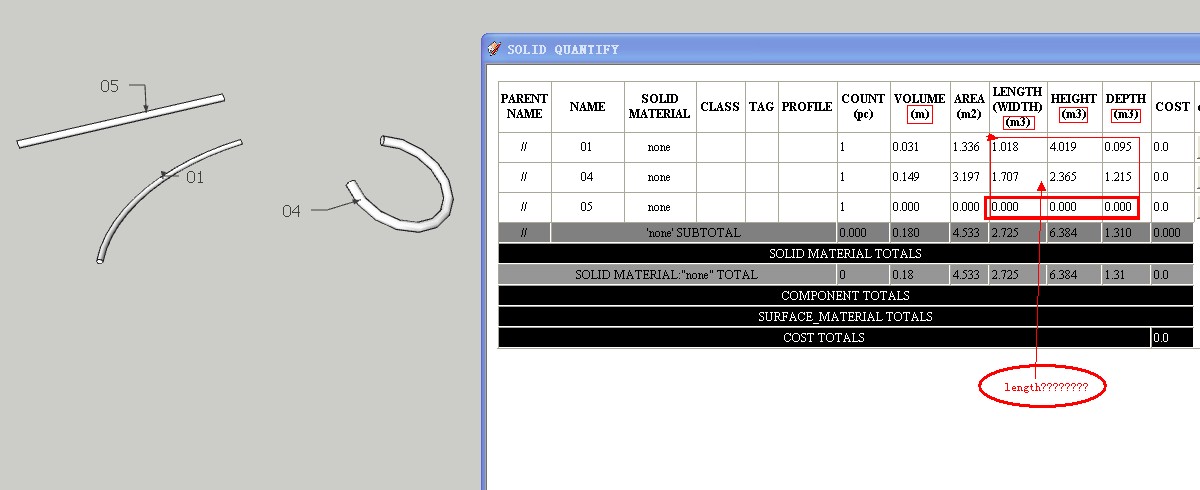
      First thanks your arduous jobs for everybody !

      NOW,01.jpgtest01.skp

      sketchup is bim

      1 條回覆 最後回覆 回覆 引用 0
      • Z 離線
        ZFRPS
        最後由 編輯

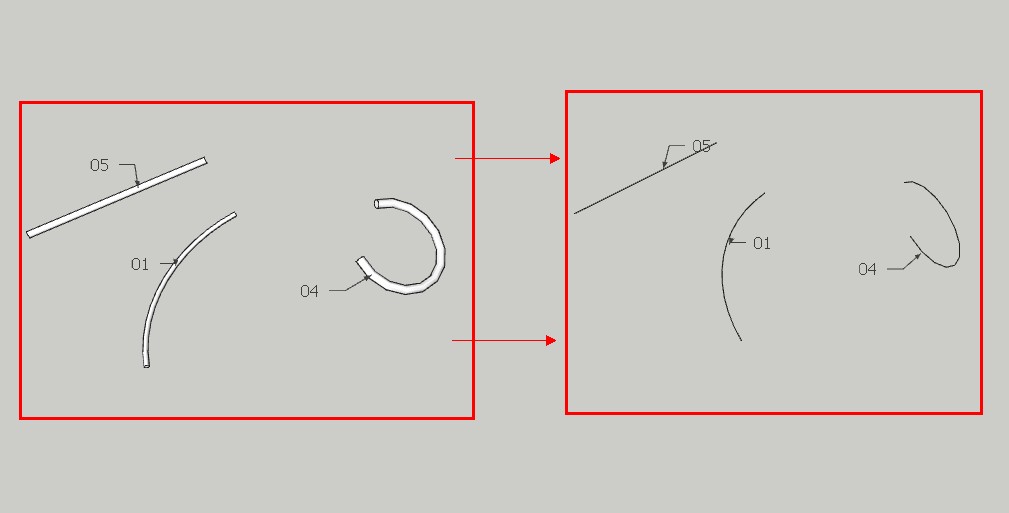
        So,about length of group,maybe i think first need a plugin:SOLIDGROUP TO LINEGROUP,then count length of linegroup,and when sketchup to CAD ,PIPE-linegroup very nice than solidgroup!

        Can you help me for plugin:SOLIDGROUP TO LINEGROUP?

        Thanks again !02.jpgtest02.skp

        sketchup is bim

        1 條回覆 最後回覆 回覆 引用 0
        • T 離線
          tak2hata
          最後由 編輯

          @unknownuser said:

          So,about length of group,maybe i think first need a plugin:SOLIDGROUP TO LINEGROUP,then count length of linegroup,and when sketchup to CAD ,PIPE-linegroup very nice than solidgroup!

          Can you help me for plugin:SOLIDGROUP TO LINEGROUP?

          Thanks again ![attachment=1:xrfumwyc]<!-- ia1 -->02.jpg<!-- ia1 -->[/attachment:xrfumwyc][attachment=0:xrfumwyc]<!-- ia0 -->test02.skp<!-- ia0 -->[/attachment:xrfumwyc]

          Hi, zfrps.
          I think it is very difficult.
          I will consider it future.
          Thanks.


          by TAK2HATA

          1 條回覆 最後回覆 回覆 引用 0
          • O 離線
            OSN58
            最後由 編輯

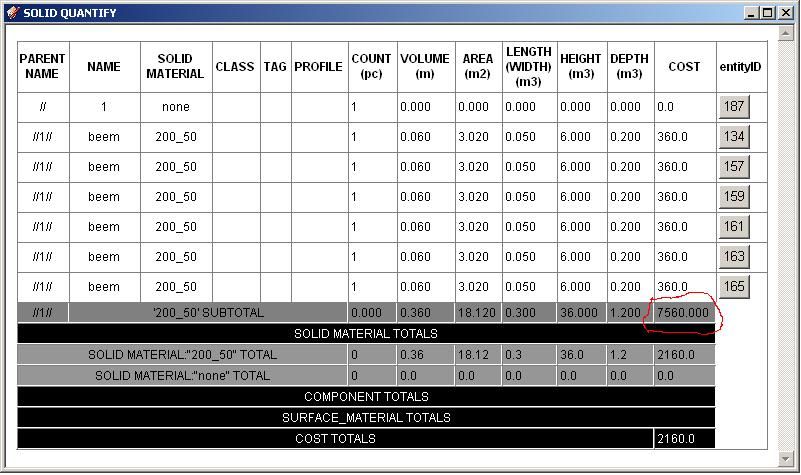
            What this number?
            Thanks.


            1.JPG

            1 條回覆 最後回覆 回覆 引用 0
            • T 離線
              tak2hata
              最後由 編輯

              @osn58 said:

              What this number?
              Thanks.

              Hi,OSN58.

              "SUB TOTAL"is sub total of volumes in that group,when The Solids exists in the Group.
              The group name is displayed in "PARENT NAME"

              Thanks.


              by TAK2HATA

              1 條回覆 最後回覆 回覆 引用 0
              • O 離線
                OSN58
                最後由 編輯

                Sub total of COST in that group,when The Solids exists in the Group does not work?
                Thanks.

                1 條回覆 最後回覆 回覆 引用 0
                • T 離線
                  tak2hata
                  最後由 編輯

                  @osn58 said:

                  Sub total of COST in that group,when The Solids exists in the Group does not work?
                  Thanks.

                  Hi,I update solid quantify2 to v2.0b.

                  OSN58....
                  "Cost" in subtotal is incorrect.
                  It fixed now.
                  Thans.


                  by TAK2HATA

                  1 條回覆 最後回覆 回覆 引用 0
                  • O 離線
                    OSN58
                    最後由 編輯

                    Great plugin.
                    Thanks.

                    1 條回覆 最後回覆 回覆 引用 0
                    • O 離線
                      OSN58
                      最後由 編輯

                      How to make localization of a plug-in (on Russian)?

                      1 條回覆 最後回覆 回覆 引用 0
                      • L 離線
                        lyvirak
                        最後由 編輯

                        ありがとうごさいます。

                        1 條回覆 最後回覆 回覆 引用 0
                        • H 離線
                          HenkW
                          最後由 編輯

                          This plug-in is great, but I found an error that renders the results unusable. Some of the material areas are doubled while most are correct in the generated reports. Secondly, in the the web dialogue there is a minor error that the volume is shown as "m" only in stead of "m³", while the distances are shown as "m³" in stead of just "m". If the first error regarding the incorrect doubling of areas could be fixed this plug-in would be perfect. Attached are a screen shot of the report as well as the SU model used to generate the report.


                          Sample report and SU model

                          1 條回覆 最後回覆 回覆 引用 0
                          • H 離線
                            HenkW
                            最後由 編輯

                            Screenshot of error report with wrong areas indicated.
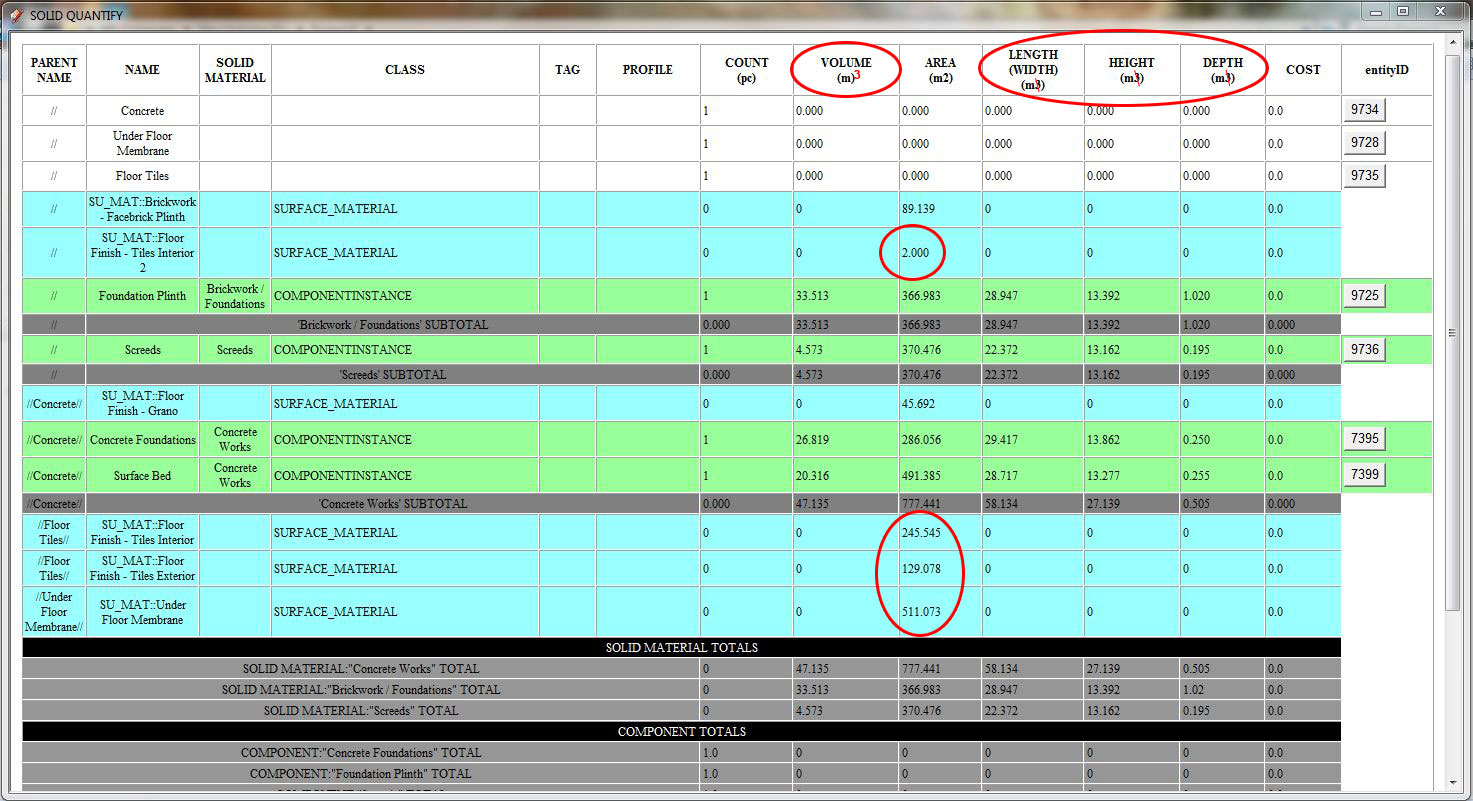

                            Report-Screenshot.jpg

                            1 條回覆 最後回覆 回覆 引用 0
                            • T 離線
                              tak2hata
                              最後由 編輯

                              @henkw said:

                              Screenshot of error report with wrong areas indicated.

                              Hi,Henk.
                              Thanks for your helps.
                              I will fix the problem in few days and update here.

                              Thanks.


                              by TAK2HATA

                              1 條回覆 最後回覆 回覆 引用 0
                              • T 離線
                                tak2hata
                                最後由 編輯

                                Hi,All and Henk.

                                I update this.
                                There are two Bugfix.
                                Surface area calculated double,when that face do not have back-material.
                                And mistaked about units when report rendered in webdialog.
                                This problem fixed.

                                Thanks.


                                by TAK2HATA

                                1 條回覆 最後回覆 回覆 引用 0
                                • H 離線
                                  HenkW
                                  最後由 編輯

                                  TAK2HATA, you have done an awesome job with this plug-in! Thanks for the fix, we are pushing its abilities to the limit. It requires a lot of discipline to keep everything clean and tagged properly to get the required results. For those who are using this as well, when models get really big and you can't seem to find why there are still errors... Make sure that the axes of all groups in a multi-level component are identically aligned. Use in conjunction with the plug-in “Solid Inspector” for quick results.

                                  1 條回覆 最後回覆 回覆 引用 0
                                  • C 離線
                                    camilozunga
                                    最後由 編輯

                                    Hello and thanks for your plugin, I just find it a few days ago and it's just perfect for what I need... Unfortanetly in my MAC is not working well, don't let me export xml, don't let me apply solid materials, JUST LET ME VIEW IN WEBDIALOG and the most of the measures of elements oriented in Y axis appears in 0.00, did you or anyone mac users who are using this plugin can help?

                                    thanks.

                                    1 條回覆 最後回覆 回覆 引用 0
                                    • Q 離線
                                      QS3D
                                      最後由 編輯

                                      Excellent Plug-in!! How to I change the quantities to SF and CY (ft^2 & yards^3)??

                                      1 條回覆 最後回覆 回覆 引用 0
                                      • T 離線
                                        tak2hata
                                        最後由 編輯

                                        Hi,camilozunga.
                                        I will test the problem on mac.
                                        Please wait. 😉

                                        Hi,QS3D.
                                        I made this plugin be using simply.
                                        So there are only "meter" or "inch".

                                        I will add selecting quantities units.(maybe units in Sketchup).

                                        Please wait. 😉

                                        Thanks.


                                        by TAK2HATA

                                        1 條回覆 最後回覆 回覆 引用 0
                                        • Q 離線
                                          QS3D
                                          最後由 編輯

                                          Looking forward to it. Thanks!

                                          1 條回覆 最後回覆 回覆 引用 0
                                          • C 離線
                                            camilozunga
                                            最後由 編輯

                                            @tak2hata said:

                                            Hi,camilozunga.
                                            I will test the problem on mac.
                                            Please wait. 😉

                                            Hi,QS3D.
                                            I made this plugin be using simply.
                                            So there are only "meter" or "inch".

                                            I will add selecting quantities units.(maybe units in Sketchup).

                                            Please wait. 😉

                                            Thanks.

                                            Thanks a lot for your answer, I'll be waiting.😄

                                            1 條回覆 最後回覆 回覆 引用 0
                                            • 1
                                            • 2
                                            • 3
                                            • 4
                                            • 2 / 4
                                            • 第一個貼文
                                              最後的貼文
                                            Buy SketchPlus
                                            Buy SUbD
                                            Buy WrapR
                                            Buy eBook
                                            Buy Modelur
                                            Buy Vertex Tools
                                            Buy SketchCuisine
                                            Buy FormFonts

                                            Advertisement