Add vertex on curve at length - or edge on surface at length
-
Is there any plugins out there that will:
Insert a vertex at a given length on a curve? ( Not like Fredo's Polyline divider, because it changed the curve segments - but just so it inserts a vertex.)
Or even better, given an extruded surface, a vertical line is inserted at a given interval along the surface?
I've lost track of what all the plugins do...

-
Evidently, Divide is not what you are looking for? And Polyline Segmentor?
-
@mitcorb said:
Evidently, Divide is not what you are looking for? And Polyline Segmentor?
No, divide only divides a single element into a given set of segments - so does Segmentor. Segmentor also reshapes the curve, like Polyline Divider does. I just want to insert vertices on the existing curve.
-
For Divide on an arc or edge, select, right click Entity Info. You want one more vertex than the display, for instance. Divide by desired number.
EDIT: Well, if the arc is an edge of a model (closed volume), I see that Divide is not available. But a straight edge is eligible to be divided on the same volume.
EDIT EDIT: Maybe I should read your post more carefully

-
Ok, See my EDIT, EDIT, EDIT (is there an echo in here?)
-
Ok so when can we expect this wonderful plugin from you?

-
Not that I know of...
However, it's not so difficult.
You know the start and end edges of the curve - we remember these.
Iterate along the curve's edges from the start one until the accumulated_length of them is beyond the distance you want, then use the last considered segment_edge and 'split' it at the required offsetd = distance-accumulated_length-edge.length[You need to trap for a distance that exceeds the curve's length etc,
Also if you want to split an Arc at a known distance around the circumference (rather than along the segmented 'polygonal' representation of the Arc) you need to do some Math to sweep the start.position.clone new_point through that distance around the true circumference, and then project the center point along the vector to that new_point offset by the radius, you get the intersection of the two 'lines' and then split the affected Arc-segment there, then you move this newly added vertex to its correct location on the true circumference at new_point; reforming the Curve if desired - but then it's no longer an Arc.
You could also toggle the curve's start/end as desired]You know the new_segment returned from the 'split'.
Your original curve is now split into two with the new_segment added between them.
Get the original curve belonging to the original curve's start_edge, and get its vertices, 'vss'.
Get the vertices of the new_segment, 'vsn'.
Get the new curve belonging to the original curve's end_edge, and get its vertices, 'vse'.
Thenverts=(vss+vsn+vse).flatten.uniq
The addgroup=new_segment.parent.entities.add_group() group.entities.add_curve(verts) group.explode
which should now reform the curve back as one piece with the extra segment/vertex added in ? -
I was hoping I wouldn't need to...
-
Thom,
For what it is worth, I have had situations where I had needed such a script (or one that places construction points along a curve at equal intervals). -
There is a plugin that places cpoints along a path. But i can't think of it.
-
@unknownuser said:
There is a plugin that places cpoints along a path. But i can't think of it.
maybe you're thinking of 1001bit's divide along edges?
that's what i use when i need to do what TT is asking for (not the surface thing.. rather inserting a vertex along an arc)
you can set it up to where it starts from one end of the curve then places a cpoint at a given distance (though it will keep repeating that distance til it runs out of curve so you may end up with a few extra cpoints)..
you then have to go in and manually modify the vertex.. a bit of a pain but it's the easiest way i've found how to do it so far..if it worked automagically then, well, that'd be sweet!

[edit] example of using said plugin.. i actually use it for something a little different than shown here but this version will keep it simple
-
ThomThom,
The attached plugin will add a vertex at a given interval along a selected curve.
Add vertices to curve at given interval
-
-
Very nice. Thank you.
Could a similar script add points at Equal Intervals? Perhaps leave the points selected or grouped after being created?
-
You can make a list of the new_vertices and then move the old_vertices to their locations [vector_from old_to_new?], using a transform_by_vectors on the new_vertices...
PS: Glad someone can understand what I'm a saying...

-
@jclements said:
Very nice. Thank you.
Could a similar script add points at Equal Intervals? Perhaps leave the points selected or grouped after being created?
It could select and/or group the construction points but not the individual vertices added to the curve.
thomthom, what kind of "extruded surface" are we talking about? Curved or straight?
-
Hi,
I had in mind the construction points; the user would input how many equal intervals, contruction points would be placed and then grouped.
-
@sdmitch said:
ThomThom,
The attached plugin will add a vertex at a given interval along a selected curve.
hmm.. i don't think that's quite right. (or at least what i'm talking about.. maybe i'm mis-understanding TT's question ?)
it's just placing a point along the curve but it's not actual moving the vertex into it's proper place..
as an exaggeration, here's a picture showing an arc with 3 segments.. then it shows how it should look after running the script..
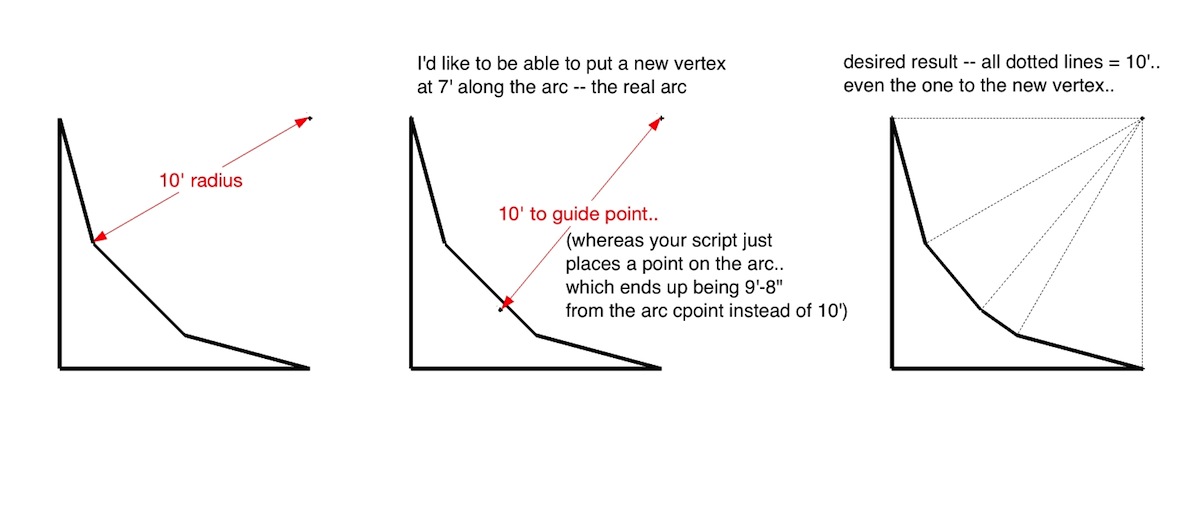
[EDiT].. well, i reread thomas' original post and i think i'm misunderstanding him
it looks as if the script you (sam) wrote is what he's looking for -
Jeff, You are right regarding the arc, the point added is on the existing segment.
-
@unknownuser said:
hmm.. i don't think that's quite right. (or at least what i'm talking about.. maybe i'm mis-understanding TT's question ?)
it's just placing a point along the curve but it's not actual moving the vertex into it's proper place..
You understood me correctly.
@sdmitch said:
thomthom, what kind of "extruded surface" are we talking about? Curved or straight?
An extruded surface from the 2D profile of a curve. It's the shape of a building constant of several curves.








Hello! It looks like you're interested in this conversation, but you don't have an account yet.
Getting fed up of having to scroll through the same posts each visit? When you register for an account, you'll always come back to exactly where you were before, and choose to be notified of new replies (either via email, or push notification). You'll also be able to save bookmarks and upvote posts to show your appreciation to other community members.
With your input, this post could be even better 💗
Register Login


Advertisement