sketchucation logo sketchucation
    • Login
    Oops, your profile's looking a bit empty! To help us tailor your experience, please fill in key details like your SketchUp version, skill level, operating system, and more. Update and save your info on your profile page today!
    ⚠️ Important | Libfredo 15.6b introduces important bugfixes for Fredo's Extensions Update

    Add vertex on curve at length - or edge on surface at length

    Scheduled Pinned Locked Moved Plugins
    25 Posts 7 Posters 4.5k Views 7 Watching
    Loading More Posts
    • Oldest to Newest
    • Newest to Oldest
    • Most Votes
    Reply
    • Reply as topic
    Log in to reply
    This topic has been deleted. Only users with topic management privileges can see it.
    • Rich O BrienR Offline
      Rich O Brien Moderator
      last edited by

      There is a plugin that places cpoints along a path. But i can't think of it.

      Download the free D'oh Book for SketchUp πŸ“–

      1 Reply Last reply Reply Quote 0
      • jeff hammondJ Offline
        jeff hammond
        last edited by

        @unknownuser said:

        There is a plugin that places cpoints along a path. But i can't think of it.

        maybe you're thinking of 1001bit's divide along edges?

        that's what i use when i need to do what TT is asking for (not the surface thing.. rather inserting a vertex along an arc)

        you can set it up to where it starts from one end of the curve then places a cpoint at a given distance (though it will keep repeating that distance til it runs out of curve so you may end up with a few extra cpoints)..
        you then have to go in and manually modify the vertex.. a bit of a pain but it's the easiest way i've found how to do it so far..

        if it worked automagically then, well, that'd be sweet! πŸ˜„

        [edit] example of using said plugin.. i actually use it for something a little different than shown here but this version will keep it simple πŸ˜„

        divide_curve.skp

        dotdotdot

        1 Reply Last reply Reply Quote 0
        • sdmitchS Offline
          sdmitch
          last edited by

          ThomThom,

          The attached plugin will add a vertex at a given interval along a selected curve.


          Add vertices to curve at given interval


          AddPts2Curve demo

          Nothing is worthless, it can always be used as a bad example.

          http://sdmitch.blogspot.com/

          1 Reply Last reply Reply Quote 0
          • Rich O BrienR Offline
            Rich O Brien Moderator
            last edited by

            @Sam

            You should give this it's own thread. It's a great tool πŸ‘

            Thank You

            Download the free D'oh Book for SketchUp πŸ“–

            1 Reply Last reply Reply Quote 0
            • JClementsJ Offline
              JClements
              last edited by

              Very nice. Thank you.

              Could a similar script add points at Equal Intervals? Perhaps leave the points selected or grouped after being created?

              John | Illustrator | Beaverton, Oregon

              1 Reply Last reply Reply Quote 0
              • TIGT Offline
                TIG Moderator
                last edited by

                You can make a list of the new_vertices and then move the old_vertices to their locations [vector_from old_to_new?], using a transform_by_vectors on the new_vertices...

                PS: Glad someone can understand what I'm a saying... πŸ˜‰

                TIG

                1 Reply Last reply Reply Quote 0
                • sdmitchS Offline
                  sdmitch
                  last edited by

                  @jclements said:

                  Very nice. Thank you.

                  Could a similar script add points at Equal Intervals? Perhaps leave the points selected or grouped after being created?

                  It could select and/or group the construction points but not the individual vertices added to the curve.

                  thomthom, what kind of "extruded surface" are we talking about? Curved or straight?

                  Nothing is worthless, it can always be used as a bad example.

                  http://sdmitch.blogspot.com/

                  1 Reply Last reply Reply Quote 0
                  • JClementsJ Offline
                    JClements
                    last edited by

                    Hi,

                    I had in mind the construction points; the user would input how many equal intervals, contruction points would be placed and then grouped.

                    John | Illustrator | Beaverton, Oregon

                    1 Reply Last reply Reply Quote 0
                    • jeff hammondJ Offline
                      jeff hammond
                      last edited by

                      @sdmitch said:

                      ThomThom,

                      The attached plugin will add a vertex at a given interval along a selected curve.

                      hmm.. i don't think that's quite right. (or at least what i'm talking about.. maybe i'm mis-understanding TT's question ?)

                      it's just placing a point along the curve but it's not actual moving the vertex into it's proper place..

                      as an exaggeration, here's a picture showing an arc with 3 segments.. then it shows how it should look after running the script..
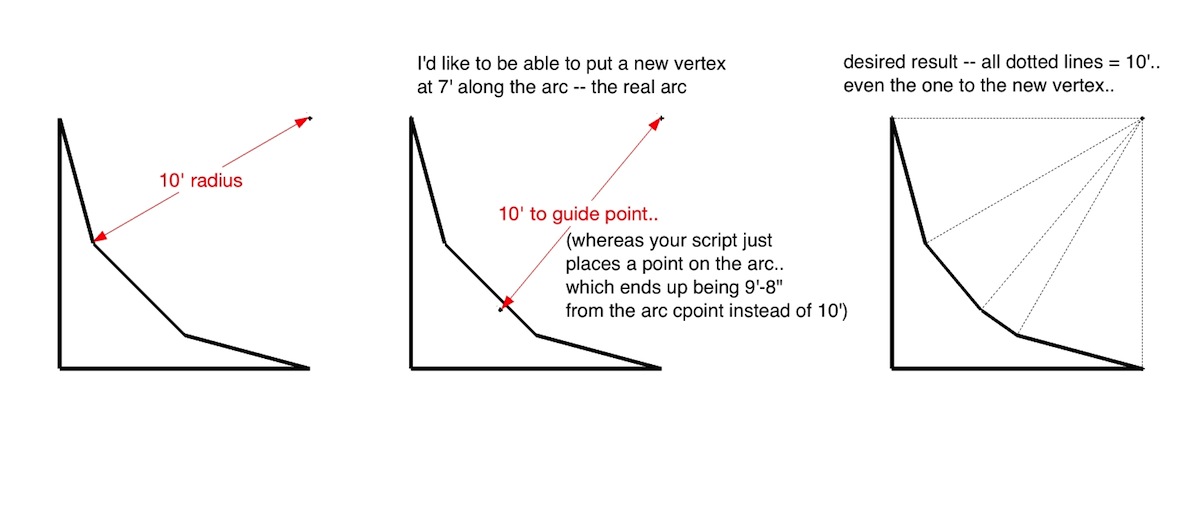
                      click pic for bigger

                      [EDiT].. well, i reread thomas' original post and i think i'm misunderstanding him 😳
                      it looks as if the script you (sam) wrote is what he's looking for

                      dotdotdot

                      1 Reply Last reply Reply Quote 0
                      • sdmitchS Offline
                        sdmitch
                        last edited by

                        Jeff, You are right regarding the arc, the point added is on the existing segment.

                        Nothing is worthless, it can always be used as a bad example.

                        http://sdmitch.blogspot.com/

                        1 Reply Last reply Reply Quote 0
                        • thomthomT Offline
                          thomthom
                          last edited by

                          @unknownuser said:

                          hmm.. i don't think that's quite right. (or at least what i'm talking about.. maybe i'm mis-understanding TT's question ?)

                          it's just placing a point along the curve but it's not actual moving the vertex into it's proper place..

                          You understood me correctly. πŸ˜„

                          @sdmitch said:

                          thomthom, what kind of "extruded surface" are we talking about? Curved or straight?

                          An extruded surface from the 2D profile of a curve. It's the shape of a building constant of several curves.

                          Thomas Thomassen β€” SketchUp Monkey & Coding addict
                          List of my plugins and link to the CookieWare fund

                          1 Reply Last reply Reply Quote 0
                          • TIGT Offline
                            TIG Moderator
                            last edited by

                            @sdmitch said:

                            Jeff, You are right regarding the arc, the point added is on the existing segment.
                            But as I said in my diatribe... if it's a Arc you can do the Math to work out where the swept start-point will be to become the new point where the new vertex ought to be on the true circumference, so you add the new vertex on the segment as normal then apply an entities transformation on the new vertex to relocate it at that new point that lies on the circumference... The Arc will become a Curve...

                            TIG

                            1 Reply Last reply Reply Quote 0
                            • thomthomT Offline
                              thomthom
                              last edited by

                              @tig said:

                              @sdmitch said:

                              Jeff, You are right regarding the arc, the point added is on the existing segment.
                              But as I said in my diatribe... if it's a Arc you can do the Math to work out where the swept start-point will be to become the new point where the new vertex ought to be on the true circumference, so you add the new vertex on the segment as normal then apply an entities transformation on the new vertex to relocate it at that new point that lies on the circumference... The Arc will become a Curve...

                              Are we now talking about a new topic?
                              (Just trying to catch up to the post since last evening.)

                              Thomas Thomassen β€” SketchUp Monkey & Coding addict
                              List of my plugins and link to the CookieWare fund

                              1 Reply Last reply Reply Quote 0
                              • TIGT Offline
                                TIG Moderator
                                last edited by

                                No - same topic.
                                Adding a new vertex on a curve splits a segment.
                                If the curve is an Arc then we have been considering if the vertex should split a segment AND adjust the vertex so it is on the true circumference too...

                                TIG

                                1 Reply Last reply Reply Quote 0
                                • thomthomT Offline
                                  thomthom
                                  last edited by

                                  I see. In terms of what I needed to, no adjustments can be done. But I can see the use of this option.
                                  Just had to check if there was existing plugins I'd missed out of.

                                  Thomas Thomassen β€” SketchUp Monkey & Coding addict
                                  List of my plugins and link to the CookieWare fund

                                  1 Reply Last reply Reply Quote 0
                                  • sdmitchS Offline
                                    sdmitch
                                    last edited by

                                    I have modified the plugin so that, if the the selected entity is an arc, the point is placed in its true position instead of on the segment as before.

                                    Should this be an option?


                                    Add points to curve

                                    Nothing is worthless, it can always be used as a bad example.

                                    http://sdmitch.blogspot.com/

                                    1 Reply Last reply Reply Quote 0
                                    • 1
                                    • 2
                                    • 1 / 2
                                    • First post
                                      Last post
                                    Buy SketchPlus
                                    Buy SUbD
                                    Buy WrapR
                                    Buy eBook
                                    Buy Modelur
                                    Buy Vertex Tools
                                    Buy SketchCuisine
                                    Buy FormFonts

                                    Advertisement




