[Plugin] DXF_export v0.0.4 (2011-10-28)
-
Hi,
I would like to share my plugin ...
Just copy the dxf_export.rb file in your plugins folder.
You'll find it in 'Tools->Export to DXF'It outputs polygons|polylines|cirles|arcs|lines to DXF (contours only)
(2d orientation for circles and arcs these do not have a 3d one but the centerpoint is positioned in 3d space)
3d rotated circles and arcs will be output segmented (lines)polygons, polylines, lines, 3d circles, 3d arcs as lines
2d cirles, 2d arcs as circles and arcs (NOT lines) !!!I did this because I use the DXF with heekscnc to generate milling operations (G-Code).
Milling a circle or an arc is much faster than several lines ...I had some trouble with the rotation of the arcs but I think I did it

History:
*** v0.0.4 (2011-10-28)- fixed arc orientation (finally?)
- model won't be exploded anymore
- 3d rotated circles & arcs export to lines
*** v0.0.3 (2011-10-22)
- fixed arc orientation
- improved objects assignment ( faster)
- corrected calculations ( x/2 returned int and not float as needed
 )
) - automatic unit detection (to be tested
 )
)
Any arc orientation testers online?


Comments still welcome!
Jörg -
First quick test ,and it workt fine
Thanks ,

Bep
-
Thanks a lot for this plugin!
I tested it and it seems to have some bugs as follows:
-it explodes everything in model.
-it doesn't export faces.
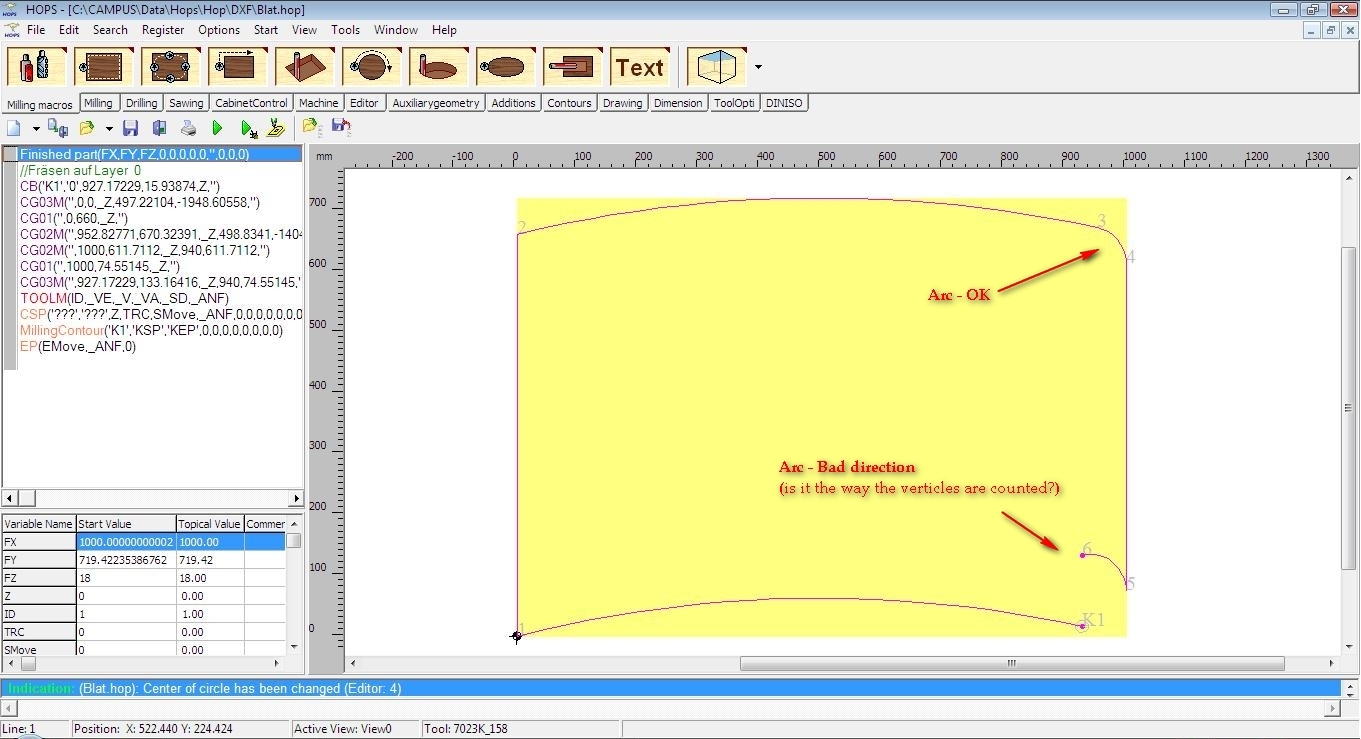
-some arcs are oriented wrongfully. - funny fact is that the built-in SU8-PRO exporter does the same.
-it behaves differently if everything in model is selected, or if nothing is selected.-what DXF version does it export? (most milling software need DXF2000)
I also need DXF for CNC milling. I posted some request here: http://forums.sketchucation.com/viewtopic.php?f=323&t=40311&p=357180&hilit=batch+dxf#p356582 . Maybe your plugin can be tweaked to batch export each Component Definition(/group?) in a different file, on same folder, using Definition's name?
Beloy you have:
-resulted (exploded) SKP file
-DXF from ALL SELECTED
-DXF from NONE SELECTED (it asked to export entire model)
-Image from NC HOPS (software for CNC Milling) which shows the wrongfully oriented arc.
-
Hi,
thanks for your comments!
This is a quick and dirty release ...
But I couldn't await to release it and see if anyone needs it's functionality.About the bugs ...
-it explodes everything in model.
Yes! It explodes everything and then it loops through all edges and get's each connected.
That's the way I try to find 'Objects'.
I will change it to respect Groups and Components!
But first I have to get rid of the orentation problem of the arcs!!!!!!
-it doesn't export faces.
This plugin does not process any faces (by now ).
-some arcs are oriented wrongfully.
I know
If anyone knows a solution ... ... ...
- funny fact is that the built-in SU8-PRO exporter does the same.
I didn't know
-it behaves differently if everything in model is selected, or if nothing is selected.
Not in my environment (but I changed the script a bit).
Pls. try again with the next release!
-what DXF version does it export? (most milling software need DXF2000)
Ups! I didn't care about any DXFversion!
Just took the first spec I found.
But in future I'll use DXF2000!dereeei, thanks for all information!
Stay tuned!
Jörg -
I'm very happy that I could help !
Indeed, I'm very interested in the development of this script, I'll be glad to test the next releases.
For now, it doesn't bother me if it doesn't export faces, because for milling purposes, all I need are contours, arcs, circles, correct orientation and Layers (name, color).
Indeed, respecting components (and groups, but not necessary), it would be a great thing! But take care to not process each instance of a Component Definition, because that would be redundant. Also, as I mentioned in the earlier post, if the content of each component would be saved as separate file in a chosen directory, would be awesome
-
Hi,
new Version v0.0.3 available!
I updated the text and the dl-link in the first post and added something like a version history.
Still feel free to comment ...
And use the plugin as often as you canGreetings
Jörg -
-
@blajnov said:
Error persists arc oriented incorrectly.
Hi blajnov,
can you pls. provide the source .skp file?
So that I can reproduce here ...I have drawn something similar and opened in heekscnc and freeCAD.
Both seem to be fine!Kind regards
Jörg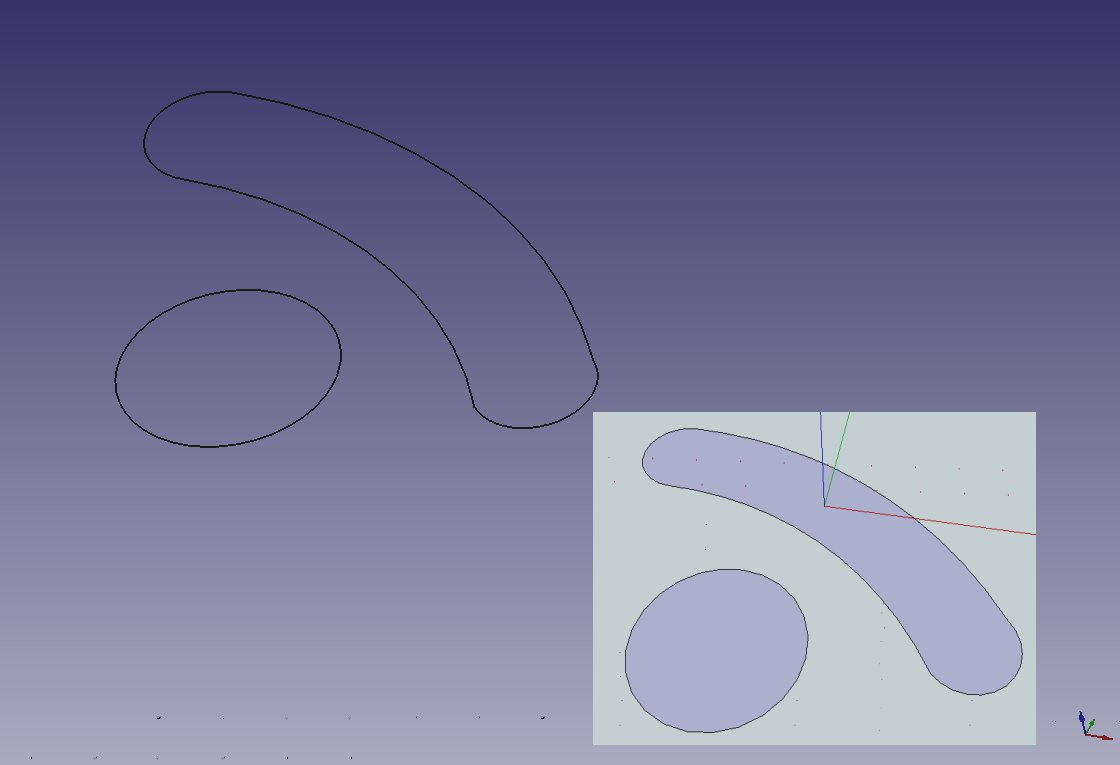
-
@joergber said:
........
Hi blajnov,
can you pls. provide the source .skp file?
So that I can reproduce here ...
I have drawn something similar and opened in heekscnc and freeCAD.
Both seem to be fine!
Kind regards
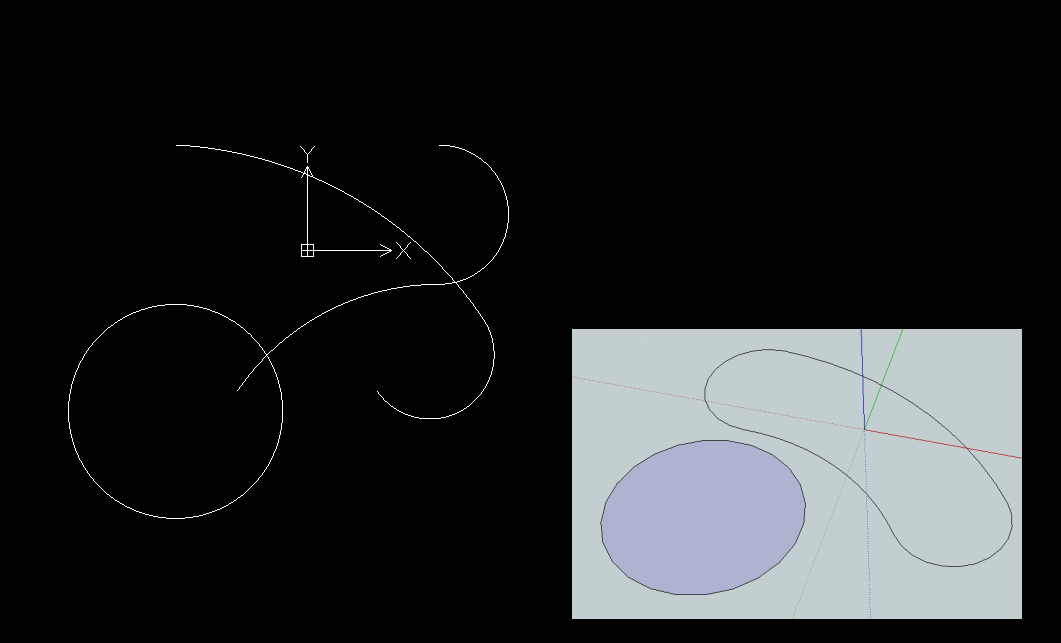
JörgI opened the exported file in DraftSight.
In AutoCAD 2008, similar.
And when you export, create a file with no extension dxf
Here skp files and dfx
-
My drawing imported exploded and flipped also.
I hope you get this fixed.The audit report in Doublecad xt (free) reported:
AcDbArc(21). An invalid Normal direction (0 0 -2.54) was found. Validation: Invalid. Replaced by Normalized.
AcDbArc(22). An invalid Normal direction (0 0 -2.54) was found. Validation: Invalid. Replaced by Normalized.
AcDbArc(23). An invalid Normal direction (0 0 2.54) was found. Validation: Invalid. Replaced by Normalized.
AcDbArc(24). An invalid Normal direction (0 0 2.54) was found. Validation: Invalid. Replaced by Normalized.
AcDbCircle(25). An invalid Normal direction (0 0 2.54) was found. Validation: Invalid. Replaced by Normalized.
AcDbViewportTable(8). An invalid Viewport *Active missing was found. Validation: . Replaced by Created.
Audit recovered database.
AcDbBlockTableRecord(1D). An invalid BlockBeginId was found. Validation: Invalid. Replaced by Created.
AcDbBlockTableRecord(1D). An invalid BlockEndId was found. Validation: Invalid. Replaced by Created.
AcDbBlockTableRecord(1B). An invalid BlockBeginId was found. Validation: Invalid. Replaced by Created.
AcDbBlockTableRecord(1B). An invalid BlockEndId was found. Validation: Invalid. Replaced by Created.
54 objects audited
Total errors found during audit 10, fixed 10Greetings,
Bep
-
The error report sounds like you are converting vectors from inches to cm when you should not - a vector [0,0,1] is normalized [0,0,2.54] is NOT. Only 'cm-ize' dimensions and leave vectors alone.
-
Hi,
as mentioned above, the plugin does not export to correct DXF2000 format!
By now (for example) arcs with startangle of 245° and endangle 13° can happen!
I am not sure if this will be interpreted correctly by all importers or Autocad ...
And there is no HEADER or TABLE section or any (ENTITIES only!)
But I'll correct this in a future release!But I also noticed that my 'orientation-algorithm' was incorrect for arcs with odd number of edges ...
I realized that the z-normal tells me if the arc was drawn cw or ccw ...
Thanks to TIG, which gave me food for thoughtBep:
Thank you for the report!
I'll try Doublecad xt ...!
(or let you generate the reports )TIG:
Yes, I converted everything although normals shouldn't.
Thank you!Give me a day or two to
- 'fix' arc-orientation (again ).
- implement export of 3d oriented circles and arcs to lines ...
- support Faces (however
 )
) - respect Components
- not explode everything anymore!
Thanks again to everybody!
Jörg - 'fix' arc-orientation (again
-
Thank you, Jörg ! Today I had the occasion to use the updated version of the plugin, as I had to export some sketchup drawings as DXF for CNC. Despite it turns some arcs in AutoCAD, they are right oriented in CNC Software, and that is what I'm interested in.
You made me very happy here! Good luck with the improvements -
Hi,
new version v0.0.4 available ...
I updated the first post.Have fun!
Jörg -
I imported this plug-in, when I select the items & export, it does not give me any file types to choose from, no DXF. Is there something I'm missing or is there another plugin to make this work? Thanks for any advice!
I just downloaded the new version, but it still does not give the dxf file type to save as. Any suggestion ?
-
Hi,
@Dubman1013
There is no filetype to choose from!
The Plugin takes the current skp-filename and exchanges '.skp' with '.dxf' thats all!
(For unsaved models the default filename is 'Untitled.dxf')Just click 'Export to DXF' then choose the folder to save to and save the dxf.
Before saving you may change the filename to your needs!
(But don't forget '.dxf' at the end of the filename)Have a nice day!
Jörg -
Thanks for a great plugin! I just sent a .dxf file to a friend and he could open it perfectly in SolidWorks. Next step is to CNC the part.
Edit: One thing. My friend just mentioned that when he opened the .dxf in SolidWorks it was in Inches even though I made it in mm. He could just change to mm, but still...
-
Hi!
Gumleguf:
I can not reproduce here ...
The only thing I could imagine is that you disabled the
'Display units format' setting (Window->Model Info->Units) but then there should have been a messagebox saying "Unable to detect the actual unit setting ...\nGenerate Output in inch?" and the whole DXF would have been 'inverted' because the units calculation factor is -1 in this case ...
(will be fixed in next release! )Pls. let me know if the problem persists!
And maybe you do have a screenshot that could help or the .skp file of your model ... ... ...Anyway, thank you very much for the feedback
More than 120 downloads and just this few problems/bugs/featurerequests/... Enjoy,
Jörg -
You are welcome, and thank you (!) for the plugin!
Here is an example of a sketchup that he says opens in Inches:
-
Wohooo, that was fast

I exported without any problems ...
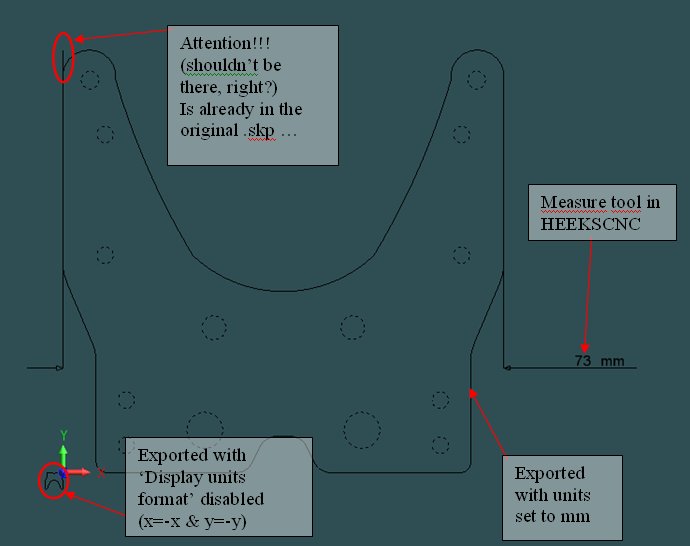
Here is my output ...
unitsFactorProblem.dxf
Could you pls. send this file to your friend to doublecheck?
Could you pls. check the setting and try again? If you select the measure tool in SU ...
is the length displayed like '371,25mm'?Thank you!
Cheers
Jörg





Advertisement