[Plugin] DXF_export v0.0.4 (2011-10-28)
-
Hi joergber,
Can you explain how this plugin differs to a standard SU export? -
Hi,
utiler:
It might not have come out clearly ...
I'm using SU 8 free (just updated my profile )
)
And the standard dxf-exporter is for pros only ( as far as I know )So ...
I don't know how it differs to standard SU export
Is there a specific reason why you are asking?
Respects
Jörg -
Only that I'm using PRO and wanted to know the difference; that's all....
thanks for the explain!

-
@unknownuser said:
I also need DXF for CNC milling.
@joergber said:
I did this because I use the DXF with heekscnc to generate milling operations (G-Code).
Milling a circle or an arc is much faster than several lines ...Thanks for the plugin!
I also use SketchUp to create files for CNC cutting.
There is an excellent plugin to do the right Gcode in Sketchup, Phlatscript (SketchUcam)
For more information, visit the site:http://forums.sketchucation.com/viewtopic.php?f=15&t=38150&p=337062&hilit=phlatscript#p337062
Hugs
-
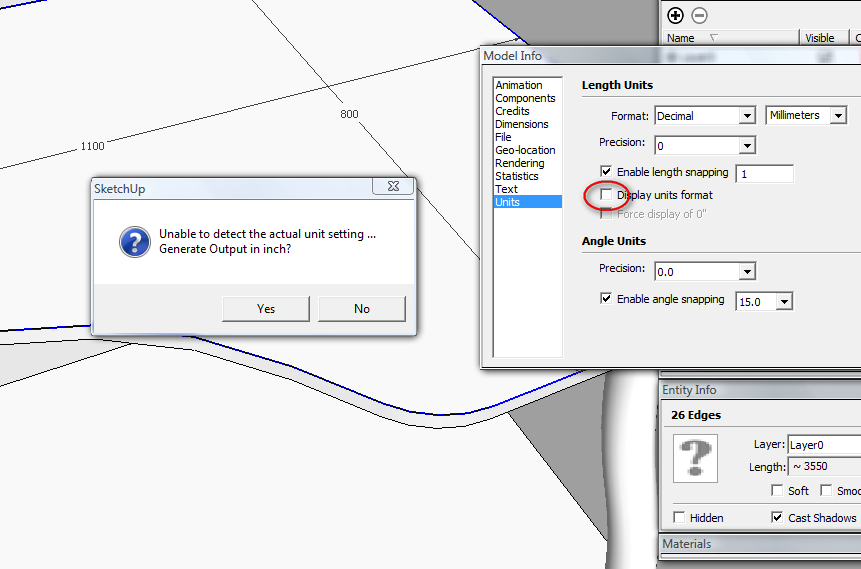
I just found a bug in the program. As seen in image below, the unit format is disabled (to not show it in dimension lines). But, the exporter doesn't recognize the units that I used and wants to export by default in inch. My suggestion: if there is a program limitation for this situation, to replace the YES/NO message box with a list box with all units available. So, if the exporter doesn't recognize the units, to let the user choose.
Another thing... I selected only the contour lines from a 3d object (the lines that formed one face), the exporter reported "one shape",but in DXF I had all lines exported of the solid. Is it possible to export ONLY what is selected? I mention that I was inside a component when I selected the outer shape of the face.
One more thing: it would be useful to have the possibility to export in XY plane for all 2D shapes, regardless they are oriented on a different plane.This is the most useful DXF exporter I ever used. Actually, is the only one that is helping me

Thank you.
-
dereeei:
I recognized too that my unit detection was not fool proof and added a listbox ...It seems that we are working on similar tasks ...
since I came across the same problems than you.
Currently the exporter exports all connected entities of the current selection.
So selecting a contour of a object will export the whole thingI am in the process of developing some kind of peprocessing tools ...
The first one will be a drop tool where you can select any face of a model and it will be copied to z=0 and rotated to ground plane.But I'm neither familiar with Ruby nor Sketchup toolbars ...
So this will take some time
Thanks again for your feedback!
We read!
Jörg -
@joergber
Why don't you simply use selected entities to build the dxf? Is more simpler for start... You can iterate trough all selected and check what are they. If there are edges only, use them to build a dxf. If there are also faces, add to dxf the edges that build that face.
Because selecting a face is simple by double clicking. Usually a tool that selects a face, will select only a planar face, not a curved one (like a cylinder). To select that, I think you have to take into consideration the edge smoothing angle. So, I'm guessing that double click on a smooth face is pretty fast to not require a select tool (for now, at least).Thanks for still working on it
-
Sorry for the late reply.
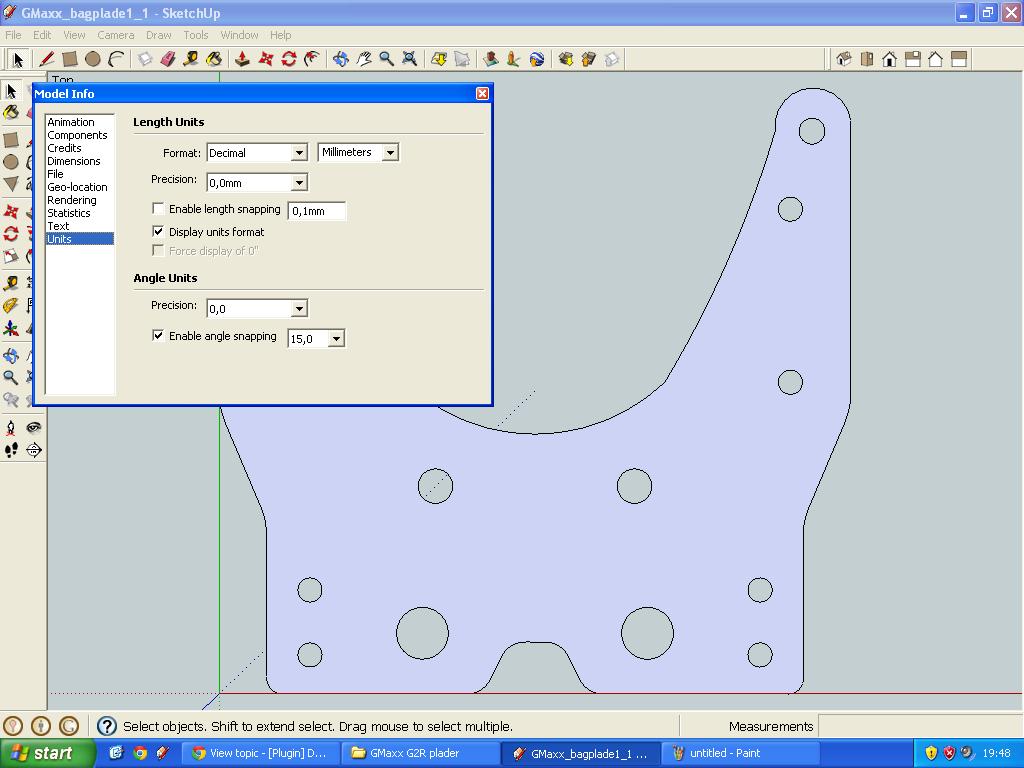
No, I haven't disabled "Display units format" and it still opens in inches:
-
Hi Jörg,
Maybe I'm doing something wrong but here's one problem I have.
1. I create a 100mm x 100mm rectangle with some random circles, see attached file "Untitled.skp".
2. Using your fine tool I export it as "Untitled.dxf".
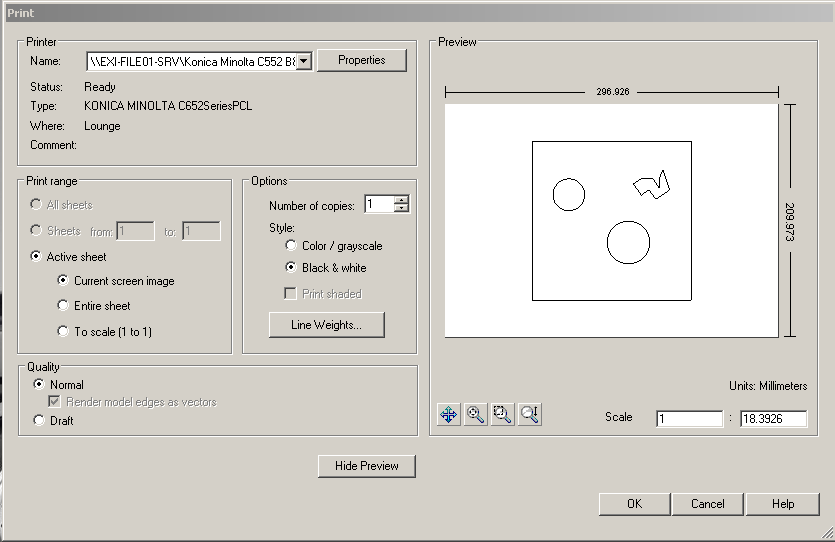
3. To print out my drawing I open the .dxf file in eDrawings (from Solidworks, version 12.2.0.110) and press the print button. I then see a windows where the drawing is scaled to 1:18.3926?
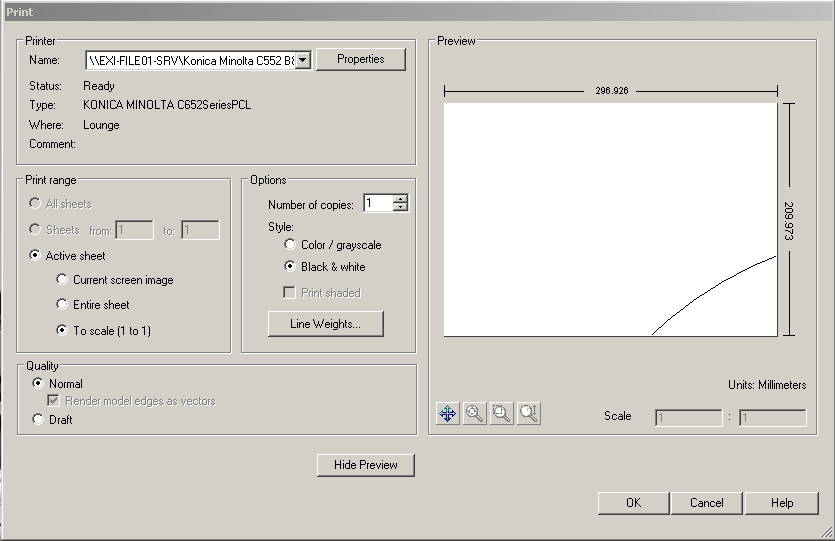
4. If I change the "Active sheet" setting "To scale (1 to 1)" the result is that the drawing get's massive big - you can only just see a small corner of a circle on an A4 sized paper.
Isn't that strange? And by the way, if I print out from step 3 the actual rectangle on paper is something like 137mm x 137mm and not 100mm x 100mm.
/Greg
-
Hello Jörg!
Just wanted to thank you for a wonderful plugin. We have struggeled alot with exporting .dxf files with true circle to our CNC machine software. And yours works perfect so far.
You really made my day! Thanksbr
Lars -
Sorry, I must be missing something. Does this .rb file install into:
"/Applications/Google\ SketchUp\ 8/SketchUp.app/Contents/Plugins/"Doing this doesn't seem to work for me. Is there another plugins directory that SketchUp 8 uses?
-
@pumplerod said:
Sorry, I must be missing something. Does this .rb file install into:
"/Applications/Google\ SketchUp\ 8/SketchUp.app/Contents/Plugins/"
Doing this doesn't seem to work for me. Is there another plugins directory that SketchUp 8 uses?
You have it all wrong
There are many helpful posts on the forum - including how to install 'plugins'...
Macintosh HD/Library/Application Support/Google SketchUp 8/SketchUp/plugins
On a MAC this folder is the one and only location for such scripts.
They'll auto-load from there, and the tool's activation/menu/usage/etc is then as indicated in each tool's notes... -
hi all
i'm a newbie so hi to all!
im trying to export the side view of a 400mm*700mm egg shape component as a dxf. when i load it up in VCarvePro instead of getting the full view i just get the 400mm wide top view. what am i doing wrong - cheers
Scott -
Hi Scott,
Perhaps your shape is too advanced for the DXF_export tool to handle or there are errors in your drawing.
Try to upload your Sketchup model here and perhaps someone with a Sketchup Pro version could try to export it to dxf. If it also fails your drawing is bad, if it works the DXF_export tool doesn't support your model.
/Greg
-
thanks greg
i couldnt even work out how to attach a file earlier - lol. (still cant work it out!)
i drew a circle in a new document and exported - no worries.
somehow i changed the axis on my model so it was actually exporting the top view. does it export any particular view by default??i rotated my model and off it went.
thanks for the quick reply - great
i also had troublesmoothing the edges toany acceptable level. i hope to create a toolpath for my cnc so would like to get it a lot smoother. maybe not possible with SU8 Free Vers.regard scott
-
Hi Scot,
You are welcome. Glad you solved your problem.
If yuo right click the circle in Sketchup you should be able to select properties and define the smoothing of the edge. Default value is pretty rough (12, or so) but just change it to whatever value you need.
/Greg
-
If it is an arc or circle you can make it initially with lots of segments [e.g. typing 72s gives it 72 segments] OR select it and use 'Entity Info' to adjust its segment count later. BUT once an arc is incorporated in a 3d object it's no longer editable like that, and so it will mean recreating that part later... so plan ahead. Unattached other 'curves' like Bezier etc can have their segmentation changed with the edit function within Fredo's BezierTools...
-
Yeah, what TIG said. I don't have Sketchup here, so sorry I couldn't be more precise.
-
thanks guys
regards scott -
Nice fixing on this plugin. Thank you ! It's a very useful tool for me.
If I may, I would like to ask for some feature requests as follows:
.1 -save layers (I don't know if it does it now, but I had some edges distributed on layers and all of them were saved on Layer 0 in DXF)
.2 -Save As name of the selected object (Component/Group), or Parent's name (if I select raw geometry inside a Comp/Group)optional (.3 -Bulk Save As separate files, if several Components/Groups are selected. Each one using its own name.)
Thank you very much !





Advertisement