[Plugin] QuadFaceTools
-
can someone help me please im having this error on quad face tools plugin sketchup pro 2019 C:/Users/USER/AppData/Roaming/SketchUp/SketchUp 2019/SketchUp/Plugins/TT_Lib2/debug.rb:36:in
debug' C:/Users/USER/AppData/Roaming/SketchUp/SketchUp 2019/SketchUp/Plugins/TT_QuadFaceTools/core.rb:1866:inselection_grow'
C:/Users/USER/AppData/Roaming/SketchUp/SketchUp 2019/SketchUp/Plugins/TT_QuadFaceTools/core.rb:124:inblock in <module:QuadFaceTools>' C:/Users/USER/AppData/Roaming/SketchUp/SketchUp 2019/SketchUp/Plugins/TT_QuadFaceTools/command.rb:25:inblock in new'
C:/Users/USER/AppData/Roaming/SketchUp/SketchUp 2019/SketchUp/Plugins/TT_Lib2/debug.rb:36:indebug' C:/Users/USER/AppData/Roaming/SketchUp/SketchUp 2019/SketchUp/Plugins/TT_QuadFaceTools/core.rb:1902:inselection_shrink'
C:/Users/USER/AppData/Roaming/SketchUp/SketchUp 2019/SketchUp/Plugins/TT_QuadFaceTools/core.rb:132:inblock in <module:QuadFaceTools>' C:/Users/USER/AppData/Roaming/SketchUp/SketchUp 2019/SketchUp/Plugins/TT_QuadFaceTools/command.rb:25:inblock in new'
2019/SketchUp/Plugins/TT_Lib2/debug.rb:36:indebug' C:/Users/USER/AppData/Roaming/SketchUp/SketchUp 2019/SketchUp/Plugins/TT_QuadFaceTools/core.rb:1704:inselect_rings'
C:/Users/USER/AppData/Roaming/SketchUp/SketchUp 2019/SketchUp/Plugins/TT_QuadFaceTools/core.rb:140:inblock in <module:QuadFaceTools>' C:/Users/USER/AppData/Roaming/SketchUp/SketchUp 2019/SketchUp/Plugins/TT_QuadFaceTools/command.rb:25:inblock in new'
2019/SketchUp/Plugins/TT_Lib2/debug.rb:36:indebug' C:/Users/USER/AppData/Roaming/SketchUp/SketchUp 2019/SketchUp/Plugins/TT_QuadFaceTools/core.rb:1704:inselect_rings'
C:/Users/USER/AppData/Roaming/SketchUp/SketchUp 2019/SketchUp/Plugins/TT_QuadFaceTools/core.rb:140:inblock in <module:QuadFaceTools>' C:/Users/USER/AppData/Roaming/SketchUp/SketchUp 2019/SketchUp/Plugins/TT_QuadFaceTools/command.rb:25:inblock in new'
please how do I fix this
-
The first culprit would be update TTlib to the latest version.
You can do it via Extension Manager & update or via Sketchucation Tools, update on th small icon above.
Next would be update of QFT itself. If there's no update sign, try to force the update and see if you still have the error after close and reload SU.Sometimes I have this kind of error when I launch SU too soon after the PC boot. Just wait 1-2 min after the boot and fire SU. I guess some background routines need to be loaded and in place before launching SU as the plugins rely on these routines?
-
Hello Thomthom
Just an idea for the LINE tool of QFT:
Is it possible to have a LINE tool that always generate quads with NORMALS unified towards the camera?
I don't know how you define the normal orientation for generating quads when you close a quad surface with the line tool. Usually it's pinpoint but sometimes I get reversed normals and with complex mesh the Su genuine "orient surfaces" tool fails. -
I downloaded Quadface and it show's up in my manager but not in the SketchUp homepage what am i missing?
-
Install TTLib too its a dependency library used by many on Thom's stuff.
-
I think I've figured out what is wrong with the OBJ files generated by the OBJ Exporter from QFT and why sometimes they don't work properly in other software such as RizomUV or Substance Painter.
I have reported this issue on the GitHub page for QFT, but I believe it could be helpful to someone if I also post it here, especially since a solution to the problem is provided at the end of the post.
I've been struggling with this issue for quite some time, but since I didn't fully understand what was happening, I couldn't provide useful feedback. Recently, however, I've been able to clearly identify the problem and even managed to resolve it using Meshlab, a free software to clean and improve 3D models.
The Issue
The OBJ files generated with the OBJ exporter from QuadFaceTools have duplicated faces in those quads that have been triangulated in SketchUp.
When you open an OBJ file created with this exporter, software like Blender automatically resolves this issue. However, other software such as Substance Painter or RizomUV may struggle to handle these duplicates correctly.
I believe this issue is the root cause of these issues:
- https://github.com/thomthom/quadface-tools/issues/127
- https://github.com/thomthom/quadface-tools/issues/124
- https://github.com/thomthom/quadface-tools/issues/120
Reproducing the Issue
I created a simple SketchUp model with just two cubes:
Each cube have 24 quads. The triangulated one (on the left) is a component called 'cube_t', and the other one (on the right) is also a component called 'cube_q'. I exported them separately using the OBJ exporter from QFT to identify the problem, using the following settings:
After exporting, I obtained these two files: cube_q.obj and cube_t.obj.
Next, I used the free open-source software Meshlab to check the number of faces in each OBJ file. After opening Meshlab, navigate to File > Import Mesh and select cube_q.obj.
For the first mesh ('0'), you can see there are 48 faces (24 front + 24 back), as expected. However, when I added cube_t.obj using File > Import Mesh, for the second mesh ('1'), there were 96 faces, TWICE (!) the expected number for the same number of quads.
This issue causes Substance Painter to struggle with generating proper automated UVs, while RizomUV fails to correctly utilize OBJ files exported from QFT's OBJ exporter.
Fixing these OBJ Files using Meshlab
Until a potential solution is considered within QFT's OBJ exporter itself, here's a simple and practical solution using MeshLab:
-
Select the problematic mesh from the Layer Dialog.
-
Go to Filters > Cleaning and Repairing > Remove Duplicated Faces.
-
After completing the previous step, verify that the number of faces in
cube_t.objis 48. If correct, proceed to File > Export Mesh and save the corrected file asnew_cube_t.obj(or a similar name).
If you try to open this corrected file in RizomUV or Substance Painter (using the auto-UV features), it should work smoothly.
Alejandro Soriano Visuals · All my links
-
@alsomar said in [Plugin] QuadFaceTools:
other software such as Substance Painter or RizomUV may struggle to handle these duplicates correctly
Hi Alejandro, I have no problem at all in Substance with QFT obj files (I can even bake hipoly objs into low poly objs with no issue).
BTW it's a known problem and has been there forever.
There's also a problem with unwelded UV islands (the UV are in the right places but actually each quad has cuts/seams at all edges).I shared a few info and workarounds about this problem years ago, but unfortunately Thom is really busy and apparently doesn't have time to fix it for now, so we still have to use workarounds.

[Plugin] QuadFaceTools
@summerson1990 said: @pilou said: Why not export from Max only unwelded quads? (separated) I have found that it's probably best of all to export from max ...
sketchucation (community.sketchucation.com)
The workaround in 3dsMax I mentioned in that post is outdated.
Now I just filter the selection for polygons with 3 sides (in the selection tab) and erase all of them.
In some cases I also export from QFT to Blender and then export an FBX to 3dsMax. -
 P panixia referenced this topic on
-
@panixia said in [Plugin] QuadFaceTools:
There's also a problem with unwelded UV islands (the UV are in the right places but actually each quad has cuts/seams at all edges).
It's not another problem; it's the same one. The triangulated quads in SketchUp are being exported with duplicated faces. These duplicated faces are the ones you see unwelded in RizomUV. Blender usually fixes this problem just by opening the OBJ files.
-
@panixia I made a fix for the OBJ export issue in QuadFace Tools and submitted a pull request to the main branch. You can find the RBZ file from my fork here:
Release Version 1.0.0-1 (obj export fix) · alsomar/quadface-tools
Suite of tools for manipulating quad faces in SketchUp. - Release Version 1.0.0-1 (obj export fix) · alsomar/quadface-tools

GitHub (github.com)
Hope it helps.
Alejandro Soriano Visuals · All my links
-
@alsomar Thanks Alejandro, I'll try this as soon as possible.
Where do you tested the fix?
Rizom? 3dsMax?
Which modules sre involved? The exporter_obj.rb only?I myself have a slightly "hacked" version of QFT (mainly to use png icons which are better on my laptop with Sketchup 2021 rather than the new svg ones) so I would probably prefer to merge only the strictly necessary modules.
-
@panixia Tested with RizomUV and Substance Painter. Works fine on my side, no unwelded UV islands.
The modified file is
entities.rb. At the end of this file, there's a method calledget_entity. You have to delete there these three lines (1729 - 1731):if add_to_cache && @types[ Sketchup::Face ][ entity ].nil? cache_entity( quad ) endAnd replace them with this one:
cache_entity( quad ) if add_to_cacheHere's the full explanation why this works:
https://github.com/thomthom/quadface-tools/pull/135Alejandro Soriano Visuals · All my links
-
@alsomar ok, I'm going to test it against Max (using a model which I'm sure gave me problems in the past), gimme a moment.

-
@alsomar the floating triangles are gone, but still a few normal welding issue and unwelded UVs.
-
@panixia You see the model unsmoothed in 3ds Max just because your SketchUp model has unsmoothed lines. Despite the SubD subdivisions making the surface look smooth, if you can see the edges it means the lines are actually unsmoothed. In this frame I can see all the lines:
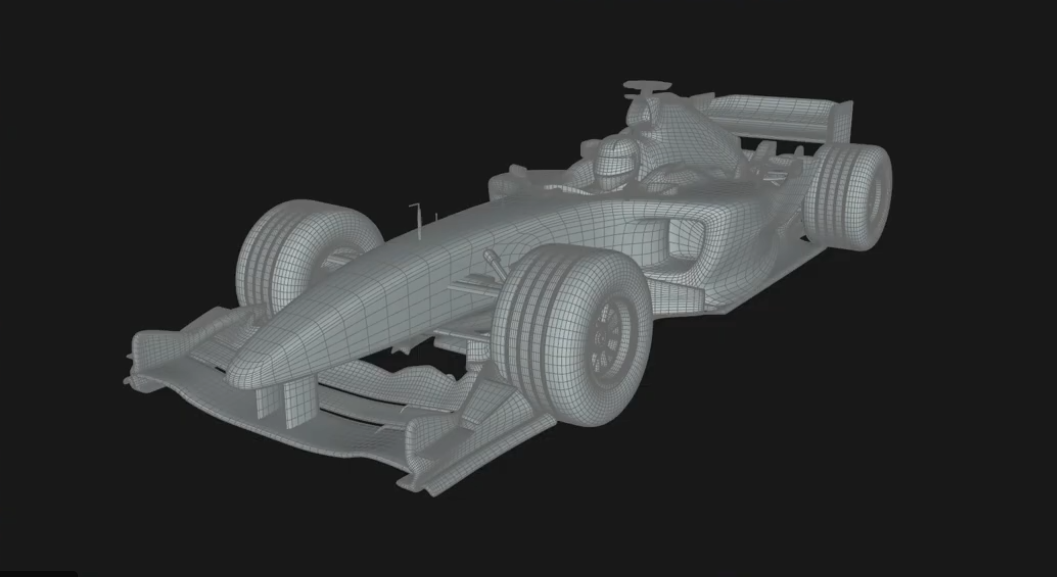
A quick example to clarify my point. Same shape in SketchUp, with smoothed and unsmoothed lines:
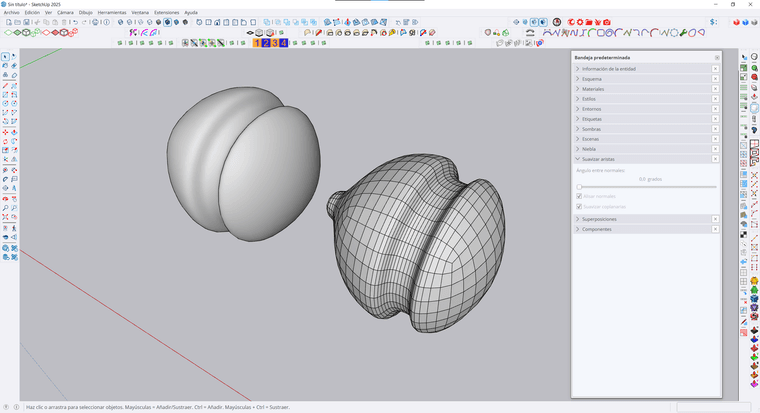
This is how the exported obj look in Blender:
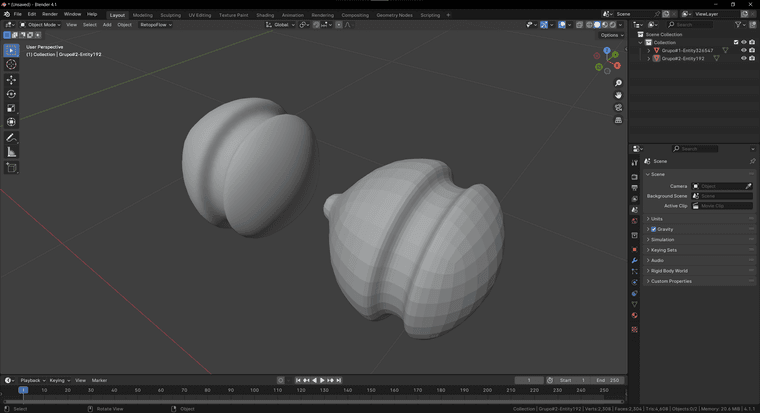
Alejandro Soriano Visuals · All my links
-
@alsomar said in [Plugin] QuadFaceTools:
You see the model unsmoothed in 3ds Max just because your SketchUp model has unsmoothed lines. Despite the SubD subdivisions making the surface look smooth, if you can see the edges it means the lines are actually unsmoothed. In this frame I can see all the lines
Nope.
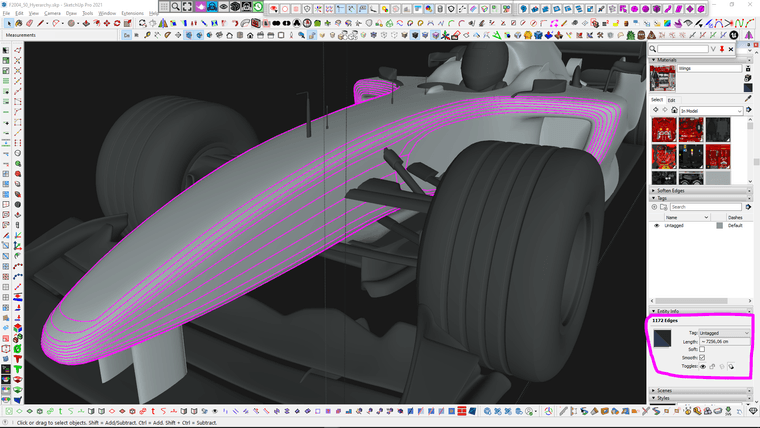
They are soft = false; smooth = true.The smooth attribute is the one actually welding the normals/creating smoothing groups.
The soft is a Sketchup-thing only to separate "logical surfaces" which can be selected with a single click.In the legacy version of the exporter, the generated obj from 3dsMax was seen as 2 overlapped meshes: one with the properly welded/smoothed quads (BUT unwelded UV seams between each quad, despite the individual quads being perfectly in place in the UV chart) + one made of floating/unwelded triangles.
In Blender the legacy exporter always worked fine (didn't test your fork against Blender, but I guess it could work fine).
Another weird/interesting thing is that the same objects, when exported straight out of WrapR work 100% fine.



Hello! It looks like you're interested in this conversation, but you don't have an account yet.
Getting fed up of having to scroll through the same posts each visit? When you register for an account, you'll always come back to exactly where you were before, and choose to be notified of new replies (either via email, or push notification). You'll also be able to save bookmarks and upvote posts to show your appreciation to other community members.
With your input, this post could be even better 💗
Register Login


Advertisement