sketchucation logo sketchucation
    • 登入
    Oops, your profile's looking a bit empty! To help us tailor your experience, please fill in key details like your SketchUp version, skill level, operating system, and more. Update and save your info on your profile page today!
    🔌 Smart Spline | Fluid way to handle splines for furniture design and complex structures. Download

    [Plugin] QuadFaceTools

    已排程 已置頂 已鎖定 已移動 Plugins
    673 貼文 116 Posters 544.8k 瀏覽 116 Watching
    正在載入更多貼文
    • 從舊到新
    • 從新到舊
    • 最多點贊
    回覆
    • 在新貼文中回覆
    登入後回覆
    此主題已被刪除。只有擁有主題管理權限的使用者可以查看。
    • thomthomT 離線
      thomthom
      最後由 編輯

      Bug Alert
      I just discovered an issue where the Hidden property of triangulated quads might get lost when you copy / import a quad face mesh into a model with existing scenes. In some cases the mesh can be recovered by using the Sandbox To Quads and then updating the scenes - but there is a potential for losing the Quad definition of the mesh.

      Issue logged at: https://bitbucket.org/thomthom/quadface-tools/issue/57/hidden-property-is-lost-when-activating

      Will find a solution to this. Might end up reverting back to the old way of defining Quads. Sorry for the inconvenience this might cause.

      Thomas Thomassen — SketchUp Monkey & Coding addict
      List of my plugins and link to the CookieWare fund

      1 條回覆 最後回覆 回覆 引用 0
      • jarynzlesaJ 離線
        jarynzlesa
        最後由 編輯

        this plug-in deserves three thumbs up.

        http://www.vizualizaceschodiste.mypage.cz/

        1 條回覆 最後回覆 回覆 引用 0
        • L 離線
          Luigi987
          最後由 編輯

          Amazing plugin!

          Though, on various occasions it does this:
          http://puu.sh/8aAc

          the corners always get messed up no matter how perfectly I make them.
          Not sure if this is a bug or just me being dumb, help appreciated though~

          1 條回覆 最後回覆 回覆 引用 0
          • thomthomT 離線
            thomthom
            最後由 編輯

            I'm suspecting it's the shape of the quads in the corners that makes the UV mapping distort in such a manner. I'm guessing it's native quads - so I'd try to triangulate them (using the Triangulate method in QuadFace Tools.)

            Can you share a sample model?

            Thomas Thomassen — SketchUp Monkey & Coding addict
            List of my plugins and link to the CookieWare fund

            1 條回覆 最後回覆 回覆 引用 0
            • L 離線
              Luigi987
              最後由 編輯

              @thomthom said:

              I'm suspecting it's the shape of the quads in the corners that makes the UV mapping distort in such a manner. I'm guessing it's native quads - so I'd try to triangulate them (using the Triangulate method in QuadFace Tools.)

              Can you share a sample model?

              Tried triangulating with said option, no luck.

              Here's the model part.

              example.skp

              1 條回覆 最後回覆 回覆 引用 0
              • T 離線
                Thiago Luz
                最後由 編輯

                This plugin only works for now with 4 faces between lines is this?

                I'm sorry, I do not speak English and use an online translator does not always help a lot!

                Because I would like to map quilts, but I see that this is not possible, as this is the following example:
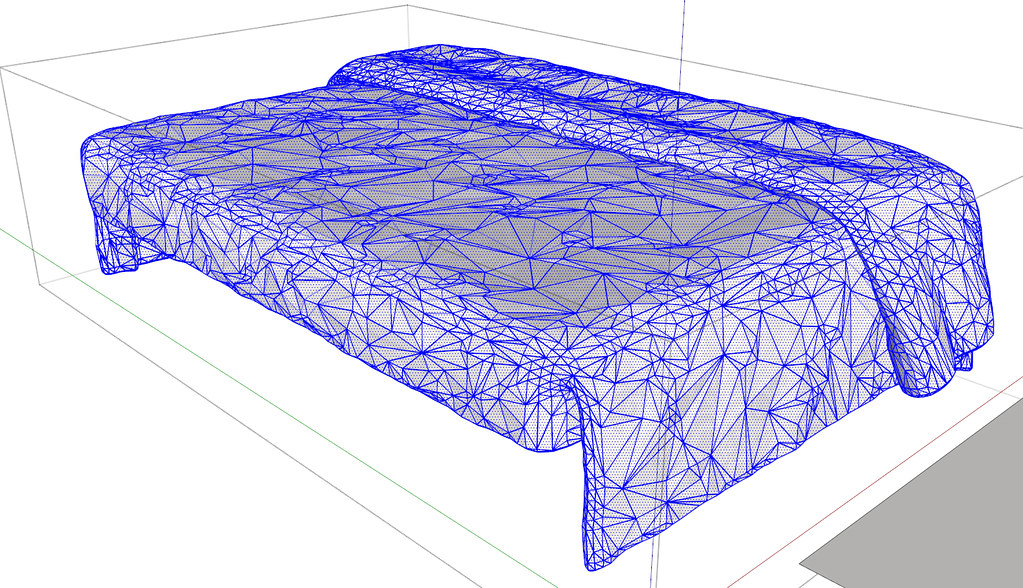
                http://farm7.static.flickr.com/6107/6321101719_f427ed0d38_b.jpg

                Link Preview Image

                Thanks!

                1 條回覆 最後回覆 回覆 引用 0
                • thomthomT 離線
                  thomthom
                  最後由 編輯

                  @thiago luz said:

                  This plugin only works for now with 4 faces between lines is this?

                  Yes, they must be quads, and you also needs to have a good topology of quads for the tools to work well.

                  Thomas Thomassen — SketchUp Monkey & Coding addict
                  List of my plugins and link to the CookieWare fund

                  1 條回覆 最後回覆 回覆 引用 0
                  • thomthomT 離線
                    thomthom
                    最後由 編輯

                    @luigi987 said:

                    @thomthom said:

                    I'm suspecting it's the shape of the quads in the corners that makes the UV mapping distort in such a manner. I'm guessing it's native quads - so I'd try to triangulate them (using the Triangulate method in QuadFace Tools.)

                    Can you share a sample model?

                    Tried triangulating with said option, no luck.

                    Here's the model part.

                    Here's your sample model remapped ( I erased the hidden geometry stuff and purged before reposting to keep filesize down )
                    The screenshot got annotations to what I did.
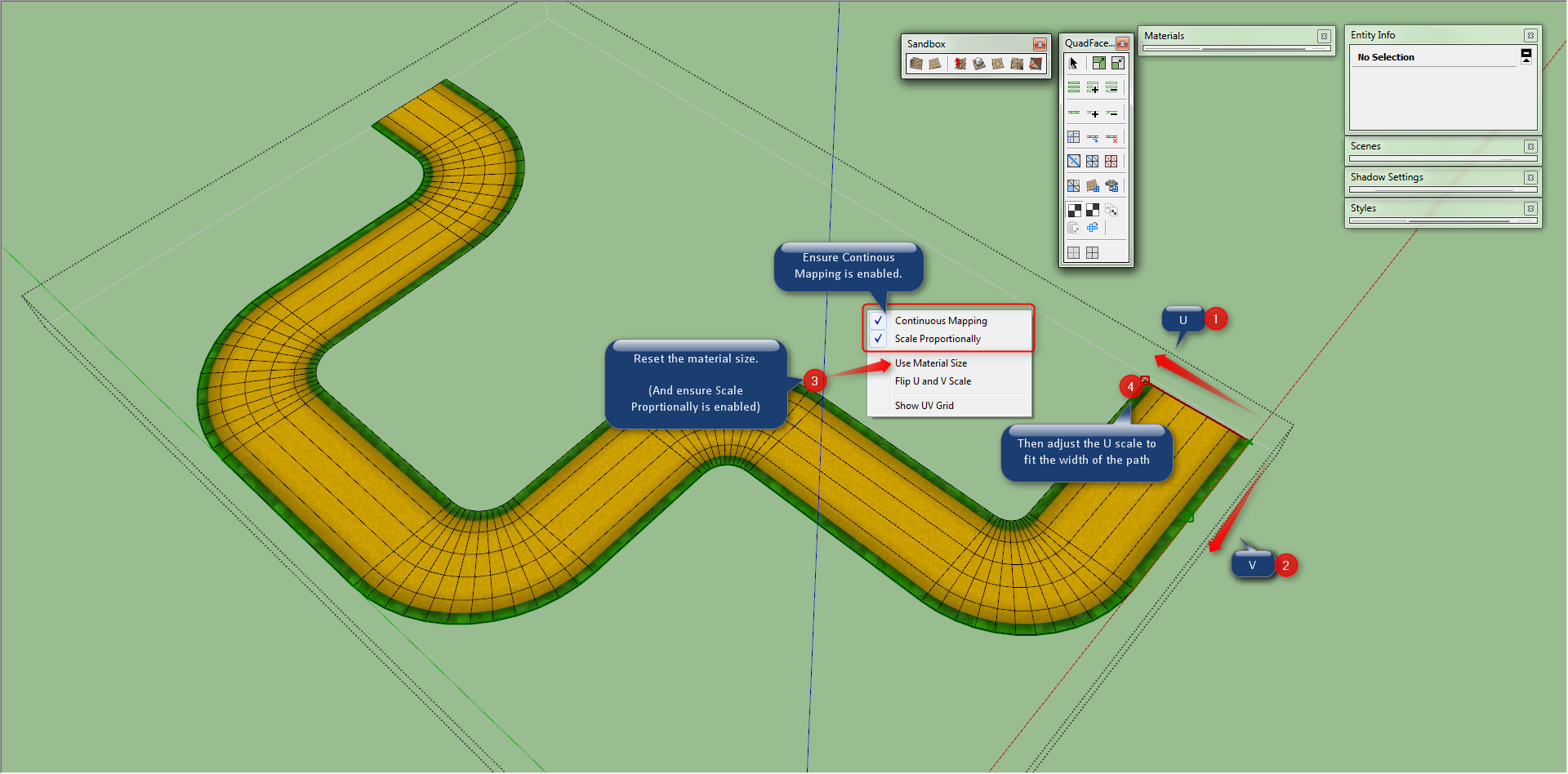

                    UV Map.png


                    example mapped.skp

                    Thomas Thomassen — SketchUp Monkey & Coding addict
                    List of my plugins and link to the CookieWare fund

                    1 條回覆 最後回覆 回覆 引用 0
                    • T 離線
                      Thiago Luz
                      最後由 編輯

                      Still, a great plugin, thanks!

                      1 條回覆 最後回覆 回覆 引用 0
                      • Rich O BrienR 離線
                        Rich O Brien Moderator
                        最後由 編輯

                        Thom,

                        Is it possible that you'll mimic Selection Toys and allow the user to choose what's on the toolbar?

                        Or am I missing the option?

                        Download the free D'oh Book for SketchUp 📖

                        1 條回覆 最後回覆 回覆 引用 0
                        • thomthomT 離線
                          thomthom
                          最後由 編輯

                          @unknownuser said:

                          Is it possible that you'll mimic Selection Toys and allow the user to choose what's on the toolbar?
                          Or am I missing the option?

                          That is in fact something I want to implement. The features and commands for this plugin has grown a lot since first version, and there's several commands still without toolbar buttons and more will come. yaiks...

                          Though first I need to get 0.6 out asap - that address the issue with scenes breaking the quads... 😞

                          Thomas Thomassen — SketchUp Monkey & Coding addict
                          List of my plugins and link to the CookieWare fund

                          1 條回覆 最後回覆 回覆 引用 0
                          • Rich O BrienR 離線
                            Rich O Brien Moderator
                            最後由 編輯

                            That's good to hear ☀

                            Any Bezier Surface news on the horizon?

                            Download the free D'oh Book for SketchUp 📖

                            1 條回覆 最後回覆 回覆 引用 0
                            • thomthomT 離線
                              thomthom
                              最後由 編輯

                              I hope so... 😞 I've really blown my internally estimated timeline for this... Gotto get my focus straight! First sign will be that beta for Vertex Tools open up.

                              Thomas Thomassen — SketchUp Monkey & Coding addict
                              List of my plugins and link to the CookieWare fund

                              1 條回覆 最後回覆 回覆 引用 0
                              • romboutR 離線
                                rombout
                                最後由 編輯

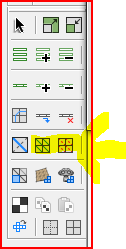
                                i cant find a option to make quads of a selection?!
                                1 條回覆 最後回覆 回覆 引用 0
                                • TIGT 離線
                                  TIG Moderator
                                  最後由 編輯

                                  @rombout said:

                                  i cant find a option to make quads of a selection?!
                                  Capture.PNG

                                  TIG

                                  1 條回覆 最後回覆 回覆 引用 0
                                  • Rich O BrienR 離線
                                    Rich O Brien Moderator
                                    最後由 編輯

                                    You need to select a quad to then convert the mesh to quads.

                                    Download the free D'oh Book for SketchUp 📖

                                    1 條回覆 最後回覆 回覆 引用 0
                                    • thomthomT 離線
                                      thomthom
                                      最後由 編輯

                                      @rombout said:

                                      i cant find a option to make quads of a selection?!

                                      What kind of selection do you got?

                                      There are a couple of commands to Convert to quads:
                                      QFConvert.png

                                      The left command "Convert Triangulated Mesh to Quads" will try to find quads in the mesh - you need to either selected a native quad or two triangles as a starting point.

                                      The right one is converting Sandbox Tools type of quad mesh into QuadFace quads.

                                      Maybe you can explain, and show, what mesh you have and what you try to convert?

                                      Thomas Thomassen — SketchUp Monkey & Coding addict
                                      List of my plugins and link to the CookieWare fund

                                      1 條回覆 最後回覆 回覆 引用 0
                                      • thomthomT 離線
                                        thomthom
                                        最後由 編輯

                                        @tig said:

                                        @rombout said:

                                        i cant find a option to make quads of a selection?!
                                        [attachment=0:zfyitihf]<!-- ia0 -->Capture.PNG<!-- ia0 -->[/attachment:zfyitihf]

                                        That's Triangulate and Remove Triangulation you highlighted... don't think it's what he's looking for.

                                        Thomas Thomassen — SketchUp Monkey & Coding addict
                                        List of my plugins and link to the CookieWare fund

                                        1 條回覆 最後回覆 回覆 引用 0
                                        • V 離線
                                          vouda
                                          最後由 編輯

                                          Big congratulations for your plugin!
                                          But I have a problem. When I render with su podium the aspect ratio of edited surfaces colapses.
                                          Any solution?

                                          1 條回覆 最後回覆 回覆 引用 0
                                          • thomthomT 離線
                                            thomthom
                                            最後由 編輯

                                            @vouda said:

                                            When I render with su podium the aspect ratio of edited surfaces colapses.

                                            I do not understand what you mean by that. Got screenshot and possibly a sample model?

                                            Thomas Thomassen — SketchUp Monkey & Coding addict
                                            List of my plugins and link to the CookieWare fund

                                            1 條回覆 最後回覆 回覆 引用 0
                                            • 1
                                            • 2
                                            • 3
                                            • 4
                                            • 5
                                            • 6
                                            • 7
                                            • 8
                                            • 33
                                            • 34
                                            • 6 / 34
                                            • 第一個貼文
                                              最後的貼文
                                            Buy SketchPlus
                                            Buy SUbD
                                            Buy WrapR
                                            Buy eBook
                                            Buy Modelur
                                            Buy Vertex Tools
                                            Buy SketchCuisine
                                            Buy FormFonts

                                            Advertisement


