sketchucation logo sketchucation
    • Login
    Oops, your profile's looking a bit empty! To help us tailor your experience, please fill in key details like your SketchUp version, skill level, operating system, and more. Update and save your info on your profile page today!
    Check out Febhouse | New extensions for Shadow Analysis in SketchUp Download

    [Plugin] Drop Vertices

    Scheduled Pinned Locked Moved Plugins
    54 Posts 18 Posters 153.0k Views 18 Watching
    Loading More Posts
    • Oldest to Newest
    • Newest to Oldest
    • Most Votes
    Reply
    • Reply as topic
    Log in to reply
    This topic has been deleted. Only users with topic management privileges can see it.
    • pilouP Offline
      pilou
      last edited by

      Maybe use of Ferrari can also gives some cool results πŸ˜‰

      Frenchy Pilou
      Is beautiful that please without concept!
      My Little site :)

      1 Reply Last reply Reply Quote 0
      • K Offline
        ktslambieng
        last edited by

        oh .thank u verry much
        but ruby SplitUp I can find where, who can help me, please
        i saw on Youtube
        http://www.youtu.be/watch?v=kAUx4AHVbOU&feature=related

        1 Reply Last reply Reply Quote 0
        • TIGT Offline
          TIG Moderator
          last edited by

          @ktslambieng said:

          oh .thank u verry much
          but ruby SplitUp I can find where, who can help me, please
          i saw on Youtube
          http://www.youtu.be/watch?v=kAUx4AHVbOU&feature=related

          Like 'On Screen Rolling Reel' - 'SplitUp' has never been published.
          It's in beta testing with a select group [Rich O'B].
          The bugs are now ironed out... I'll speak with the other[s] to see what we should do next...

          TIG

          1 Reply Last reply Reply Quote 0
          • Rich O BrienR Offline
            Rich O Brien Moderator
            last edited by

            Don't forget my NURBS plugin that's fairly stable. Just too powerful for mere mortals.

            Download the free D'oh Book for SketchUp πŸ“–

            1 Reply Last reply Reply Quote 0
            • peter_shawP Offline
              peter_shaw
              last edited by

              great plugin, used it to fix a f-ed up model

              1 Reply Last reply Reply Quote 0
              • cottyC Offline
                cotty
                last edited by

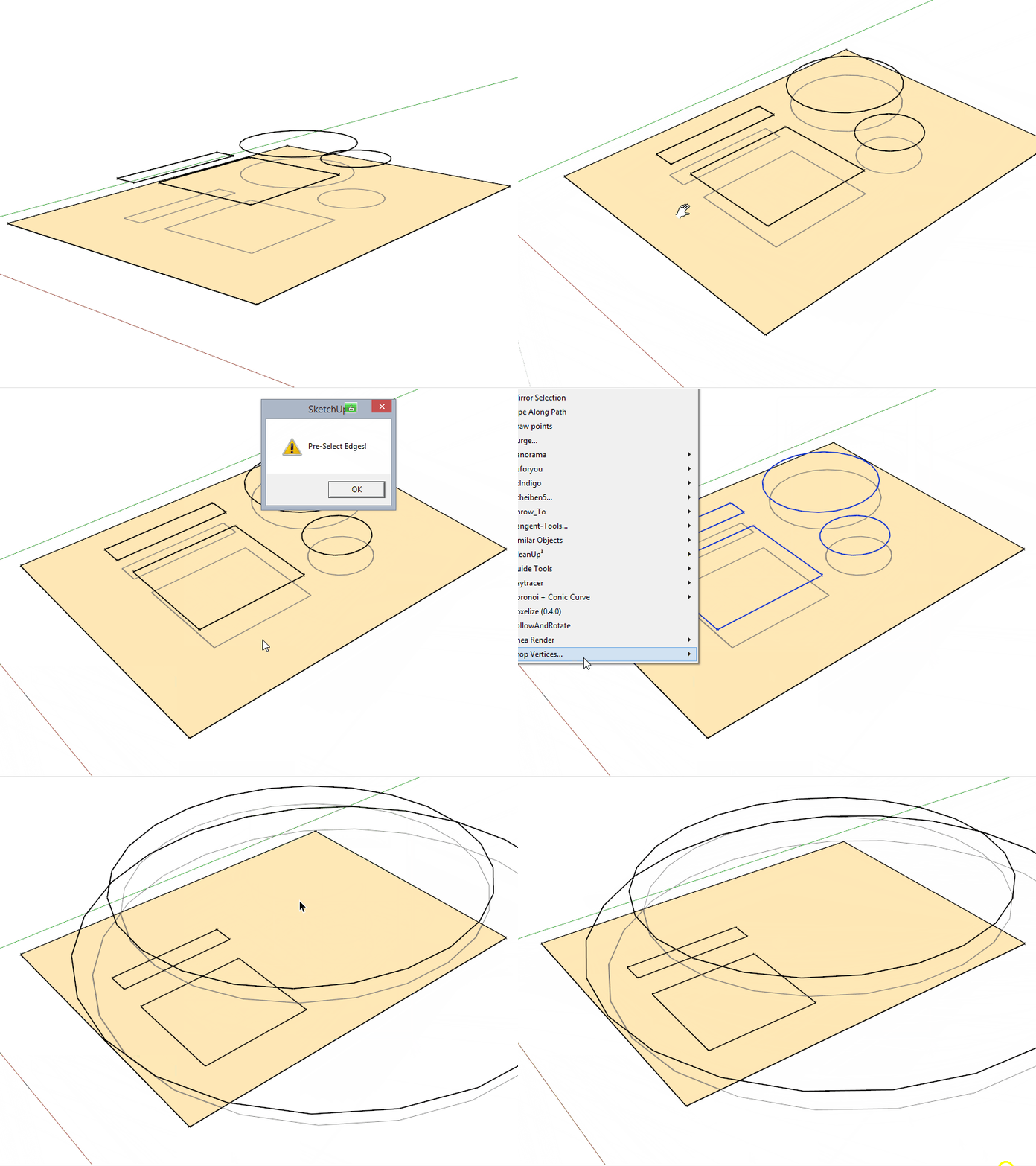
                What did I wrong here?

                klick image

                my SketchUp gallery

                1 Reply Last reply Reply Quote 0
                • TIGT Offline
                  TIG Moderator
                  last edited by

                  Scant on what you've tried...
                  arcs/curves do not drop unless they are exploded first...
                  but see this example...
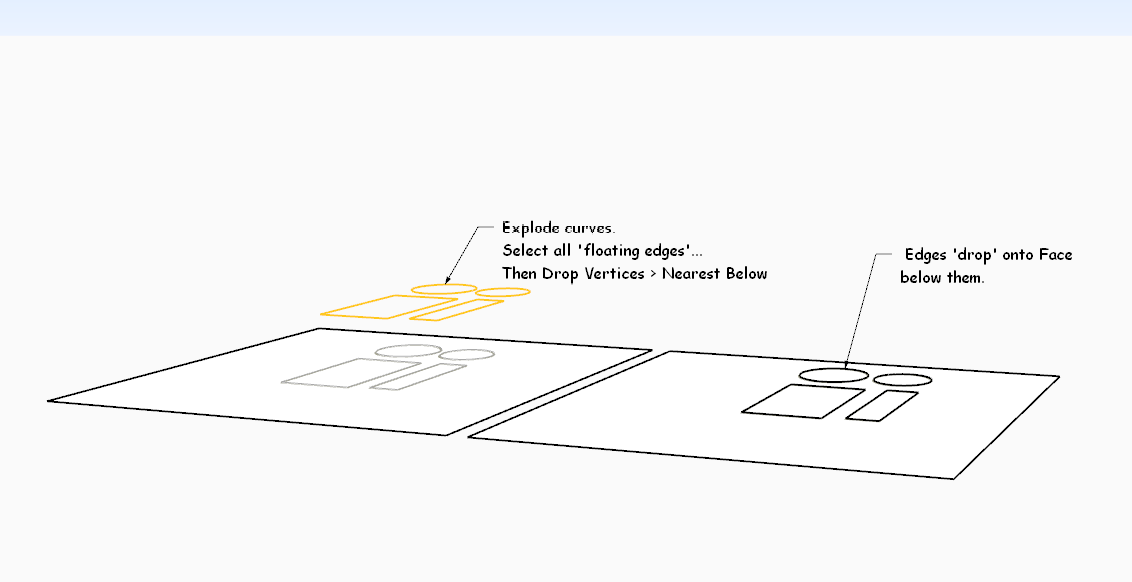

                  DropVertsBelow.PNG

                  TIG

                  1 Reply Last reply Reply Quote 0
                  • TIGT Offline
                    TIG Moderator
                    last edited by

                    Here is v2.0 http://sketchucation.com/pluginstore?pln=dropverts It now overcomes the curve issue.
                    All edges in a dropped curve are now treated as separate edges.

                    TIG

                    1 Reply Last reply Reply Quote 0
                    • cottyC Offline
                      cotty
                      last edited by

                      Thank you, nice update!

                      my SketchUp gallery

                      1 Reply Last reply Reply Quote 0
                      • pilouP Offline
                        pilou
                        last edited by

                        Does it possible to imagine a "drop" on X or Y direction ?
                        (sure I can rotate all before but...)

                        Frenchy Pilou
                        Is beautiful that please without concept!
                        My Little site :)

                        1 Reply Last reply Reply Quote 0
                        • mariochaM Offline
                          mariocha
                          last edited by

                          Hi TIG,
                          I found that To Middle and To average do not work.
                          Console indicates that line 93 z=z.to_s.to_l if z is faulty; cannot convert to length.
                          I changed it to z=z.to_f if z . (float) They now work.
                          Is this right ?

                          %(#008000)[Mario C.
                          Every rule has exceptions, but some.]

                          1 Reply Last reply Reply Quote 0
                          • mariochaM Offline
                            mariocha
                            last edited by

                            @pilou said:

                            Does it possible to imagine a "drop" on X or Y direction ?
                            (sure I can rotate all before but...)

                            In this port are functions for the 3 axis.
                            I tried to stick to the actual extension standards.
                            Re-named it since it does more than just drop.
                            Added LanguageHandler, french. And a contextual menu for the most frequent ones I use.


                            Mc-AlignEnds.rbz

                            %(#008000)[Mario C.
                            Every rule has exceptions, but some.]

                            1 Reply Last reply Reply Quote 0
                            • M Offline
                              maxosmedia
                              last edited by

                              Extension Errors Report

                              SketchUp: 26.2.242
                              OS: Tahoe
                              Ruby: 3.2.2

                              Extension: [unknown]
                              Error: SyntaxError (/Users/maxos/Library/Application Support/SketchUp 2026/SketchUp/Plugins/ropverts.rb:1: syntax error, unexpected ':', expecting end-of-input
                              Name: dropverts.rb

                              1 Reply Last reply Reply Quote 0
                              • TIGT Offline
                                TIG Moderator
                                last edited by TIG

                                @maxosmedia

                                Why have you posted 6 almost identical posts about something - one will do.
                                And your post doesn't contain enough info for the error either.
                                You can copy the whole thing and post that - it'd include the error details, and even the line number ?
                                In you copy/paste it looks like you didn't get the file name right - it's dropverts.rb - you missed off the 'd' - or have you somehow mangled the file's name in reality within the Plugins folder ?
                                ALSO note that this script is 16 years old and no one has posted here for 10 years. So SketchUp versions and their Ruby installations can vary to generate errors for older scripts when loaded in newer SketchUp versions !
                                Having said that, I just loaded it into v2026 [PC] and it works fine - just as expected... So please be more helpful with your reporting, so we can help you...

                                TIG

                                1 Reply Last reply Reply Quote 0
                                • Rich O BrienR Offline
                                  Rich O Brien Moderator
                                  last edited by

                                  @tig

                                  Extra removed.

                                  Download the free D'oh Book for SketchUp πŸ“–

                                  1 Reply Last reply Reply Quote 0

                                  Hello! It looks like you're interested in this conversation, but you don't have an account yet.

                                  Getting fed up of having to scroll through the same posts each visit? When you register for an account, you'll always come back to exactly where you were before, and choose to be notified of new replies (either via email, or push notification). You'll also be able to save bookmarks and upvote posts to show your appreciation to other community members.

                                  With your input, this post could be even better πŸ’—

                                  Register Login
                                  • 1
                                  • 2
                                  • 3
                                  • 3 / 3
                                  • First post
                                    Last post
                                  Buy SketchPlus
                                  Buy SUbD
                                  Buy WrapR
                                  Buy eBook
                                  Buy Modelur
                                  Buy Vertex Tools
                                  Buy SketchCuisine
                                  Buy FormFonts

                                  Advertisement