sketchucation logo sketchucation
    • Login
    Oops, your profile's looking a bit empty! To help us tailor your experience, please fill in key details like your SketchUp version, skill level, operating system, and more. Update and save your info on your profile page today!
    Mac User? | Join the Rayscaper Beta for Mac Learn More

    [Plugin] Zero Tilt Camera

    Scheduled Pinned Locked Moved Plugins
    18 Posts 15 Posters 16.2k Views 15 Watching
    Loading More Posts
    • Oldest to Newest
    • Newest to Oldest
    • Most Votes
    Reply
    • Reply as topic
    Log in to reply
    This topic has been deleted. Only users with topic management privileges can see it.
    • Dave RD
      Dave R
      last edited by

      Looks similar to Two-Point Perspective without the label in the upper left corner. It's not quite the same though. thank you for this.

      I did a quickie example.

      Two Point:


      http://farm7.static.flickr.com/6028/5963379939_dec4c2e42e.jpg

      Zero Tilt:


      http://farm7.static.flickr.com/6003/5963937768_766fbf179d.jpg

      Combined:


      http://farm7.static.flickr.com/6124/5963379955_5ef113e1c3.jpg

      Etaoin Shrdlu

      %

      (THERE'S NO PLACE LIKE)

      G28 X0.0 Y0.0 Z0.0

      M30

      %

      1 Reply Last reply
      Reply Quote 0
      • B
        bjornkn
        last edited by

        I don't quite get this..
        If the verticals are not parallel, which they obviously are not on the compared 2-point/zero tilt image , the camera does not have 0 tilt. ?
        BTW, I typically use the 'position camera' to get 0 tilt, and then Walk to move back/forward and up down.
        Works great too.

        1 Reply Last reply
        Reply Quote 0
        • O
          odowhacker
          last edited by

          maybe i shouldn't have posted this to plugins - it's rather simple and was meant ironic too.
          a beginners try at coding ruby/SUapi...
          the script is handy for me with walktrough animations where i would look around during setup (leave eye height and planar view) and also use different 'camera lens' settings.
          the effect desired was that of a steady cam (with a weigth underneath and the camera set to 90Β° from that weight).
          the two point perspective is kind of static and for me 'position camera' will often fail without a proper reference line or the axes.
          i mainly use the shortcut for setting up scene views - sort of constructing a camera path. transitions look nicer this way (same eye heigth, 0tilt and you can do a rotational move along the way.)

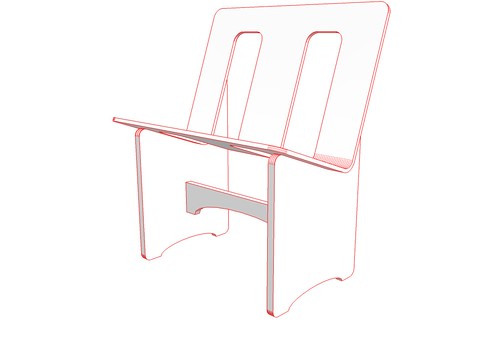
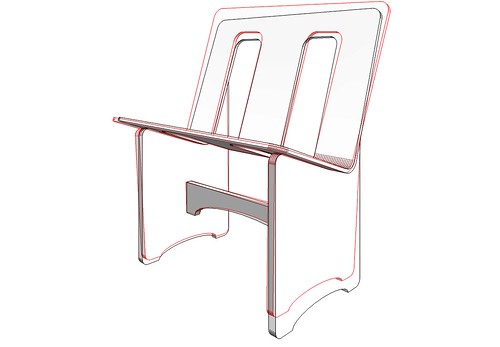
          ..the diversion in the chair overlay would occur if you choose 0tilt coming from a 2point perspective view. this won't work - i hadn't thought of the possiblity - i never use 2point.
          try with a house. inside. use the walk or move tool (hand) to navigate around once you've chosen 0tilt. you'll see.

          attached a dennismethod output of some planar view of a few huts..
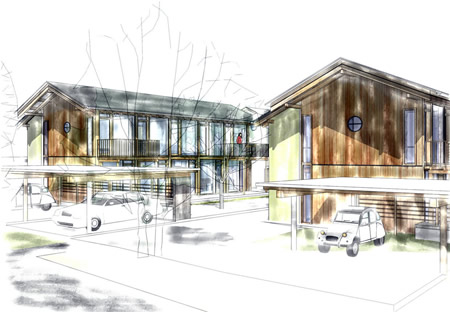
          SW_dennisM.jpg.

          1 Reply Last reply
          Reply Quote 0
          • honoluludesktopH
            honoluludesktop
            last edited by

            @honoluludesktop said:

            Hi Paul, I didn't download the plugin, but based on your description, how is it different from viewing SketchUp in parallel projection?

            Oops, I meant 2 point perspective. Thanks for the explanation.

            1 Reply Last reply
            Reply Quote 0
            • unclebimU
              unclebim
              last edited by

              Thanks, I find this useful, especially when a shortcut is assigned.

              1 Reply Last reply
              Reply Quote 0
              • A
                andre51
                last edited by

                Thanks a lot!
                Anybody that has battled with shift lenses in architectural photography will appreciated this.

                1 Reply Last reply
                Reply Quote 0
                • C
                  clifdon
                  last edited by

                  It can be a useful plug-in. Thanks πŸ˜„ all the plug-ins are appreciated πŸ˜„

                  1 Reply Last reply
                  Reply Quote 0
                  • B
                    bjornkn
                    last edited by

                    Just what I was looking for πŸ˜„

                    It is very useful for rendering spherical/equirectangular panorama with Twilight.
                    If the camera is not level the panorama will be all wavy.

                    1 Reply Last reply
                    Reply Quote 0
                    • L
                      LanceCampeau
                      last edited by

                      Thank you for posting this... this is exactly what I was looking for... Finally, no more "dutch angles" during my transitions. πŸ˜„

                      1 Reply Last reply
                      Reply Quote 0
                      • S
                        sketchuh
                        last edited by

                        Thanks!

                        1 Reply Last reply
                        Reply Quote 0
                        • TAYEBIT
                          TAYEBI
                          last edited by

                          very good plugin .. very hsady
                          since some of render engines do not support Su's native '2 point perspective' ..

                          1 Reply Last reply
                          Reply Quote 0
                          • tridemT
                            tridem
                            last edited by

                            πŸ‘ very useful plugin!

                            1 Reply Last reply
                            Reply Quote 0
                            • F
                              FlorinAp
                              last edited by FlorinAp

                              Finally, i think i figured it out - the best description for this one is "perspective perpendicular center view", i used it a lot through the first button of Curic Align View, and now through Dezmo Dice "center (front, left, right, back) view".
                              Somebody please tell me if I'm wrong.!
                              It is very useful, and in SketchUp, there is no way that you can manually and precisely achieve this.


                              1 Reply Last reply
                              Reply Quote 0

                              Hello! It looks like you're interested in this conversation, but you don't have an account yet.

                              Getting fed up of having to scroll through the same posts each visit? When you register for an account, you'll always come back to exactly where you were before, and choose to be notified of new replies (either via email, or push notification). You'll also be able to save bookmarks and upvote posts to show your appreciation to other community members.

                              With your input, this post could be even better πŸ’—

                              Register Login
                              • 1 / 1
                              • First post
                                Last post
                              Buy SketchPlus
                              Buy SUbD
                              Buy WrapR
                              Buy eBook
                              Buy Modelur
                              Buy Vertex Tools
                              Buy SketchCuisine
                              Buy FormFonts

                              Advertisement