Problem with SU
-
@thomthom said:
@tig said:
However, as I explained there can be a lot of duplicated toolbar- entries too - I manually remove those...
What? Another set of entries? I'm confused to which one you refer to...

The 'ToolbarsUser' that your bat file finds, excludes all of the many 'Toolbars' entries - many of which can have duplicated BarIDs [resulting from multiple savings of the toolbar settings?], which also seems to slow everything down...
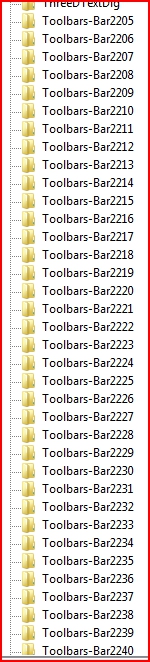
-
I'm not seeing those kind of entries at all...

-
I have virtually the same set up as you ?
I tried removing them all from the registry list - even those without duplicated BarIDs - and Sketchup still loaded fine
Then I re-saved the toolbar settings, and exited Sketchup... but no new entries were added to the registry ??
I must conclude that my v8 'Toolbars-' entries were somehow left over from an earlier version ???
Or does Sketchup have an occasional hiccup and make some
Weird ? -
I have no idea - I've not seen those entries on any system/computer where I've looked.
-
This is weird, now, parts of my toolbars just seem to vanish, in this example, ATViews, TOS, Fredoscale and Sandbox have all gone weird .... Needs a reboot/redock for them to reappear ....

-
Hi,
I had also a lot of these registry entries in Sketchup Sketchup 7 and 8. ThomThoms "Reset SketchUp Toolbars" worked fine for me but after use you have to rearrange the toolbars. Now all is clean.
Charly
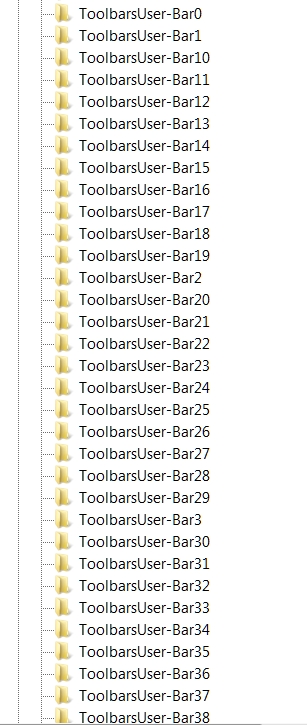
-
Oops, after re-arranging the tool bars the registry entries are present again in 7 and 8. In Sketchup 8 i have some additional entries.
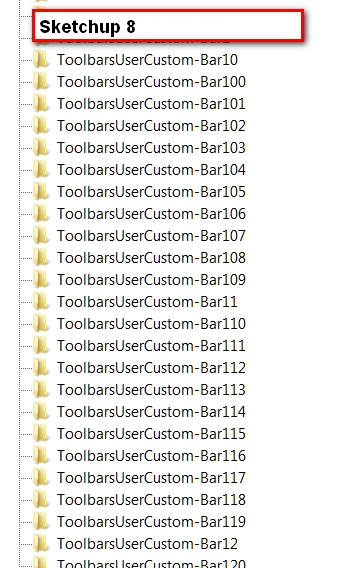
-
I think the extra entries are to do with remembering the toolbar settings ??
-
@tig said:
I think the extra entries are to do with remembering the toolbar settings ??
Aye - the ToolbarsUserCustom entries are new to SU which it uses to restore toolbar settings.
-
Still following....though lost.
Is this turn of events a good or bad thing?
-
@leedeetee said:
This is weird, now, parts of my toolbars just seem to vanish, in this example, ATViews, TOS, Fredoscale and Sandbox have all gone weird .... Needs a reboot/redock for them to reappear ....
Sorry chaps, just a little bump for this. Is there any reaosn why I should lose my toolbar icons at all?
-
Did you do anything to your Plugins or Tools folders? I ran ThomThom's bat file on my computer at work but had no trouble when I put the toolbars back. All the icons were present and accounted for.
-
You should not loose any icons no.
Do you mean you get the toolbars, but with missing icons? Or missing toolbars? -
Sorry for being unclear, I meant icons within the toolbars. Turned computer on this morning and it seems fine however!
-
When you browse to your plugin folder - do you see a "Compatibility Files" button?
-
@thomthom said:
When you browse to your plugin folder - do you see a "Compatibility Files" button?
Sorry, do you mean via Windows Explorer? (C:\Program Files (x86)\Google\Google SketchUp 8\Plugins) If so, no.
-
it works ! after execute the command my toolbars blast!
now my sketchup starts faster more than before and then i rearrange the toolbars.
thank you. -
THIS FIXES THE ISSUE! ThomThom saves the day once again. Hopefully Trimble fixes this as a bug.
-
@thomthom said:
Use at Own Risk!!!
This is a couple of batch commands I use to clear the toolbar registry. It has worked for me - but I put a word of caution anyway; use at own risk.Activate the one corresponding to your SketchUp version.
I had to change the content of the batch-file to (Windows 7-64):
"c;\Windows\System32\reg.exe" query "HKEY_CURRENT_USER\Software\Google\SketchUp8" /f "ToolbarsUser" >> reg_keys.txt

for /f %%k in (reg_keys.txt) do (
    "c;\Windows\System32\reg.exe" delete %%k /f
)
(I found 4539 entries, who has more
 ? )
? ) -
@cotty said:
I had to change the content of the batch-file to (Windows 7-64):
[code]"c:\Windows\System32\reg.exe" query "HKEY_CURRENT_USER\Software\Google\SketchUp8" /f "ToolbarsUser" >> reg_keys.txtIt was made on Windows 7 64bit...
It's using relative path - I see you used a full path. Seems like there's something odd about your PATH environment variables...@cotty said:
(I found 4539 entries, who has more
? )I've had double that... After a session of longer debugging a toolbar problem.








Hello! It looks like you're interested in this conversation, but you don't have an account yet.
Getting fed up of having to scroll through the same posts each visit? When you register for an account, you'll always come back to exactly where you were before, and choose to be notified of new replies (either via email, or push notification). You'll also be able to save bookmarks and upvote posts to show your appreciation to other community members.
With your input, this post could be even better 💗
Register Login


Advertisement