Skb files
-
Hello,
I did a search for the meaning of "skb" files. No results. What's the deal with them? I mean-why do my drawings "convert" to skb? Is this good/bad? Should I attempt to change them to "skp"?, etc.
Thanks, ocd
-
.skb is the backup or autosave of your .skp in case things go tits up during modeling
-
It's the previously saved version of the SKP.
You can turn it back into a SKP by changing the SKB suffix to SKP...
-
Thanks, I just looked them up on Google. Is there a need to convert them to "skp" or should I get used to going to the "All files" tab at the bottom of the window? What about a skb to skp converter, if yes to that, which one?
-
SketchUp is set to create .skb files. If you model then save but continue to model your can use the skb file to restore to the last saved state. No need to convert as you can do as TIG says and rename the extension from .skb to .skp.
But I'd suggest that you make a habit of saving frequently. I hit CTRL+S constantly while modeling.
-
@unknownuser said:
But I'd suggest that you make a habit of saving frequently. I hit CTRL+S constantly while modeling.
Especially do that beforeany complex action like running a heavy plugin or such.
And just leave those skb's there. One day they can come handy, believe me.
-
They're just backup files...pure and simple. A number of other programs also generated them, but they normally have a .bak extension or something similar. As Gaius says, don't do anything to them...not until you have completely finished your model and thoroughly checked it over for mistakes or other glitches.
In the event of a program crash (and SU not saving an autosave file) the skb may be the only thing that stands between you and repeating several hours of work. After that, you can delete them if you wish.
As a matter of fact, it was necessary for me to rename a skb to skp earlier today. I was generating a number of variations of a component from a base model and accidentally typed in the wrong "Save As" name, overwriting the wrong file. The skb that was automatically generated was the only way of retrieving that particular variant. Without it, I'd have had to model the whole thing over again. -
@alan fraser said:
As a matter of fact, it was necessary for me to rename a skb to skp earlier today. I was generating a number of variations of a component from a base model and accidentally typed in the wrong "Save As" name, overwriting the wrong file. The skb that was automatically generated was the only way of retrieving that particular variant. Without it, I'd have had to model the whole thing over again.
See, Alan is probably one of the most experienced members here. If hesays that, keep his advice!
-
Keep in mind the SKB file is a slightly older rendition of the Autosave file.
SKB files are your last saved file version before hitting the SAVE icon. SU renames the file extension then saves your current version as the SKP file by overwriting the previous SKB.
Then depending on the autosave interval (mine is set at 30 minutes), SU will create an Autosave file in the interim between the last SKP/SKB save and now. When you do a save or exit normal, the autosave is deleted. An SU crash will leave the Autosave on file so it can be resurected with only the last minutes (upto the interval) of lost work.
The SKB is a slightly older version. -
I have a model that is too large (48.6Mbs) to upload to the warehouse but others want a copy. Can I use the .skb or .skp file as an info transfer to an on line forum? I have tried but nothing seems to work.
-
You might have to zip it. Not sure how much smaller it would get.
-
The SKB file is just a version of the SKP file that is one save behind it, so there is often little size difference, and the file is slightly out of date.
Use the SKP file.
Have you used Model Info > Statistics to Purge Unused on the SKP ?
The saved SKP will then be as small as it can be, when unused components, materials, layers and styles are cleared out.
Also note that if you have large images used for textured materials, you could also try editing those to something smaller in their resolution, and then reapply them to their materials - the SKP might not loose much in its appearance at all, but this can shrink its size noticeably.
Zipping a SKP will make it smaller, but by how much depends on its constituents.
File Sharing sites have varying limits on file size.
Most email services limit an attachment size to 20/25Mb.
This forum has a limit of 4Mb.
Some services disallow unusual file extensions - like SKP - so a ZIP file is more likely to be acceptable AND smaller too... -
Thanks guys. Zipping doesn't do it, breaking the model into smaller parts doesn't do it so I think those that want my model are going to have to make their own.
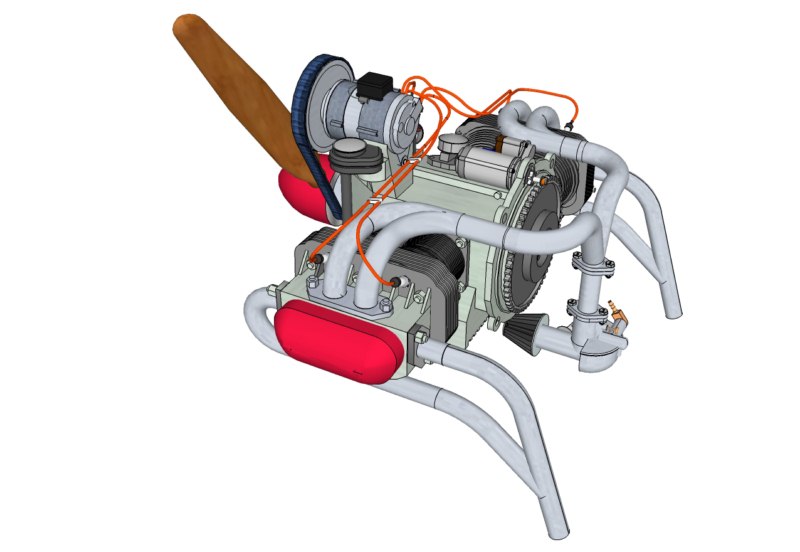
-
@unknownuser said:
Thanks guys. Zipping doesn't do it, breaking the model into smaller parts doesn't do it so I think those that want my model are going to have to make their own.
Yes you can easily break the model into smaller parts, and be very easy to reassemble.

I do it with my big airplane project, currently at about 16 separate but totally integrated sub drawings, that I can combine as I need for fit and function interfaces. I can do it all in 1 humongous file (about 100mb) but a pan or move will take about 90 seconds to see happen, and a save takes about 3 minutes.
1-Open your model normally in SU.
2-Decide how you need to break it up into manageable files. Say 3 for example.
3-Open 3 more blank SU sessions.
4-In the full model session, select a set of components/groups or entities.
5-Clipboard copy that set.
6-Switch windows to empty SU session 1, and paste-in-place.
7-Save that file with save-as.
8-Repeat 4-7 for the remaining parts in the other 2 files.
You now have 3 smaller separate sub-files, all position and attributes, including materials and layers co-ordinated.
Post the sub-files to the warehouse or SketchUcation with the following reassembly instructions.
To reassemble the model into 1 file,
1-Open all of the files as separate SU sessions.
2-Select one file as the main model.
3-Switch windows to the next file.
4-Select all and clipboard copy.
5-Back to main SU window.
6-Paste-in-place.
7-Repeat 3-6 for the remaining parts.
You now have a totally "cloned" copy of the big file.Note: I tried using Files-Import but it does not paste-in-place.

-
@unknownuser said:
I have a model that is too large (48.6Mbs) to upload to the warehouse but others want a copy. Can I use the .skb or .skp file as an info transfer to an on line forum? I have tried but nothing seems to work.
You can upload to one of the free services such as "dropbox" which will give you 2 gigs of memory. Once uploaded to your dropbox folder, you send an e-mail link to whom ever wants the file and they download. I use it all the time for large drawing files and photos.
-
Hi folks.
Using File menu --> Openand then specifying all file type will let you open skbfile directly from within SU.
Also, dragging a skbfile on the icon of SU or a shortcut of SU, even if the shortcut is on the Task bar will launch SU.
Just ideas.
-
@tig said:
The SKB file is just a version of the SKP file that is one save behind it, so there is often little size difference, and the file is slightly out of date.
Use the SKP file.
Have you used Model Info > Statistics to Purge Unused on the SKP ?
The saved SKP will then be as small as it can be, when unused components, materials, layers and styles are cleared out.
Also note that if you have large images used for textured materials, you could also try editing those to something smaller in their resolution, and then reapply them to their materials - the SKP might not loose much in its appearance at all, but this can shrink its size noticeably.
Zipping a SKP will make it smaller, but by how much depends on its constituents.
File Sharing sites have varying limits on file size.
Most email services limit an attachment size to 20/25Mb.
This forum has a limit of 4Mb.
Some services disallow unusual file extensions - like SKP - so a ZIP file is more likely to be acceptable AND smaller too...Hi, TIG! Is there some way to do "Model Info > Statistics to Purge Unused on the SKP" by ruby code? I have to many .skp files, it's wasting to much time to shrink them one by one.

-
Try TIG's Purge All plugin. It does mean doing this for each file.
-
@rich o brien said:
Try TIG's Purge All plugin. It does mean doing this for each file.
Although with a little rewriting you could 'batch' purge all SKP files in a folder say, removing the dialog/option prompts...
-











Advertisement