sketchucation logo sketchucation
    • 登入
    Oops, your profile's looking a bit empty! To help us tailor your experience, please fill in key details like your SketchUp version, skill level, operating system, and more. Update and save your info on your profile page today!
    🔌 Smart Spline | Fluid way to handle splines for furniture design and complex structures. Download

    [Plugin] Sketchup Ivy

    已排程 已置頂 已鎖定 已移動 Plugins
    732 貼文 172 Posters 314.8k 瀏覽 172 Watching
    正在載入更多貼文
    • 從舊到新
    • 從新到舊
    • 最多點贊
    回覆
    • 在新貼文中回覆
    登入後回覆
    此主題已被刪除。只有擁有主題管理權限的使用者可以查看。
    • soloS 離線
      solo
      最後由 編輯

      It's lumenrt that's the culptrit. no problems now that I deleted it.

      I reported this to them on the e-on software beta forum.

      http://www.solos-art.com

      If you see a toilet in your dreams do not use it.

      1 條回覆 最後回覆 回覆 引用 0
      • G 離線
        gaonirico
        最後由 編輯

        I uninstalled the previous version and installed the update but follows without functioning

        1 條回覆 最後回覆 回覆 引用 0
        • P 離線
          Pierreden
          最後由 編輯

          @gaonirico said:

          I uninstalled the previous version and installed the update but follows without functioning

          Any messages in the ruby console?

          1 條回覆 最後回覆 回覆 引用 0
          • G 離線
            gaonirico
            最後由 編輯

            Error: #<IOError: Invalid component file>
            C:/Program Files/Google/Google SketchUp 8/Plugins/LiveIvy/LiveIvy_tool.rb:298:in load' C:/Program Files/Google/Google SketchUp 8/Plugins/LiveIvy/LiveIvy_tool.rb:298:in load_definitions'
            C:/Program Files/Google/Google SketchUp 8/Plugins/LiveIvy/LiveIvy_tool.rb:10:in initialize' C:/Program Files/Google/Google SketchUp 8/Plugins/LiveIvy/LiveIvy_tool.rb:342:in new'
            C:/Program Files/Google/Google SketchUp 8/Plugins/LiveIvy/LiveIvy_tool.rb:342
            C:/Program Files/Google/Google SketchUp 8/Plugins/LiveIvy/LiveIvy_tool.rb:298:in `call'
            C:/Program Files/Google/Google SketchUp 8/Plugins/LiveIvy/LiveIvy_tool.rb:298

            1 條回覆 最後回覆 回覆 引用 0
            • P 離線
              Pierreden
              最後由 編輯

              @gaonirico said:

              Error: #<IOError: Invalid component file>
              C:/Program Files/Google/Google SketchUp 8/Plugins/LiveIvy/LiveIvy_tool.rb:298:in load' C:/Program Files/Google/Google SketchUp 8/Plugins/LiveIvy/LiveIvy_tool.rb:298:in load_definitions'
              C:/Program Files/Google/Google SketchUp 8/Plugins/LiveIvy/LiveIvy_tool.rb:10:in initialize' C:/Program Files/Google/Google SketchUp 8/Plugins/LiveIvy/LiveIvy_tool.rb:342:in new'
              C:/Program Files/Google/Google SketchUp 8/Plugins/LiveIvy/LiveIvy_tool.rb:342
              C:/Program Files/Google/Google SketchUp 8/Plugins/LiveIvy/LiveIvy_tool.rb:298:in `call'
              C:/Program Files/Google/Google SketchUp 8/Plugins/LiveIvy/LiveIvy_tool.rb:298

              Try the new file (0.5.2) 👍

              1 條回覆 最後回覆 回覆 引用 0
              • G 離線
                gaonirico
                最後由 編輯

                Yeah, it working fine now... Thanks Pierreden, million thanks

                1 條回覆 最後回覆 回覆 引用 0
                • G 離線
                  gaonirico
                  最後由 編輯

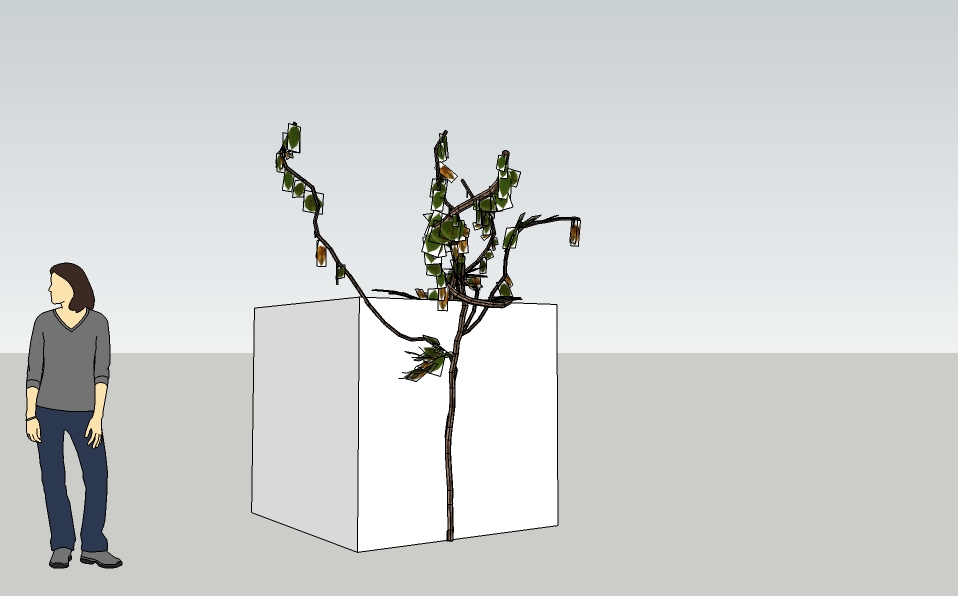
                  The proof that works well:


                  Sin título.jpg

                  1 條回覆 最後回覆 回覆 引用 0
                  • G 離線
                    gaonirico
                    最後由 編輯

                    Mnn, maybe two errors: the first
                    quietly_force_sync_mats_cb just calledquietly_force_sync_mats_cb just calledquietly_force_sync_mats_cb just calledquietly_force_sync_mats_cb just calledquietly_force_sync_mats_cb just calledquietly_force_sync_mats_cb just calledquietly_force_sync_mats_cb just calledquietly_force_sync_mats_cb just calledquietly_force_sync_mats_cb just calledquietly_force_sync_mats_cb just calledERROR: skpHelperClasses.rb:updateSkpMaterial, unable to find a material called: Ivyleaf_21
                    ERROR: skpHelperClasses.rb:updateSkpMaterial, unable to find a material called: Ivyleaf_21

                    ... the second and but notable is that not takes me the changes of parameters in the menu
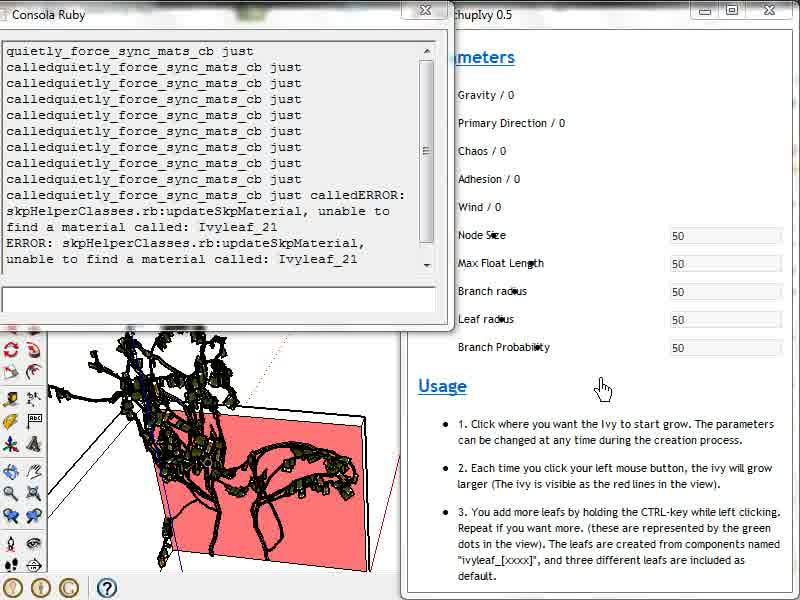

                    vlcsnap-2011-05-09-20h40m20s222.jpg

                    1 條回覆 最後回覆 回覆 引用 0
                    • P 離線
                      Pierreden
                      最後由 編輯

                      It seems like Sketchup cant find the correct material, which is "Ivyleaf_2" (it looks for "Ivyleaf_21"), or that vray looks for the wrong one. Does this happen every time you make an ivy, or does it happen on special actions? Cant recreate this myself. After completely uninstaling and reinstaling the plugin, i dont get any errors with sketchup nor with vray

                      http://i.imgur.com/eSwjM.jpg

                      (I appreciate your debugging very much gaonirico!!)

                      1 條回覆 最後回覆 回覆 引用 0
                      • G 離線
                        gaonirico
                        最後由 編輯

                        It uninstalled and installed and did not give errors with the material. In the image of the left all parameters are in 1 , in the image of the right all parameters are in 50. There is not significant changes in both cases... I am sorry if do not speak well the english language ^_^
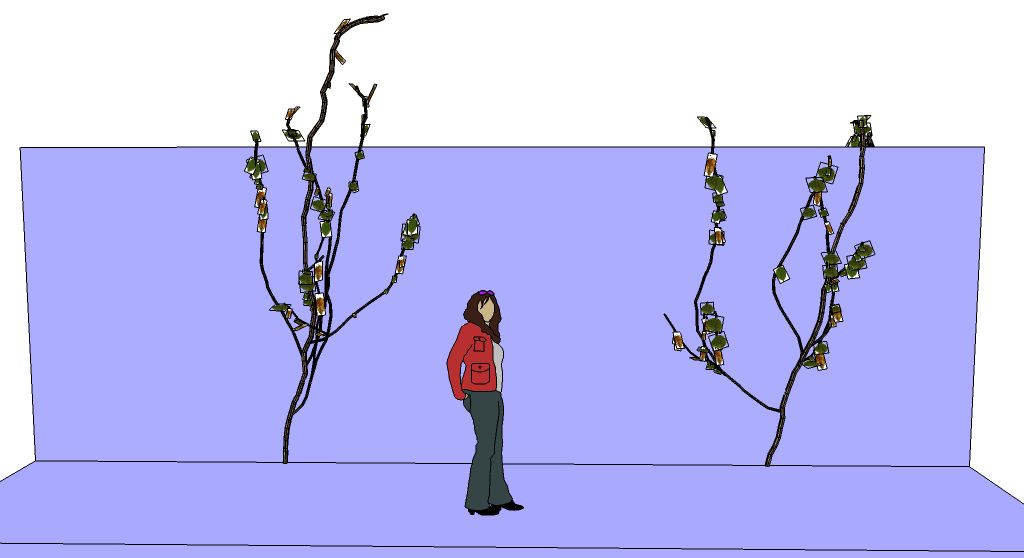

                        Sin título.jpg

                        1 條回覆 最後回覆 回覆 引用 0
                        • F 離線
                          function
                          最後由 編輯

                          I'm handling A LOT more branches in the new version 👍

                          1 條回覆 最後回覆 回覆 引用 0
                          • soloS 離線
                            solo
                            最後由 編輯

                            Working for me also.


                            ivysutest.png

                            http://www.solos-art.com

                            If you see a toilet in your dreams do not use it.

                            1 條回覆 最後回覆 回覆 引用 0
                            • thomthomT 離線
                              thomthom
                              最後由 編輯

                              @gaonirico said:

                              Mnn, maybe two errors: the first
                              quietly_force_sync_mats_cb just calledquietly_force_sync_mats_cb just calledquietly_force_sync_mats_cb just calledquietly_force_sync_mats_cb just calledquietly_force_sync_mats_cb just calledquietly_force_sync_mats_cb just calledquietly_force_sync_mats_cb just calledquietly_force_sync_mats_cb just calledquietly_force_sync_mats_cb just calledquietly_force_sync_mats_cb just calledERROR: skpHelperClasses.rb:updateSkpMaterial, unable to find a material called: Ivyleaf_21
                              ERROR: skpHelperClasses.rb:updateSkpMaterial, unable to find a material called: Ivyleaf_21

                              ... the second and but notable is that not takes me the changes of parameters in the menu

                              That is a V-Ray for SketchUp error. What version do you have installed?

                              Thomas Thomassen — SketchUp Monkey & Coding addict
                              List of my plugins and link to the CookieWare fund

                              1 條回覆 最後回覆 回覆 引用 0
                              • massimoM 離線
                                massimo Moderator
                                最後由 編輯

                                Thanks for this one Pierreden. 👍 I've tried the very first version and it worked, but now i get this when i start the plugin:

                                Error; #<RuntimeError; Can't insert empty component.>
                                C;/Program Files (x86)/Google/Google SketchUp 7/Plugins/LiveIvy/LiveIvy_tool.rb;305;in `load'
                                C;/Program Files (x86)/Google/Google SketchUp 7/Plugins/LiveIvy/LiveIvy_tool.rb;305;in `load_definitions'
                                C;/Program Files (x86)/Google/Google SketchUp 7/Plugins/LiveIvy/LiveIvy_tool.rb;10;in `initialize'
                                C;/Program Files (x86)/Google/Google SketchUp 7/Plugins/LiveIvy/LiveIvy_tool.rb;348;in `new'
                                C;/Program Files (x86)/Google/Google SketchUp 7/Plugins/LiveIvy/LiveIvy_tool.rb;348
                                C;/Program Files (x86)/Google/Google SketchUp 7/Plugins/LiveIvy/LiveIvy_tool.rb;347;in `call'


                                Maybe SU 8 is required?

                                1 條回覆 最後回覆 回覆 引用 0
                                • M 離線
                                  mukul.ar
                                  最後由 編輯

                                  I don't know if its just me or some other thea user, probably solo can confirm... I get more leaves in thea than the ones visible in sketchup.. this may be a sketchup to thea issue, maybe not.. just thought of sharing it here.

                                  SKP1.jpg


                                  1.png

                                  My Works

                                  1 條回覆 最後回覆 回覆 引用 0
                                  • M 離線
                                    mukul.ar
                                    最後由 編輯

                                    I've uploaded a *Rar file of the sketchup file of the above image. In case anyone wants to look into it... will try and see if its a one off incident or happens again...

                                    great plugin by the way!! 😄

                                    *EDIT: definitely something going on here... the problem persits.. leaves are scattering around in thea. Its probably due to the way the pivot points might be getting relocated or twisted somehow in the sketchup to thea interface or maybe something totally unrelated..


                                    11.rar

                                    My Works

                                    1 條回覆 最後回覆 回覆 引用 0
                                    • B 離線
                                      bbx
                                      最後由 編輯

                                      I also got the
                                      Error: #<RuntimeError: Can't insert empty component.>

                                      Figured out the texture components are in SU8 format, so I converted them to SU7 and it al works fine.
                                      http://www.megaupload.com/?d=2HBVEVR0

                                      Great plugin, thanks a lot!

                                      Dave

                                      1 條回覆 最後回覆 回覆 引用 0
                                      • PixeroP 離線
                                        Pixero
                                        最後由 編輯

                                        I got the same problem in Thea as described above.

                                        @unknownuser said:

                                        Will now use components with "ivyleaf" in the name as leafs. 3 included by default.

                                        May I suggest an option where you select what components should be used as leaves instead.
                                        How is your solution working if you want to use different leaves for different "ivys"?

                                        1 條回覆 最後回覆 回覆 引用 0
                                        • M 離線
                                          mukul.ar
                                          最後由 編輯

                                          @ Pixero: the leaves are materials applied to rectangular components. I believe you can select a new material (your leaf) and change it in one component (will change in all). But it might have limitations as to the position of the texture of the leaves. (or not)

                                          how did you go about solving the thea issue?

                                          My Works

                                          1 條回覆 最後回覆 回覆 引用 0
                                          • soloS 離線
                                            solo
                                            最後由 編輯

                                            Thea users: uncheck 'export as components' before exporting.

                                            Change the leaves in thea, just copy the one you like and paste it in the material slot of the one you want to replace.


                                            http://www.solos-art.com

                                            If you see a toilet in your dreams do not use it.

                                            1 條回覆 最後回覆 回覆 引用 0
                                            • 1
                                            • 2
                                            • 3
                                            • 4
                                            • 5
                                            • 36
                                            • 37
                                            • 1 / 37
                                            • 第一個貼文
                                              最後的貼文
                                            Buy SketchPlus
                                            Buy SUbD
                                            Buy WrapR
                                            Buy eBook
                                            Buy Modelur
                                            Buy Vertex Tools
                                            Buy SketchCuisine
                                            Buy FormFonts

                                            Advertisement