sketchucation logo sketchucation
    • Login
    Oops, your profile's looking a bit empty! To help us tailor your experience, please fill in key details like your SketchUp version, skill level, operating system, and more. Update and save your info on your profile page today!
    Mac User? | Join the Rayscaper Beta for Mac Learn More

    [Plugin] Voxelize - Updated 2011-04-04

    Scheduled Pinned Locked Moved Plugins
    48 Posts 21 Posters 65.9k Views 21 Watching
    Loading More Posts
    • Oldest to Newest
    • Newest to Oldest
    • Most Votes
    Reply
    • Reply as topic
    Log in to reply
    This topic has been deleted. Only users with topic management privileges can see it.
    • 2
      22curious
      last edited by

      Thanks TheDro & Dan!

      How about adding options for:

      • spreading the cubes out, with inputs for x, y, and z separation spaces
      • choosing which planes to slice, one, some, or all... x-z, y-z, x-y
        ?

      Are there any existing plugins do these slicing, dicing, and spread-em-out actions?

      1 Reply Last reply
      Reply Quote 0
      • T
        TheDro
        last edited by

        Well it's possible to spread out the cubes just by modifying any one of the cubes since they are all instances of the same component. So you can double click on one of the cubes, then use the scaling tool to shrink it, and they will all shrink while remaining in position, and this will produce spacing between them all. As for the plane slicing, I'm not sure I follow. Could explain in more detail, 22curious?

        I'll probably release a new version tonight that calculates the position of the cubes MUCH faster.

        1 Reply Last reply
        Reply Quote 0
        • Dan RathbunD
          Dan Rathbun
          last edited by

          @thedro said:

          I'll probably release a new version tonight that calculates the position of the cubes MUCH faster.

          It is customary (here at SCF,) to replace the file in the first post of the topic, with the new version, and then edit the topic title (which only you can do because you "own" the topic,) to reflect the revision date.
          Example revised topic title:
          "[Plugin] Voxelize - Updated 2011-03-24"

          *** standard date format for Ruby is YYYY-MM-DD**

          Then you can slide all the way down to the bottom of the webpage, and click the "Bump" link to bring the topic to the top of the forum list (without needing to post a new message.)

          After you do that, I'll remove my version 1a and put a link back to the first post.

          I'm not here much anymore.

          1 Reply Last reply
          Reply Quote 0
          • 2
            22curious
            last edited by

            @unknownuser said:

            spread out the cubes...double click on one...use scaling tool to shrink it.

            This is where that Homer [doh] audio plugin button comes in handy. Of course!
            'Wearing too many hats, my SKU skills are SKrUsty...

            @unknownuser said:

            As for the plane slicing
            My need may be met using asteronimo's SliceModeler.rb "plugin that slices a solid 3d model along 2 axes, f.i. an X- and a Z-axis." SliceModeler.rb is based on Tig's Slicer.rb (that isn't on the plugins list? but found at http://forums.sketchucation.com/viewtopic.php?f=180&t=10413&p=68825&hilit=slicer.rb#p688). I'm checking SliceModeler and Voxelize out now!

            ...another path may be combining a lattice>>cutting component>>Tig's Hole punching Tool.

            1 Reply Last reply
            Reply Quote 0
            • Dan RathbunD
              Dan Rathbun
              last edited by

              Made a few changes for you Andrew:

              • properly module wrapped the plugin.

              • cube size is remembered during session in var @@cube_size

              • made it easier to control menu with constants defined at top of file

              • added validation for the menu item

              I think the "group test" should fire before the inputbox is displayed.
              But otherwise it looks good.


              Latest version now in the first post

              I'm not here much anymore.

              1 Reply Last reply
              Reply Quote 0
              • G
                Gillman
                last edited by

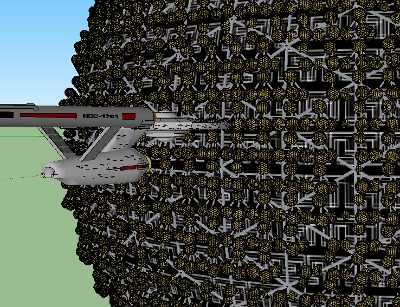
                Very intesting plug-in, and practical too. I was looking for a quick way to place a repeating element on a sphere (in this case Clint Howard's ship from Star Trek TOS "The Corbomite Manuver"). I edited the cube and replaced it with a pyramid with geodesic spheres at each angle.Fesperus.jpg

                It turned what would have been a mind-numbing task into something trivial. Now all I have to do is upload it to the warehouse.

                1 Reply Last reply
                Reply Quote 0
                • T
                  TheDro
                  last edited by

                  @Gillman: I'm glad to hear that it was of use to you.

                  @Khai: I've been looking at the structure of the .schematic file which is used to import structures into Minecraft using MCEdit. I think I've got it figured out but I still need to write the code and I'm reading the book of ruby to try and figure out the best way to do it.

                  @Everyone: I've added a new "spiral" algorithm to prevent interpreting sharp edges of solids as "entrances" to the solids. Basically, I improved the algorithm to work with more solids which is good. I'll upload the new version once I'm not too busy with work/school.

                  1 Reply Last reply
                  Reply Quote 0
                  • 2
                    22curious
                    last edited by

                    @TheDro, the spiral refinement will be useful - looking forward to it - thanks!

                    1 Reply Last reply
                    Reply Quote 0
                    • K
                      Khai
                      last edited by

                      thanks Dro 😄

                      1 Reply Last reply
                      Reply Quote 0
                      • mitcorbM
                        mitcorb
                        last edited by

                        You will discover, while scaling an instance of a component, that the others do not scale accordingly, at least while using the native scale tool.

                        I take the slow, deliberate approach in my aimless wandering.

                        1 Reply Last reply
                        Reply Quote 0
                        • TIGT
                          TIG Moderator
                          last edited by

                          Scaling one Component Instance from the 'outside' won't affect other Component Instances of the same Component BUT scaling a Component Instance's 'contents' will change all Component Instances of that Component - that's because when you edit the contents of a Component Instance you change the Component Definition itself and this is repeated across all of its Instances]...

                          TIG

                          1 Reply Last reply
                          Reply Quote 0
                          • mitcorbM
                            mitcorb
                            last edited by

                            Aaah yes. Thank you. 😄

                            I take the slow, deliberate approach in my aimless wandering.

                            1 Reply Last reply
                            Reply Quote 0
                            • L
                              Lobster
                              last edited by

                              Thanks for this,

                              Interesting plug in.

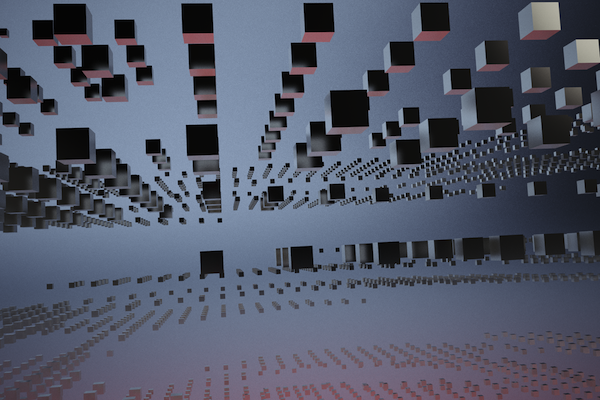
                              voxelise.png

                              1 Reply Last reply
                              Reply Quote 0
                              • Dave RD
                                Dave R
                                last edited by

                                Is there any chance of making this work to allow selection of a component as well as a group?

                                Etaoin Shrdlu

                                %

                                (THERE'S NO PLACE LIKE)

                                G28 X0.0 Y0.0 Z0.0

                                M30

                                %

                                1 Reply Last reply
                                Reply Quote 0
                                • T
                                  TheDro
                                  last edited by

                                  I might eventually get to adding that feature but it's hard to say when. I've been pretty busy this summer and plan to be until September so I might not get to programming any time soon. I just checked out some of the methods of components (instance and definition) and there is a "bounds" method (not found in the api documentation...) which I could use to run my script. This means it should be possible to make it work for components but I might not get to it any time soon.

                                  Have a great summer 😄 .

                                  1 Reply Last reply
                                  Reply Quote 0
                                  • TIGT
                                    TIG Moderator
                                    last edited by

                                    Of course you could always explode the component-instance and immediately group the highlighted geometry that results... now you have a group to process...

                                    TIG

                                    1 Reply Last reply
                                    Reply Quote 0
                                    • Dave RD
                                      Dave R
                                      last edited by

                                      That's true, TIG. I guess for no more often than I would use the plugin, that wouldn't be too much trouble.

                                      Etaoin Shrdlu

                                      %

                                      (THERE'S NO PLACE LIKE)

                                      G28 X0.0 Y0.0 Z0.0

                                      M30

                                      %

                                      1 Reply Last reply
                                      Reply Quote 0
                                      • L
                                        leminilab
                                        last edited by

                                        @unknownuser said:

                                        This screams out for Sketchy Physics to drop all those cubes.

                                        👍 That's what I thought too!
                                        Can't wait to see that! 🎉

                                        • "Live every day as if it were your last and then some day you'll be right."
                                        • "ThomThom rules!!!"
                                        1 Reply Last reply
                                        Reply Quote 0
                                        • O
                                          octopus2
                                          last edited by

                                          Is there a way of knowing how many cubes were generated?

                                          1 Reply Last reply
                                          Reply Quote 0
                                          • Dave RD
                                            Dave R
                                            last edited by

                                            Since the plugin creates the cubes as instances of a component, select one of them and look at the Entity Info box. It'll tell you how many there are.


                                            Etaoin Shrdlu

                                            %

                                            (THERE'S NO PLACE LIKE)

                                            G28 X0.0 Y0.0 Z0.0

                                            M30

                                            %

                                            1 Reply Last reply
                                            Reply Quote 0

                                            Hello! It looks like you're interested in this conversation, but you don't have an account yet.

                                            Getting fed up of having to scroll through the same posts each visit? When you register for an account, you'll always come back to exactly where you were before, and choose to be notified of new replies (either via email, or push notification). You'll also be able to save bookmarks and upvote posts to show your appreciation to other community members.

                                            With your input, this post could be even better 💗

                                            Register Login
                                            • 1
                                            • 2
                                            • 3
                                            • 2 / 3
                                            • First post
                                              Last post
                                            Buy SketchPlus
                                            Buy SUbD
                                            Buy WrapR
                                            Buy eBook
                                            Buy Modelur
                                            Buy Vertex Tools
                                            Buy SketchCuisine
                                            Buy FormFonts

                                            Advertisement