sketchucation logo sketchucation
    • 登入
    Oops, your profile's looking a bit empty! To help us tailor your experience, please fill in key details like your SketchUp version, skill level, operating system, and more. Update and save your info on your profile page today!
    🔌 Smart Spline | Fluid way to handle splines for furniture design and complex structures. Download

    Any plugin to evenly space objects?

    已排程 已置頂 已鎖定 已移動 Plugins
    24 貼文 10 Posters 11.6k 瀏覽 10 Watching
    正在載入更多貼文
    • 從舊到新
    • 從新到舊
    • 最多點贊
    回覆
    • 在新貼文中回覆
    登入後回覆
    此主題已被刪除。只有擁有主題管理權限的使用者可以查看。
    • thomthomT 離線
      thomthom
      最後由 編輯

      Is there no plugin to evenly space objects?

      Thomas Thomassen — SketchUp Monkey & Coding addict
      List of my plugins and link to the CookieWare fund

      1 條回覆 最後回覆 回覆 引用 0
      • pilouP 離線
        pilou
        最後由 編輯

        An exemple?

        Frenchy Pilou
        Is beautiful that please without concept!
        My Little site :)

        1 條回覆 最後回覆 回覆 引用 0
        • TIGT 離線
          TIG Moderator
          最後由 編輯

          My old 'Matrix' tool allows you to matrix copy components in 3d with set spacings in XYZ, and also individual rotation/scaling/handing, randomness etc... look for 'MatrixProximity' [craie?]

          TIG

          1 條回覆 最後回覆 回覆 引用 0
          • Dave RD 離線
            Dave R
            最後由 編輯

            Copy along path?

            (pathcopy.rb)

            Etaoin Shrdlu

            %

            (THERE'S NO PLACE LIKE)

            G28 X0.0 Y0.0 Z0.0

            M30

            %

            1 條回覆 最後回覆 回覆 引用 0
            • thomthomT 離線
              thomthom
              最後由 編輯

              I don't want to copy anything - just space out existing objects along a vector.
              Really thought something like this would have existed already...

              Thomas Thomassen — SketchUp Monkey & Coding addict
              List of my plugins and link to the CookieWare fund

              1 條回覆 最後回覆 回覆 引用 0
              • Dave RD 離線
                Dave R
                最後由 編輯

                If it does, I don't know. If it really doesn't, it might soon. 😄

                Etaoin Shrdlu

                %

                (THERE'S NO PLACE LIKE)

                G28 X0.0 Y0.0 Z0.0

                M30

                %

                1 條回覆 最後回覆 回覆 引用 0
                • TIGT 離線
                  TIG Moderator
                  最後由 編輯

                  Like an 'align tool' that aligns ['spaces'] existing objects onto a set 'grid' or along a linear spacing ?

                  TIG

                  1 條回覆 最後回覆 回覆 引用 0
                  • thomthomT 離線
                    thomthom
                    最後由 編輯

                    @tig said:

                    Like an 'align tool' that aligns ['spaces'] existing objects onto a set 'grid' or along a linear spacing ?

                    Yes - like any align and distribute function in graphic applications like Indesign, Inkspace etc...

                    http://dave.lab6.com/acid/dump/2008/inkscape-align-a.png

                    404 Not Found

                    favicon

                    (livedocs.adobe.com)

                    Thomas Thomassen — SketchUp Monkey & Coding addict
                    List of my plugins and link to the CookieWare fund

                    1 條回覆 最後回覆 回覆 引用 0
                    • Dave RD 離線
                      Dave R
                      最後由 編輯

                      That would be interesting for when you have a bunch of different, unrelated components to deal with.

                      Etaoin Shrdlu

                      %

                      (THERE'S NO PLACE LIKE)

                      G28 X0.0 Y0.0 Z0.0

                      M30

                      %

                      1 條回覆 最後回覆 回覆 引用 0
                      • thomthomT 離線
                        thomthom
                        最後由 編輯

                        @dave r said:

                        That would be interesting for when you have a bunch of different, unrelated components to deal with.

                        Exactly - like I have now.
                        Since it's such a common feature in other application I thought it would have existed by now. There is an align plugin (only by X,Y,Z axis AFAIK) and no distribute.

                        I imagine a tool, where you clicked in the model to set the align direction would be good. Object would be sorted along that vector and spaced out evenly.

                        Thomas Thomassen — SketchUp Monkey & Coding addict
                        List of my plugins and link to the CookieWare fund

                        1 條回覆 最後回覆 回覆 引用 0
                        • Dave RD 離線
                          Dave R
                          最後由 編輯

                          So the line would define the line of alignment and distance over which the components would be spaced? Components placed by their origins? How would alignment be determined? Aligned to global axes? In Pathcopy the alignment can be tricky so sometimes for my use it is a bit of trial and error.

                          Etaoin Shrdlu

                          %

                          (THERE'S NO PLACE LIKE)

                          G28 X0.0 Y0.0 Z0.0

                          M30

                          %

                          1 條回覆 最後回覆 回覆 引用 0
                          • Didier BurD 離線
                            Didier Bur
                            最後由 編輯

                            Maybe this one (align 2D) ? http://rhin.crai.archi.fr/rld/plugin_details.php?id=12

                            DB

                            1 條回覆 最後回覆 回覆 引用 0
                            • Dave RD 離線
                              Dave R
                              最後由 編輯

                              Didier rides to the rescue wearing a white hat! 👍

                              How hard would it be to add an option to space the components evenly along the line?

                              Etaoin Shrdlu

                              %

                              (THERE'S NO PLACE LIKE)

                              G28 X0.0 Y0.0 Z0.0

                              M30

                              %

                              1 條回覆 最後回覆 回覆 引用 0
                              • pilouP 離線
                                pilou
                                最後由 編輯

                                This one ? 💚

                                http://forums.sketchucation.com/download/file.php?id=30068

                                Frenchy Pilou
                                Is beautiful that please without concept!
                                My Little site :)

                                1 條回覆 最後回覆 回覆 引用 0
                                • CadFatherC 離線
                                  CadFather
                                  最後由 編輯

                                  no such thing exists (yet) - 'js align' is the closest i've seen to play with the position of objects but of course does not space them. the fact that master Thom himself is asking, is unreasonably worrying... it really is needed.

                                  with all the trickery, surely this can't be too difficult..?

                                  1 條回覆 最後回覆 回覆 引用 0
                                  • thomthomT 離線
                                    thomthom
                                    最後由 編輯

                                    @cadfather said:

                                    the fact that master Thom himself is asking, is unreasonably worrying

                                    Not really - it's not hard - just didn't want to reinvent the wheel. But alas, I never got around to make anything myself... 😳

                                    Thomas Thomassen — SketchUp Monkey & Coding addict
                                    List of my plugins and link to the CookieWare fund

                                    1 條回覆 最後回覆 回覆 引用 0
                                    • CadFatherC 離線
                                      CadFather
                                      最後由 編輯

                                      ok, i feel better now... (at least there's no intellectual property on the wheel!)

                                      1 條回覆 最後回覆 回覆 引用 0
                                      • JClementsJ 離線
                                        JClements
                                        最後由 編輯

                                        I think it would be useful, but tricky to do in 3D.

                                        For instance, equal spacing between objects/groups/components that have a depth, height, and width. Do you use the model axes or the axes of the group/component to determine the spacing in between them (assuming the measurements are taken orthogonally to the axes)?

                                        John | Illustrator | Beaverton, Oregon

                                        1 條回覆 最後回覆 回覆 引用 0
                                        • thomthomT 離線
                                          thomthom
                                          最後由 編輯

                                          @jclements said:

                                          For instance, equal spacing between objects/groups/components that have a depth, height, and width. Do you use the model axes or the axes of the group/component to determine the spacing in between them (assuming the measurements are taken orthogonally to the axes)?

                                          If I had made it I would have had toggles for setting the axis it would work in: World, Local, Custom (Tool defining a custom working axis)

                                          Thomas Thomassen — SketchUp Monkey & Coding addict
                                          List of my plugins and link to the CookieWare fund

                                          1 條回覆 最後回覆 回覆 引用 0
                                          • pilouP 離線
                                            pilou
                                            最後由 編輯

                                            Why do you want not use my little "undrop" plug above? 💚
                                            Very rustic but works very well 😄

                                            First "Align" (or not), "Drop" your objects selected with any plugs existing
                                            Then "undrop" them with my little plug with any measures ☀
                                            And then rotate if wanted a special orientation "line" of them as you want !
                                            All takes only seconds 😉
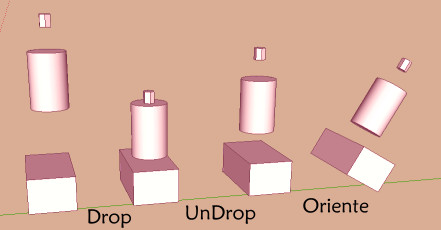
                                            Undrop.jpg

                                            Frenchy Pilou
                                            Is beautiful that please without concept!
                                            My Little site :)

                                            1 條回覆 最後回覆 回覆 引用 0
                                            • 1
                                            • 2
                                            • 1 / 2
                                            • 第一個貼文
                                              最後的貼文
                                            Buy SketchPlus
                                            Buy SUbD
                                            Buy WrapR
                                            Buy eBook
                                            Buy Modelur
                                            Buy Vertex Tools
                                            Buy SketchCuisine
                                            Buy FormFonts

                                            Advertisement




