sketchucation logo sketchucation
    • Login
    Oops, your profile's looking a bit empty! To help us tailor your experience, please fill in key details like your SketchUp version, skill level, operating system, and more. Update and save your info on your profile page today!
    Mac User? | Join the Rayscaper Beta for Mac Learn More

    Zipped Plugins -- A Guide to Installing Them

    Scheduled Pinned Locked Moved Plugins
    66 Posts 18 Posters 549.6k Views 18 Watching
    Loading More Posts
    • Oldest to Newest
    • Newest to Oldest
    • Most Votes
    Reply
    • Reply as topic
    Log in to reply
    This topic has been deleted. Only users with topic management privileges can see it.
    • P
      pedropon
      last edited by

      Hi there,
      I am trying to install "The SCF Power Toolbar (version 1)"
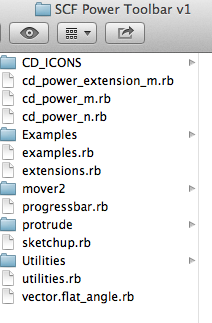
      I tried to drop the "SCF Power Toolbar v1" in my plugins folder, try to install extension in the pref.
      Screen Shot 2012-10-28 at 6.32.07 PM.png

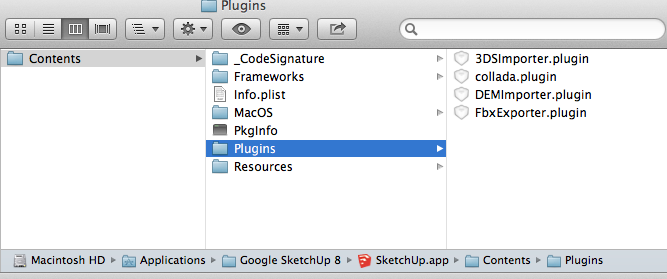
      My Plugins folder
      Content of my plugins folderContent of my plugins folder
      Nothing works
      Please help
      SU V 8.0.15157
      Mac OS X 10.8.2

      1 Reply Last reply
      Reply Quote 0
      • Dave RD
        Dave R
        last edited by

        That's the wrong plugins folder shown in your second and third screenshots. Rather than rehash this again, go back and read the beginning of this thread.

        Etaoin Shrdlu

        %

        (THERE'S NO PLACE LIKE)

        G28 X0.0 Y0.0 Z0.0

        M30

        %

        1 Reply Last reply
        Reply Quote 0
        • GaieusG
          Gaieus
          last edited by

          Hi Pierre,

          Besides what Dave suggested, as you can see from the notes at the bottom of the plugin post here: http://sketchucation.com/forums/viewtopic.php?t=14770
          it is a buggy plugin and no-one takes the time and responsibility to trouble shoot any issues.

          Please, try something else instead.

          Gai...

          1 Reply Last reply
          Reply Quote 0
          • thomthomT
            thomthom
            last edited by

            @pedropon said:

            I am trying to install "The SCF Power Toolbar (version 1)"

            As mentioned by the others, it's the wrong location you're trying to install to.
            have a look at this article on installing plugins: http://www.thomthom.net/thoughts/2012/01/installing-plugins-for-google-sketchup/

            Thomas Thomassen β€” SketchUp Monkey & Coding addict
            List of my plugins and link to the CookieWare fund

            1 Reply Last reply
            Reply Quote 0
            • P
              pedropon
              last edited by

              @Dave R, @Gaieus, @thomthom
              Thanks guys I will definitely try to find some better plugins and not waste my time with those.
              Can you point to some general interesting ones?

              1 Reply Last reply
              Reply Quote 0
              • Dave RD
                Dave R
                last edited by

                Interesting plugins? Well, what do you need a plugin to do? Don't just install plugins because they exist.

                Etaoin Shrdlu

                %

                (THERE'S NO PLACE LIKE)

                G28 X0.0 Y0.0 Z0.0

                M30

                %

                1 Reply Last reply
                Reply Quote 0
                • thomthomT
                  thomthom
                  last edited by

                  Hard to tell without know what and how you work. But you'll find the original plugins from that package you tried to install in the Plugins list: http://sketchucation.com/forums/viewtopic.php?p=250026

                  Thomas Thomassen β€” SketchUp Monkey & Coding addict
                  List of my plugins and link to the CookieWare fund

                  1 Reply Last reply
                  Reply Quote 0
                  • GaieusG
                    Gaieus
                    last edited by

                    Yes, that toolbar plugin is "only" a collection of other plugins so you can actually install them (their up-to-date versions) one by one - and only that you really need.

                    Gai...

                    1 Reply Last reply
                    Reply Quote 0
                    • V
                      villena
                      last edited by

                      Please help i try to download plugin store download but its tell me that there is no application available to open it

                      1 Reply Last reply
                      Reply Quote 0
                      • V
                        villena
                        last edited by

                        thats what I'm planning to as i told it doesn't download to my computer because its say i don't have application to open it. Once i download it then i can copy it to my sketch up the problem is i can't download it.

                        1 Reply Last reply
                        Reply Quote 0
                        • TIGT
                          TIG Moderator
                          last edited by

                          When you download something from the SketchUcation PluginStore it is an RBZ file.
                          You do not want to 'open' it - you want to 'download' it onto your computer...
                          Ensure your browser's options are set to offer alternative processing and a folder location etc...

                          I think you are on a MAC, so are you using Safari ?
                          Here's some Safari help, there's lots about...
                          http://www.dummies.com/how-to/content/how-to-change-safaris-default-file-download-locati.html

                          When you have got the RBZ file downloaded onto your computer, you can then use SketchUp's Preferences > Extensions > Install... button, to automatically install its contents into your Plugins folder...

                          TIG

                          1 Reply Last reply
                          Reply Quote 0
                          • B
                            blackdogsketch
                            last edited by

                            The sketchucation warehouse is very easy.
                            Using Preferences/Extensions/Install Extension...is very easy.
                            Buying extensions from Smustard is a PITA! I know they were the first but this business of having a zip folder...extracting the files manually...and having to guess which of the four different locations Sketchup 2015 now expects extensions (oh- plugins? Because 2015 STILL calls them PLUGINS!)..
                            Is it App Data\Roaming\Sketchup2015\Sketchup\Plugins folder? Programs data\Sketchup\Sketchup 2015\Sketchup\Plugins? Why cant Trimble finally put an end to this insanity and why can't Smustard update their delivery system to standard rbz FILES?

                            I've spend hours on this stuff...probably my chief gripe about the whole sketchup platform. The whole CONCEPT of Sketchup is that you really need scripts/plugins/extensions...but installing them can be confusing. And I'm not a rank amateur either.

                            1 Reply Last reply
                            Reply Quote 0
                            • Dave RD
                              Dave R
                              last edited by

                              If you haven't got the SCF Plugin Store installed, why don't you just change the file extension from .zip to .rbz and use Install Extension from Preferences>Extensions. That's a hell of a lot easier.

                              This thread was started long before Install Extension, Extension Warehouse and the SCF Plugin Store came about.

                              Etaoin Shrdlu

                              %

                              (THERE'S NO PLACE LIKE)

                              G28 X0.0 Y0.0 Z0.0

                              M30

                              %

                              1 Reply Last reply
                              Reply Quote 0
                              • TIGT
                                TIG Moderator
                                last edited by

                                If you have the SketchUcation PluginsStore toolset installed it's even easier than renaming the .ZIP as .RBZ ! ...
                                The SketchUcation submenu item 'Archive Installer...' lets you install the contents of a chosen RBZ file OR a selected ZIP file...

                                'Add-ons' for SketchUp are ALL actually 'Plugins' - scripts written in Ruby.
                                Some of them are written in such a way that they are ALSO 'Extensions' - this kind of Plugin allows you to control their activation using the clunky Preferences > Extensions options...
                                In a moment of madness in v2015 Trimble renamed the 'Plugins' menu as 'Extensions'.
                                The folder containing them is still named 'Plugins'.
                                This broke all imported Shortcuts from earlier versions which were looking for Plugins/.. and offered users nothing more than confusion about naming...
                                I can only surmise that it was during a fit of pique, since SketchUcation's toolset offered better management of activated Extensions etc, and similar management of ALL Plugins too...
                                Their Extensions-Warehouse only hosts 'Plugins' which are written as 'Extensions' [which they also 'vet'].
                                SketchUcation's PluginStore also hosts many of these in parallel, and also hosts many simpler 'Plugins' too...

                                TIG

                                1 Reply Last reply
                                Reply Quote 0

                                Hello! It looks like you're interested in this conversation, but you don't have an account yet.

                                Getting fed up of having to scroll through the same posts each visit? When you register for an account, you'll always come back to exactly where you were before, and choose to be notified of new replies (either via email, or push notification). You'll also be able to save bookmarks and upvote posts to show your appreciation to other community members.

                                With your input, this post could be even better πŸ’—

                                Register Login
                                • 1
                                • 2
                                • 3
                                • 4
                                • 4 / 4
                                • First post
                                  Last post
                                Buy SketchPlus
                                Buy SUbD
                                Buy WrapR
                                Buy eBook
                                Buy Modelur
                                Buy Vertex Tools
                                Buy SketchCuisine
                                Buy FormFonts

                                Advertisement