sketchucation logo sketchucation
    • 登入
    Oops, your profile's looking a bit empty! To help us tailor your experience, please fill in key details like your SketchUp version, skill level, operating system, and more. Update and save your info on your profile page today!
    🔌 Smart Spline | Fluid way to handle splines for furniture design and complex structures. Download

    [Plugin][Code]SKMtools,Material/ImageTools

    已排程 已置頂 已鎖定 已移動 Plugins
    176 貼文 36 Posters 274.2k 瀏覽 36 Watching
    正在載入更多貼文
    • 從舊到新
    • 從新到舊
    • 最多點贊
    回覆
    • 在新貼文中回覆
    登入後回覆
    此主題已被刪除。只有擁有主題管理權限的使用者可以查看。
    • TIGT 離線
      TIG Moderator
      最後由 編輯

      http://sketchucation.com/pluginstore?pln=SKMtools
      Updated v20160621
      Main change is the recently reported issue, where the JAR files associated with ImageTrimmer failed to return a valid file path on some Windows systems, when the folder-path/file-name contained accented characters.
      This has now been resolved.
      But it's still best to avoid such accents in paths etc...

      TIG

      1 條回覆 最後回覆 回覆 引用 0
      • simjoubertS 離線
        simjoubert
        最後由 編輯

        Thanks TIG

        1 條回覆 最後回覆 回覆 引用 0
        • A 離線
          Ahmed0007
          最後由 編輯

          what's wrong i'm doing
          Please see the video https://streamable.com/u3u7h
          please help! 😕

          1 條回覆 最後回覆 回覆 引用 0
          • TIGT 離線
            TIG Moderator
            最後由 編輯

            This has been explained several times...

            It uses several JAR files shipped with the toolset - which are tiny applets which process certain aspects of the image files.
            JAR files are a special kind of renamed ZIP file.
            By default JAR files should be set to open [i.e. execute] in Java.
            Some compression-tools hijack the JAR file-type and open it themselves, as if it were a ZIP file, thereby breaking how the tool works.

            To fix it try the following steps...

            • Open your compression tool, and it will have a settings menu option, ensure that JAR file-type is NOT one of its ticked file-type options.
              Save the changes and close the tool.

            • Also ensure that you have the latest version of Java installed on your PC, and that it is set to open [execute] JAR files.

            • Retry an ImageTrim and see if the JAR files now work correctly...

            TIG

            1 條回覆 最後回覆 回覆 引用 0
            • A 離線
              Ahmed0007
              最後由 編輯

              i'm very happy to see your quick response
              Thank you soooo much!
              Problem solved.
              paypal is not available in our country is there is any other way to donate developers on sketchucation ?

              1 條回覆 最後回覆 回覆 引用 0
              • TIGT 離線
                TIG Moderator
                最後由 編輯

                I'm afraid that it's pretty much only donations/payment by PayPal.
                No worries just have nice thoughts about us instead - that's more that many people do !

                TIG

                1 條回覆 最後回覆 回覆 引用 0
                • A 離線
                  atek
                  最後由 編輯

                  Why the png did not convert to geometry. I tried the SKM TOOL image trimmer plugin. I save the file before using it. Then i selected this png image

                  Link Preview Image

                  It just process and nothing happens. May i know the reason why it does not convert to a geometry so that i can modify. Thanks

                  1 條回覆 最後回覆 回覆 引用 0
                  • TIGT 離線
                    TIG Moderator
                    最後由 編輯

                    Your PNG file is not suitable for processing.
                    The transparent background is 0% Alpha [==good]
                    The foreground is 99% Alpha - ==bad, because it must be 100%, as it is the ImageTrimmer tools sees everything with some transparency - so it's assumed to be all background and there's nothing left to process !
                    Hence the error message at the end.

                    It's easily fixed.
                    I opened the PNG in Gimp [other tools like Photoshop will also do the fix].
                    Flattened the image to remove all Alpha.
                    Added an Alpha Channel Layer.
                    Used the magic-wand to select all of the background pixels [now 'white'].
                    Delete.
                    Saved the changes.

                    Imported the PNG as an Image and processed it with ImageTrimmer.
                    Took a minute or two, because it has a lot of pixels to go through.
                    I skipped the 'Smoothing' step at the end as it's so finely pixilated...

                    The updated PNG is attached - but I suggest you try doing the fix yourself.
                    [attachment=1:2detnhr6]<!-- ia1 -->place-marker.png<!-- ia1 -->[/attachment:2detnhr6]

                    There's also a screenshot of the result...
                    [attachment=0:2detnhr6]<!-- ia0 -->Capture.PNG<!-- ia0 -->[/attachment:2detnhr6]

                    PS: You can attach image files directly onto your posts - no need to link off to external websites...


                    Capture.PNG

                    TIG

                    1 條回覆 最後回覆 回覆 引用 0
                    • R 離線
                      RoRay
                      最後由 編輯

                      Is this pluging compatible with SU2017?

                      1 條回覆 最後回覆 回覆 引用 0
                      • Dave RD 離線
                        Dave R
                        最後由 編輯

                        Yes it is compatible with SketchUp 2017.

                        Etaoin Shrdlu

                        %

                        (THERE'S NO PLACE LIKE)

                        G28 X0.0 Y0.0 Z0.0

                        M30

                        %

                        1 條回覆 最後回覆 回覆 引用 0
                        • R 離線
                          RoRay
                          最後由 編輯

                          @dave r said:

                          Yes it is compatible with SketchUp 2017.

                          thanks! 😄

                          1 條回覆 最後回覆 回覆 引用 0
                          • TIGT 離線
                            TIG Moderator
                            最後由 編輯

                            Updated for compatibility of the ImageTrimmer tool with newer SketchUp versions...
                            https://sketchucation.com/pluginstore?pln=SKMtools

                            TIG

                            1 條回覆 最後回覆 回覆 引用 0
                            • V 離線
                              Vizan
                              最後由 編輯

                              Your plugin issues this message SU2017:
                              "Could not find the main class: EdgeDetector. Program will exit."

                              1 條回覆 最後回覆 回覆 引用 0
                              • TIGT 離線
                                TIG Moderator
                                最後由 編輯

                                @Vizan

                                Please read this post about JAR files...
                                https://sketchucation.com/forums/viewtopic.php?p=642919#p642919
                                Once you are sure you have your compression tools and Java set up correctly, please retry it...

                                If the issue continues... It might be because files are copied and written to a Temp folder, and it could be that you have not installed SketchUp properly, and thereby the Temp folder / files have incorrect permissions for reading/writing etc...

                                To try an resolve this, you can do the following...
                                Whilst logged into Windows as your usual Windows user, ensure SketchUp is closed.
                                Find the SketchUp installer's exe file - it's usually in your Downloads folder.
                                Select the exe file's icon.
                                Right-click > context-menu > "Run as administrator"
                                When prompted choose "Repair"
                                When it completes retry SketchUp and see if it works...

                                If it still fails, then it might be some latent permissions issues...
                                Try the following...
                                Close SketchUp.
                                Find the folder: C:\Users\YOUR_USER_NAME\AppData\Local\Temp\SKMtools
                                This is where the needed JAR files get created.
                                Delete that folder.

                                Note that folders in the AppData path are hidden by default.
                                If you enter the path to the Temp folder in a Windows Explorer window it should open directly...
                                Alternatively, copy/paste this code into the SketchUp Ruby Console and press <enter>, the Temp folder should open for you.
                                UI.openURL("file:///#{Sketchup.temp_dir}")

                                When SketchUp restarts and the tool is used, then it will remake that folder and also copy in new JAR files, which should now have proper permissions.

                                TIG

                                1 條回覆 最後回覆 回覆 引用 0
                                • deaneauD 離線
                                  deaneau
                                  最後由 編輯

                                  Hi TIG, the ImageTrimmer lets Sketchup crash . in both Versions SKPV17 Make and V19pro.
                                  what am I doing wrong?
                                  Java is installed and not linked with WinRAR etc.

                                  Thank you

                                  MADE, BORN AND LIVING IN BERLIN
                                  Big Thank You to all Programmers
                                  Some German words are so long that they have a perspective. M.Twain

                                  1 條回覆 最後回覆 回覆 引用 0
                                  • TIGT 離線
                                    TIG Moderator
                                    最後由 編輯

                                    When you say 'crash' what happens - in detail...
                                    If you run it with the Ruby Console open - errors ?
                                    Are there any other errors ?
                                    Have you got a simple PNG to share to test ...

                                    TIG

                                    1 條回覆 最後回覆 回覆 引用 0
                                    • deaneauD 離線
                                      deaneau
                                      最後由 編輯

                                      Page Not Found

                                      Web word processing, presentations and spreadsheets

                                      favicon

                                      (drive.google.com)

                                      Page Not Found

                                      Web word processing, presentations and spreadsheets

                                      favicon

                                      (drive.google.com)

                                      here the png
                                      https://drive.google.com/file/d/1Jhsdqlomjbc-PIK9RW5IQhjdU_NHQsbk/view?usp=sharing

                                      MADE, BORN AND LIVING IN BERLIN
                                      Big Thank You to all Programmers
                                      Some German words are so long that they have a perspective. M.Twain

                                      1 條回覆 最後回覆 回覆 引用 0
                                      • TIGT 離線
                                        TIG Moderator
                                        最後由 編輯

                                        Why not upload the files directly into your post ?
                                        I'll look at them anyway...

                                        PS: the error msg only shows the end - the start is usually the most informative !

                                        TIG

                                        1 條回覆 最後回覆 回覆 引用 0
                                        • deaneauD 離線
                                          deaneau
                                          最後由 編輯

                                          some forums dont provide this.

                                          Page Not Found

                                          Web word processing, presentations and spreadsheets

                                          favicon

                                          (drive.google.com)

                                          Error: #<TypeError: reference to deleted ComponentDefinition>
                                          C:/Users/Dean/AppData/Roaming/SketchUp/SketchUp 2019/SketchUp/Plugins/Estimator/observers.rb:427:in entities' C:/Users/Dean/AppData/Roaming/SketchUp/SketchUp 2019/SketchUp/Plugins/Estimator/observers.rb:427:in onComponentAdded'
                                          C:/Users/Dean/AppData/Roaming/SketchUp/SketchUp 2019/SketchUp/Plugins/SKMtools/image_class.rb:314:in explode' C:/Users/Dean/AppData/Roaming/SketchUp/SketchUp 2019/SketchUp/Plugins/SKMtools/image_class.rb:314:in use_as_material'
                                          C:/Users/Dean/AppData/Roaming/SketchUp/SketchUp 2019/SketchUp/Plugins/SKMtools/image_class.rb:599:in save_imagefile' C:/Users/Dean/AppData/Roaming/SketchUp/SketchUp 2019/SketchUp/Plugins/SKMtools/ImageTrimmer.rb:191:in process_image'
                                          C:/Users/Dean/AppData/Roaming/SketchUp/SketchUp 2019/SketchUp/Plugins/SKMtools/ImageTrimmer.rb:170:in initialize' C:/Users/Dean/AppData/Roaming/SketchUp/SketchUp 2019/SketchUp/Plugins/SKMtools/ImageTrimmer.rb:834:in new'
                                          C:/Users/Dean/AppData/Roaming/SketchUp/SketchUp 2019/SketchUp/Plugins/SKMtools/ImageTrimmer.rb:834:in `block in <top (required)>'

                                          MADE, BORN AND LIVING IN BERLIN
                                          Big Thank You to all Programmers
                                          Some German words are so long that they have a perspective. M.Twain

                                          1 條回覆 最後回覆 回覆 引用 0
                                          • TIGT 離線
                                            TIG Moderator
                                            最後由 編輯

                                            I thought I've got your PNG to trim OK.
                                            But SketchUp crashes silently after processing all of the pixels !
                                            I'll re-look at your PNG...

                                            It works with other PNG !
                                            Just did this one...
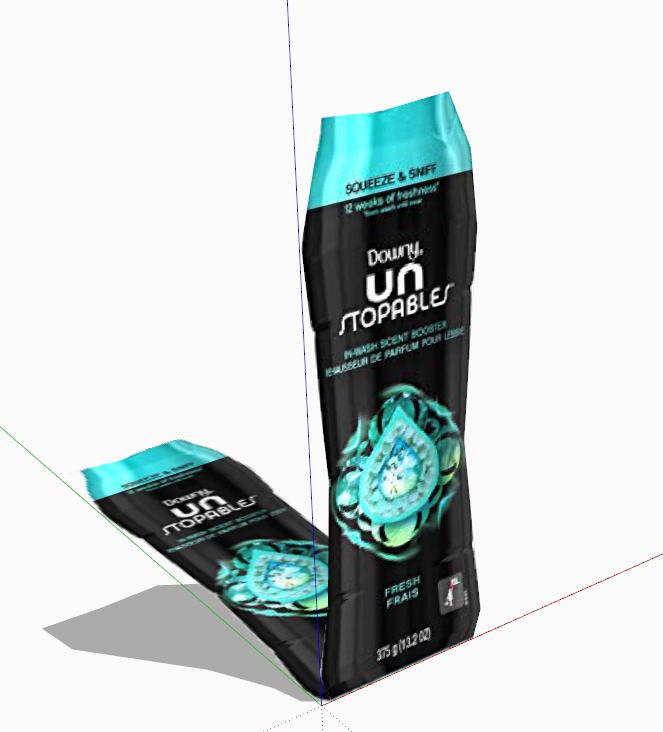

                                            Capture.PNG

                                            TIG

                                            1 條回覆 最後回覆 回覆 引用 0
                                            • 1
                                            • 2
                                            • 3
                                            • 4
                                            • 5
                                            • 6
                                            • 7
                                            • 8
                                            • 9
                                            • 6 / 9
                                            • 第一個貼文
                                              最後的貼文
                                            Buy SketchPlus
                                            Buy SUbD
                                            Buy WrapR
                                            Buy eBook
                                            Buy Modelur
                                            Buy Vertex Tools
                                            Buy SketchCuisine
                                            Buy FormFonts

                                            Advertisement