[Plugin][Code]SKMtools,Material/ImageTools
-
No worries...
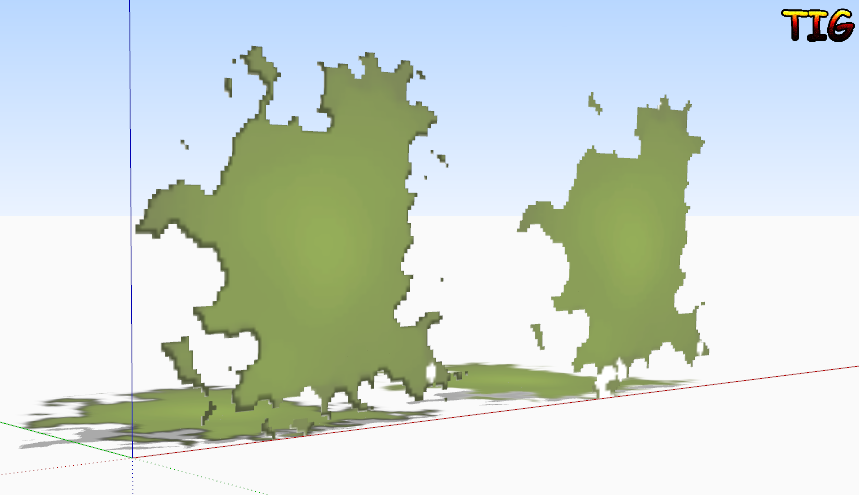
You'll appreciate that the algorithms in the files that have to find the edges around the 'solid' parts are quite complex, and occasionally you can contrive a set of pixels that it processes in a gapped result - in your case it was just one pixel ! A simple image-edit fixed it in a trice... Try to keep PNG files for trimming quite simple, with no single pixel 'inlets' or 'peninsulas' as these are ignored anyway as they cannot form a face because their two edges would be coincident and [rare] occasional combos can cause edges to get missed and face to fail to form...

With Gimp I find the best way is to flatten the PNG, add a transparent alpha-layer back in and then use the 'magic-wand' to pick the background color pixels en mass, with a limited color-variation range + delete-key to remove them - you can then see the 'chequered-background' rather than the typical 'white'; then zoom in and pick any 'edge pixels' that have been 'anti-aliased' where the object's color and the background's color are 'merged'... and delete those too - always ensuring that small transparent holes or solid 'peninsulas' or 'islands' are at least 2 pixels wide... Finally auto-crop the PNG image to minimize the amount of 'blank' background, this is because every pixel needs to be considered, so because the transparent ones are not important to us in the final form you are best of to minimize how many of them there are in the image, before trimming it...

-
@unknownuser said:
then zoom in and pick any 'edge pixels' that have been 'anti-aliased' where the object's color and the background's color are 'merged'.
Or this might be possible in most images using "grow" selection.
@unknownuser said:
Finally auto-crop the PNG image to minimize the amount of 'blank' background, this is because every pixel needs to be considered,
Thanks, that would not have occurred to me--somehow I thought it would just ignore those. Peter
-
It does ignore them BUT it has to look at them to find out they are to be ignored, so an image with masses of blank outer space will take longer to process simply because all of those [eventually] unused pixels must be examined; so if they are not going to be used in the image-trimming don't include them in the Image... That also goes for all tiny areas in an Image; any that are < 2 pixels across will [usually] not become either faces or 'holes' because their edges will be coincident when considered for trimming !
-

-
Here's an update: http://sketchucation.com/forums/viewtopic.php?p=293677#p293677
The SKMtools Temp folder that is needed to process files etc, is now made in the User's Temp folder [OS specific] rather that the ../Plugins/SKMtools folder, avoiding potential permission issues... -
TIG,
Thank you for your generosity.
What am I doing wrong? I imported a .png and implement image trimmer, but I don't see anything different about it once the process is completed.
-
Number of possible issues...
Any messages in the Ruby Console ?
Do you have Java installed/enabled - it's need to run the JARDs that manipulate the files etc...
Do you have .JAR files set to open/execute in Java [their default] - some compression apps can hikack that filetype and so open it instead - change it back to the default.ImageTrimmer needs a PNG image with an alpha-layer - that is a transparent background, but with other pixels 100% solid.
In Gimp or a similar image-editor...
Flatten the PNG image, then add the alpha-layer back, select the background's color [usually white or black] with a magic-wand and delete, so its now transparent.
Make sure the image is cropped tight to minimize the amount of trimming needed by the tool.
Export back as the PNG.
Re-Import and retry...If you are still having problems post the PNG image so we can look at it directly.
-
I think I might have found a glitch... watch for updates...
-
You were right !
There was a silly typo in the revised ImageTrimmer code I hadn't trapped...
Here's a link to the update http://sketchucation.com/forums/viewtopic.php?p=293677#p293677It's updated in the PluginStore too...
-
TIG,
Still no results. PNG image attached.
Ruby Console:
Error: #<Errno::ENOENT: No such file or directory -Thanks.

-
Works for me.

Although you haven't flattened the PNG and re-added an alpha channel, it works after a fashion...
As has been explained several times regarding different issues...
You cannot have' non-ASCII characters' in the file name or paths that need to be processed by SketchUp's Ruby version [on PC]...
It's a known PITA.So if your SKP is saved in a folder path containing even one tiny accented character - then it will fail to complete.
What is your folder path ?
The Image's name is OK, but if there's a rogue "ö" [or similar] in there, then it'll fall over !What is your OS / version - your User Profile is incomplete...
-
There was a minor typo in the loader .rb's name...
Making it non EW compliant.
Here's a link to the update http://sketchucation.com/forums/viewtopic.php?p=293677#p293677
It's updated in the PluginStore too... -
There has been some reworking of syntax to future-proof the code.
Here's the update.
http://sketchucation.com/forums/viewtopic.php?p=293677#p293677Get the latest version from the SCF PluginStore
http://sketchucation.com/resources/pluginstore?pln=SKMtools -
hey there, i did download the plugin and it comes up as skmtools_v20131214.rbz i did put in my plugins folder but is nowhere to be seen in Sketchup
any ideas ?
Thank you in advance nasos
-
You didn't install the plugin. Take the .rbz file out of the Plugins folder and put it back in your Downloads folder or something. Open SketchUp and go to Preferences>Extensions. Click on Install Extension. Navigate to where you saved the .rbz file and select it. Click Open...
Before you do any of that, make sure you have properly set the permissions for the Plugins folder. See TIG's thread at the top of the Plugins forum.
Please complete your profile with SketchUp version and OS. Thanks.
-
@dave r said:
You didn't install the plugin. Take the .rbz file out of the Plugins folder and put it back in your Downloads folder or something. Open SketchUp and go to Preferences>Extensions. Click on Install Extension. Navigate to where you saved the .rbz file and select it. Click Open...
Before you do any of that, make sure you have properly set the permissions for the Plugins folder. See TIG's thread at the top of the Plugins forum.
Please complete your profile with SketchUp version and OS. Thanks.
Hello Dave and thank you for your prompt reply !
I have opened Sketchup and went to Preferences>Extensions but there is no such thing as Install extension.
Any ideas ?
Am on MAC os 10.7.5 and Sketchup pro 7
Thank you !
-
See? There's a perfect reason to have your profile filled in before asking questions. Maybe we could use you as a "poster child" for filling in profiles.

So with version 7 you wouldn't have the Install Extension option. In that case you get to do it the hard way. Change the .rbz extension to .zip, then double click on the file name. You should get a folder of the same name. Open that folder and select the contents. Hit Command-C to copy them. Navigate to the Plugins folder and press Command-V to paste the files. The files must be in exactly the same structure as when you copied them.
I don't think the Sketchucation Plugin Store will do you any good either because SU7 can't do anything with .rbz files. That came with SU8M2.
Maybe you ought to look at upgrading to SU2013 Pro.
-
I think you should use me as a "poster child" !
 thanks a million
It worked ! And sure i have to look in upgrading to SU2013 Pro ... but me being blonde and all, with regards to all my plugins, after the upgrade, do i have to manually transfer them or do they transfer themselves ?
-
I'm glad that worked for you.
When you upgrade, don't copy the plugins over. Just download fresh to make sure you've got the most recent versions of them. Get the SCF Plugin Store and install it first. That'll make installing others you've gotten here painless.
-
Thank you again for your time Dave !
And one last question, am trying to find a plugin that could either convert a scanned pdf plan to a dxf format, alternatively a plugin that I could use to automatically trace over a scanned pdf or jpeg, without having to go around redrawing on top of the imported image.
Any suggestions ?





Advertisement