sketchucation logo sketchucation
    • 登入
    Oops, your profile's looking a bit empty! To help us tailor your experience, please fill in key details like your SketchUp version, skill level, operating system, and more. Update and save your info on your profile page today!
    🔌 Smart Spline | Fluid way to handle splines for furniture design and complex structures. Download

    [Plugin][$] Vertex Tools

    已排程 已置頂 已鎖定 已移動 Plugins
    667 貼文 92 Posters 433.3k 瀏覽 92 Watching
    正在載入更多貼文
    • 從舊到新
    • 從新到舊
    • 最多點贊
    回覆
    • 在新貼文中回覆
    登入後回覆
    此主題已被刪除。只有擁有主題管理權限的使用者可以查看。
    • R 離線
      rv1974
      最後由 編輯

      Amazing product in every aspect Thomthom 👍

      1 條回覆 最後回覆 回覆 引用 0
      • N 離線
        nlipovac
        最後由 編輯

        Well, I reallllllllyyyyyyy love Vertex Slide A LOT!
        Still having some pole issues but this time I have patients to finish it.
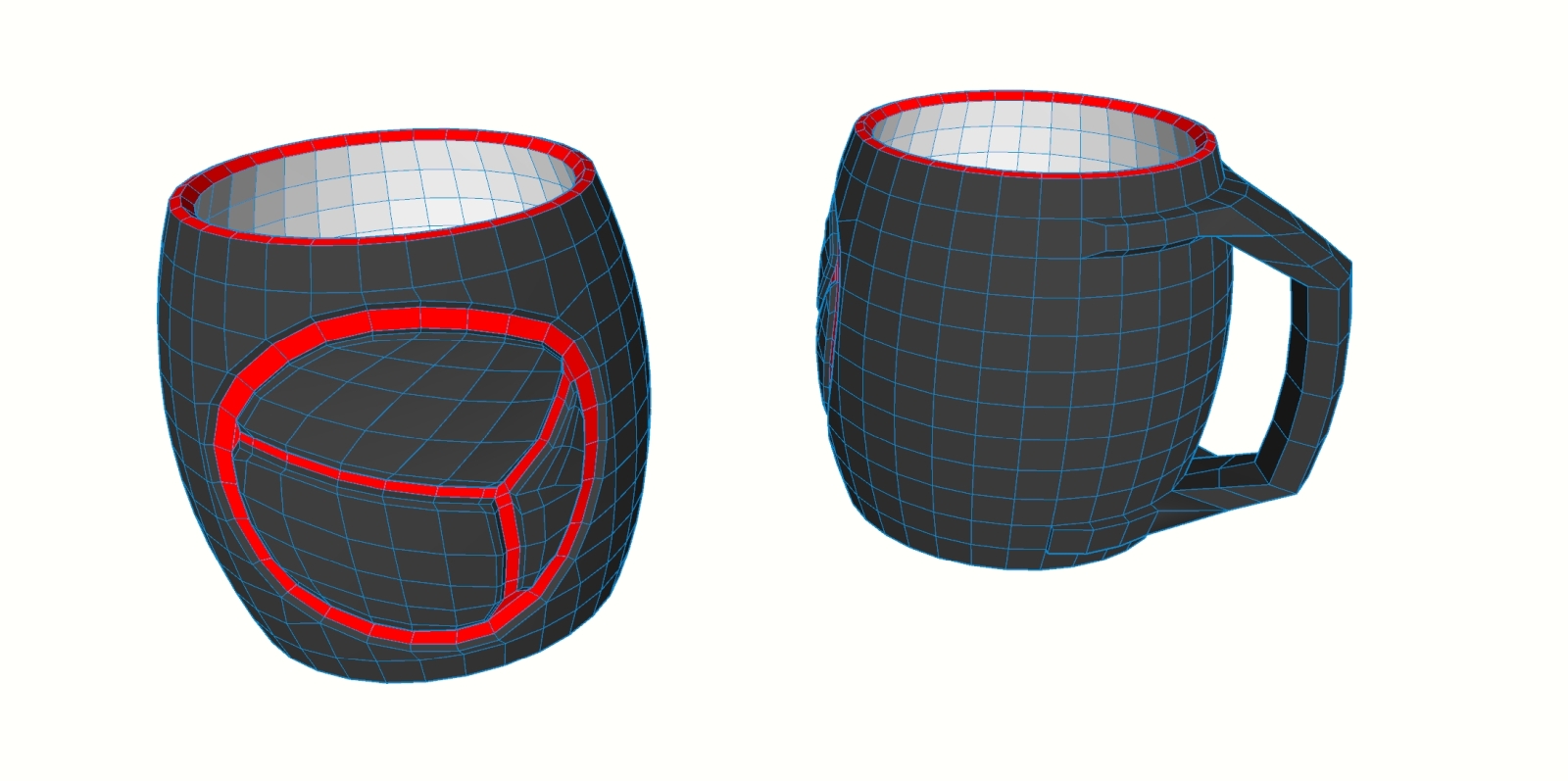

        Control mesh


        Subdivided

        1 條回覆 最後回覆 回覆 引用 0
        • HornOxxH 離線
          HornOxx
          最後由 編輯

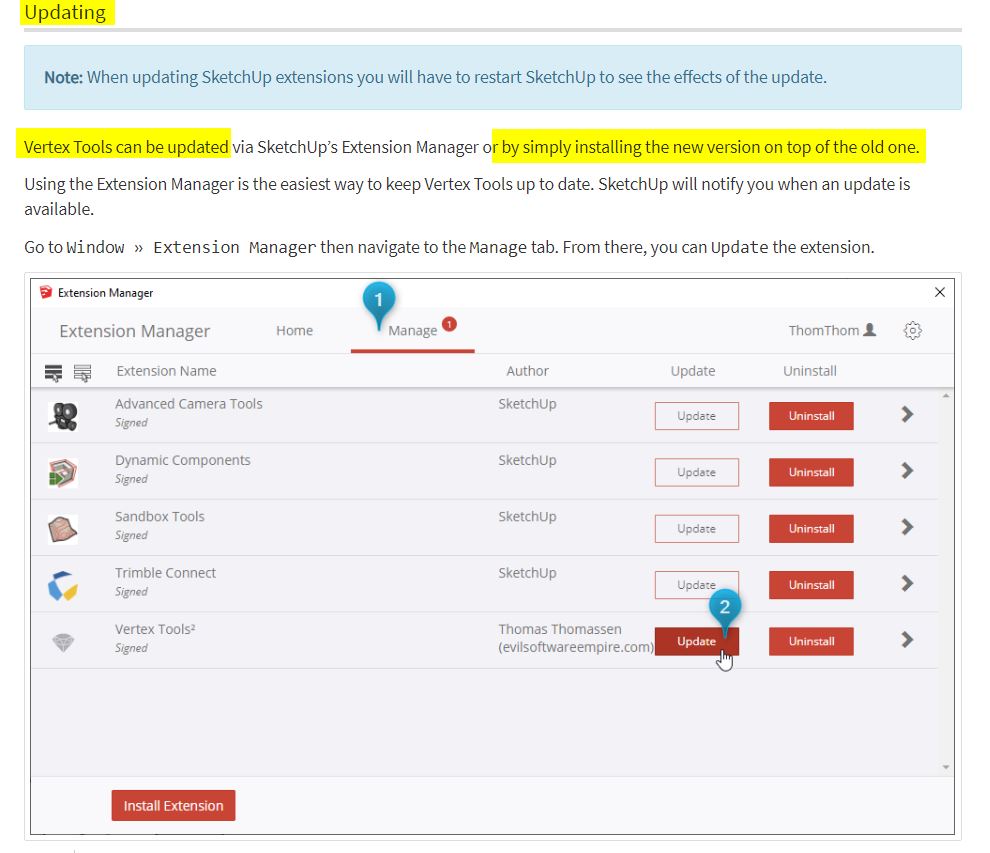
          ... for Dummies like me 😉 - do I have to uninstall the previous vertex tools somehow before or does the new version overwrite the old one?

          EDIT:
          I have found the answer to my question 😄
          https://evilsoftwareempire.com/vertex-tools/manual/getting_started#updating


          update - Getting Started — Vertex Tools.jpg

          never trust a skinny cook

          1 條回覆 最後回覆 回覆 引用 0
          • thomthomT 離線
            thomthom
            最後由 編輯

            @nlipovac said:

            Well, I reallllllllyyyyyyy love Vertex Slide A LOT!
            Still having some pole issues but this time I have patients to finish it.
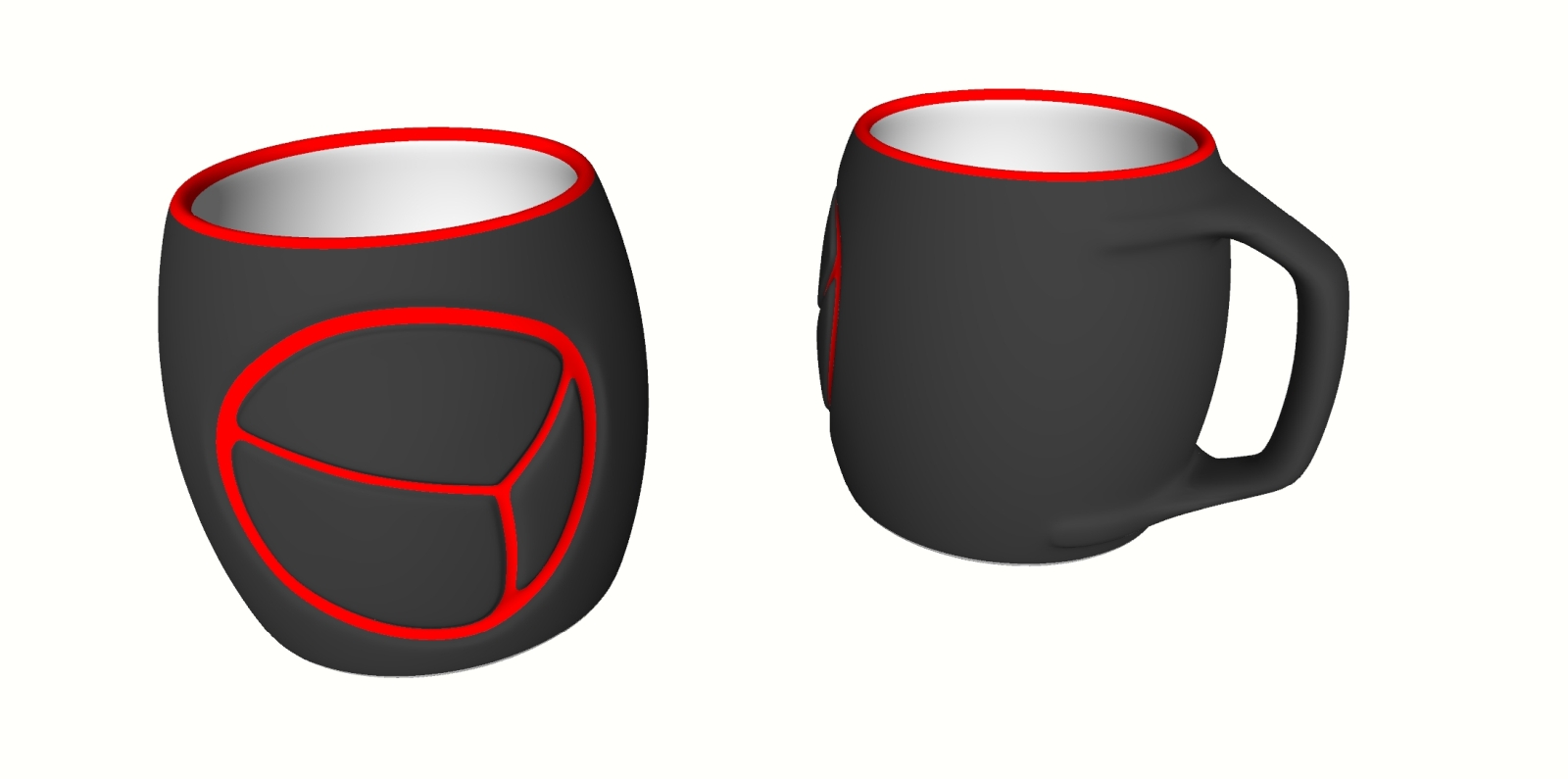
            I want to find a 3D printing service that can make this in ceramic for me!

            @hornoxx said:

            ... for Dummies like me 😉 - do I have to uninstall the previous vertex tools somehow before or does the new version overwrite the old one?

            Version 2 can be installed side by side with version 1. (But v2 got everything v1 got - so I don't see the need.)

            Thomas Thomassen — SketchUp Monkey & Coding addict
            List of my plugins and link to the CookieWare fund

            1 條回覆 最後回覆 回覆 引用 0
            • N 離線
              nlipovac
              最後由 編輯

              I found this one in US.
              https://kwambio.com/

              @thomthom said:

              @nlipovac said:

              Well, I reallllllllyyyyyyy love Vertex Slide A LOT!
              Still having some pole issues but this time I have patients to finish it.

              I want to find a 3D printing service that can make this in ceramic for me!

              @hornoxx said:

              ... for Dummies like me 😉 - do I have to uninstall the previous vertex tools somehow before or does the new version overwrite the old one?

              Version 2 can be installed side by side with version 1. (But v2 got everything v1 got - so I don't see the need.)

              1 條回覆 最後回覆 回覆 引用 0
              • thomthomT 離線
                thomthom
                最後由 編輯

                Can you share the 3D model with me?

                Thomas Thomassen — SketchUp Monkey & Coding addict
                List of my plugins and link to the CookieWare fund

                1 條回覆 最後回覆 回覆 引用 0
                • N 離線
                  nlipovac
                  最後由 編輯

                  Sure, I´ve sent you a PM with the model.

                  @thomthom said:

                  Can you share the 3D model with me?

                  1 條回覆 最後回覆 回覆 引用 0
                  • R 離線
                    rv1974
                    最後由 編輯

                    tessellated variant will look more interesting. it'd be neat to print before\after subd set.

                    1 條回覆 最後回覆 回覆 引用 0
                    • K 離線
                      kaas
                      最後由 編輯

                      Nice update and generous to give a discount to existing users. 👍

                      1 條回覆 最後回覆 回覆 引用 0
                      • cmeedC 離線
                        cmeed
                        最後由 編輯

                        Love this - a fantastic update..

                        Loving the vertex slide. question - Can we copy the vertexes along the edge?
                        the cursor changes, adds plus and minus with the addition of shift. I assume there isn't a copy function? (yet?)

                        Fantastic Extension - Professional in every way - I feel spoilt.

                        Cheers
                        Chris

                        1 條回覆 最後回覆 回覆 引用 0
                        • thomthomT 離線
                          thomthom
                          最後由 編輯

                          @cmeed said:

                          Loving the vertex slide. question - Can we copy the vertexes along the edge?
                          the cursor changes, adds plus and minus with the addition of shift. I assume there isn't a copy function? (yet?)

                          That's interesting. I'll have to think a little on how that would technically work. But I logged it for consideration. 👍

                          Thomas Thomassen — SketchUp Monkey & Coding addict
                          List of my plugins and link to the CookieWare fund

                          1 條回覆 最後回覆 回覆 引用 0
                          • CadFatherC 離線
                            CadFather
                            最後由 編輯

                            when i choose the select tools from the menu, I only get the rectangle selection.

                            works fine from the panel though

                            (fantastic update btw)

                            1 條回覆 最後回覆 回覆 引用 0
                            • thomthomT 離線
                              thomthom
                              最後由 編輯

                              @cadfather said:

                              when i choose the select tools from the menu, I only get the rectangle selection.

                              Menu or toolbar? Exactly what item do you select? Can you do a screenshot for me?

                              Thomas Thomassen — SketchUp Monkey & Coding addict
                              List of my plugins and link to the CookieWare fund

                              1 條回覆 最後回覆 回覆 引用 0
                              • CadFatherC 離線
                                CadFather
                                最後由 編輯

                                Menu. same thing if i assign a shortcut to them (polygon, freehand, etc)
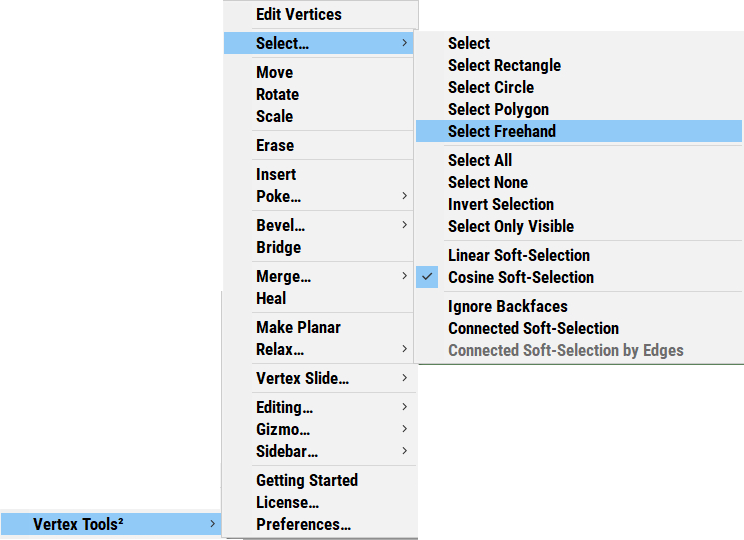
                                scrmn.png

                                1 條回覆 最後回覆 回覆 引用 0
                                • thomthomT 離線
                                  thomthom
                                  最後由 編輯

                                  Ah! I see the same thing. That's a bug - thank you for reporting!

                                  Thomas Thomassen — SketchUp Monkey & Coding addict
                                  List of my plugins and link to the CookieWare fund

                                  1 條回覆 最後回覆 回覆 引用 0
                                  • cmeedC 離線
                                    cmeed
                                    最後由 編輯

                                    this has probably been asked before - can I move the gizmo and have it snap to a point? in 10 years of questions I think this has been asked.... 'negative' will be the answer.

                                    maybe i need to ask why cant it?

                                    cheers
                                    c

                                    1 條回覆 最後回覆 回覆 引用 0
                                    • Dave RD 離線
                                      Dave R
                                      最後由 編輯

                                      @cmeed said:

                                      'negative' will be the answer.

                                      Not so.

                                      Right click on the gizmo, choose the option and hold Shift while clicking to place it.

                                      vt.gif
                                      Click on the picture

                                      Etaoin Shrdlu

                                      %

                                      (THERE'S NO PLACE LIKE)

                                      G28 X0.0 Y0.0 Z0.0

                                      M30

                                      %

                                      1 條回覆 最後回覆 回覆 引用 0
                                      • thomthomT 離線
                                        thomthom
                                        最後由 編輯

                                        @cmeed said:

                                        this has probably been asked before - can I move the gizmo and have it snap to a point? in 10 years of questions I think this has been asked.... 'negative' will be the answer.

                                        maybe i need to ask why cant it?

                                        Because it's not been entirely clear what to snap to. The user grabs hold of the gizmo which is offset from the gizmo origin, so is snapping supposed to snap the origin to the point snapped? Or the point grabbed?

                                        There's been some conversations about this - this thread for instance: http://sketchucation.com/forums/viewtopic.php?f=323&t=66039#p606094

                                        Snapping is described to relate relative to the gizmo origin, and with improved control of setting the origin.

                                        If you have your own idea of how snapping should work with the Gizmo I'm happy to hear it. I'm not sure everyone has the same expectations on how this would work.

                                        Because of that the separate Move/Rotate/Scale tools has been the main means of precision adjustments. While the gizmo is more eyeballing it.

                                        I'd be curious to hear why you prefer the Gizmo to snap as oppose to using the separate Move/Rotate/Scale tools. (Maybe there's some improvements with them that you achieve the same thing?)

                                        Thomas Thomassen — SketchUp Monkey & Coding addict
                                        List of my plugins and link to the CookieWare fund

                                        1 條回覆 最後回覆 回覆 引用 0
                                        • thomthomT 離線
                                          thomthom
                                          最後由 編輯

                                          @cmeed said:

                                          this has probably been asked before - can I move the gizmo and have it snap to a point?

                                          Oh wait, did I read that correctly?

                                          Did you talk about snapping while positioning the Gizmo? Or snapping while using the Gizmo Move?

                                          Thomas Thomassen — SketchUp Monkey & Coding addict
                                          List of my plugins and link to the CookieWare fund

                                          1 條回覆 最後回覆 回覆 引用 0
                                          • N 離線
                                            nlipovac
                                            最後由 編輯

                                            Is it possible to add option, i.e. hold CTRL, when using vertex slide to copy moved vertices and this way I can add loops without exiting Vertex tools?
                                            And one more wild one, plus if I hold Shift I get that copy to be parallel to ones I have made copy off.


                                            1 條回覆 最後回覆 回覆 引用 0
                                            • 1
                                            • 2
                                            • 3
                                            • 4
                                            • 5
                                            • 33
                                            • 34
                                            • 1 / 34
                                            • 第一個貼文
                                              最後的貼文
                                            Buy SketchPlus
                                            Buy SUbD
                                            Buy WrapR
                                            Buy eBook
                                            Buy Modelur
                                            Buy Vertex Tools
                                            Buy SketchCuisine
                                            Buy FormFonts

                                            Advertisement