sketchucation logo sketchucation
    • 登入
    Oops, your profile's looking a bit empty! To help us tailor your experience, please fill in key details like your SketchUp version, skill level, operating system, and more. Update and save your info on your profile page today!
    🔌 Smart Spline | Fluid way to handle splines for furniture design and complex structures. Download

    [Plugin][$] Vertex Tools

    已排程 已置頂 已鎖定 已移動 Plugins
    667 貼文 92 Posters 434.1k 瀏覽 92 Watching
    正在載入更多貼文
    • 從舊到新
    • 從新到舊
    • 最多點贊
    回覆
    • 在新貼文中回覆
    登入後回覆
    此主題已被刪除。只有擁有主題管理權限的使用者可以查看。
    • Rich O BrienR 離線
      Rich O Brien Moderator
      最後由 編輯

      If you have no verts selected and then activate the Move tool it goes into Hover Select mode and a little circle appears when you are over a vert to indicate it is selected.

      A shortcut to drop any selected verts is to right click and choose Select None. Now change to the move tool and this hover method is active.

      See you next month Bob 😉

      Download the free D'oh Book for SketchUp 📖

      1 條回覆 最後回覆 回覆 引用 0
      • Bob JamesB 離線
        Bob James
        最後由 編輯

        Thanks, Rich. Such a great tool 👍 The merge vertices: oh yes. The gizmo

        Have tickets. Have reservations. Raring to go 😍

        i7-4930K 3.4Ghz, 2x GTX780 6GB, 32GB DDR3-1600 ECC, OCZ Vertex 4 500GB, WD Black 3TB, 32TB NAS, 4x 27" Monitors, SpaceMouse Pro, X-keys XK-60

        1 條回覆 最後回覆 回覆 引用 0
        • iichiversiiI 離線
          iichiversii
          最後由 編輯

          Best tool ever, it's completely changed sketchup forever, thanks TT 👍

          Bring on the Rain...

          1 條回覆 最後回覆 回覆 引用 0
          • thomthomT 離線
            thomthom
            最後由 編輯

            Thanks guys! 😄

            Thomas Thomassen — SketchUp Monkey & Coding addict
            List of my plugins and link to the CookieWare fund

            1 條回覆 最後回覆 回覆 引用 0
            • pbacotP 離線
              pbacot
              最後由 編輯

              Would it make sense for "Merge Close Vertices" to default to the last user setting? I always get it reverting 3/8", even in the same session, which is pretty small for what I do.

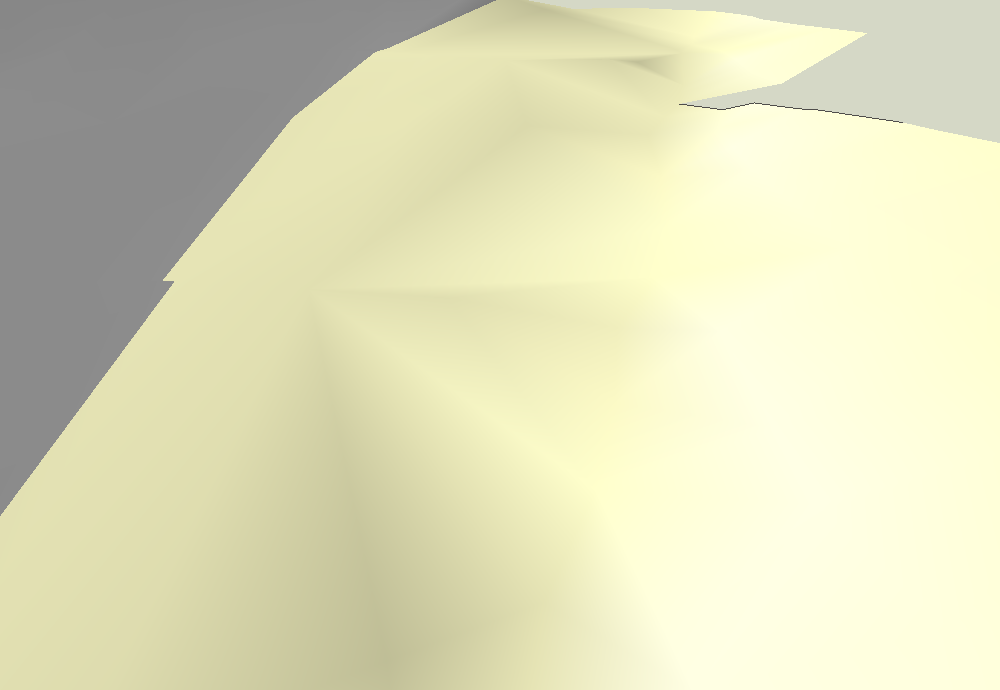
              I have found that merge vertices helps remove the rough look of Sandbox and other terrain surfaces. I am not sure why some surfaces look overly creased and I am not sure yet this is a good solution, but it seems to work without affecting the topography too much.
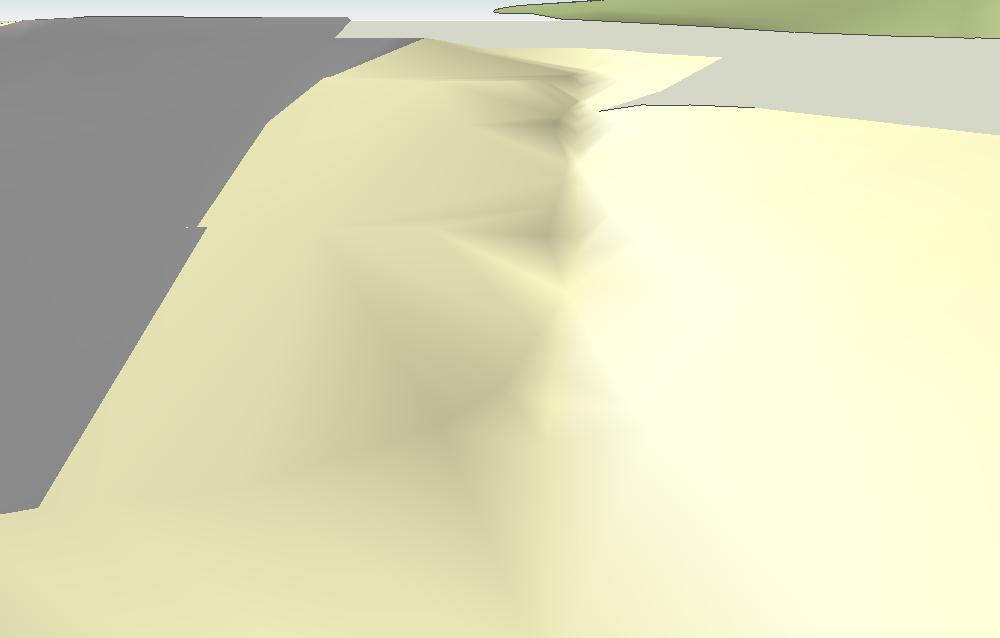
              creased terrain.png
              In this example the setting was 36", run a couple times (plus a Make Planar in one spot) and the ditch in this area is still "intact".less creased terrain.png
              MacOSX MojaveSketchUp Pro v19 Twilight v2 Thea v3 PowerCADD

              1 條回覆 最後回覆 回覆 引用 0
              • thomthomT 離線
                thomthom
                最後由 編輯

                @pbacot said:

                Would it make sense for "Merge Close Vertices" to default to the last user setting?

                Ah! I can see it's hard-coded to 10mm. 😳 One setting that slipped past me. I'll add it to the next bug-fix release. (I'm going away this week - will be gone most of it. Not sure if I get time to sort it out until after I get back.)

                Thomas Thomassen — SketchUp Monkey & Coding addict
                List of my plugins and link to the CookieWare fund

                1 條回覆 最後回覆 回覆 引用 0
                • pbacotP 離線
                  pbacot
                  最後由 編輯

                  Thanks ! Well have fun, wherever you're off to!

                  MacOSX MojaveSketchUp Pro v19 Twilight v2 Thea v3 PowerCADD

                  1 條回覆 最後回覆 回覆 引用 0
                  • thomthomT 離線
                    thomthom
                    最後由 編輯

                    @pbacot said:

                    I have found that merge vertices helps remove the rough look of Sandbox and other terrain surfaces. I am not sure why some surfaces look overly creased and I am not sure yet this is a good solution, but it seems to work without affecting the topography too much.

                    That could be due to small edges that's got a distinct different angle then the rest of the geometry. The shader computes a normal for each vertex based on its connected faces. Each face obtains a shading which is a gradient between each vertex normal. If just on is off by a sharp angle you get that harsh shading difference.

                    Thomas Thomassen — SketchUp Monkey & Coding addict
                    List of my plugins and link to the CookieWare fund

                    1 條回覆 最後回覆 回覆 引用 0
                    • thomthomT 離線
                      thomthom
                      最後由 編輯

                      Version 1.1.4 Released

                      • Merge Close tolerance wasn't remembered.
                      • Toggle Select didn't work for new vertices after using Extrude Edges.

                      Thomas Thomassen — SketchUp Monkey & Coding addict
                      List of my plugins and link to the CookieWare fund

                      1 條回覆 最後回覆 回覆 引用 0
                      • panixiaP 離線
                        panixia
                        最後由 編輯

                        man, doesn't work for me.. 😞
                        i re-installed version 1.1.3 and it works fine again..

                        1 條回覆 最後回覆 回覆 引用 0
                        • thomthomT 離線
                          thomthom
                          最後由 編輯

                          @panixia said:

                          man, doesn't work for me.. 😞

                          ❓

                          Can you be specific please?

                          Thomas Thomassen — SketchUp Monkey & Coding addict
                          List of my plugins and link to the CookieWare fund

                          1 條回覆 最後回覆 回覆 引用 0
                          • panixiaP 離線
                            panixia
                            最後由 編輯

                            so.. when i install the .rbz the tool stops to work at all, the regular sketchup 1 button toolbar shows, but when you clik it, the floating vertex tols toolbars doesn't appear at all.
                            same thing on my laptop and desktop pc.
                            i pulled off the .rb and the folder from plugins directory and reloaded the 1.1.3 version and works fine again on both machines.
                            that's it

                            i even tried to open ruby console but i can't understand how to use it, but i noticed that on version 3 it only says: "quietly_force_sync_mats_cb just called"
                            when i opened it calling v4 it was continuosly scrolling tons of error messages.. i don't know..

                            1 條回覆 最後回覆 回覆 引用 0
                            • thomthomT 離線
                              thomthom
                              最後由 編輯

                              @panixia said:

                              when i opened it calling v4 it was continuosly scrolling tons of error messages.. i don't know..

                              Those error messages are the most important pieces of information to report. Please post back the error messages as I am not able to reproduce this.

                              Also, what OS, OS version and SketchUp version do you have.

                              If you open the Ruby Console and type TT_Vertex.debug_info - what is the result of that?

                              @panixia said:

                              "quietly_force_sync_mats_cb just called"

                              That is related to V-Ray for SketchUp.

                              Thomas Thomassen — SketchUp Monkey & Coding addict
                              List of my plugins and link to the CookieWare fund

                              1 條回覆 最後回覆 回覆 引用 0
                              • panixiaP 離線
                                panixia
                                最後由 編輯

                                don't ask me why but now i reinstalled 1.1.4 and it works fine again..
                                sketchup m3 on win7home premium, anyway

                                also i notice in the credits it is not v 1.1.4 but 1.2.0 and also have this cool merge to point button, so the upgrade works..

                                1 條回覆 最後回覆 回覆 引用 0
                                • Dave RD 離線
                                  Dave R
                                  最後由 編輯

                                  Why don't you update SketchUp to M4?

                                  Etaoin Shrdlu

                                  %

                                  (THERE'S NO PLACE LIKE)

                                  G28 X0.0 Y0.0 Z0.0

                                  M30

                                  %

                                  1 條回覆 最後回覆 回覆 引用 0
                                  • thomthomT 離線
                                    thomthom
                                    最後由 編輯

                                    @panixia said:

                                    don't ask me why but now i reinstalled 1.1.4 and it works fine again..
                                    sketchup m3 on win7home premium, anyway

                                    also i notice in the credits it is not v 1.1.4 but 1.2.0 and also have this cool merge to point button, so the upgrade works..

                                    😮 😲 Oh crap!
                                    My head is still a mush after the field trip with the office - lack of sleep. I built the experimental development build instead of v1.1.4! 😳

                                    Pulled and uploaded the correct version!

                                    Oh well - 15 people got some secret experiment to play with. (Another thing to add to the check list...)

                                    Thomas Thomassen — SketchUp Monkey & Coding addict
                                    List of my plugins and link to the CookieWare fund

                                    1 條回覆 最後回覆 回覆 引用 0
                                    • panixiaP 離線
                                      panixia
                                      最後由 編輯

                                      @dave r said:

                                      Why don't you update SketchUp to M4?

                                      i'm not on mac, i'don't use layout, i don't have any problem at the moment with M3, the toolbars are stable (2 months!! record!!!) i enjoy the old logo, everything is fine, i'm lazy.. it's that enough? 😄

                                      1 條回覆 最後回覆 回覆 引用 0
                                      • panixiaP 離線
                                        panixia
                                        最後由 編輯

                                        @thomthom said:

                                        Oh well - 15 people got some secret experiment to play with. (Another thing to add to the check list...)

                                        😆

                                        1 條回覆 最後回覆 回覆 引用 0
                                        • thomthomT 離線
                                          thomthom
                                          最後由 編輯

                                          A good thing you got that error for whatever reason - otherwise I'd probably not have noticed for a very long time! 😕

                                          Thomas Thomassen — SketchUp Monkey & Coding addict
                                          List of my plugins and link to the CookieWare fund

                                          1 條回覆 最後回覆 回覆 引用 0
                                          • panixiaP 離線
                                            panixia
                                            最後由 編輯

                                            this is luck, man ! 😛 i'm proud to test this experiment!!! looks cool anyway! 👍

                                            1 條回覆 最後回覆 回覆 引用 0
                                            • 1
                                            • 2
                                            • 12
                                            • 13
                                            • 14
                                            • 15
                                            • 16
                                            • 33
                                            • 34
                                            • 14 / 34
                                            • 第一個貼文
                                              最後的貼文
                                            Buy SketchPlus
                                            Buy SUbD
                                            Buy WrapR
                                            Buy eBook
                                            Buy Modelur
                                            Buy Vertex Tools
                                            Buy SketchCuisine
                                            Buy FormFonts

                                            Advertisement




