[Plugin][$] Curviloft 2.0a - 31 Mar 24 (Loft & Skinning)


-
@jgb said:
The main reason I posted this problem is for Fredo. CL should NOT refuse to skin a properly connected and clean contour.
Joel,
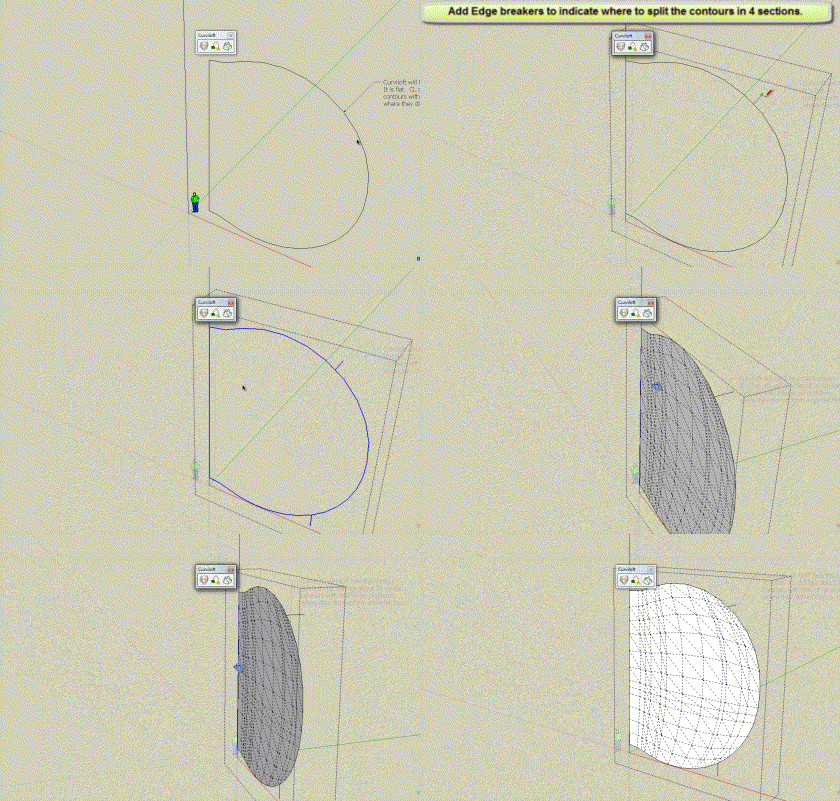
Curviloft (and TIG's ExtrudeEdgesByRail) can generally skin surfaces when 3 or 4 contiguous contoursare given, not more not less. This is called a "coon".
When the contour is rather continuous, you need to indicate where to break it into these 3 or 4 pieces. This can be done by small breaker segments, as illustrated by Rich, or by the user selecting each and freezing it.
Alternatively, you can use TGI3d which has a much more powerful function to skin continuous 3D contours (and maybe Soap Skin & Bubble and Ferrari).
Fredo
-
Tig, Cotty & Rich
You all twigged onto the source of the problem with my contour, exclusive of Curviloft.
You all said I had non co-planar edges, and gave a few solutions to form a face, but none were flat single faces as I needed, as I stated in my original post.
You all missed the obvious......... Bring the vertices into plane.
So, knowing that was the solution, (thanks to you all again) I fixed all 4 pairs in less than 20 minutes.
All I did was delete whatever malformed faces there were, picked a corner that was co-planar with another part of the model, then proceeded, one by one, to move each vertex on the contour perimeter along the green axis to align with that "master" corner. Most were out less than a tenth of an inch, a few as much as an inch.
Then I selected a vertical, "Face" command and a perfect face formed. (Sorry Mod, couldn't resist!
  )
)Then to ease my task on the corresponding sections mating face, I clip-copied the face, moved it along green to the "master corner" and used Solid Inspector to tell me exactly what needed fixin'.
That still leaves Fredo with the problem of Curviloft vrs. nearly flat contours.
EDIT: (And I just saw Fredo's reply, sent while I was writing this post, which took me longer to write than the fix took)
-
I have tools like 'Project to Plane' that would 'flatten' your slightly non-coplanar edges on to any selected plane [aka 'workplane']. This might be a quick way to 'regularize' your wayward edges ?
Unfortunately, we had all rather assumed that you wanted your original edges to be slightly non-coplanar

Why else might you have made them like that, and then presented them to us like that ?Remember that had all of these edges been coplanar initially, or made so by some adjustment, then no special tools at all would have been needed, because the edges should take a face if one edges is over-drawn, or for more complex forms perhaps if a temporary diagonal [or two] were added...
-
@unknownuser said:
You all missed the obvious......... Bring the vertices into plane.
Apparently you did, too, or this would have been finished business long ago.

-
-
@unknownuser said:
Rich; If the vertices were properly co-planar, the face would form as soon as the 2nd vertical line was drawn, as did in the other 40+ sections. I would not need to resort to Curviloft to make the face.
In your original file there was text saying 'It is flat'. It was not flat so I answered that part.
I then showed how to skin this non-planar ring using CurviLoft and breakers.
There is an appropriate time to use


 smilies and there is an inappropriate way to overuse them. Please use discretion when you decide to decorate your posts with these.
 -
Thanks again;
I re-read my OP and I should have been more clear, that the contour was supposed to be flat, based on the fact it was created by a flat intersection. Why it went awry is a mystery.
I assumed it was flat, or nearly so, as stated, so to go the extra step of making it flat never occurred to me, until it was shown that portions were out of plane.
As I said before, CL seems to have problems with some almost flat contours. It should not matter if the contour resembles the rocky mountains or the prairies.
And again, my OP intent was very much more-so to show Fredo a case where CL failed to skin, than to get a solution. And if I had made a mistake in forming the contour, just what was that error and how did you find it. Both of those reasons were far more important than the actual solution.
Fredo, as far as breakers are concerned, I do use them when CL (on occasion) gives me an inconsistent/weird curve. But this time, there were no pretty colored lines, just a blank non response from CL. And I do get these blank responses from CL even when there are very clear and distinctive sections to a contour.
I (we all) eagerly await your "Contour Inspector". either as a stand-alone Ruby or as an integral part of Curviloft.
Tig; I will look into that, thanks.
Rich, see? only 1 smiley
 (OK, 2)
 -
@jgb said:
Fredo, as far as breakers are concerned, I do use them when CL (on occasion) gives me an inconsistent/weird curve. But this time, there were no pretty colored lines, just a blank non response from CL. And I do get these blank responses from CL even when there are very clear and distinctive sections to a contour.
Curviloft is not really finished and the error handling is deficient.
When you don't get a skinning, then it is because Curviloft does not have enough information to perform it. A message would of course be welcome. I'll include error detection in a next version.Fredo
-
BTW Is there a skinning video? I periodically watch the other videos at the top of thread, as I seem not to catch or retain all of it on one viewing.
-
-
fredo, you are a coding god! this is absolutely amazing.
-
I'm on a Mac and I can't get curv a loft to install properly. I get an error message when I start SU. I copied everything to the plug in directory including the separate library download. There is an entry in the windows dropdown but no tool bar available. Can someone help me with this...I really need to start using the plug in for a project
Frank Trocino
ftrocino@earthlink.net -
If you get an error message related to the plugin when you first start SU, you've installed the plugin incorrectly. Since you told us what the error message is, it is impossible to diagnose beyond that. Correct installation has been covered repeatedly in this thread. Please read through it. Fredo's first post shows the footprint of the plugin. Make sure it matches on your machine.
-
It looks really cool, but I can't install it:(
As you wrote I install also Libfredo pack and .rb
but I don't have pligin in SU.
When I open SS I have info with load error:"Error Loading File bootstrap_Curviloft.rb
uninitialized constant Curviloft::T6Error Loading File CurviloftAlgo.rb
uninitialized constant Curviloft::T6Error Loading File CurviloftCurveMover.rb
uninitialized constant Curviloft::T6Error Loading File CurviloftPalette.rb
uninitialized constant Curviloft::T6Error Loading File CurviloftTool.rb
uninitialized constant Curviloft::T6Error Loading File Lib6Config.rb
uninitialized constant Traductor::T6Error Loading File Lib6EdgePicker.rb
uninitialized constant Traductor::T6Error Loading File Lib6Error.rb
uninitialized constant Traductor::T6Error Loading File Lib6Input.rb
uninitialized constant Traductor::T6Error Loading File Lib6Operation.rb
uninitialized constant Traductor::T6Error Loading File Lib6Palette.rb
uninitialized constant Traductor::T6Error Loading File Lib6PaletteHelper.rb
uninitialized constant Traductor::T6Error Loading File Lib6Plugin.rb
uninitialized constant Traductor::T6Error Loading File Lib6PluginDialogs.rb
uninitialized constant Traductor::T6Error Loading File Lib6Protractor.rb
uninitialized constant Traductor::T6Error Loading File Lib6Selmode.rb
uninitialized constant Traductor::T6Error Loading File Lib6Startup.rb
uninitialized constant Traductor::T6Error Loading File Lib6Tool.rb
uninitialized constant Traductor::T6Error Loading File Lib6Translate.rb
uninitialized constant Traductor::T6Error Loading File Lib6Upgrade.rb
uninitialized constant Traductor::T6Error Loading File Lib6WebHtml.rb
uninitialized constant Traductor::T6Error Loading File Lib6WebXTable.rb
uninitialized constant Traductor::T6Error Loading File Lib6_txtmsg.rb
uninitialized constant Traductor::T6Error Loading File __loader.rb
undefined method `effective_load' for nil:NilClass"what's the problem????
I copy all files to my plugin folder in SU, (as usually with plugins).
But only this doesn't work. -
You installed it incorrectly. You copied all the files out into the Plugins folder instead of leaving them in the Curviloft folder as they should be. This has been covered repeatedly in this thread. Go back to the beginning and look at the footprint Fredo shows for the plugin. Make it look that way on your computer.
-
@dave r said:
You installed it incorrectly. You copied all the files out into the Plugins folder instead of leaving them in the Curviloft folder as they should be. This has been covered repeatedly in this thread. Go back to the beginning and look at the footprint Fredo shows for the plugin. Make it look that way on your computer.
Thank YOU!!!!
Now it works!!! -
Looks fantastic, really looking forward to seeing the finished product in operation.
-
Mr fredo
thank for your plugin curviloft , it s perfect solution to my project
thanks again
regards
geo ( french new SU user ) -
Hello everybody,
When I installed this plugin on my MacBook Pro with Retina it worked great but it did not look like it is suppose to look. It would be very great if this wil be fixed!

I put an image of how it looks in the attachments. -
I don't see any images.










Advertisement