sketchucation logo sketchucation
    • 登入
    Oops, your profile's looking a bit empty! To help us tailor your experience, please fill in key details like your SketchUp version, skill level, operating system, and more. Update and save your info on your profile page today!
    🔌 Smart Spline | Fluid way to handle splines for furniture design and complex structures. Download

    [Plugin][$] Curviloft 2.0a - 31 Mar 24 (Loft & Skinning)


    已排程 已置頂 已鎖定 已移動 Plugins
    1.3k 貼文 299 Posters 2.5m 瀏覽 297 Watching
    正在載入更多貼文
    • 從舊到新
    • 從新到舊
    • 最多點贊
    回覆
    • 在新貼文中回覆
    登入後回覆
    此主題已被刪除。只有擁有主題管理權限的使用者可以查看。
    • T 離線
      transamws6
      最後由 編輯

      Here are the three screen shots, I couldn't figure out how to embed them in the reply, sorry about that...

      https://plus.google.com/photos/102203539408319890483/albums/5775843620657745937?authkey=CPiYyrqfi9zFNQ

      1 條回覆 最後回覆 回覆 引用 0
      • T 離線
        transamws6
        最後由 編輯

        I also used the installer plugin to try to install both but with no luck. I've gotten other plugins to work using the same approach so I'm kind of stumped... Could it be a version issue?

        1 條回覆 最後回覆 回覆 引用 0
        • Dave RD 離線
          Dave R
          最後由 編輯

          As I said, it's an install error.

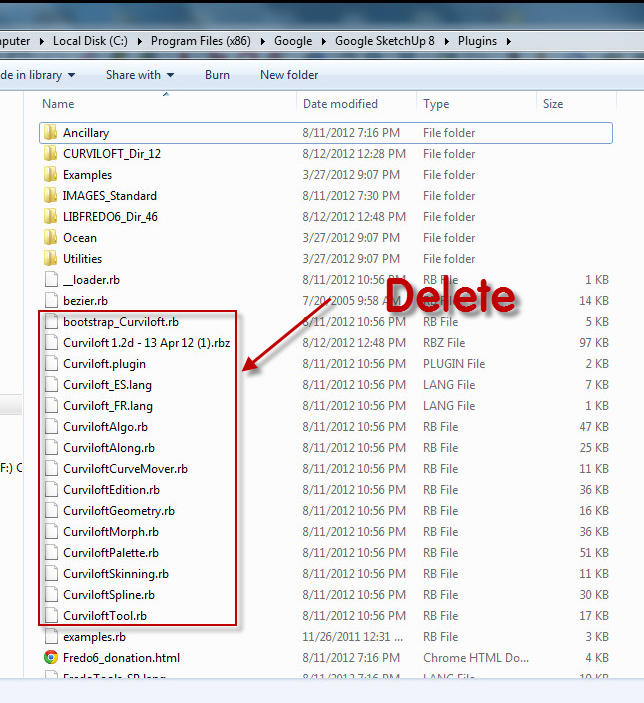
          You have extracted all those curviloft... .rb files into the Plugins folder. They are loading at the wrong place. They should be in the curviloft folder. Go back to the first post and look at the Footprint of the plugin as described by Fredo.

          I think if you delete all the curviloft .rb files you see in Plugins you'll probably be fine.
          Cloft 1.png

          Etaoin Shrdlu

          %

          (THERE'S NO PLACE LIKE)

          G28 X0.0 Y0.0 Z0.0

          M30

          %

          1 條回覆 最後回覆 回覆 引用 0
          • thomthomT 離線
            thomthom
            最後由 編輯

            You can also use this utility to help you install ZIP packages correctly: http://forums.sketchucation.com/viewtopic.php?t=42315

            Thomas Thomassen — SketchUp Monkey & Coding addict
            List of my plugins and link to the CookieWare fund

            1 條回覆 最後回覆 回覆 引用 0
            • T 離線
              transamws6
              最後由 編輯

              I get the same error after deleting.

              I tried using the install utility as well, as was recommended in earlier posts. I pointed to the libfredo plugin zip first, followed by the curviloft plugin zip.

              1 條回覆 最後回覆 回覆 引用 0
              • Dave RD 離線
                Dave R
                最後由 編輯

                Can you show a current shot of your entire Plugins folder and the current contents of the Curviloft and LiFredo folders. You must still have something installed incorrectly or the plugin would work without errors.

                You can upload your images to the forum by clicking on Upload Attachment below your text window.

                Etaoin Shrdlu

                %

                (THERE'S NO PLACE LIKE)

                G28 X0.0 Y0.0 Z0.0

                M30

                %

                1 條回覆 最後回覆 回覆 引用 0
                • 3 離線
                  3cookec
                  最後由 編輯

                  Hi everyone, like some people i am having trouble with the plugin, below should be the screens of my plugin directory:

                  I added fredoscale and round corners with no problem, but when i downloaded these they have Z_loaders (ZLoader__FredoScale) with the curviloft download there is no Z_loader...is this the problem?
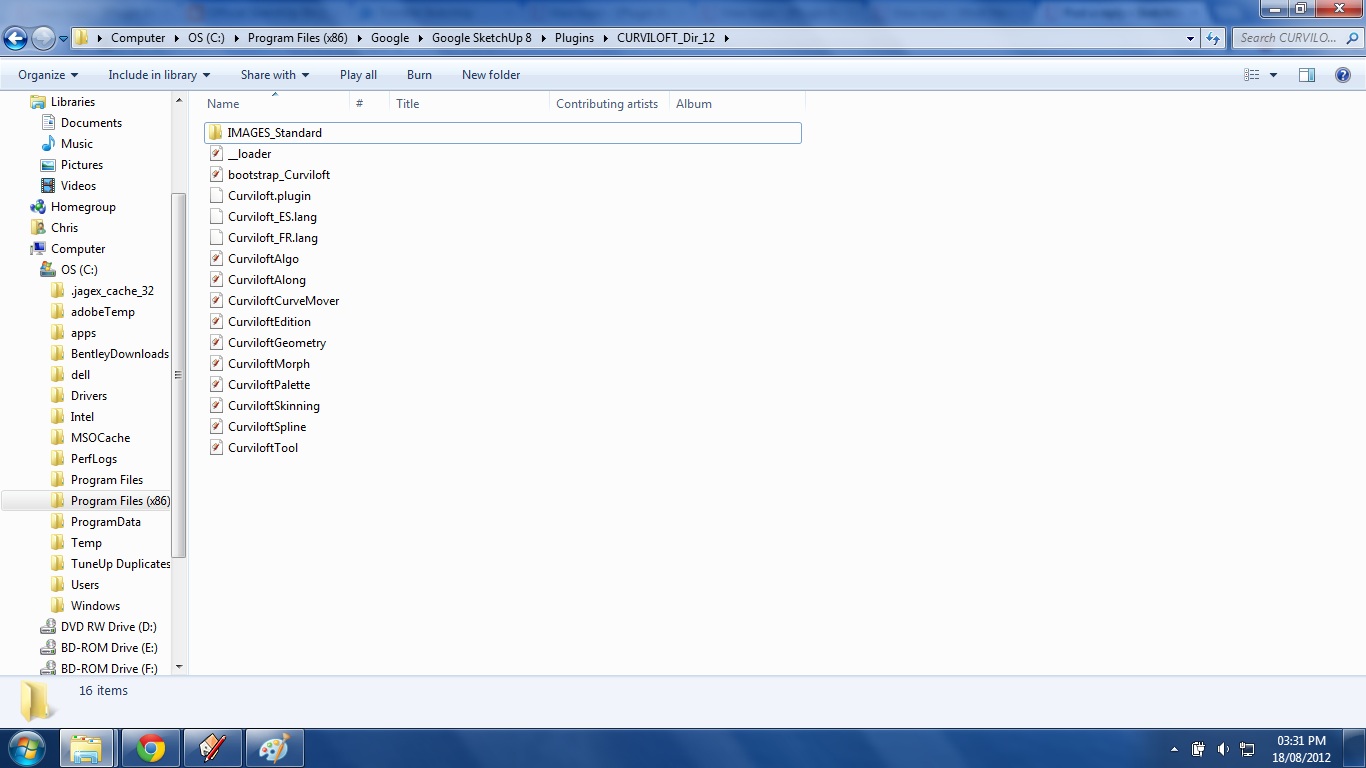
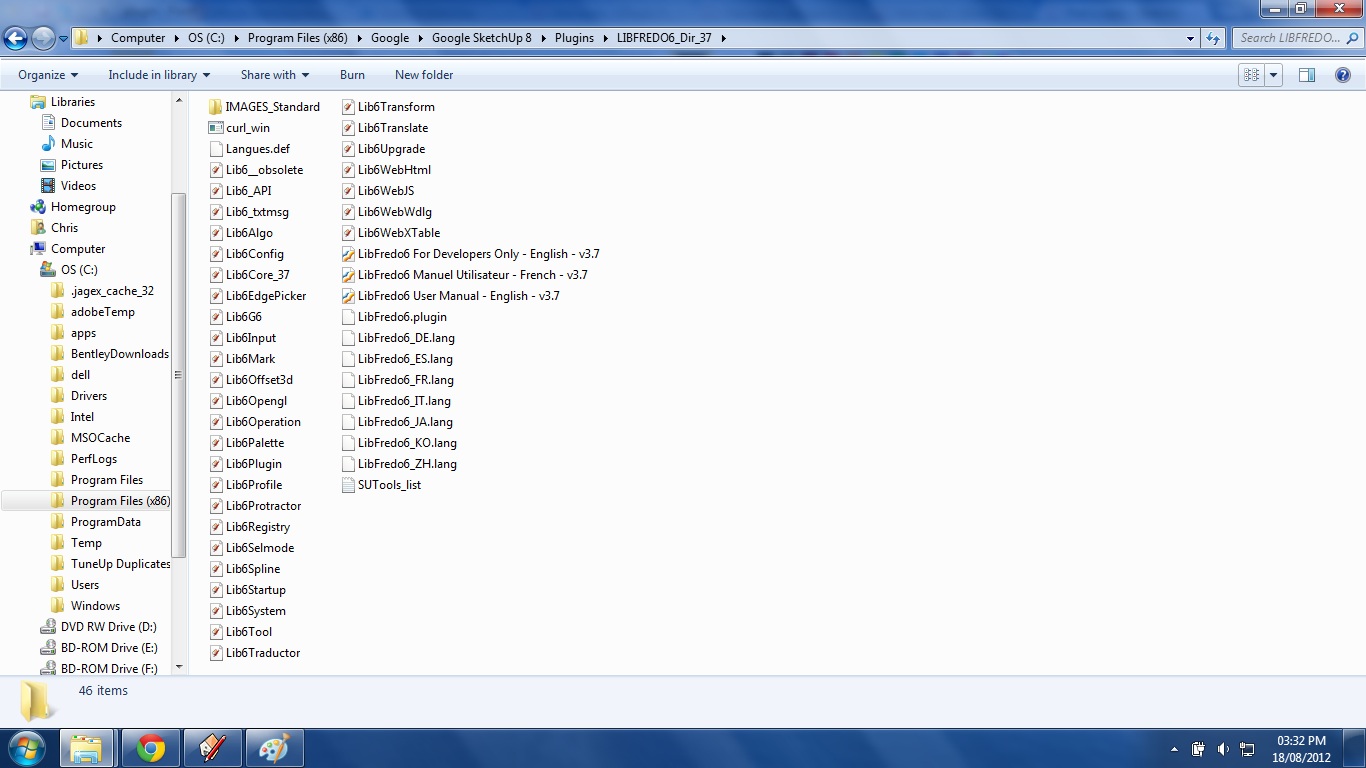
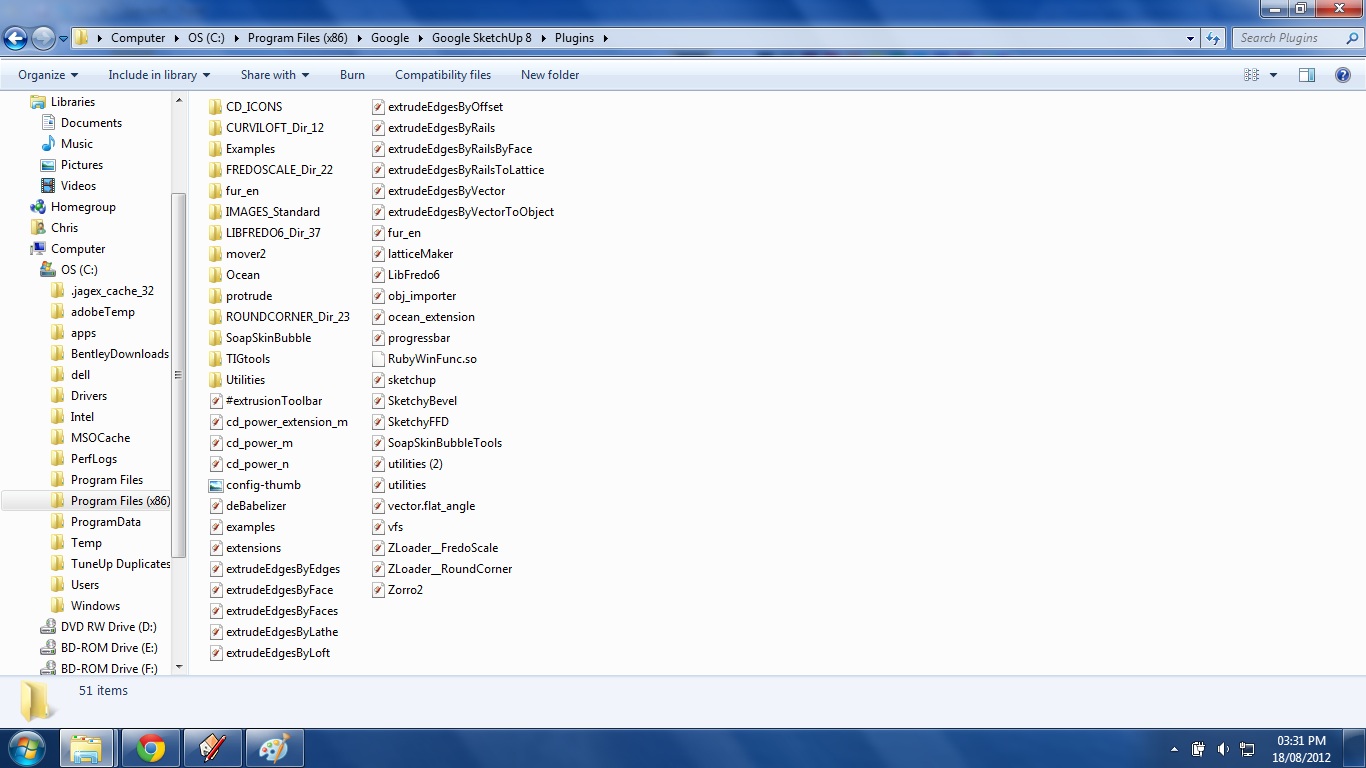
                  curviloft file


                  fredo


                  default plugins

                  1 條回覆 最後回覆 回覆 引用 0
                  • Dave RD 離線
                    Dave R
                    最後由 編輯

                    Look in Window>Preferences>Extensions and see if the box for Curviloft is checked. If it isn't, check it.

                    Etaoin Shrdlu

                    %

                    (THERE'S NO PLACE LIKE)

                    G28 X0.0 Y0.0 Z0.0

                    M30

                    %

                    1 條回覆 最後回覆 回覆 引用 0
                    • 3 離線
                      3cookec
                      最後由 編輯

                      Just looked under extensions, curviloft does not appear on the list at all. 😐

                      1 條回覆 最後回覆 回覆 引用 0
                      • Dave RD 離線
                        Dave R
                        最後由 編輯

                        What version of Windows are you using? Please edit your profile to make that information useful. Do you have full administrative rights to install files into the Plugins folder? If not, change that and reinstall the files.

                        Etaoin Shrdlu

                        %

                        (THERE'S NO PLACE LIKE)

                        G28 X0.0 Y0.0 Z0.0

                        M30

                        %

                        1 條回覆 最後回覆 回覆 引用 0
                        • 3 離線
                          3cookec
                          最後由 編輯

                          im using windows 7 and i have full administrative rights, the trouble is that curviloft is the only plugin that has not worked for me, could the missing Z_loader be the problem?

                          1 條回覆 最後回覆 回覆 引用 0
                          • TIGT 離線
                            TIG Moderator
                            最後由 編輯

                            3cookec

                            This shows that you do not have FULL access rights to your Plugins folder.
                            If you did they'd be no 'Compatibility Files' link on the bar.Capture.PNG
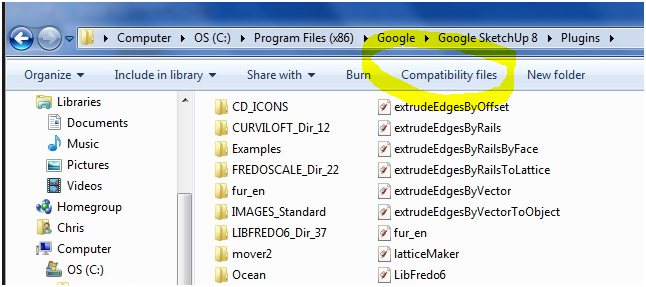
                            Select your Sketchup folder's icon and right-click > context-menu > Properties [last item on the list] > Security [tab] - find you details and select the item > Edit [button]... set all permissions to be 'checked' == FULL.
                            You might need to be 'administrator' to do this effectively.
                            Being an administrator is not enough to ensure correct installation settings - even an 'admin' can have limited rights to folders within 'Program Files', which are causing you these problems.

                            This permissions-set should ripple down through the folder's subfolders/files so that you can now add files/subfolders into the Plugins folder without the system hiding them in a subfolder without telling you, and thereby giving unexpected and perplexing results.
                            This 'fix' will also allow you to use save_as etc for Materials, Components and Styles into those Sketchup subfolders too...

                            TIG

                            1 條回覆 最後回覆 回覆 引用 0
                            • Dave RD 離線
                              Dave R
                              最後由 編輯

                              @3cookec said:

                              im using windows 7 and i have full administrative rights, the trouble is that curviloft is the only plugin that has not worked for me, could the missing Z_loader be the problem?

                              TIG beat me to it. But you don't have full administrative rights.

                              What missing z_loader? There isn't one for Curviloft.

                              Etaoin Shrdlu

                              %

                              (THERE'S NO PLACE LIKE)

                              G28 X0.0 Y0.0 Z0.0

                              M30

                              %

                              1 條回覆 最後回覆 回覆 引用 0
                              • TIGT 離線
                                TIG Moderator
                                最後由 編輯

                                It's quite possible to be an administrator and for you still not to have FULL rights to change some folders or files.
                                The system tries to protect things within folders like Program Files by limiting what you can do by default.
                                However you must reset the Sketchup folders to be 'FULL' to allow installation and save_as to work as desired...

                                TIG

                                1 條回覆 最後回覆 回覆 引用 0
                                • H 離線
                                  hygicell
                                  最後由 編輯

                                  many thanks, TIG, for extremely helpful information

                                  1 條回覆 最後回覆 回覆 引用 0
                                  • 3 離線
                                    3cookec
                                    最後由 編輯

                                    Ok so I set permissions to full on google folder, sketchup folder, plugins folder. and now when I extract curviloft to plugins folder i dont get a permissions pop up, but when i load sketchup curviloft still does not show.

                                    I still have 'combatibility files' tab showing , does that mean I somehow have not set full permission?

                                    1 條回覆 最後回覆 回覆 引用 0
                                    • TIGT 離線
                                      TIG Moderator
                                      最後由 編輯

                                      Click on the Plugins folder's 'Compatibility Files' link and remove what comes up that's related to this tool.

                                      Retry installing everything related to this tool after that...
                                      Remember that it also needs the linked 'Lib' file installing, before a restart of Sketchup, as previously explained.

                                      Also remember that this particular tool is an Extension that needs activating from Preferences before you can access it...

                                      Once it's installed and the extension has been activated you should then have the menu items [as detailed on the tool's main-page] and its toolbar is activated from View > Toolbars...

                                      TIG

                                      1 條回覆 最後回覆 回覆 引用 0
                                      • 3 離線
                                        3cookec
                                        最後由 編輯

                                        Under 'combatibilty files' there was only roundcorner.def and LibFredo06.def, are these still related?
                                        Is the linked Lib file LIBFREDO06? i have that installed and working, or is there a different one?
                                        Under extensions, Curviloft does not appear on the list at all, and re extracting the files does not seen to help.
                                        Is there any way to get a previous version of curviloft to see if that works?

                                        1 條回覆 最後回覆 回覆 引用 0
                                        • Dave RD 離線
                                          Dave R
                                          最後由 編輯

                                          The current version of Curviloft works just fine. An earlier version won't fix your problem. You don't have a unique version of SketchUp and the current version of the plugin works for thousands of users.

                                          Try this. Rename the Plugins folder to something like Plugins Original. Make a new Plugins folder (make sure you have full admin priveleges and install the Curviloft and LibFredo files in it. See if that works.

                                          Etaoin Shrdlu

                                          %

                                          (THERE'S NO PLACE LIKE)

                                          G28 X0.0 Y0.0 Z0.0

                                          M30

                                          %

                                          1 條回覆 最後回覆 回覆 引用 0
                                          • 3 離線
                                            3cookec
                                            最後由 編輯

                                            @dave r said:

                                            The current version of Curviloft works just fine. An earlier version won't fix your problem. You don't have a unique version of SketchUp and the current version of the plugin works for thousands of users.

                                            Try this. Rename the Plugins folder to something like Plugins Original. Make a new Plugins folder (make sure you have full admin priveleges and install the Curviloft and LibFredo files in it. See if that works.

                                            😍 Well it finally worked, huge thankyou to Dave R and TIG for taking time to help me out on this.

                                            1 條回覆 最後回覆 回覆 引用 0
                                            • 1
                                            • 2
                                            • 46
                                            • 47
                                            • 48
                                            • 49
                                            • 50
                                            • 65
                                            • 66
                                            • 48 / 66
                                            • 第一個貼文
                                              最後的貼文
                                            Buy SketchPlus
                                            Buy SUbD
                                            Buy WrapR
                                            Buy eBook
                                            Buy Modelur
                                            Buy Vertex Tools
                                            Buy SketchCuisine
                                            Buy FormFonts

                                            Advertisement

