[Plugin][$] Curviloft 2.0a - 31 Mar 24 (Loft & Skinning)


-
@michlja said:
@dave r said:
Looks like you installed Curviloft incorrectly. I expect you probably copied the contents of the folder called CURVILOFT_Dir_12 out into the Plugins folder rather than leaving them in the folder as they are supposed to be.
Thanks!
looks like that corrected it! Maybe I've been installing the others improperly as well... though they work LOL
here is the contents of the plugins folder:
__loader.rb
bezierspline.rb
bootstrap_Curviloft.rb
BZ_Dir_14
Curviloft_donation.html
Curviloft_ES.lang
Curviloft_FR.lang
Curviloft.plugin
CurviloftAlgo.rb
CurviloftAlong.rb
CurviloftCurveMover.rb
CurviloftEdition.rb
CurviloftGeometry.rb
CurviloftMorph.rb
CurviloftPalette.rb
CurviloftSkinning.rb
CurviloftSpline.rb
CurviloftTool.rb
DEFPARAM_Dir
Examples
examples.rb
FredoTools__ConstructFaceNormal.rb
FredoTools__CountFacesBySides.rb
FredoTools__CurviShear.rb
FredoTools__MarkVertices.rb
FredoTools__RemoveLonelyVertices.rb
FredoTools__ReportLabelArea.rb
FredoTools__RevertCurve.rb
FredoTools_ES.lang
FredoTools_FR.lang
FredoTools.plugin
FredoTools.rb
IMAGES_Standard
jointpushpull.rb
JPP_Dir_20
LIBFREDO6_Dir_43
LibFredo6.rb
LibTraductor.rb
ShaderlightLoader.rbs
ShaderlightRubyExtension.bundle
Utilities
utilities.rbWell, that's proof you installed Curviloft incorrectly. All the files I marked in bold should be in that folder and not loose in the Plugins directory.
-
I see no download button or link on this page. What's wrong?
-
@christa lennert said:
I see no download button or link on this page. What's wrong?
Look on the very first post in this topic - it's the standard location for a download link for any toolset... Note that there are requirements for 'library-helper' files that are also linked for this tool...
-
Because I am really missing the feature I just cannot resist to ask here, too.
If you are planning new features for Curviloft it would be great when selecting of curves that are part of different components could become possible. (I mean like the right one where two curves can be one contour.)
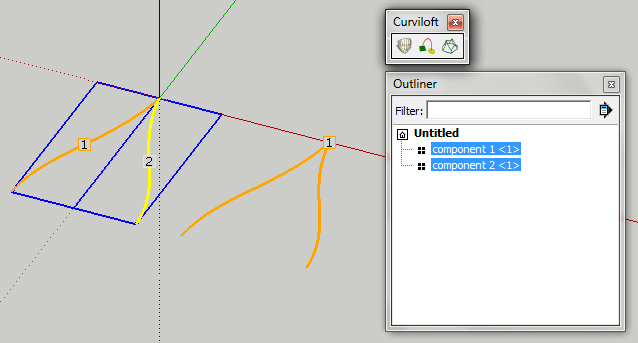
Of course I know, that exploding is possible but it is really unconvenient. Especially, because right now you cannot have one instance of the component connected to the path you want to loft with while having the parent somewhere else where it is easier to edit. (You can but if you make the child unique for lofting the connection is gone...)
-
Hi,
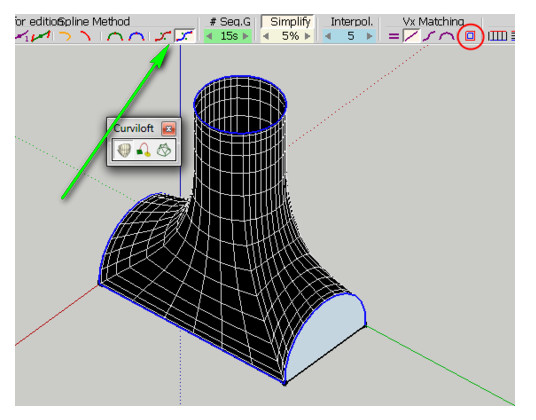
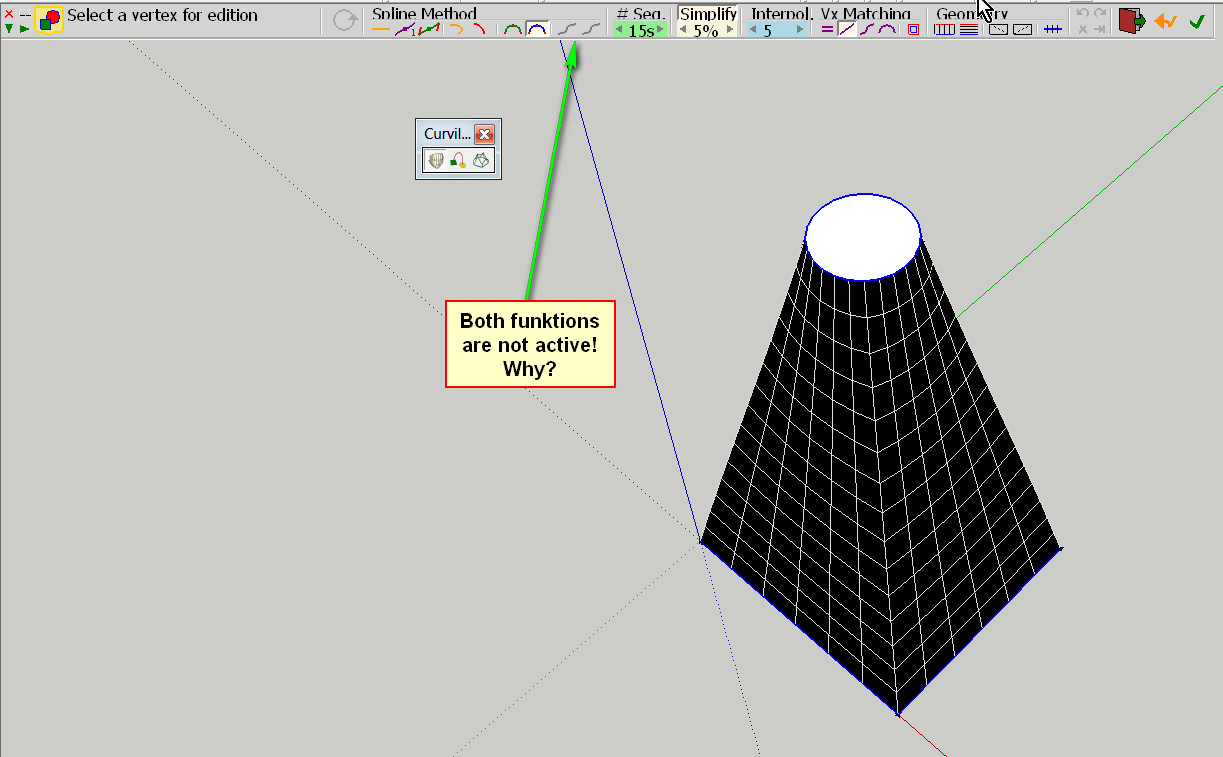
I wanted to understand this example from NickGenerator and found that these two functions are not active for me. Am I doing something wrong? Any help would be appreciated.
Charly
-
Komisch auf Englisch, aber okay...
I think it is, because you just have the circle and the rectangle. And not three shapes.
-
@nickgenerator said:
I think it is, because you just have the circle and the rectangle. And not three shapes.
@Charly
These 2 modes are only enabled when you have 3 shapes or more. They somehow use the fisrt and last profile and build the shape as close as possible to the intermediate ones.
Note that this does not always work fine. Still some more work needed when I have time.Fredo
-
Thank you Fredo and Marcus.
-
Does this plugin work for a Mac? The reason i need the plugin is because im trying to create a twisting prism. It has a base of 7"x7"x7", it goes up 22", and tappers to to become 6"x6"x6", i want it twisting at a 137.5 degrees. if somebody would like to practice with Curviloft please give this a shot and send me a copy of it to jackson.stephens7@gmail.com . Thanks in advance to anyone who will help me out!!!!
-
@unknownuser said:
if somebody would like to practice with Curviloft please give this a shot and send me a copy
why not post your problem?
-
Or try this...
[flash=600,450:hms19pr0]http://www.youtube.com//v/mVQ51i0G7AM[/flash:hms19pr0]
-
Curviloft is the perfect tool for this however if you want to twist it by 137.5 degrees, it will twist through itself and will look awful. Practically, you cannot twist it more than 60 degrees as beyond that, an edge will inevitably cross a neighbouring face. Here I twisted it by 180-137.5=42.5 degrees.
-
@nickgenerator said:
Because I am really missing the feature I just cannot resist to ask here, too.
If you are planning new features for Curviloft it would be great when selecting of curves that are part of different components could become possible. (I mean like the right one where two curves can be one contour.)
[attachment=0:vrc6ns2r]<!-- ia0 -->comp.png<!-- ia0 -->[/attachment:vrc6ns2r]
Of course I know, that exploding is possible but it is really unconvenient. Especially, because right now you cannot have one instance of the component connected to the path you want to loft with while having the parent somewhere else where it is easier to edit. (You can but if you make the child unique for lofting the connection is gone...)
I've done something very much like this easily, several times successfully. I've done it with curves from as many as 5 different comps building fairings for my airplane designs.
Open to edit one of the comps and select only the lines you want the curve to edge on.
Copy to the clipboard and close the comp.
Paste in Place the copy and immediately make the copy a comp or group.
Open the next comp and clipboard its lines as before, then close it.
Open the lines copy comp/group and Paste in Place, building up the curve control lines.
Repeat as needed.
When done, apply Curviloft to the copied lines, and you have a surface that conforms to the lines from several separate comps. Remember you now have 2 groups containing the surface, so delete one of them.Also, bear in mind you may also need to do some tweaking of the endpoints common to disparate source comps to close loops, etc, before Curviloft can do a successful surface.
-
Hi, but where to download?
-
@curlaloosh said:
Hi, but where to download?
If you mean the Curviloft pluggin, you can always find the latest version of any pluggin thread in SketchUcation in the very first post by the author. It's a convention in this forum to avoid downloading old versions.
-
I have been waiting for a plugin like this my whole life!
Nice work. -
Hello I'm new here, I just installed CURVILOFT_Dir_12 and LibFredo6 4.3c - 31 Jan 12, But when I open SketchUp I don't see Curviloft any where to use the plugin. I Have both folders in SketchUp-plugins folder like what was explained to do. So maybe I'm just a little stupid because I can't figure it out what I'm doing wrong.
Thank You to who ever can help me.
-
CurviLoft is coded as an 'Extension'.
It might need a one-time activation from Window > Preferences > Extensions.
It also has a toolbar which can then be activated from View > Toolbars...
This is assuming all files and supporting files/subfolders have been correctly installed.
If you still have issues, then please post a screen-shot of your Plugins folder etc... -
I installed this plugin as per directions, but when I start SU, I get the following error msg:
Error Loading File bootstrap_Curviloft.rb
uninitialized constant Curviloft::T6Error Loading File CurviloftAlgo.rb
uninitialized constant Curviloft::T6Error Loading File CurviloftCurveMover.rb
uninitialized constant Curviloft::T6Error Loading File CurviloftPalette.rb
uninitialized constant Curviloft::T6Error Loading File CurviloftTool.rb
uninitialized constant Curviloft::T6When I run this plugin, the first two features work fine (loft junction between spline surfaces and a given path.
When I try Skinning of shapes, I select the two edges. But when I click to validate contours, nothing happens. Click for transition also doesn't work.
All the files in my Plugin Folder appear to be as prescribed. Any thoughts?
-
@beeo said:
I installed this plugin as per directions, but when I start SU, I get the following error msg:
Error Loading File bootstrap_Curviloft.rb
uninitialized constant Curviloft::T6Error Loading File CurviloftAlgo.rb
uninitialized constant Curviloft::T6Error Loading File CurviloftCurveMover.rb
uninitialized constant Curviloft::T6Error Loading File CurviloftPalette.rb
uninitialized constant Curviloft::T6Error Loading File CurviloftTool.rb
uninitialized constant Curviloft::T6When I run this plugin, the first two features work fine (loft junction between spline surfaces and a given path.
When I try Skinning of shapes, I select the two edges. But when I click to validate contours, nothing happens. Click for transition also doesn't work.
All the files in my Plugin Folder appear to be as prescribed. Any thoughts?
beeo
Strange that you can run the plugin with the loading erros you mentioned.
For skinning, you need to have at least 3 edges to form a contour.
Fredo









Advertisement