sketchucation logo sketchucation
    • Login
    Oops, your profile's looking a bit empty! To help us tailor your experience, please fill in key details like your SketchUp version, skill level, operating system, and more. Update and save your info on your profile page today!
    Mac User? | Join the Rayscaper Beta for Mac Learn More

    [Plugin][$] Curviloft 2.0a - 31 Mar 24 (Loft & Skinning)


    Scheduled Pinned Locked Moved Plugins
    1.3k Posts 300 Posters 3.2m Views 298 Watching
    Loading More Posts
    • Oldest to Newest
    • Newest to Oldest
    • Most Votes
    Reply
    • Reply as topic
    Log in to reply
    This topic has been deleted. Only users with topic management privileges can see it.
    • fredo6F
      fredo6
      last edited by

      @daniel s said:

      [b]But looks like the skinning option has a regression ๐Ÿ˜ž

      Daniel S

      Daniel,

      You always find the right bugs. Thanks for that! This seems to be with 3 sides shapes.
      I have a look.

      Fredo

      1 Reply Last reply
      Reply Quote 0
      • pilouP
        pilou
        last edited by

        Happy new year Fredo! ๐Ÿ˜Ž et ๐Ÿ‘

        Frenchy Pilou
        Is beautiful that please without concept!
        My Little site :)

        1 Reply Last reply
        Reply Quote 0
        • fredo6F
          fredo6
          last edited by

          Small bug signaled by Daniel S in Skinning (on 3-side shapes) is fixed.
          You just need to upgrade to LibFredo6 3.6b

          Fredo

          1 Reply Last reply
          Reply Quote 0
          • D
            Daniel S
            last edited by

            That was fast.. thank you again Fredo!!!

            Awesome plugin

            Daniel S

            1 Reply Last reply
            Reply Quote 0
            • pilouP
              pilou
              last edited by

              Speedy SAV (in English after sales service ) ๐Ÿ’š
              ๐Ÿ˜Ž

              Frenchy Pilou
              Is beautiful that please without concept!
              My Little site :)

              1 Reply Last reply
              Reply Quote 0
              • jason_marantoJ
                jason_maranto
                last edited by

                Hi Fredo,

                Thank-you again for this -- I do have a slight request... I have some re-occurring twisting and if I take the time to align the verts manually the result comes out exactly the way I want, but manually setting the verts seems a bit temperamental at this point and I was wondering if it could be possible to set the "twist" parameters to decimal increments as it would solve my problem (1 is too large a change). See attached file for example.

                If there is a better solution then I am very interested... I have split the profiles down the middle and successfully finished it that way.

                Best,
                Jason.


                twisty verts.skp

                I create video tutorial series about several 2D & 3D graphics programs.

                1 Reply Last reply
                Reply Quote 0
                • massimoM
                  massimo Moderator
                  last edited by

                  Amazing as usual... ๐Ÿ˜ฎ
                  Thank you.

                  1 Reply Last reply
                  Reply Quote 0
                  • fredo6F
                    fredo6
                    last edited by

                    @jason_maranto said:

                    Hi Fredo,

                    Thank-you again for this -- I do have a slight request... I have some re-occurring twisting and if I take the time to align the verts manually the result comes out exactly the way I want, but manually setting the verts seems a bit temperamental at this point and I was wondering if it could be possible to set the "twist" parameters to decimal increments as it would solve my problem (1 is too large a change). See attached file for example.

                    If there is a better solution then I am very interested... I have split the profiles down the middle and successfully finished it that way.

                    Best,
                    Jason.

                    Jason,

                    In your case, the alignment issue can be solved by using naturalvertex matching, as opposed to best-fit of shapes(which is the default).
                    Here is an illustration on your model. In your case, the natural 'straight' matching is more appropriate than the shape best-fit method.
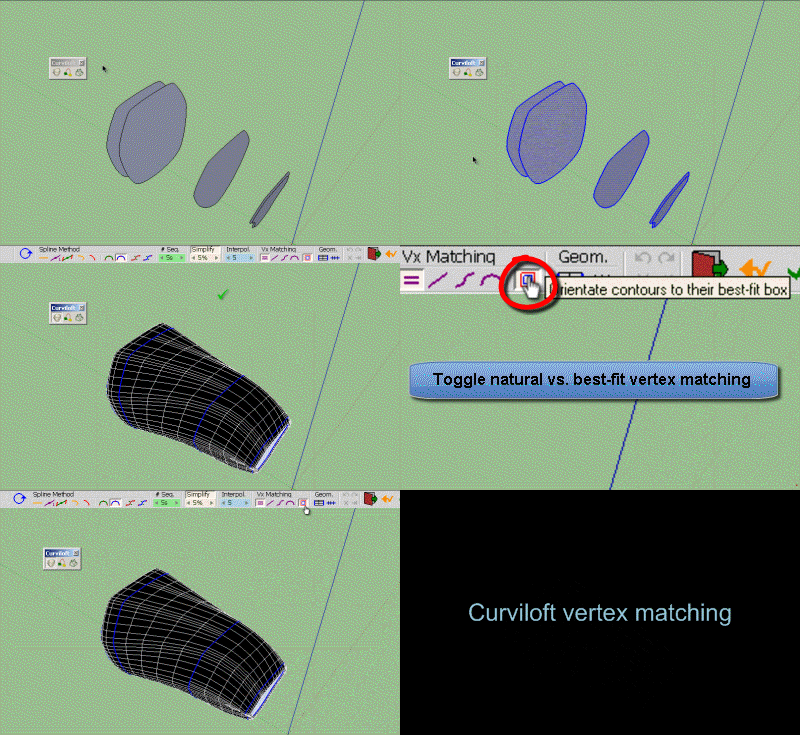
                    natural matching.gif

                    Fredo

                    PS: by the way, your model is a good illustration for using the transversal Spline methods (like F-Spline, second icon from the right, in red). See in attached file
                    twisty verts - Fredo.skp

                    1 Reply Last reply
                    Reply Quote 0
                    • fredo6F
                      fredo6
                      last edited by

                      @utiler said:

                      Fredo, I don't know how many time I can say thank you with out it becoming monotonous but, thank you!

                      Thanks to your thanks. I hope you are safe with all the water flooding in Queensland.

                      Fredo

                      1 Reply Last reply
                      Reply Quote 0
                      • jason_marantoJ
                        jason_maranto
                        last edited by

                        Thank-you again Fredo -- I tried all the other icons there but failed to try that last one (toggle natural) ๐Ÿ˜ณ This is such an amazing tool for Sketchup ๐Ÿ˜

                        Best,
                        Jason.

                        I create video tutorial series about several 2D & 3D graphics programs.

                        1 Reply Last reply
                        Reply Quote 0
                        • B
                          Ben Ritter
                          last edited by

                          Fredo, thank you very very much, again.

                          1 Reply Last reply
                          Reply Quote 0
                          • erikBE
                            erikB
                            last edited by

                            Very usefull pluging !!!
                            Thank you very much Fredo.
                            I had some bugsplats due to the fact that I was still using an old version of JPP. (It was the libtraductor.rb file who caused it)
                            But after upgrading both rudys work like charme.
                            greetings, erikB

                            1 Reply Last reply
                            Reply Quote 0
                            • mitcorbM
                              mitcorb
                              last edited by

                              Well, good to know the updates appear to be backward compatible to earlier Sketchup versions. We would expect nothing less from the very capable Fredo6.
                              ๐Ÿ‘ ๐Ÿ‘ ๐Ÿ‘ ๐Ÿ˜„
                              And, I add my Thank You, Fredo

                              I take the slow, deliberate approach in my aimless wandering.

                              1 Reply Last reply
                              Reply Quote 0
                              • fredo6F
                                fredo6
                                last edited by

                                @mitcorb said:

                                Well, good to know the updates appear to be backward compatible to earlier Sketchup versions. We would expect nothing less from the very capable Fredo6.
                                ๐Ÿ‘ ๐Ÿ‘ ๐Ÿ‘ ๐Ÿ˜„
                                And, I add my Thank You, Fredo

                                Yes. Normally the scripts should still work in SU6.
                                The issue with SU* is that, due to a change of the Ruby interpreter, there were some small bugs generated and also some unuseful warnings.

                                Also, for me, it is better is users can move to latest versions because it is easier to support.

                                Fredo

                                1 Reply Last reply
                                Reply Quote 0
                                • N
                                  notareal
                                  last edited by

                                  Thank you! โ˜€

                                  Welcome to try Thea Render, Thea support | kerkythea.net -team member

                                  1 Reply Last reply
                                  Reply Quote 0
                                  • C
                                    chloesdad
                                    last edited by

                                    Just wanted to add my thanks to you, Fredo for your generosity and talent.

                                    1 Reply Last reply
                                    Reply Quote 0
                                    • FletchF
                                      Fletch
                                      last edited by

                                      Fredo, with you+SketchUp it eliminates need for almost any other modeling software. ๐Ÿ˜„
                                      (except for Sculptris... but I believe Whaat will have that covered in a few days/weeks/months.)

                                      Fletch
                                      3D Modeling addict. Former owner/developer of Twilight Render. sleepinggiantvisual.com

                                      1 Reply Last reply
                                      Reply Quote 0
                                      • R
                                        rattusNOR
                                        last edited by

                                        Great work. Thank you Fredo !

                                        1 Reply Last reply
                                        Reply Quote 0
                                        • B
                                          bowlr
                                          last edited by

                                          Thanks for the plugins, howver, after I copied the files to plugins folder, I get this error msg from SU

                                          "Error Loading File ZLoader__Curviloft.rb
                                          no such file to load -- LibFredo6.rb"

                                          1 Reply Last reply
                                          Reply Quote 0
                                          • Dave RD
                                            Dave R
                                            last edited by

                                            bowlr, please go back and read the first post in the thread. Especially this:

                                            @unknownuser said:

                                            IMPORTANT: Requires to download LibFredo6 3.6 or higher if not already installed.

                                            Etaoin Shrdlu

                                            %

                                            (THERE'S NO PLACE LIKE)

                                            G28 X0.0 Y0.0 Z0.0

                                            M30

                                            %

                                            1 Reply Last reply
                                            Reply Quote 0

                                            Hello! It looks like you're interested in this conversation, but you don't have an account yet.

                                            Getting fed up of having to scroll through the same posts each visit? When you register for an account, you'll always come back to exactly where you were before, and choose to be notified of new replies (either via email, or push notification). You'll also be able to save bookmarks and upvote posts to show your appreciation to other community members.

                                            With your input, this post could be even better ๐Ÿ’—

                                            Register Login
                                            • 1
                                            • 2
                                            • 46
                                            • 47
                                            • 48
                                            • 49
                                            • 50
                                            • 65
                                            • 66
                                            • 48 / 66
                                            • First post
                                              Last post
                                            Buy SketchPlus
                                            Buy SUbD
                                            Buy WrapR
                                            Buy eBook
                                            Buy Modelur
                                            Buy Vertex Tools
                                            Buy SketchCuisine
                                            Buy FormFonts

                                            Advertisement