[Plugin][$] Curviloft 2.0a - 31 Mar 24 (Loft & Skinning)


-
fredo and Danial s
i have installed the latest uptate and tested it on the tangent at vertex skp and the tent1 skp
in chosing on of the tangent at vertex outlines and the skinning command the programe runs and then flashes between thick line to thin line with the green tick floating after 2 hrs it said it was done in 2 second and showed no meshing i tryed this on all shapes in the file and no luck in getting a skin,what might the problem be here.
in testing it in the tent1 skp i se no change in the result from the previous version and get a better result in using tigs rail plug in.
not sure if it is just me or has anyone else had a similar result
regards
grim
-
This new beta is amazing!!!
The skin works with all the shapes that I tried... only one not work... Seems that there is a problem when you put arcs with tangent ar vertex..
I have no idea how to explain this.. so I take the definition from the sketchup help:
"Tangent at Vertex: The Tangent at Vertex inference indicates an arc whose vertex is tangent to a previously drawn arc's vertex. The Tangent at Vertex inference is represented by a cyan arc"
Also I include quick shapes that I made to recreate and show this.
Thank you Fredo!!!
Daniel SEDIT: I delete the attachment because it can cause confusion.
-
@grim said:
i have installed the latest uptate and tested it on the tangent at vertex skp (...)
Hi grim...
The "tangent at vertex.skp" is a file that I upload to show that is not working for this kind of shapes...
It can cause confusion so I remove it.
In the latest version... Fredo fix some issues and now is working for more shapes...
Try skin with this ones to see if it is working for you.Daniel S
PS. I think it will be a good idea to add a test .skp file next to the download link of the plugin... so people download and can test the plugin inmediately.
There are a lot of good examples on this posts, but perhaps not everyone wants to read all the pages.
-
Fredo6
Will I have downloaded the latest version of Curviloft and I get a complete shutdown of Sketchup, no error message, just a program shutdown. Note, I am not sure if I had this shut down problem with your earlier versions, as I have been re-installing, with great care all my plugins, trying to limit or remove the graying out problems I had in the past.
So I removed all plugins expect for your new version. Works great. Started reloading plugins in alphabet order. Found that the plugin "Sunposition.rb" was the guilty party, causing some kind of conflict. Not sure what the conflict is, however your program works without this program loading, and with Sunposition.rb loaded, you program shuts down Sketchup. Note, I am not implying your program or the sunpostion plugin are at fault, just that they will not work together.
Just thought I would pass this along. Now does anyone know of a sun positioning program that will not cause problems?
Again thanks for all your plugins.
Ken
-
@unknownuser said:
Fredo6
Will I have downloaded the latest version of Curviloft and I get a complete shutdown of Sketchup, no error message, just a program shutdown. Note, I am not sure if I had this shut down problem with your earlier versions, as I have been re-installing, with great care all my plugins, trying to limit or remove the graying out problems I had in the past.
So I removed all plugins expect for your new version. Works great. Started reloading plugins in alphabet order. Found that the plugin "Sunposition.rb" was the guilty party, causing some kind of conflict. Not sure what the conflict is, however your program works without this program loading, and with Sunposition.rb loaded, you program shuts down Sketchup. Note, I am not implying your program or the sunpostion plugin are at fault, just that they will not work together.
Just thought I would pass this along. Now does anyone know of a sun positioning program that will not cause problems?
Again thanks for all your plugins.
Ken
Ken,
Could you give me a link to this SunPosition script so that I have a look at the possible conflicts.
In principle if there is one, it should also exist with the previous version 1.0bFredo
-
Here for the sunposition.rb
-
ABOUT A CONFLICT BETWEEN sunposition.rb and Curviloft
There is a known problem which causes a crash of Sketchup when both Curviloft and sunposition.rb are installed.I am contacting Gabriel Miller on his site (he is the author of the sunposition script).
In the mean time:
- either take the attached modified version of sunposition
version slightly modified by Fredo to avoid conflicts with other Ruby scripts - or comment out lines 45 to 50 (by putting a # in front of each line)
Then both Curviloft and sunposition should work fine.
Fredo
PS: sunposition.rb overwrites and extends some Ruby built-in classes (precisely Float#round), which causes the problem. This may affect other scripts than just Curviloft.
- either take the attached modified version of sunposition
-
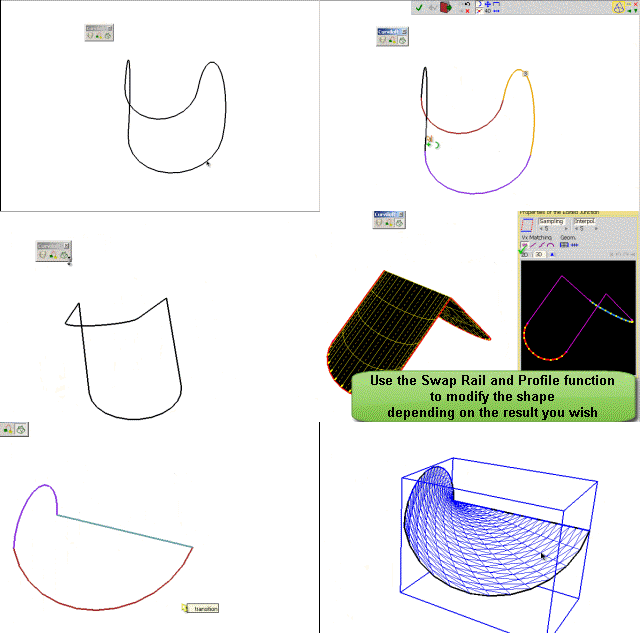
Just a precision on some issues mentioned in the previous posts. Curviloft may have problem to identify the right contours in PRE-SELECTION mode.
However, you can always default to the MANUAL selection mode, where you have options to select curves only, or even the contours edge-by-edge.
Fredo
-
@unknownuser said:
Just a precision on some issues mentioned in the previous posts. Curviloft may have problem to identify the right contours in PRE-SELECTION mode.
However, you can always default to the MANUAL selection mode, where you have options to select curves only, or even the contours edge-by-edge.Fredo
oh nice. thanks for clearing that up.
i keep finding all these little options and i gotta admit, i'm very impressed..for one, the spline lofting is great.. at first, i was set on skinning and trying to form all of the encompassing curves but in many cases, it seems as if loft will actually make my life way easier.. especially once i started experimenting with the different spline methods.. namely, the two junction by orthogonal curve methods..
i'm sure i'll have some questions soon about what's actually happening with those but for now, i'll continue experimenting with them.
-
Thanks fredo6 for the latest update. letting you know that the Tent1.skp happily skinned on my mac
cheers -
@unknownuser said:
especially once i started experimenting with the different spline methods.. namely, the two junction by orthogonal curve methods..
Jeff,
Note that these two methods, by arc of ellipse and by arc of Bezier, are correct for straight junctions, but I still need to work out the case where you end up with an S-curve (I only implemented an approximate solution, due to lack of time).
I am interested in your evaluation, because I added the methods just for trial, not being sure this corresponds to real situations.Fredo
-
@unknownuser said:
Jeff,
Note that these two methods, by arc of ellipse and by arc of Bezier, are correct for straight junctions, but I still need to work out the case where you end up with an S-curve (I only implemented an approximate solution, due to lack of time).
I am interested in your evaluation, because I added the methods just for trial, not being sure this corresponds to real situations.Fredo
here's a simple example.. i've added some notes to the skp showing things that aren't possible with other sketchup lofting/skinning plugins and i've only seen them in rhino.
i'll compile a few other examples a little bit later that show some of the problems and other advantages i've seen..
[edit - the lofted surface in the attached skp was formed using the two curves on the left side with the spline method set to ortho bezier]
-
Jeff,
It seems the S-curves are working fine in your case (contours are in parallel planes).
The two methods are designed to ensure tangential continuity between contours, so that you can chain them in one block. Below is your model, slightly amended, where the whole shape is generated in one pass.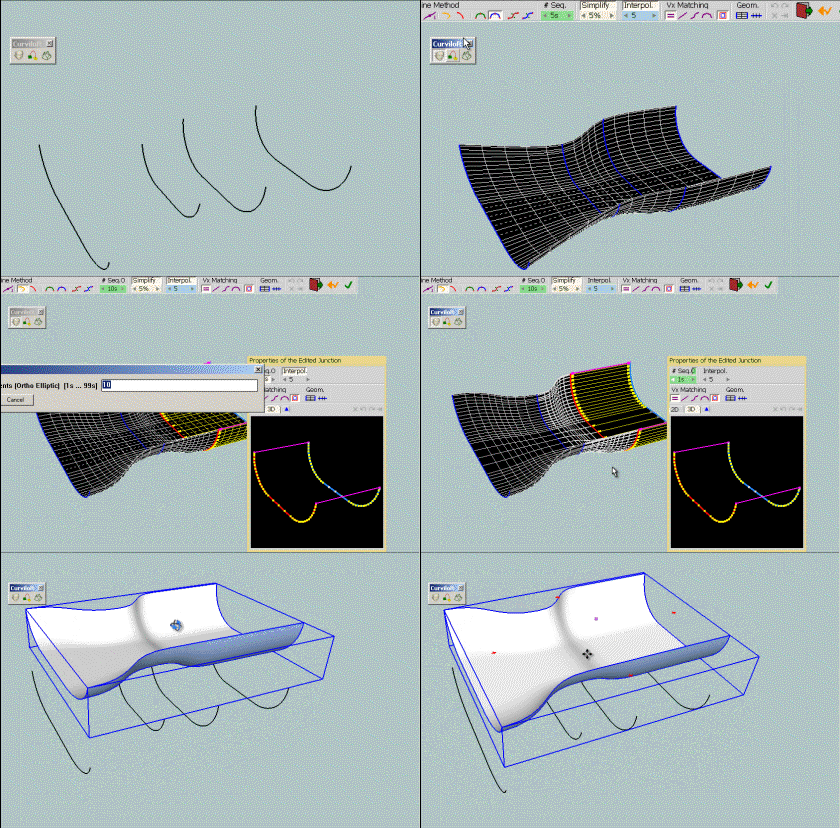
Fredo
-
Fredo, just another thank you. The Skinning function turns out to be the perfect tool for sculpting seats such as this one for a Welsh stick chair.
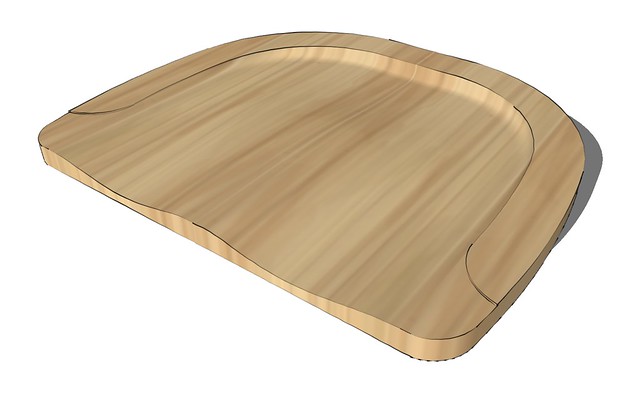
Thank you.
-
@Fredo6:
This tool may be in beta, but the couple of times I have used it show that it is very effective, and, once again I must salute you for your talent, and thank you for your generosity.
Humbly,
mitcorb -
FREDO you HIT IT AGAIN!
THANK YOU
-
@dave r said:
Fredo, just another thank you. The Skinning function turns out to be the perfect tool for sculpting seats such as this one for a Welsh stick chair.
Thank you.
Dave,
By chance, i found your video on YouTube explaining how to build the chair.
[url]http://www.youtube.com/watch?v=7UGgcMqMg0I]video[/url]Fredo
-
Fredo, that's not my video although the chair seat is the same one. The guy who did the video and I have been working with another fellow who is learning SketchUp by drawing one of his Welsh stick chairs. I used the same idea (we came up with independently) although I took it a little farther and refined the scoop out for the seat. Instead of a video, I described the process here.
-
Dave,
Oops!, I should have noticed the differences! I am not specialist of Welsh chairs definitely

Anyway, an interesting use case of the tool.Fredo
-
No worries.
I've got a project in my mind that I'm thinking this plugin will make fairly easy to do. We'll see if I can pull it off.









Advertisement