[Plugin][$] Curviloft 2.0a - 31 Mar 24 (Loft & Skinning)


-
This seems to be a problem of geometry which you can simulate manually.
If you wish to keep the junction straight, then the intermediate profiles do not keep the same dimensions.
If you wish to keep the junction straight
No, what is needed is intermediate segments to preserve initial dimentions of the profile.
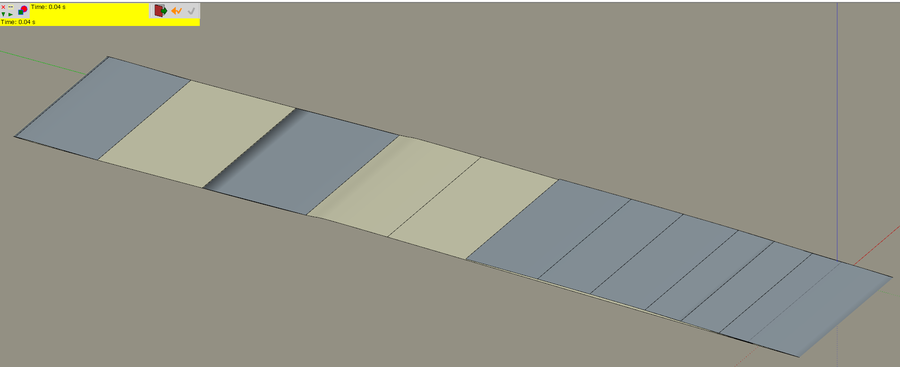
In attached file the red body is OK (all horizontal segments keep right sizing),
and the blue one (lofting with 51 intermediate segments) misbehaves.
-
@rv1974 said:
No, what is needed is intermediate segments to preserve initial dimensions of the profile.
Then, Curviloft is not adapted, and you should use FollowMe Rotate or TIG Grow extensions.
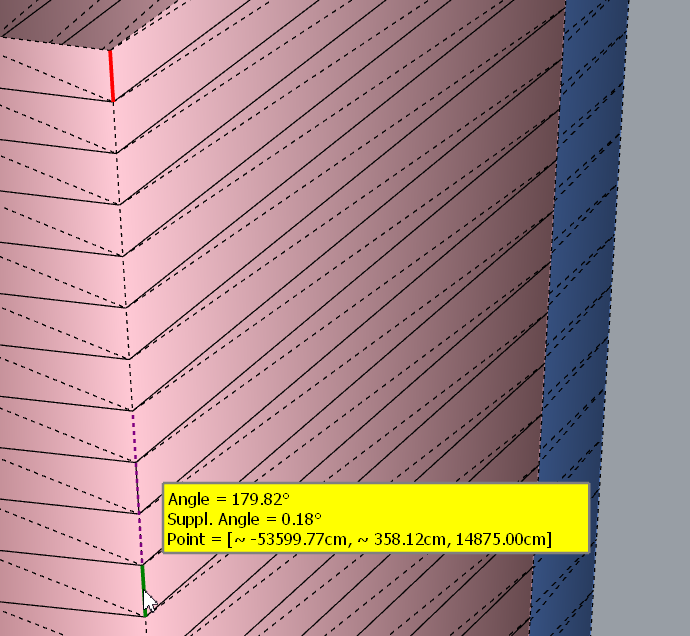
With rotated profile, line joining the begin and end profile corner does not meet the corner of the intermediate profiles.
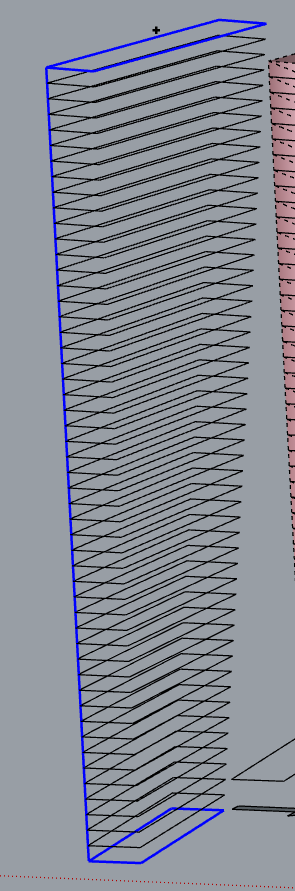
In your red shape, you can see that the short segments joining stores are not aligned and do not form a big straight line.
Fredo
-
Thanks for mentioning those alternatives- I'll check them. I'm so glued to your tools that completely forgot others

BTW the straight line on a blue tower shows the horizontal segments don't sit perfectly on it. The gap is ridiculously small in real life scale (~0.3cm in the middle floors, but big enough to spoil the model -
-
@rv1974 said:
Fredo could you take a look please
I need to consider this case of indetical profiles more seriously, which Curviloft did not really do.
So I'll come with something more robust.
Fredo
-
Hi there,
When selecting more than 3 edge curves, and choosing for junction by orthogonal bezier curves, the surfaces do not get the reach the right spline method result.
Here is what the ruby console shows
Error: #<ArgumentError: Cannot create unit vector from zero length vector>
c:/users/mbe/appdata/roaming/sketchup/sketchup 2018/sketchup/plugins/fredo6_!libfredo6/lib6profile.rbe:119:inaxes' c:/users/mbe/appdata/roaming/sketchup/sketchup 2018/sketchup/plugins/fredo6_!libfredo6/lib6profile.rbe:119:incompute_by_offset'
c:/users/mbe/appdata/roaming/sketchup/sketchup 2018/sketchup/plugins/fredo6_!libfredo6/lib6profile.rbe:58:incompute_by_vectors2' c:/users/mbe/appdata/roaming/sketchup/sketchup 2018/sketchup/plugins/fredo6_!libfredo6/lib6profile.rbe:86:incompute_by_normals'
c:/users/mbe/appdata/roaming/sketchup/sketchup 2018/sketchup/plugins/fredo6_curviloft/curviloftspline.rbe:357:inblock in spline_profiling_construct' c:/users/mbe/appdata/roaming/sketchup/sketchup 2018/sketchup/plugins/fredo6_curviloft/curviloftspline.rbe:351:ineach'
c:/users/mbe/appdata/roaming/sketchup/sketchup 2018/sketchup/plugins/fredo6_curviloft/curviloftspline.rbe:351:ineach_with_index' c:/users/mbe/appdata/roaming/sketchup/sketchup 2018/sketchup/plugins/fredo6_curviloft/curviloftspline.rbe:351:inspline_profiling_construct'
c:/users/mbe/appdata/roaming/sketchup/sketchup 2018/sketchup/plugins/fredo6_curviloft/curviloftspline.rbe:249:inspline_junction_construct' c:/users/mbe/appdata/roaming/sketchup/sketchup 2018/sketchup/plugins/fredo6_curviloft/curviloftalgo.rbe:497:ingeneric_junction_construct'
c:/users/mbe/appdata/roaming/sketchup/sketchup 2018/sketchup/plugins/fredo6_curviloft/curviloftalgo.rbe:1418:injunction_construct' c:/users/mbe/appdata/roaming/sketchup/sketchup 2018/sketchup/plugins/fredo6_curviloft/curviloftalgo.rbe:407:inblock in link_construct_all'
c:/users/mbe/appdata/roaming/sketchup/sketchup 2018/sketchup/plugins/fredo6_curviloft/curviloftalgo.rbe:407:ineach' c:/users/mbe/appdata/roaming/sketchup/sketchup 2018/sketchup/plugins/fredo6_curviloft/curviloftalgo.rbe:407:inlink_construct_all'
c:/users/mbe/appdata/roaming/sketchup/sketchup 2018/sketchup/plugins/fredo6_curviloft/curviloftalgo.rbe:396:inlink_calculate_all' c:/users/mbe/appdata/roaming/sketchup/sketchup 2018/sketchup/plugins/fredo6_curviloft/curviloftalgo.rbe:530:inoption_set_prop'
c:/users/mbe/appdata/roaming/sketchup/sketchup 2018/sketchup/plugins/fredo6_curviloft/curvilofttool.rbe:206:inoption_set_prop' c:/users/mbe/appdata/roaming/sketchup/sketchup 2018/sketchup/plugins/fredo6_curviloft/curviloftpalette.rbe:773:incall'
c:/users/mbe/appdata/roaming/sketchup/sketchup 2018/sketchup/plugins/fredo6_curviloft/curviloftpalette.rbe:773:inblock in pal_family_spline_method' c:/users/mbe/appdata/roaming/sketchup/sketchup 2018/sketchup/plugins/fredo6_!libfredo6/body_lib6palette.rbe:3963:incall'Just ask me for the file if needed!
Cheers
Manuel
... -
@architure said:
Just ask me for the file if needed!
Yes the file would be useful, as this seems to be a special case.
Thanks
Fredo
-
Hi there,
Sorry for my late reply. Here is the attached 2018 skp file . You can see that the selected mode is only applied between the first 3 curves.
Let me know if I can provide more information.
Cheers
-
NEW RELEASE: Curviloft v1.8a - 31 Oct 18
Curviloft 1.8a is a maintenance release for bug fixing.
See Plugin Page of Curviloft for Download (or use the Sketchup PluginStore plugin for auto-installation.
Fredo
-
Looking forward to another excellent work.
-
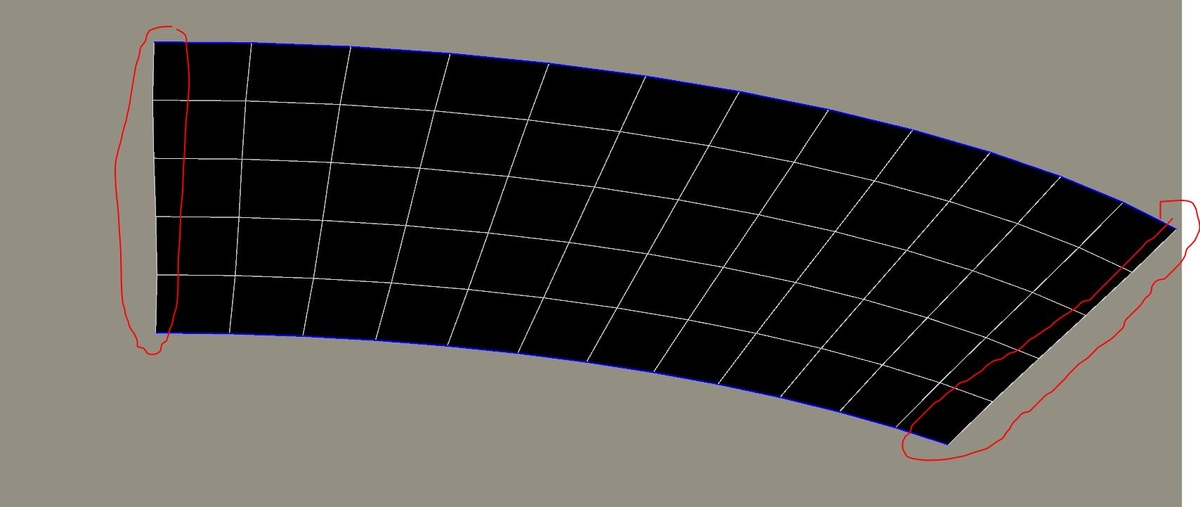
In 99% of of lofting uses I have to straighten borders connnecting ends of segments afterwards(thanks Thom there're Edge tools so it's not manual). Could there be an optionto keep them straight when creating?
Thanks -
@rv1974 said:
In 99% of of lofting uses I have to straighten borders connnecting ends of segments afterwards(thanks Thom there're Edge tools so it's not manual). Could there be an optionto keep them straight when creating?
ThanksNot too sure what you mean by 'straighten'.
Maybe an example would be helpful.Fredo
-
Edit: Only after posting I figured out 'junction by connected lines' in 'spline method' fixes this problem'
-
@rv1974 said:
Edit: Only after posting I figured out 'junction by connected lines' in 'spline method' fixes this problem'
I really need to refresh the plugin with more explicit control of the different options (and maybe selecting a few ones which make sense). Currently, Curviloft rather exposes the options that come from the algorithm, up to the user to find out what is appropriate. That's why I still leave it in Beta after all these years!
Fredo
-
I really need to refresh the plugin with more explicit control of the different options (and maybe selecting a few ones which make sense).
I wholeheartedly agree, but please also update your last 32 bit version as well.
I cannot run 64 bit apps on my old PC. I'm still running Make V.13. -
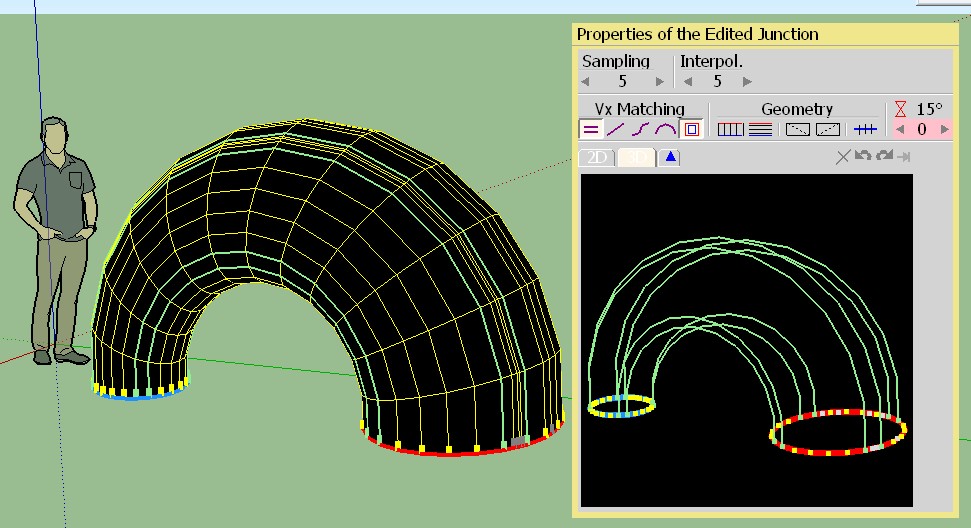
Loft along the path: can we modify the path after launch the plugin?
I don't see it! (the path)
-
@jgb said:
I wholeheartedly agree, but please also update your last 32 bit version as well.
I cannot run 64 bit apps on my old PC. I'm still running Make V.13.What do you mean?
Do you have issues with Curviloft on Sketchup 2013? -
I searched hard to find how to save this method as default but no luck. Is it possible at least make this tool to remember last used settings at least? If it could remember them permanently it'd be even better. Thank you.
-
@rv1974 said:
I searched hard to find how to save this method as default but no luck. Is it possible at least make this tool to remember last used settings at least? If it could remember them permanently it'd be even better. Thank you.
Do you use the latest version (1.8a)? It keeps the latest settings across Sketchup sessions and I checked it works with SU2013.
-
Great news!
 Gone refreshing ALL of yours




Advertisement