sketchucation logo sketchucation
    • Login
    Oops, your profile's looking a bit empty! To help us tailor your experience, please fill in key details like your SketchUp version, skill level, operating system, and more. Update and save your info on your profile page today!
    ⚠️ Update | Sketchucation Tools 5.0.8 released with licensing improvements and bugfixes Download

    [Plugin][$] Curviloft 2.0a - 31 Mar 24 (Loft & Skinning)


    Scheduled Pinned Locked Moved Plugins
    1.3k Posts 300 Posters 3.1m Views 298 Watching
    Loading More Posts
    • Oldest to Newest
    • Newest to Oldest
    • Most Votes
    Reply
    • Reply as topic
    Log in to reply
    This topic has been deleted. Only users with topic management privileges can see it.
    • J
      jumpjack
      last edited by

      I decided to upload the whole file, in case others in the world are interested in some archeo-astro-photogrammetry 😄

      http://jumpjack.altervista.org/mars-pathfinder-model-D-color.zip (43 MB)

      Project page:
      http://www.boards.ie/vbulletin/showthread.php?t=2057032501

      1 Reply Last reply
      Reply Quote 0
      • BoxB
        Box
        last edited by

        I don't think there is anything out there to heal your model. I have no idea how it was created, do you have individual files of each photometric section, but you have overlapping sections in a radial array and a mass of jagged bits and loose geometry all over the place. Maybe you can repair each part of the radial array in meshlab then stitch them together. Plus you seem to have multiple copies of the component which is making the file much bigger than it needs to be.

        What is it you want to end up with? Is it something you want to print? Is it meant to be an accurate Mars landscape? Is it just going to be a rendering?

        You can quickly sculpt a nice landscape with the Sandbox tools to form a printable solid or basis for a render.

        The one below took minutes to make. There is nothing stopping you making it as detailed as you want and starting with a solid mesh means you have no holes to fill. You can also use Fredos ThruPaint to place your images correctly.

        None of this really has much to do with Curviloft so it would probably be more appropriate moved to it's own thread.

        Also there are several plugins designed for working with topography, Toposhaper for one, that may be more suited to your project. http://sketchucation.com/forums/viewtopic.php?p=470701#p470701
        Or perhaps some point cloud plugin if the photometric data is suitable.

        If this is something like you want I can give you more information.

        Edit: I looked at your project page and now I have some understanding of what you are attempting. If you can get the point data I'm sure there is a way to get close.
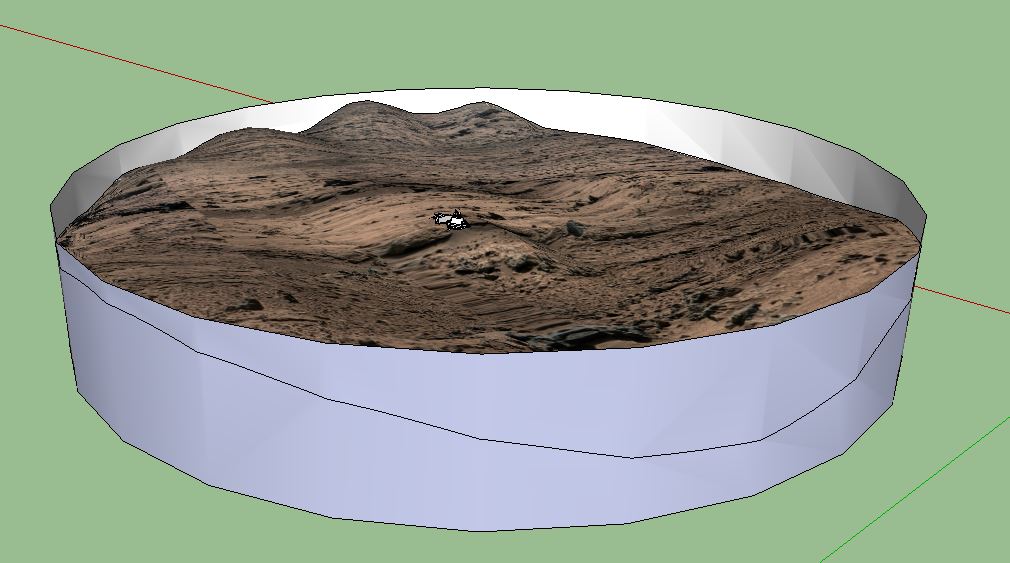

        Quick Mars.JPG

        1 Reply Last reply
        Reply Quote 0
        • cottyC
          cotty
          last edited by

          @box said:

          Edit: I looked at your project page and now I have some understanding of what you are attempting. If you can get the point data I'm sure there is a way to get close.

          I didn't have a look, but after reading this, I have thought about this:
          https://www.youtube.com/watch?v=092ZzSrsE_w

          my SketchUp gallery

          1 Reply Last reply
          Reply Quote 0
          • J
            jumpjack
            last edited by

            @box said:

            I don't think there is anything out there to heal your model. I have no idea how it was created, do you have individual files of each photometric section, but you have overlapping sections in a radial array and a mass of jagged bits and loose geometry all over the place.

            Yes, it's a mess...

            @box said:

            Maybe you can repair each part of the radial array in meshlab then stitch them together.

            Maybe I could fill holes in each part using this plugin(it works fine for simple holes) and also stitch them together using the plugin again. Hopefully this will result in new holes which I will maybe be able to fill using again the plugin... and so on till I fill all of them!

            @box said:

            Plus you seem to have multiple copies of the component which is making the file much bigger than it needs to be.

            I didn't notice it, I'll check.

            What is the attachment?

            1 Reply Last reply
            Reply Quote 0
            • BoxB
              Box
              last edited by

              @jumpjack said:

              What is the attachment?

              It is a simple sandbox model with a random mars landscape as a texture, and the rover roughly lifted from your model and dropped on it.
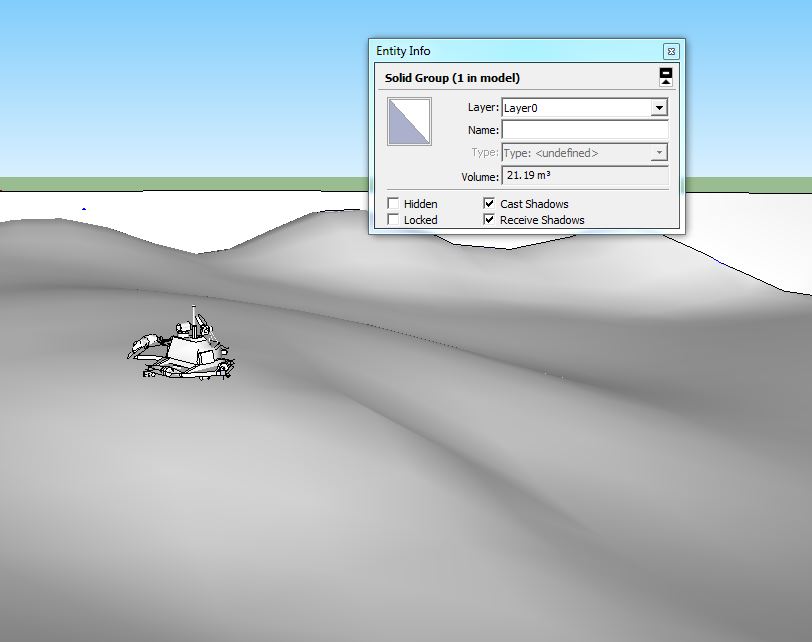

              Quick Mars.skp


              Snap1.JPG

              1 Reply Last reply
              Reply Quote 0
              • T
                thefreestman
                last edited by

                **I love this plugin, especially the splice feature.

                Does anyone know of another similar feature that creates a grided planar surface in a similar effect- to that of the black mesh that appears in modeling before it generates a smooth surface?!

                Thanks!**

                1 Reply Last reply
                Reply Quote 0
                • TIGT
                  TIG Moderator
                  last edited by

                  At any time you can make any 'smoothed surface' into a 'mesh', with fully visible edges, by selecting the surface and using the native 'Soften/Smooth Edges' tool [context-menu], with minimal angle-slider setting and the two options ticked...
                  Of course you can do the reverse [on any 'mesh'] - select all of the facets required and move slider to right so the surface becomes smooth...
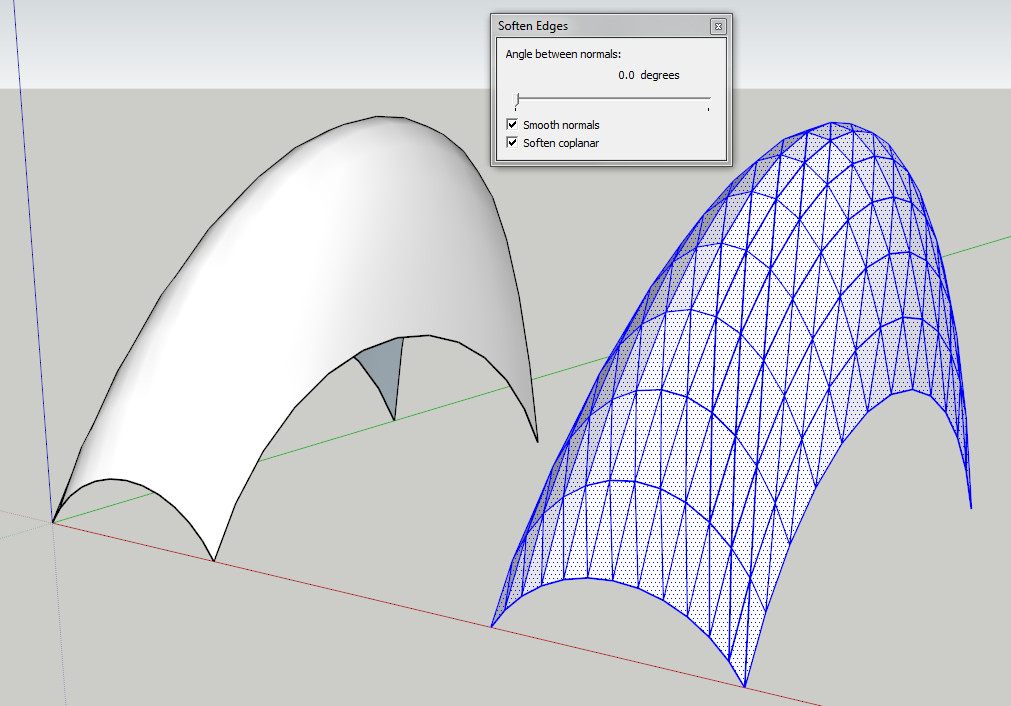

                  Capture.PNG

                  TIG

                  1 Reply Last reply
                  Reply Quote 0
                  • BoxB
                    Box
                    last edited by

                    And what Tig has modestly left out, a lot of his plugins allow you to choose quads, if that is the full square grid you are after.
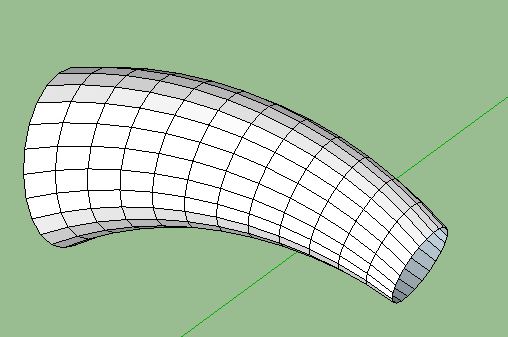

                    Quads.JPG

                    1 Reply Last reply
                    Reply Quote 0
                    • T
                      thefreestman
                      last edited by

                      Great Thanks!

                      1 Reply Last reply
                      Reply Quote 0
                      • D
                        dana2048
                        last edited by

                        This tool did exactly what I needed! Great work!
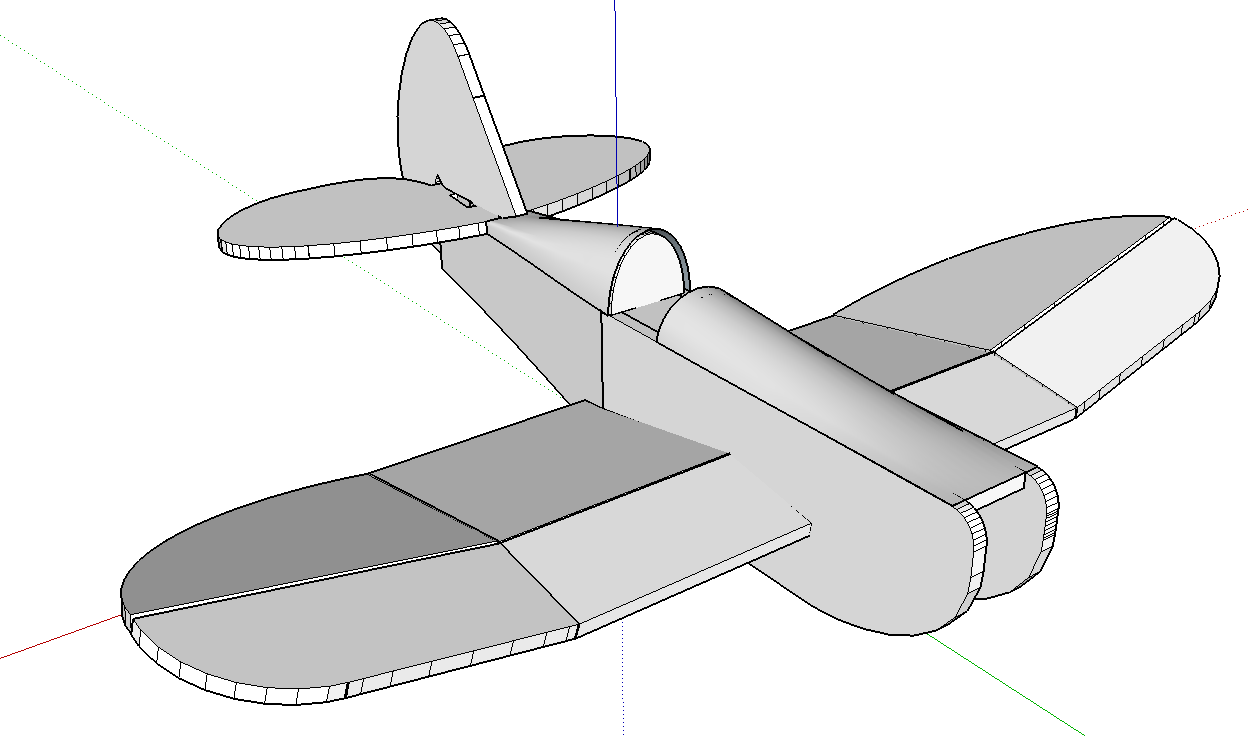
                        MiniSpeedster

                        1 Reply Last reply
                        Reply Quote 0
                        • JClementsJ
                          JClements
                          last edited by

                          Could this plugin be adapted into a new/similar plugin but for sheet metal fabrication? With some of the functions described here in this SolidsWorks video; in particular bend lines and flattening functions?

                          http://www.hawkridgesys.com/products/solidworks/videos/sheet-metal-lofted-bends/

                          John | Illustrator | Beaverton, Oregon

                          1 Reply Last reply
                          Reply Quote 0
                          • O
                            Osuki99
                            last edited by

                            thankk you very much ^^

                            1 Reply Last reply
                            Reply Quote 0
                            • R
                              ronys
                              last edited by

                              Thank you for this amazing plugin.

                              I am trying to use the outcome of the Curviloft for hotwiring foam (with CNC) for RC airplanes.
                              My problem is that the some of the faces created are triangular - which is great for the purpose of lofting in SU, but is not good for hotwiring. If I use the path of triangles, the speed of the wire will not be constant on both faces.

                              Anyway, my question is:
                              Is there a way to make Curviloft create only quadratian faces?
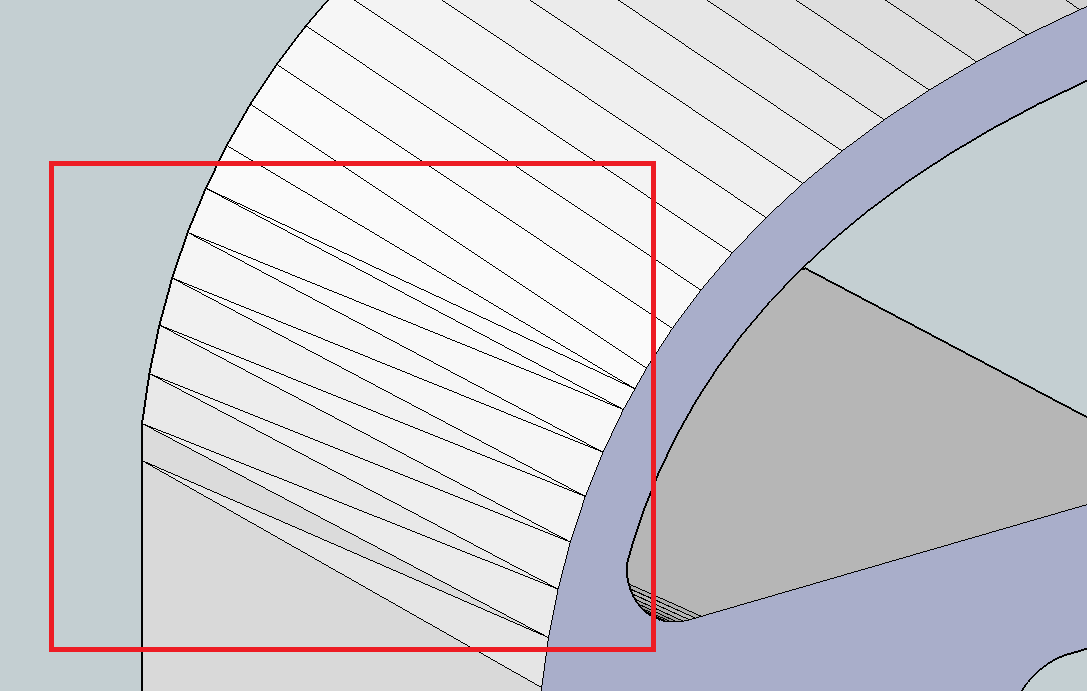
                              Triangular faces

                              Thanks,
                              Rony

                              1 Reply Last reply
                              Reply Quote 0
                              • jgbJ
                                jgb
                                last edited by

                                This is not a Curviloft (CL) problem.

                                Only when a 4 sided face is defined by opposite parallel lines will it form a face without triangles. A triangles face is, by definition, always flat.

                                If a 4 sided (or more) face has any 1 vertex not in exactly the same plane, SU and CL will define the face with triangles.

                                In your model, the lines defining the curves are not quite parallel in the lower 7 segments, and therefore cannot be defined by a 4 sided flat surface. You can prove this to yourself by drawing lines and seeing that they will not face. Other than adjusting one side or the other, there is nothing CL can do to fix that.


                                jgb

                                1 Reply Last reply
                                Reply Quote 0
                                • jeff hammondJ
                                  jeff hammond
                                  last edited by

                                  @ronys said:

                                  Anyway, my question is:
                                  Is there a way to make Curviloft create only quadratian faces?

                                  [attachment=0:358vs3zr]<!-- ia0 -->curviloft.png<!-- ia0 -->[/attachment:358vs3zr]

                                  Thanks,
                                  Rony

                                  post the .skp (or that portion of the model).. there's probably a way to get better results than the long triangles you're getting.. (via better curve segmentation and/or curvilot settings)

                                  dotdotdot

                                  1 Reply Last reply
                                  Reply Quote 0
                                  • J
                                    Jimmymino
                                    last edited by

                                    Hey community.

                                    Im having a bit of trouble with this plugin. Maybe the way I am applying it or maybe Im doing something wrong. Could someone help?

                                    Every time I attempt to loft an object along a path, the preview looks fine but the final result has tons of faces missing.

                                    I am trying to get information on what the various options in the toolbar are once you see the preview, (ie, sampling, interpolating, etc) and what they do, but cant find any info on it.

                                    Can some help?

                                    Jimmy Miño
                                    Owner
                                    the archiTECHtural workshop
                                    http://www.thearchitechturalworkshop.com

                                    1 Reply Last reply
                                    Reply Quote 0
                                    • Dave RD
                                      Dave R
                                      last edited by

                                      Very likely you're working on something that is small and you're running up against the short edges/small faces issue. It would be most helpful if you would upload a sample SKP file that exhibits the problem you're having. Otherwise we're taking stabs in the dark.

                                      Etaoin Shrdlu

                                      %

                                      (THERE'S NO PLACE LIKE)

                                      G28 X0.0 Y0.0 Z0.0

                                      M30

                                      %

                                      1 Reply Last reply
                                      Reply Quote 0
                                      • P
                                        peterromao
                                        last edited by

                                        Hey, great tool tat I've been using for some time.

                                        Funny that only now did I come across this green dialog box stating:

                                        "Handling Needle Eyes and other defects! -1"

                                        Could someone enlighten me as to what this signifies?

                                        Thanks!

                                        1 Reply Last reply
                                        Reply Quote 0
                                        • fredo6F
                                          fredo6
                                          last edited by

                                          @peterromao said:

                                          Funny that only now did I come across this green dialog box stating:

                                          "Handling Needle Eyes and other defects! -1"

                                          Could someone enlighten me as to what this signifies?

                                          Thanks!

                                          There are a few checks on the contours, but this is not very accurate.

                                          Needle eyes are defects which derive from the suprposition of two contours, creating small loops.

                                          In general, Edge defects are better handled by EdgeInspector.

                                          Fredo

                                          1 Reply Last reply
                                          Reply Quote 0
                                          • C
                                            cemileca
                                            last edited by

                                            Hi, Friends..

                                            Curviloft not working in 2015 vercion SU 😞

                                            1 Reply Last reply
                                            Reply Quote 0

                                            Hello! It looks like you're interested in this conversation, but you don't have an account yet.

                                            Getting fed up of having to scroll through the same posts each visit? When you register for an account, you'll always come back to exactly where you were before, and choose to be notified of new replies (either via email, or push notification). You'll also be able to save bookmarks and upvote posts to show your appreciation to other community members.

                                            With your input, this post could be even better 💗

                                            Register Login
                                            • 1
                                            • 2
                                            • 50
                                            • 51
                                            • 52
                                            • 53
                                            • 54
                                            • 65
                                            • 66
                                            • 52 / 66
                                            • First post
                                              Last post
                                            Buy SketchPlus
                                            Buy SUbD
                                            Buy WrapR
                                            Buy eBook
                                            Buy Modelur
                                            Buy Vertex Tools
                                            Buy SketchCuisine
                                            Buy FormFonts

                                            Advertisement