sketchucation logo sketchucation
    • 登入
    Oops, your profile's looking a bit empty! To help us tailor your experience, please fill in key details like your SketchUp version, skill level, operating system, and more. Update and save your info on your profile page today!
    🔌 Smart Spline | Fluid way to handle splines for furniture design and complex structures. Download

    [Plugin] Make Fur v.2.1.0(20140323)

    已排程 已置頂 已鎖定 已移動 Plugins
    650 貼文 255 Posters 1.1m 瀏覽 254 Watching
    正在載入更多貼文
    • 從舊到新
    • 從新到舊
    • 最多點贊
    回覆
    • 在新貼文中回覆
    登入後回覆
    此主題已被刪除。只有擁有主題管理權限的使用者可以查看。
    • cottyC 離線
      cotty
      最後由 編輯

      From the first post of this topic:

      @tak2hata said:

      DOWNLOAD HERE
      Get the latest version from the PluginStore:
      http://sketchucation.com/resources/pluginstore?pln=fur_en
      or AutoInstall from within SketchUp using the SketchUcation Tools

      This version is SU 2015-64 compatible...

      my SketchUp gallery

      1 條回覆 最後回覆 回覆 引用 0
      • A 離線
        alvro
        最後由 編輯

        Does the plugin work on windows 8.1? I tried to install several versions on SU14 and SU15 and always makes the same error: Error: #<Encoding::UndefinedConversionError: "\x81" to UTF-8 in conversion from Windows-1252 to UTF-8>

        Any help?

        1 條回覆 最後回覆 回覆 引用 0
        • Z 離線
          zcaalock
          最後由 編輯

          I have same problem as most of people here: when am using component as source the thing spreads out everywhere. I went through the whole threat and no solution, cannot see any flags to set it up and component axis are set same to rectangle where i want to place the grass.
          Any help?

          http://s16.postimg.org/unpg6eqdh/grass.png

          1 條回覆 最後回覆 回覆 引用 0
          • M 離線
            muchomurka2
            最後由 編輯

            wow,thx!

            1 條回覆 最後回覆 回覆 引用 0
            • S 離線
              Sejoe
              最後由 編輯

              This plugin doesn't working on version 2015 always giving error

              1 條回覆 最後回覆 回覆 引用 0
              • Dave RD 離線
                Dave R
                最後由 編輯

                @sejoe said:

                This plugin doesn't working on version 2015 always giving error

                It works for others with SketchUp 2015.

                Saying "always giving error" but not sharing the error message makes it impossible for anyone to help you if that's what you want. Share the error and you will get some assistance.

                Etaoin Shrdlu

                %

                (THERE'S NO PLACE LIKE)

                G28 X0.0 Y0.0 Z0.0

                M30

                %

                1 條回覆 最後回覆 回覆 引用 0
                • pilouP 離線
                  pilou
                  最後由 編輯

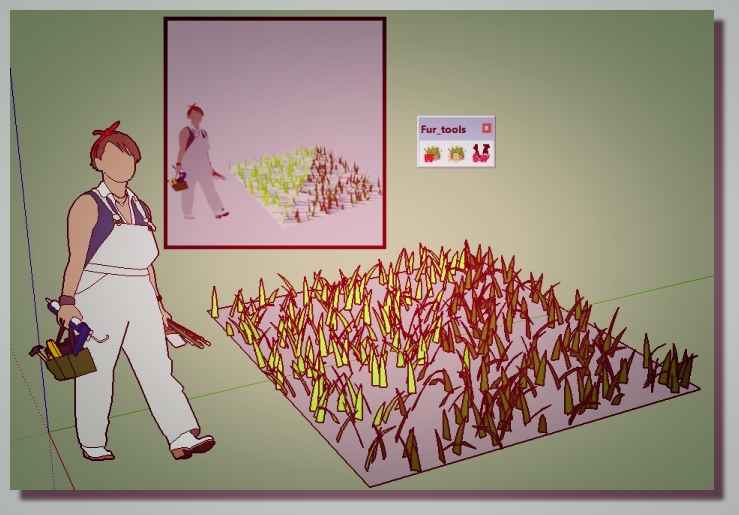
                  Yes works fine for the 2015 & 2016! 😎

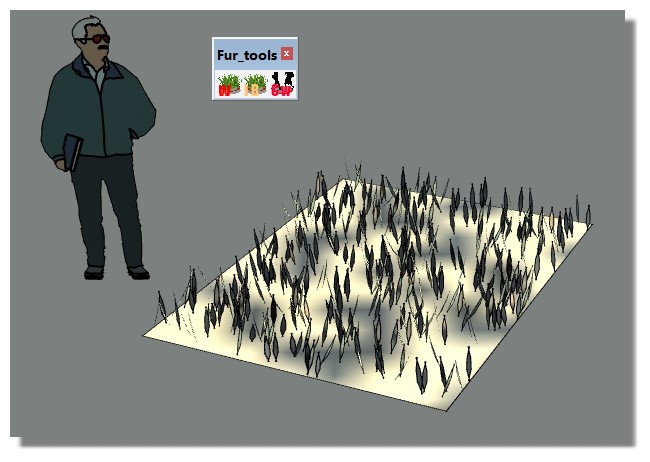
                  fur.jpg
                  fur_2016.jpg

                  Frenchy Pilou
                  Is beautiful that please without concept!
                  My Little site :)

                  1 條回覆 最後回覆 回覆 引用 0
                  • S 離線
                    Sejoe
                    最後由 編輯

                    This is my make fur error what can i do for this?I uninstalled program and installed two times but nothing changed,please help...
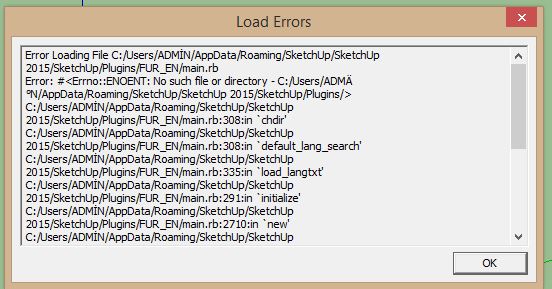

                    my make fur error

                    1 條回覆 最後回覆 回覆 引用 0
                    • TIGT 離線
                      TIG Moderator
                      最後由 編輯

                      This looks like a UTF8 issue with SketchUp's Ruby file-path reading...
                      There are ways of sidestepping this in the newest Ruby - not always invoked.
                      So these might not have been effected in this tool's code.
                      Your Windows user-name seems to be "ADMİN" [I assume that's Turkish (Türk) with a dotted 'I' ?] rather than the immediately acceptable "ADMIN".
                      Accented characters in user-names are very well known for causing issues like this...
                      But newer Plugins, which ought to use the latest Ruby methods, can often sidestep these problem...

                      TIG

                      1 條回覆 最後回覆 回覆 引用 0
                      • M 離線
                        marcodallago
                        最後由 編輯

                        Hi,
                        I have a problem.. I need to create grass in the green area of the image, so that will look the walkway emerge from the grass. But how can i do? With your plugin grass elements come out from the path and this is not what I want. Is there a workaround?
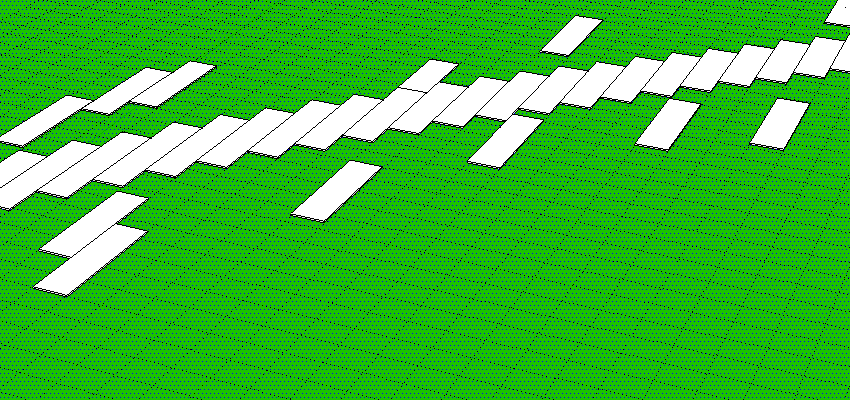
                        Schermata 2016-09-14 alle 15.08.04.png

                        Thanks

                        1 條回覆 最後回覆 回覆 引用 0
                        • majidM 離線
                          majid
                          最後由 編輯

                          فایل آپدیت زبان فارسی
                          Here is the updated Persian ( Farsi ) language file


                          در مسیر فایلهای زبان پلاگین بریزید
                          مثلا
                          C:\Users"User name"\AppData\Roaming\SketchUp\SketchUp 2016\SketchUp\Plugin

                          My inspiring A, B, Sketches book: https://sketchucation.com/shop/books/intermediate/2612-alphabet-inspired-sketches--inspiring-drills-for-architects--3d-artists-and-designers-

                          1 條回覆 最後回覆 回覆 引用 0
                          • S 離線
                            sexypox69
                            最後由 編輯

                            I too had the issue of selecting a surface and when I make fur it would be scattered everywhere except the selected surface. After changing the axis of my proxy that seem to solve the issue. I the tutorial i watch it showed the changing of the axis of the component but not to the proxy created with it. I guest when I changed component to a proxy it changed the imput axis....well this is what worked for me...Im a bit lost when it comes to these things

                            1 條回覆 最後回覆 回覆 引用 0
                            • J 離線
                              jaapberg
                              最後由 編輯

                              Please can someone teach me who can i create plugin? I need this.
                              Thank you

                              1 條回覆 最後回覆 回覆 引用 0
                              • Dave RD 離線
                                Dave R
                                最後由 編輯

                                @einstein said:

                                Any ideas?

                                My guess is pilot error. I just installed it and it works fine for me. We need more information about what exactly you are doing when you try to use it.
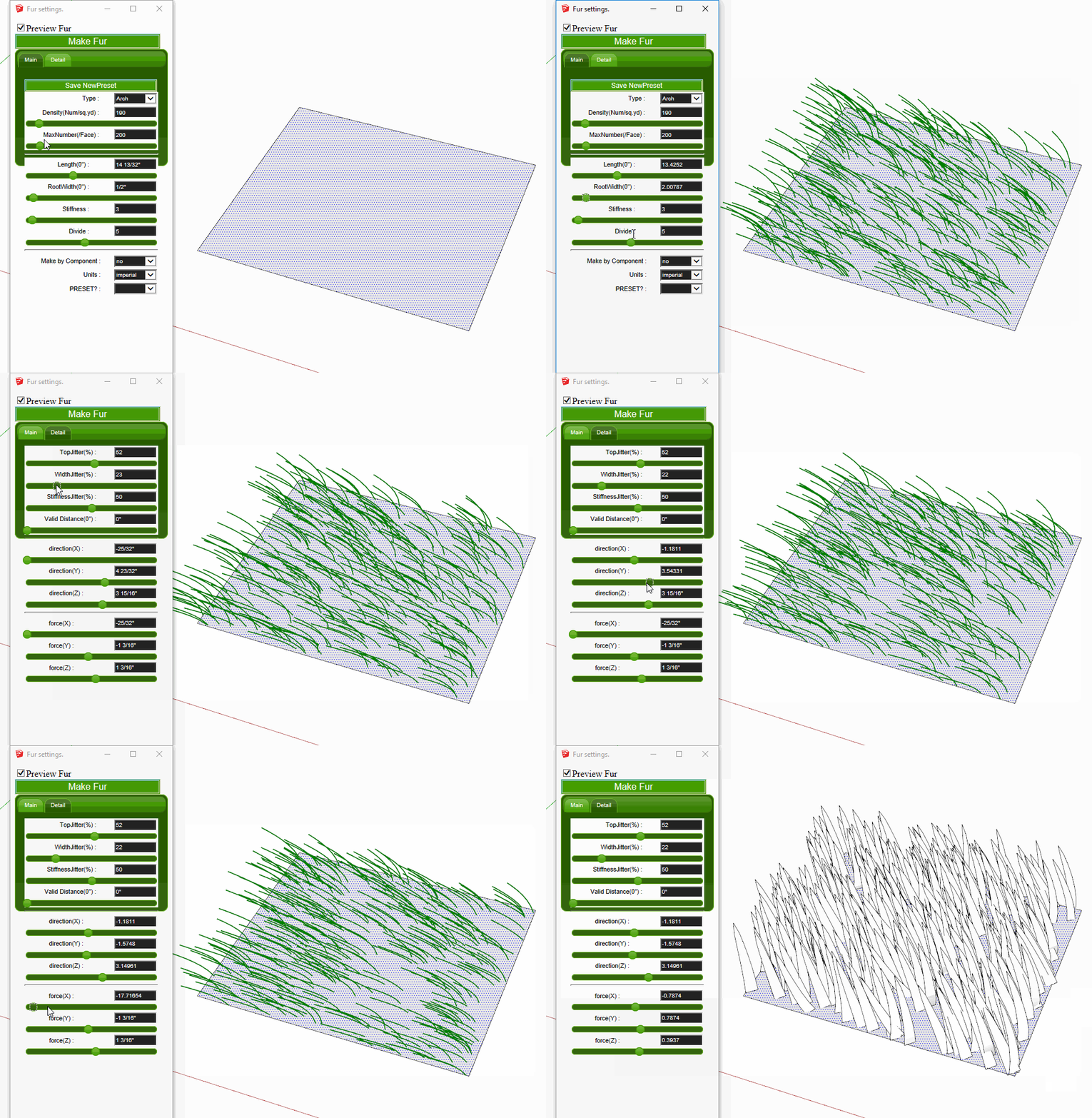
                                fur.gif

                                Etaoin Shrdlu

                                %

                                (THERE'S NO PLACE LIKE)

                                G28 X0.0 Y0.0 Z0.0

                                M30

                                %

                                1 條回覆 最後回覆 回覆 引用 0
                                • E 離線
                                  Einstein
                                  最後由 編輯

                                  No fur (grass) is created 😞 The window shows up but there's no preview, no creation 😞 Sketchup 2017 pro, Win 7 64bit. Any ideas?

                                  1 條回覆 最後回覆 回覆 引用 0
                                  • E 離線
                                    Einstein
                                    最後由 編輯

                                    @dave r said:

                                    @einstein said:

                                    Any ideas?

                                    My guess is pilot error. I just installed it and it works fine for me. We need more information about what exactly you are doing when you try to use it.

                                    [attachment=1:37noox4j]<!-- ia1 -->fur.gif<!-- ia1 -->[/attachment:37noox4j]

                                    What do you mean by "pilot error", what does it mean?
                                    Now I restarted SketchUp a few times and it started working... almost correclty. I can see the preview and generate nice fur. Unless I change some of the parameters: Length, RootWidth (Main tab) and directions, forces (Detail tab) cause the script to kinda get stuck. The preview doesn't change and the geometry doesn't generate. Nothing happens when I click MAKE FUR. I can only close the window and start again with the same issues. In comparison: if I adjust e.g. Stiffness, Divide (Main tab) or things in Detail tab marked green, everything works properly. Looks like the Author wanted to say: green background means "compatibility guaranteed", white bacground means "you're doing this at your own risk". I don't know if it really matters, if the script somehow checks compatibility. Cuz the Author's menu is all green 😛

                                    And one more question - is it possible with this plugin to retain proxies after generation and render fur fully only in external renderer, like v-ray?

                                    I attached the file I'm working with but certainly the problem is not about certain model.


                                    Untitled.skp

                                    1 條回覆 最後回覆 回覆 引用 0
                                    • Dave RD 離線
                                      Dave R
                                      最後由 編輯

                                      Pilot error=user error. I thought Einstein would know that. Sorry.

                                      Maybe you've set the length too short?
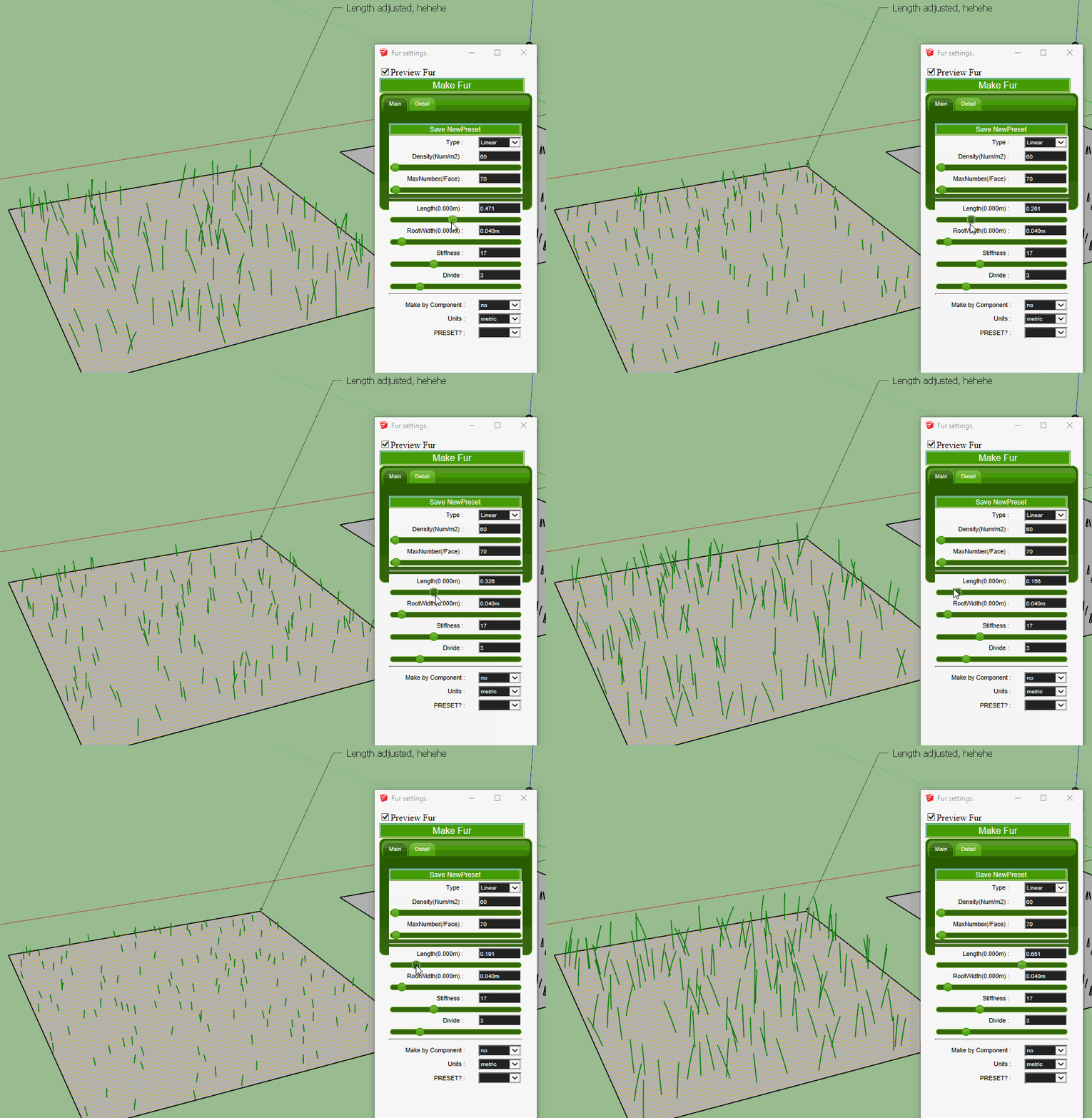
                                      Click the picture

                                      As for proxies, I'm not sure that is within the scope of this extension. I think you'd need another approach for that.

                                      Etaoin Shrdlu

                                      %

                                      (THERE'S NO PLACE LIKE)

                                      G28 X0.0 Y0.0 Z0.0

                                      M30

                                      %

                                      1 條回覆 最後回覆 回覆 引用 0
                                      • E 離線
                                        Einstein
                                        最後由 編輯

                                        Maybe I should change my nickname...

                                        I assume that when you click MAKE FUR, the geometry generates. So yes, this must be something with my sketchup.

                                        The behaviour doesn't change but thank you for your attempt to help me!

                                        1 條回覆 最後回覆 回覆 引用 0
                                        • TIGT 離線
                                          TIG Moderator
                                          最後由 編輯

                                          What settings do you have - compared to Dave's - which work ?
                                          Perhaps a screen-shot ?
                                          If you try it with the Ruby Console open are there any error messages ?
                                          Please be aware that this toolset is getting somewhat old...

                                          TIG

                                          1 條回覆 最後回覆 回覆 引用 0
                                          • E 離線
                                            Einstein
                                            最後由 編輯

                                            I tried to generate fur with SketchUp 8 also but the same problem exists with the same set of non-working params.

                                            Working parameters: Density, MaxNumber, Stiffness, Divide (Main tab), all Jitters, ValidDistance (Detail tab).

                                            Non-working parameters: Length, RootWidth (Main tab), directions and forces (Detail tab).

                                            No matter what values I am using, errors show up. I tried similar values to Dave's but it didn't change anything.

                                            Example error in Ruby console when adjusting non-working params:

                                            Error: #<ArgumentError: Cannot convert "0.006" to Length>
                                            C:/Program Files (x86)/Google/Google SketchUp 8/Plugins/FUR_EN/main.rb:2407:in to_l' C:/Program Files (x86)/Google/Google SketchUp 8/Plugins/FUR_EN/main.rb:2407:in s_to_l'
                                            C:/Program Files (x86)/Google/Google SketchUp 8/Plugins/FUR_EN/main.rb:1398:in start_fur_test' C:/Program Files (x86)/Google/Google SketchUp 8/Plugins/FUR_EN/main.rb:1340:in show_webdialog'
                                            C:/Program Files (x86)/Google/Google SketchUp 8/Plugins/FUR_EN/main.rb:2407:in `call'
                                            C:/Program Files (x86)/Google/Google SketchUp 8/Plugins/FUR_EN/main.rb:2407

                                            Additionally, when I adjust a non-working param and after that, a working param, also that working param starts to generate Ruby errors. Only when I restart plugin, I can use some of the params again.
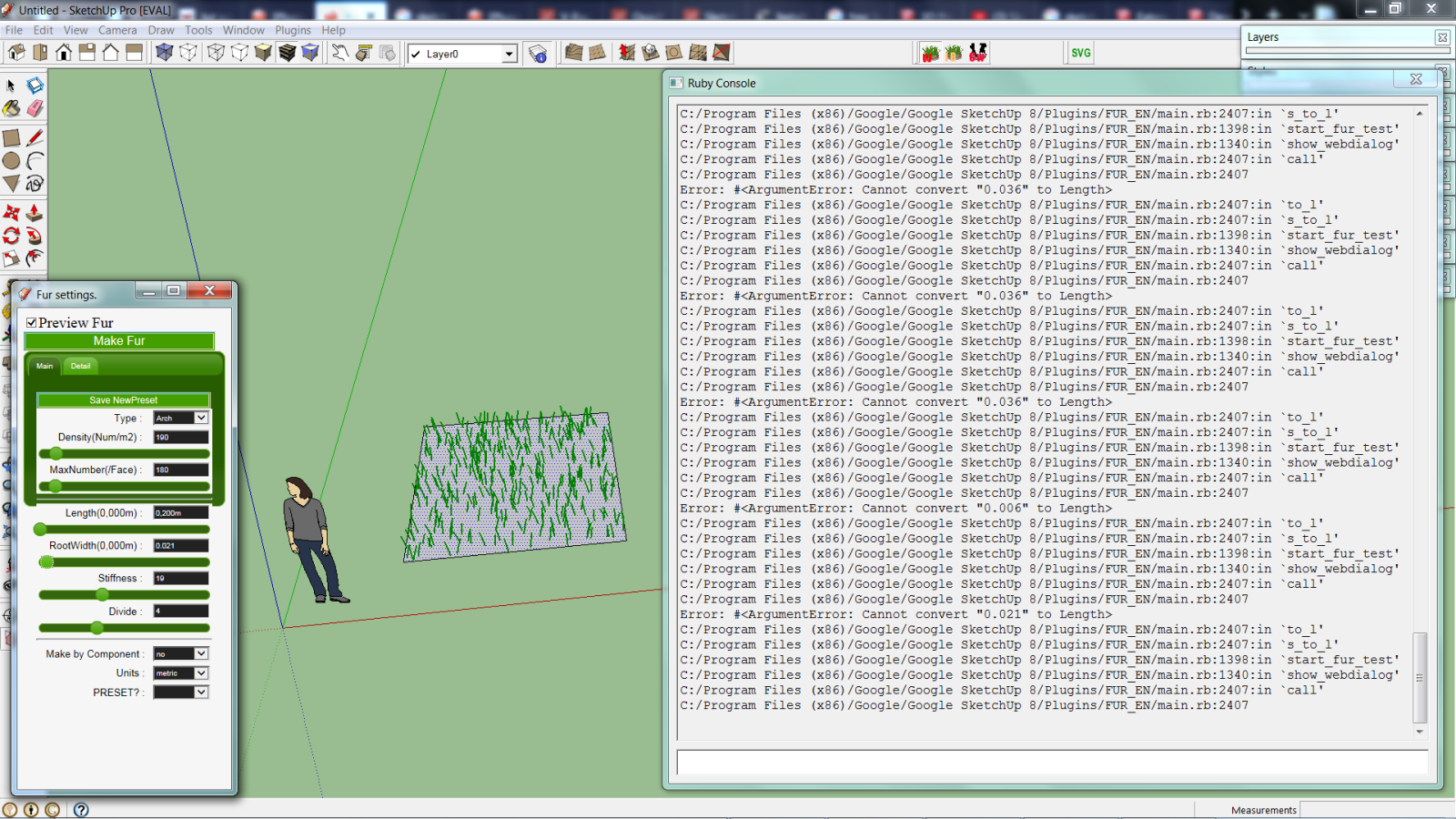


                                            fur error.png

                                            1 條回覆 最後回覆 回覆 引用 0
                                            • 1
                                            • 2
                                            • 6
                                            • 7
                                            • 8
                                            • 9
                                            • 10
                                            • 32
                                            • 33
                                            • 8 / 33
                                            • 第一個貼文
                                              最後的貼文
                                            Buy SketchPlus
                                            Buy SUbD
                                            Buy WrapR
                                            Buy eBook
                                            Buy Modelur
                                            Buy Vertex Tools
                                            Buy SketchCuisine
                                            Buy FormFonts

                                            Advertisement