sketchucation logo sketchucation
    • 登入
    Oops, your profile's looking a bit empty! To help us tailor your experience, please fill in key details like your SketchUp version, skill level, operating system, and more. Update and save your info on your profile page today!
    🔌 Smart Spline | Fluid way to handle splines for furniture design and complex structures. Download

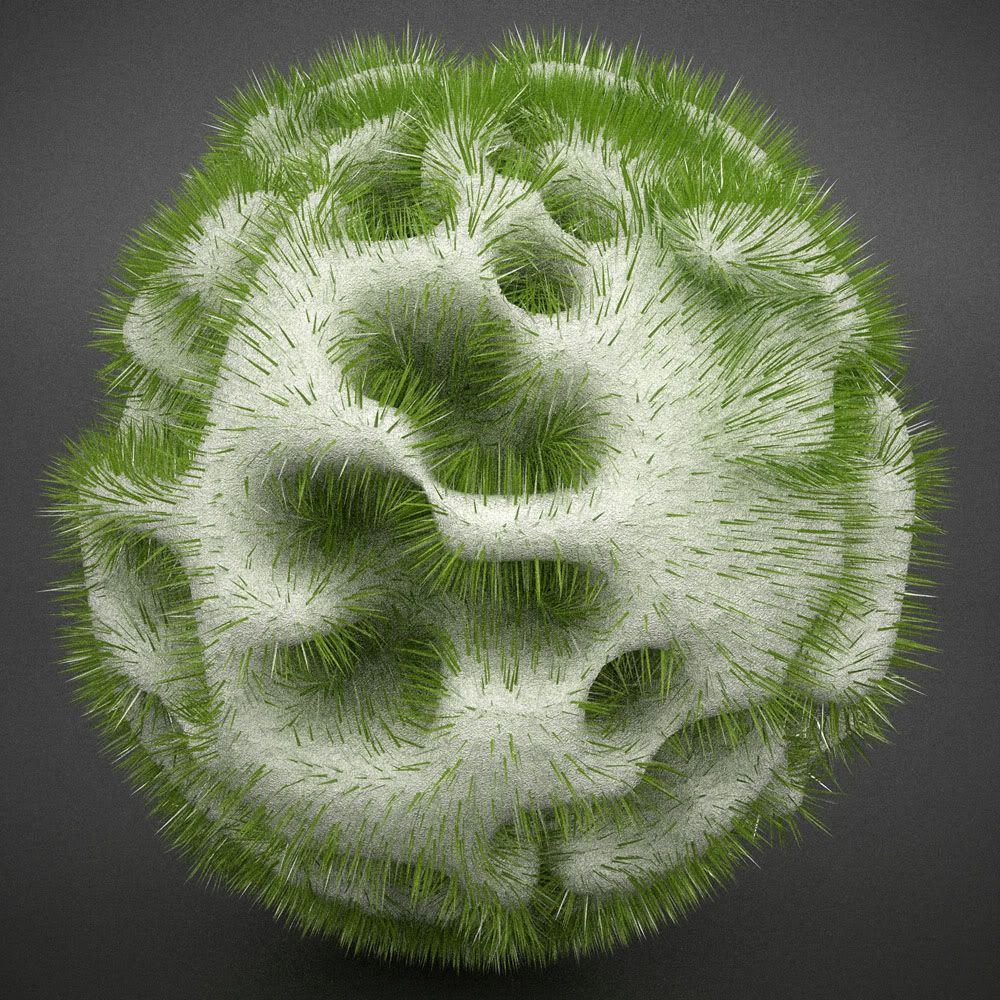
    [Plugin] Make Fur v.2.1.0(20140323)

    已排程 已置頂 已鎖定 已移動 Plugins
    650 貼文 255 Posters 1.1m 瀏覽 254 Watching
    正在載入更多貼文
    • 從舊到新
    • 從新到舊
    • 最多點贊
    回覆
    • 在新貼文中回覆
    登入後回覆
    此主題已被刪除。只有擁有主題管理權限的使用者可以查看。
    • tridemT 離線
      tridem
      最後由 編輯

      one more THANK YOU
      ...and one more request 😆 in such a tool it's usefull having the Esc key available, to stop the process if it take too long than expected

      1 條回覆 最後回覆 回覆 引用 0
      • thomthomT 離線
        thomthom
        最後由 編輯

        @tridem said:

        ...and one more request 😆 in such a tool it's usefull having the Esc key available, to stop the process if it take too long than expected

        That is easier said than done. It's difficult to get any key press events while scripts are running. Though I thing Fredo has some feature like that...

        Thomas Thomassen — SketchUp Monkey & Coding addict
        List of my plugins and link to the CookieWare fund

        1 條回覆 最後回覆 回覆 引用 0
        • massimoM 離線
          massimo Moderator
          最後由 編輯

          Really funny thank you tak2hata! 👍

          1 條回覆 最後回覆 回覆 引用 0
          • K 離線
            KarinaGM
            最後由 編輯

            Wow!
            Amazing tool.
            I've just downloaded it and can't wait to start (playing) experimenting

            THANKS!

            **"Aquel que sacrifica un poco de libertad por seguridad, no se merece ninguna y terminará perdiendo ambas"

            -Benjamín Franklin.**

            1 條回覆 最後回覆 回覆 引用 0
            • olisheaO 離線
              olishea
              最後由 編輯

              so much fun!!

              would be nice if there was a "set defaults" button....and if it remembered your settings between tweaking.

              would also be good if the grass was automatically placed on a new layer so you can quickly turn it off or on....you could render the scene without the geometry even being present.

              Sketchup view of an old model of mine:
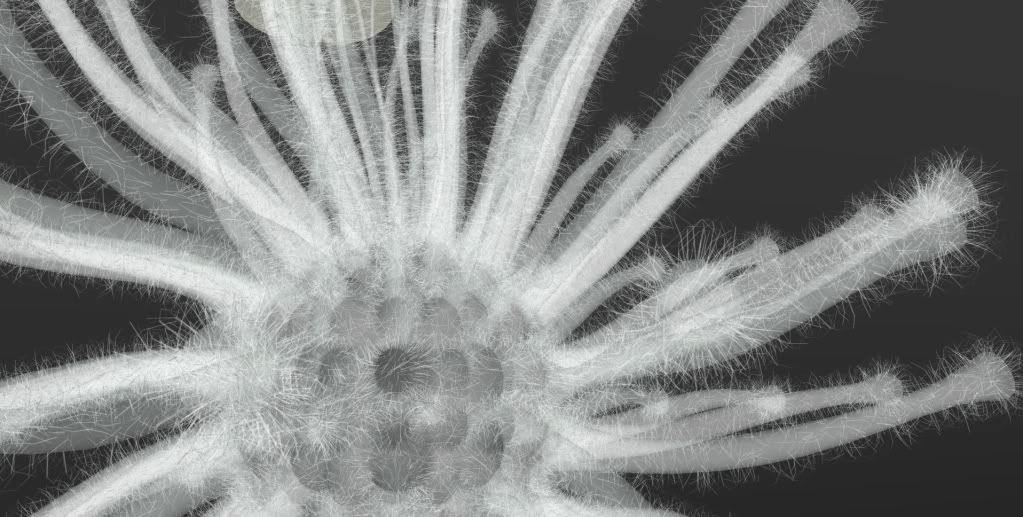
              http://i654.photobucket.com/albums/uu269/olishea/urchin_hairy.jpg

              oli

              1 條回覆 最後回覆 回覆 引用 0
              • tridemT 離線
                tridem
                最後由 編輯

                @thomthom said:

                ..
                Though I thing Fredo has some feature like that...

                I believe so... eg 'round corner' can do it

                1 條回覆 最後回覆 回覆 引用 0
                • T 離線
                  tak2hata
                  最後由 編輯

                  I updated the plugin. it's version 1.0.

                  I saw some requests now.
                  It seems to be difficult in my skill.
                  Hereafter, I will study Ruby more.


                  by TAK2HATA

                  1 條回覆 最後回覆 回覆 引用 0
                  • thomthomT 離線
                    thomthom
                    最後由 編輯

                    @tak2hata said:

                    I updated the plugin. it's version 1.0.

                    I saw some requests now.
                    It seems to be difficult in my skill.
                    Hereafter, I will study Ruby more.

                    😄 Yea, you've started something. 😄
                    If you need help with anything just ask at this forum, people are happy to help.

                    Thomas Thomassen — SketchUp Monkey & Coding addict
                    List of my plugins and link to the CookieWare fund

                    1 條回覆 最後回覆 回覆 引用 0
                    • olisheaO 離線
                      olishea
                      最後由 編輯

                      beautiful plugin.

                      I placed the grass on hidden layer and replaced the component with a single line. Then rendered in twilight using "render all hidden layers" option.

                      so each line represents blade of grass.

                      close up of components
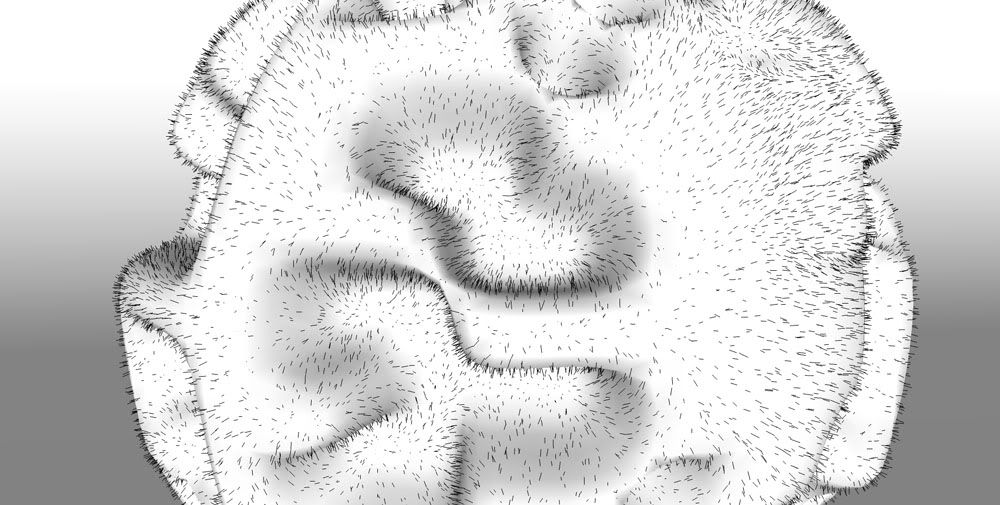
                      http://i654.photobucket.com/albums/uu269/olishea/FUR2.jpg

                      twilight render

                      http://i654.photobucket.com/albums/uu269/olishea/FUR.jpg

                      oli

                      1 條回覆 最後回覆 回覆 引用 0
                      • GaieusG 離線
                        Gaieus
                        最後由 編輯

                        That's my nostril form inside, Oli 😲

                        Definitely a very promising plugin! I really need to try it out (and Twilight's and Kerkythea's instancing abilities during rendering makes it easy to use hopefully)
                        👍 👍 👍

                        Gai...

                        1 條回覆 最後回覆 回覆 引用 0
                        • T 離線
                          tak2hata
                          最後由 編輯

                          @thomthom said:

                          @tak2hata said:

                          I updated the plugin. it's version 1.0.

                          I saw some requests now.
                          It seems to be difficult in my skill.
                          Hereafter, I will study Ruby more.

                          😄 Yea, you've started something. 😄
                          If you need help with anything just ask at this forum, people are happy to help.

                          Hi, thomas.
                          I am variously studying the article on this site.
                          Especially, Optimazition tips in Developer forum.
                          It's very useful.
                          Thanks.


                          by TAK2HATA

                          1 條回覆 最後回覆 回覆 引用 0
                          • olisheaO 離線
                            olishea
                            最後由 編輯

                            gai: just place the grass on a hidden layer and tell twilight to render all hidden layers. then bobs your uncle. its very very easy to do. you dont even need to rplace the grass with lines, i just did it so i knew where the grass was.

                            right click>twilight>render all hidden layers

                            chi ching

                            and yes it is very nasal!

                            oli

                            1 條回覆 最後回覆 回覆 引用 0
                            • DavidBoulderD 離線
                              DavidBoulder
                              最後由 編輯

                              Looks great, I haven't tried this yet, but I'm surprised nobody has posted a beard on Sang or a chi-Sang with grass growing off his head.

                              --

                              David Goldwasser
                              OpenStudio Developer
                              National Renewable Energy Laboratory

                              1 條回覆 最後回覆 回覆 引用 0
                              • J 離線
                                Jim
                                最後由 編輯

                                @davidboulder said:

                                Looks great, I haven't tried this yet, but I'm surprised nobody has posted a beard on Sang or a chi-Sang with grass growing off his head.

                                olishea beat you to it:

                                http://forums.sketchucation.com/viewtopic.php?f=81&t=28127

                                Hi

                                1 條回覆 最後回覆 回覆 引用 0
                                • olisheaO 離線
                                  olishea
                                  最後由 編輯

                                  yeah sorry about that 😄

                                  oli

                                  1 條回覆 最後回覆 回覆 引用 0
                                  • DavidBoulderD 離線
                                    DavidBoulder
                                    最後由 編輯

                                    No problem, I just missed it. Looks kind of like bigfoot.

                                    --

                                    David Goldwasser
                                    OpenStudio Developer
                                    National Renewable Energy Laboratory

                                    1 條回覆 最後回覆 回覆 引用 0
                                    • X 離線
                                      xrok1
                                      最後由 編輯

                                      the component instance is great but as you can see by the results they're not nearly as nice as without it. 😢 is they're any way to improve this? perhaps if thomthom code for 'group to component' were somehow utilized to recognize the individuals even though there are slight variations. or maybe if a small group (6-12~) was made into a component and instanced instead of each individual?
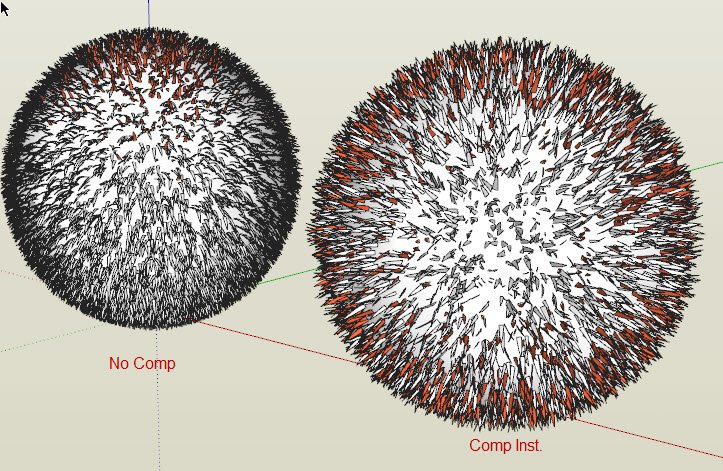

                                      Capture1.JPG

                                      “There are three classes of people: those who see. Those who see when they are shown. Those who do not see.”

                                      http://www.Twilightrender.com try it!

                                      1 條回覆 最後回覆 回覆 引用 0
                                      • U 離線
                                        unclex
                                        最後由 編輯

                                        it's wonderful
                                        thx

                                        1 條回覆 最後回覆 回覆 引用 0
                                        • X 離線
                                          xrok1
                                          最後由 編輯

                                          if you look at the image it seems to have something to do with rotation (gravity) as well?? 😕

                                          “There are three classes of people: those who see. Those who see when they are shown. Those who do not see.”

                                          http://www.Twilightrender.com try it!

                                          1 條回覆 最後回覆 回覆 引用 0
                                          • urgenU 離線
                                            urgen
                                            最後由 編輯

                                            ...very cool! 😎 thank you! 👍

                                            --pupil forever...------

                                            1 條回覆 最後回覆 回覆 引用 0
                                            • 1
                                            • 2
                                            • 5
                                            • 6
                                            • 7
                                            • 8
                                            • 9
                                            • 32
                                            • 33
                                            • 7 / 33
                                            • 第一個貼文
                                              最後的貼文
                                            Buy SketchPlus
                                            Buy SUbD
                                            Buy WrapR
                                            Buy eBook
                                            Buy Modelur
                                            Buy Vertex Tools
                                            Buy SketchCuisine
                                            Buy FormFonts

                                            Advertisement