sketchucation logo sketchucation
    • 登入
    Oops, your profile's looking a bit empty! To help us tailor your experience, please fill in key details like your SketchUp version, skill level, operating system, and more. Update and save your info on your profile page today!
    🔌 Smart Spline | Fluid way to handle splines for furniture design and complex structures. Download

    [Plugin] Make Fur v.2.1.0(20140323)

    已排程 已置頂 已鎖定 已移動 Plugins
    650 貼文 255 Posters 1.1m 瀏覽 254 Watching
    正在載入更多貼文
    • 從舊到新
    • 從新到舊
    • 最多點贊
    回覆
    • 在新貼文中回覆
    登入後回覆
    此主題已被刪除。只有擁有主題管理權限的使用者可以查看。
    • thkian92T 離線
      thkian92
      最後由 編輯

      Nope, no error message was shown when starting sketchup 2013. The Toolbar doesn't show and I can't find the plugin anywhere. But the older version of your plugin works perfectly in sketchup 2013.

      How did you install version 2.0.6 in order to get it to work?

      1 條回覆 最後回覆 回覆 引用 0
      • D 離線
        DavorP
        最後由 編輯

        Hi Takuji,

        Love the new Fur. Works great for populating grass. Here are a few images populated with Fur using Podium Browser grass instances and rendered with Podium.

        There is one thing I noticed though. Fur paints component instances with currently selected SU material when using Make by Component.
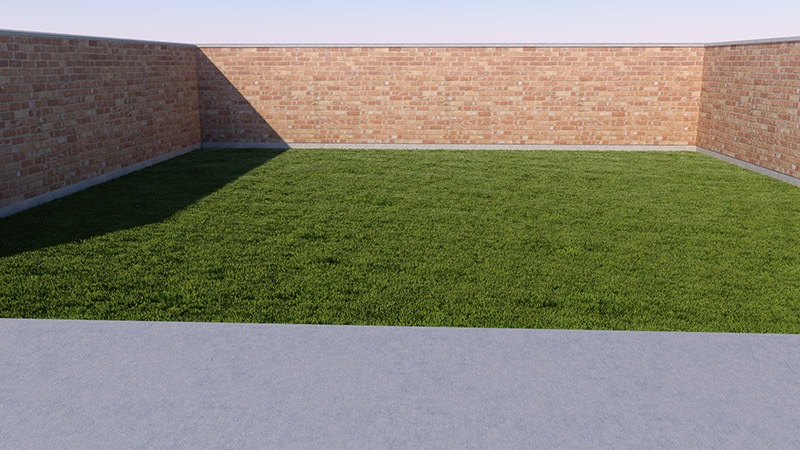
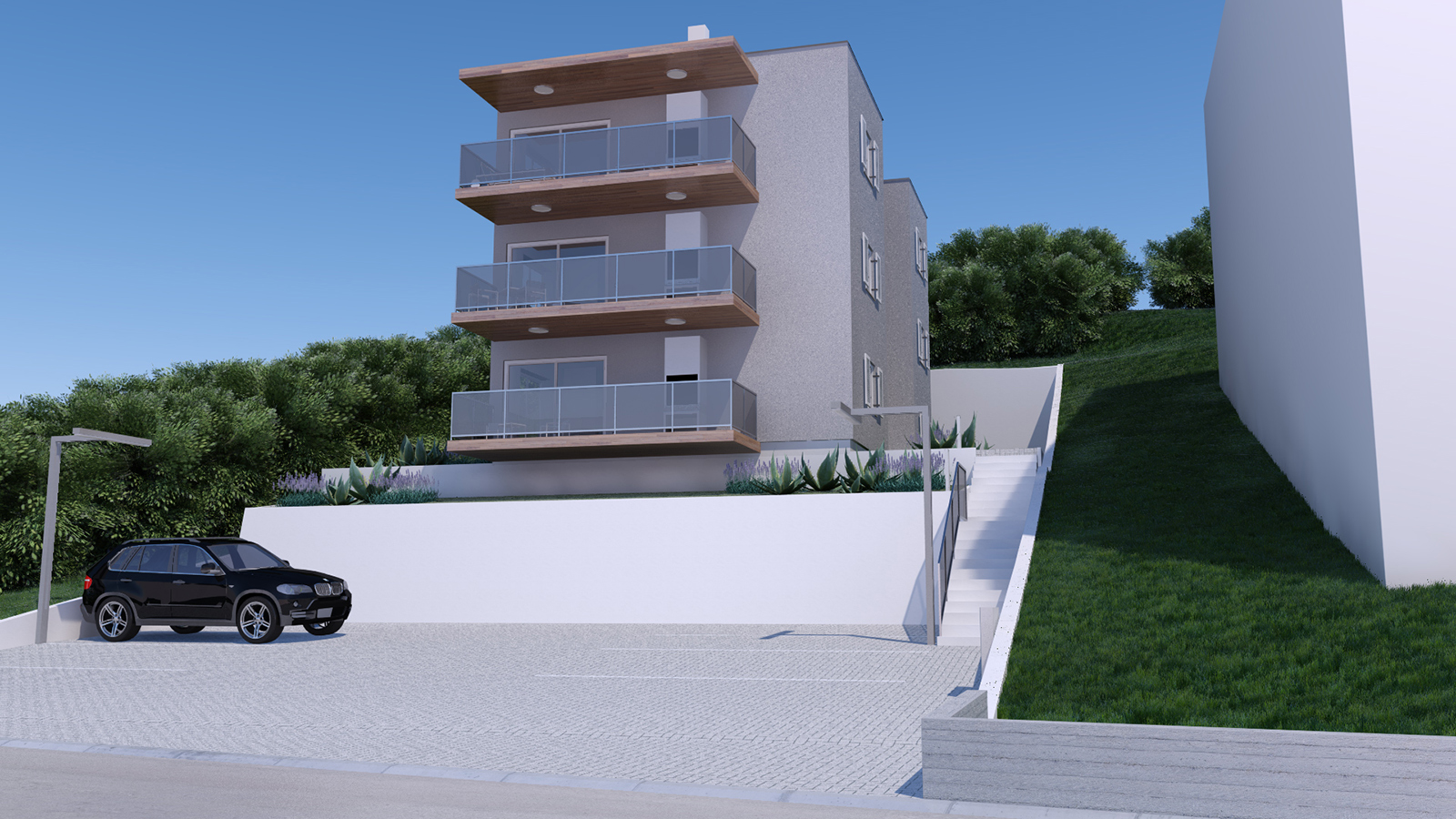
        Grass_workshop_04_2013-06-11-17052800000.jpg


        Model_08_image_03_sketchucation.jpg

        1 條回覆 最後回覆 回覆 引用 0
        • K 離線
          kashkasha
          最後由 編輯

          @mdm said:

          man this plugin is awesome 😍 🎉 🎉 🎉 🎉 🎉 🎉
          for landscaper couldn't be anything better, our dreams came through now we can grow grass in the computer, can't wait for the first mower 🤣 will be available
          great stuff I love it, and it's so much fun 😄

          where can i download it also? its seems everyone is "make-furing" except me... 😕

          1 條回覆 最後回覆 回覆 引用 0
          • TIGT 離線
            TIG Moderator
            最後由 編輯

            @kashkasha said:

            @mdm said:

            man this plugin is awesome 😍 🎉 🎉 🎉 🎉 🎉 🎉
            for landscaper couldn't be anything better, our dreams came through now we can grow grass in the computer, can't wait for the first mower 🤣 will be available
            great stuff I love it, and it's so much fun 😄

            where can i download it also? its seems everyone is "make-furing" except me... 😕

            Go to the start of the tools thread OR... please learn to use the SCF PluginStore... which can be accessed from the Resources menu above... 😒

            TIG

            1 條回覆 最後回覆 回覆 引用 0
            • T 離線
              tak2hata
              最後由 編輯

              Hi,Walt.
              I create the test_dialog.html
              test_dialog.html.zip
              please copy this file to fur_en folder.
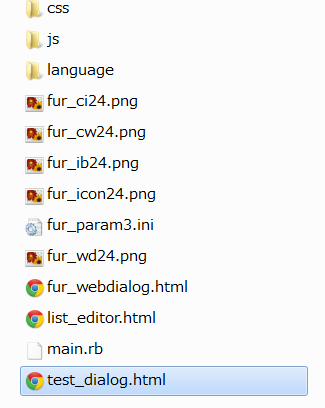
              test_dialog copy to there

              And open the html file on browser.
              I will modify fur_en to create html file if the html file show sliders

              Hi,Davor.
              Nicely rendered image! 😍
              Architecture need the beautiful grass like this.

              Hi,kashkasha.
              Please get install files on the top of this thread.
              And Enjoy fur_en!

              Hi,TIG.
              Thank you very much for your advice.

              Thanks All.


              by TAK2HATA

              1 條回覆 最後回覆 回覆 引用 0
              • L 離線
                leaosenzala
                最後由 編輯

                @thkian92 said:

                Hi,
                Thanks for the plugin! But I have a problem. It seems that I can't get v2.0.6 to work on the new Sketchup 2013. Am i doing something wrong? As usual I've placed the plugin in C:\Program Files (x86)\SketchUp\SketchUp 2013\Plugins.

                what i did was change the extension rbz to zip then extract to plugin folder

                1 條回覆 最後回覆 回覆 引用 0
                • TIGT 離線
                  TIG Moderator
                  最後由 編輯

                  Are they really in the folder?
                  Do you have full security access rights to your Plugins folder?
                  Were all files left in the same relationship [subfolders etc] as in the RBZ [ZIP]?
                  Because you didn't bother to complete your User-Info we don't know your OS [although we can guess 64bit PC] or your SUp Version.
                  If you have SUp v8 or v2013 you could far more easily install RBZ files etc in several ways... avoiding any of the complications you outlined...

                  This kind of issue has been discussed many times, in many threads...

                  TIG

                  1 條回覆 最後回覆 回覆 引用 0
                  • C 離線
                    ChEBaNaNa
                    最後由 編輯

                    This Plugin is probably the best Plugin i've ever seen....
                    Big Thanks from Switzerland!!!!! 😃

                    1 條回覆 最後回覆 回覆 引用 0
                    • plot-parisP 離線
                      plot-paris
                      最後由 編輯

                      Hey tak2hata,

                      excellent plugin! It is fun to use and a great enhancement for SketchUp.

                      However, sometimes I find it a bit difficult to master. Therefore I have two ideas:

                      1. Some of the settings use units that are not very intuitive. The stiffness for example is measured in a undefined number. Or while the jitter options use percent, the direction and force options use meters (which can be difficult, so that one has to test a lot before achieving the right result).
                        I think it might be better to have those as a percentage as well (0% no effect, 100% full effect). Like that one can see a linear increase of the effect, which makes it easier to understand.

                      2. Some of the settings are not self-explanatory. Do you think it would be possible to add tooltips that show up, when you hover over the setting with your cursor for some time? You know, with a short description of what the setting does...

                      Would be great to hear your opinion on this...

                      1 條回覆 最後回覆 回覆 引用 0
                      • B 離線
                        bb6
                        最後由 編輯

                        谢谢!hebeijianke

                        1 條回覆 最後回覆 回覆 引用 0
                        • S 離線
                          Sharkyzero
                          最後由 編輯

                          I don't seem to be getting the results everybody else is. I make a grass square and make it a component, then I try to use the crowd maker and it puts the grass everywhere else other than what I have selected. Anybody else have this problem? Also, how do you get so much grass? My comp is no slouch and it virtually crashes whenever I try to get more than a little bit in view.

                          1 條回覆 最後回覆 回覆 引用 0
                          • T 離線
                            tak2hata
                            最後由 編輯

                            @sharkyzero said:

                            I don't seem to be getting the results everybody else is. I make a grass square and make it a component, then I try to use the crowd maker and it puts the grass everywhere else other than what I have selected. Anybody else have this problem? Also, how do you get so much grass? My comp is no slouch and it virtually crashes whenever I try to get more than a little bit in view.

                            Hi,Sharkyzero.

                            I need to know your detail to help the problems.
                            Please upload screenshot of your model and crownd maker dialog.
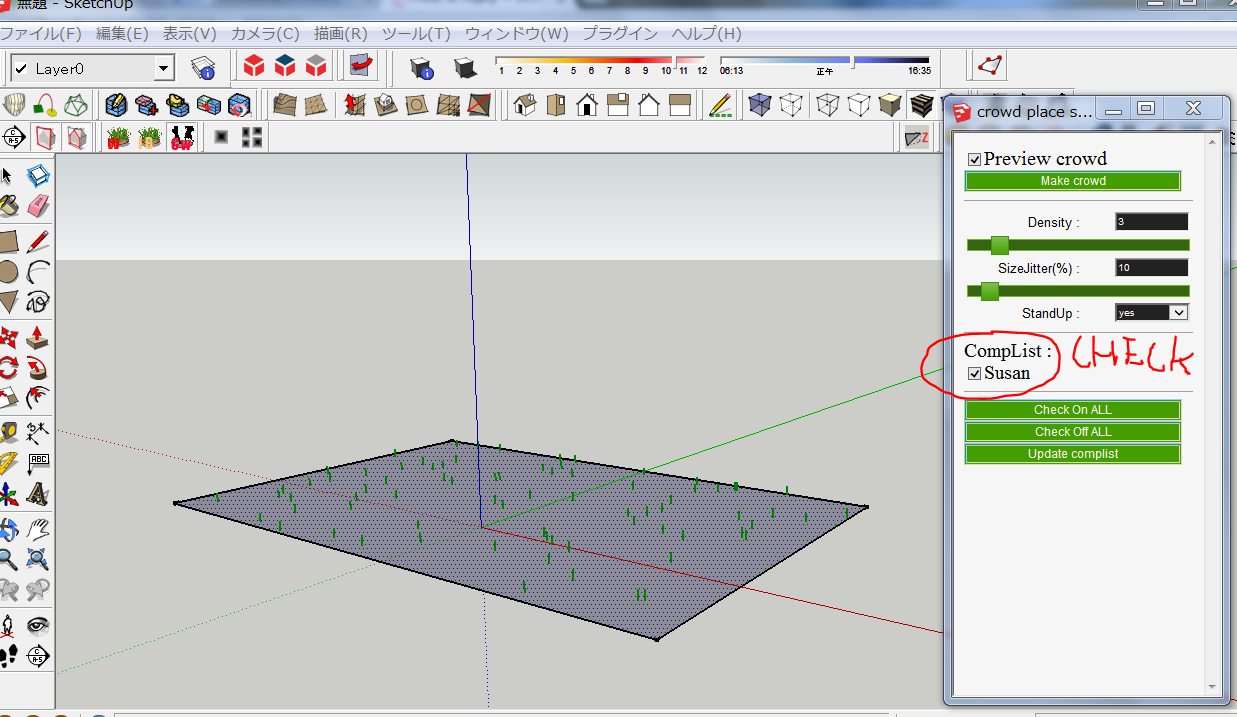
                            crowdmaker
                            Thanks.


                            by TAK2HATA

                            1 條回覆 最後回覆 回覆 引用 0
                            • S 離線
                              Sharkyzero
                              最後由 編輯

                              I just realized something, Tak. I think the fact that I'm not using instances of the grass components is screwing with everything. Let me fiddle around with it some more and I'll see if I can't get it working the way I think it should.

                              1 條回覆 最後回覆 回覆 引用 0
                              • T 離線
                                tak2hata
                                最後由 編輯

                                Hi,Sharkyzero.
                                Good luck for fiddle around with it.
                                Please ask me when you didn't get it working fine.

                                Thanks.


                                by TAK2HATA

                                1 條回覆 最後回覆 回覆 引用 0
                                • C 離線
                                  chillotti
                                  最後由 編輯

                                  Hi everybody, I have a problem, I can’t install the plugin Fur Maker, I put the file http://sketchucation.com/resources/pluginstore?pln=fur_en
                                  And also the new icons
                                  http://sketchucation.com/forums/viewtopic.php?f=323&t=28092&start=480
                                  in the
                                  C:\Program Files (x86)\SketchUp\SketchUp 2013\Plugins
                                  Can you help me? Please

                                  Thanks
                                  Carlo

                                  1 條回覆 最後回覆 回覆 引用 0
                                  • T 離線
                                    tak2hata
                                    最後由 編輯

                                    @chillotti said:

                                    Hi everybody, I have a problem, I can’t install the plugin Fur Maker, I put the file http://sketchucation.com/resources/pluginstore?pln=fur_en
                                    And also the new icons
                                    http://sketchucation.com/forums/viewtopic.php?f=323&t=28092&start=480
                                    in the
                                    C:\Program Files (x86)\SketchUp\SketchUp 2013\Plugins
                                    Can you help me? Please

                                    Thanks
                                    Carlo

                                    Hi,chillotti.
                                    I guess you didn't use autoinstall from sketchupucation store tool.
                                    You must unzip the rbz file when you manually install it.
                                    Change the extenstion name "rbz" to "zip".and unzip it.
                                    "fur_en.rb" and "fur_en" folder will be shown.
                                    Copy both to plugin folder.
                                    And New Icon file "fur_en.rar" must unzip ,also.
                                    Copy the created png file to "fur_en" folder in plugins folder.

                                    Thanks.


                                    by TAK2HATA

                                    1 條回覆 最後回覆 回覆 引用 0
                                    • S 離線
                                      SuperJesus
                                      最後由 編輯

                                      This was working previously for me but there are certain components that dont seem to want to constrain the surface I select. The preview shows everything in the right place but then they appear randomly spread out in mid air over a huge area when I do it. Its only certain components with the same settings so I don't get it. Has anybody had this issue before?

                                      1 條回覆 最後回覆 回覆 引用 0
                                      • T 離線
                                        tak2hata
                                        最後由 編輯

                                        @superjesus said:

                                        This was working previously for me but there are certain components that dont seem to want to constrain the surface I select. The preview shows everything in the right place but then they appear randomly spread out in mid air over a huge area when I do it. Its only certain components with the same settings so I don't get it. Has anybody had this issue before?

                                        Hi,SuperJesus.
                                        I guess your problem of fur.
                                        watch video

                                        Please Check the axis origin of the component.
                                        Thanks.


                                        by TAK2HATA

                                        1 條回覆 最後回覆 回覆 引用 0
                                        • bulbaB 離線
                                          bulba
                                          最後由 編輯

                                          thanks tak2hata..
                                          this plugin is very useful

                                          1 條回覆 最後回覆 回覆 引用 0
                                          • Y 離線
                                            Yoshi Ikeda
                                            最後由 編輯

                                            Hy,

                                            The fur plug in work for sketch up 8 Pro BUT it doesnot work in sketch up 2013 Pro,
                                            Any advice?

                                            Regards,
                                            Yoshi Ikeda

                                            1 條回覆 最後回覆 回覆 引用 0
                                            • 1
                                            • 2
                                            • 3
                                            • 4
                                            • 5
                                            • 6
                                            • 32
                                            • 33
                                            • 4 / 33
                                            • 第一個貼文
                                              最後的貼文
                                            Buy SketchPlus
                                            Buy SUbD
                                            Buy WrapR
                                            Buy eBook
                                            Buy Modelur
                                            Buy Vertex Tools
                                            Buy SketchCuisine
                                            Buy FormFonts

                                            Advertisement