sketchucation logo sketchucation
    • Login
    Oops, your profile's looking a bit empty! To help us tailor your experience, please fill in key details like your SketchUp version, skill level, operating system, and more. Update and save your info on your profile page today!
    Mac User? | Join the Rayscaper Beta for Mac Learn More

    [Plugin] Make Fur v.2.1.0(20140323)

    Scheduled Pinned Locked Moved Plugins
    650 Posts 255 Posters 1.3m Views 254 Watching
    Loading More Posts
    • Oldest to Newest
    • Newest to Oldest
    • Most Votes
    Reply
    • Reply as topic
    Log in to reply
    This topic has been deleted. Only users with topic management privileges can see it.
    • M
      Mauhaus
      last edited by

      Hi Gaieus

      Thanx for replying 😎
      Yes, I have been running 7 (7.1.6859) PRO for some time now. The dwg-import option disappeared after installing it. Maybe I didn't install it properly?

      /Thomas

      1 Reply Last reply
      Reply Quote 0
      • S
        SuperSized
        last edited by

        In the spirit of the SA World Cup.... nice plugin
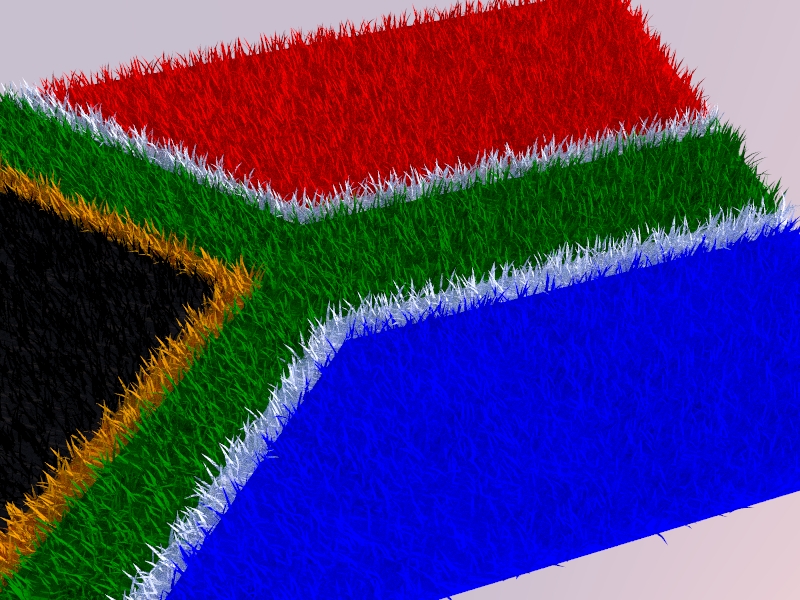

        SA_Flag.jpg

        1 Reply Last reply
        Reply Quote 0
        • FrederikF
          Frederik
          last edited by

          @mauhaus said:

          Yes, I have been running 7 (7.1.6859) PRO for some time now. The dwg-import option disappeared after installing it. Maybe I didn't install it properly?

          I'm sure the install was made properly, however, the dwg/dxf import has been excluded from ver. 7.1 and onwards...
          You need a seperate plugin...
          Please check out the DWG/DXF import plugin for SketchUp 7.1 (Free)...

          Cheers
          Kim Frederik

          1 Reply Last reply
          Reply Quote 0
          • H
            hebeijianke
            last edited by

            A Chinese translation.
            Thanks to you all !


            fur_lang_cn.txt


            1.jpg

            1 Reply Last reply
            Reply Quote 0
            • GaieusG
              Gaieus
              last edited by

              @mauhaus said:

              Yes, I have been running 7 (7.1.6859) **PRO**for some time now. The dwg-import option disappeared after installing it...

              @frederik said:

              I'm sure the install was made properly, however, the dwg/dxf import has been excluded from ver. 7.1 and onwards...

              That would only be the free version Kim. The pro still has the "native" import option.

              As you are not supposed to be able to install the free version on top of the pro, there can indeed be some problem.

              However we are going off-topic here so Thomas, after you see my post here, I will split these posts and move the new topic created this way to the SketchUp Discussions > Bug reports subforum.

              However you could try to reinstall your SU but really make sure to download the Pro version (again) to install it. Also, for the Mac version there was also a maintenance release after the main release of 7.1. A couple of fixes were made there so best is to go for sure...

              Gai...

              1 Reply Last reply
              Reply Quote 0
              • F
                frv
                last edited by

                TX for the great plugin, I love the idea of the crowedmaker.
                But under OSX it does not work, the dialog panel is empty for the crowed option.
                Francois

                1 Reply Last reply
                Reply Quote 0
                • mariochaM
                  mariocha
                  last edited by

                  @frv said:

                  ....., I love the idea of the crowedmaker.
                  But under OSX it does not work, the dialog panel is empty for the crowed option.
                  Francois

                  Yep, same here. No dialog under MacOX (10.6.3) πŸ˜•

                  %(#008000)[Mario C.
                  Every rule has exceptions, but some.]

                  1 Reply Last reply
                  Reply Quote 0
                  • M
                    Masoncrowell
                    last edited by

                    can someone tell me how i do this on a mac?
                    i downloaded the file and updated my version of sketchup. the file only shows up in my downloads and i can't open it with sketchup. i also enabled my plugins menu on sketchup and the only option that shows up is a "cost" option. How do i do this? πŸ˜•

                    1 Reply Last reply
                    Reply Quote 0
                    • T
                      tak2hata
                      last edited by

                      @mariocha said:

                      @frv said:

                      ....., I love the idea of the crowedmaker.
                      But under OSX it does not work, the dialog panel is empty for the crowed option.
                      Francois

                      Yep, same here. No dialog under MacOX (10.6.3) πŸ˜•

                      Hi,Francois and Mario.
                      It is very regrettable.
                      I will examine way for working on mac.

                      @masoncrowell said:

                      can someone tell me how i do this on a mac?
                      i downloaded the file and updated my version of sketchup. the file only shows up in my downloads and i can't open it with sketchup. i also enabled my plugins menu on sketchup and the only option that shows up is a "cost" option. How do i do this? πŸ˜•

                      This file is compressed by zip.
                      First, You should extract this file with folder.
                      It includes
                      --fur_en.rb
                      --fur_en(folder include icon images)
                      and copy created files to plugins folder.
                      Read here.
                      http://sketchup.google.com/intl/en/download/rubyscripts.html

                      Thanks.


                      by TAK2HATA

                      1 Reply Last reply
                      Reply Quote 0
                      • K
                        ktslambieng
                        last edited by

                        this is this is a new : vietnam translation for fur1.4b
                        Thanks you for all !

                        http://farm2.static.flickr.com/1273/4676700265_23fc0faee3_b.jpg


                        fur_lang_vn14b.txt

                        1 Reply Last reply
                        Reply Quote 0
                        • F
                          frv
                          last edited by

                          TX Tak,
                          hope you find the time to look into the blanc dialog for crowds.
                          I love your idea to specialise the furmaker for crowds
                          Francois

                          1 Reply Last reply
                          Reply Quote 0
                          • thomthomT
                            thomthom
                            last edited by

                            That is due to some oddness in Geom::Transformation.scaling which I mentioned earlier.
                            http://forums.sketchucation.com/viewtopic.php?f=323&t=28092&p=248300#p248300

                            But tak2hata said later he's swapped to use .scaling(a,a,a) isntead of .scaling(a) - so that should have taken care of it. Unless there is something else that also creates this scenario.

                            Oli: are you using the latest version?

                            Thomas Thomassen β€” SketchUp Monkey & Coding addict
                            List of my plugins and link to the CookieWare fund

                            1 Reply Last reply
                            Reply Quote 0
                            • thomthomT
                              thomthom
                              last edited by

                              ❓ what happened to Oli's post..?

                              Thomas Thomassen β€” SketchUp Monkey & Coding addict
                              List of my plugins and link to the CookieWare fund

                              1 Reply Last reply
                              Reply Quote 0
                              • M
                                michaelhsu
                                last edited by

                                amazing, thanks.

                                1 Reply Last reply
                                Reply Quote 0
                                • W
                                  wanchoke
                                  last edited by

                                  I use this plugin to my model, It's help to improve atmosphere a lot.

                                  Thank you very much. πŸ‘ πŸ‘

                                  http://lh6.ggpht.com/_xQzZkoFEzSQ/TBLHIaL6eII/AAAAAAAACV8/QfktBGuUv2U/s912/House on Haunted Hill 2.jpg

                                  <model link>
                                  http://sketchup.google.com/3dwarehouse/details?mid=5e3202cae2da28223fc4dc5809e00c5c&prevstart=0

                                  1 Reply Last reply
                                  Reply Quote 0
                                  • GaieusG
                                    Gaieus
                                    last edited by

                                    You do not really need to open it just drop into the plugins folder in your SU application.

                                    Otherwise rb files are text files and should be opened with some simple text editor (never with some word processor!).

                                    Gai...

                                    1 Reply Last reply
                                    Reply Quote 0
                                    • McGyverM
                                      McGyver
                                      last edited by

                                      I just tried this out on my G5(Power PC) Mac using SU 6 free version... it works like a charm! I look forward to experimenting with this! Awesome job! Thank you!!!
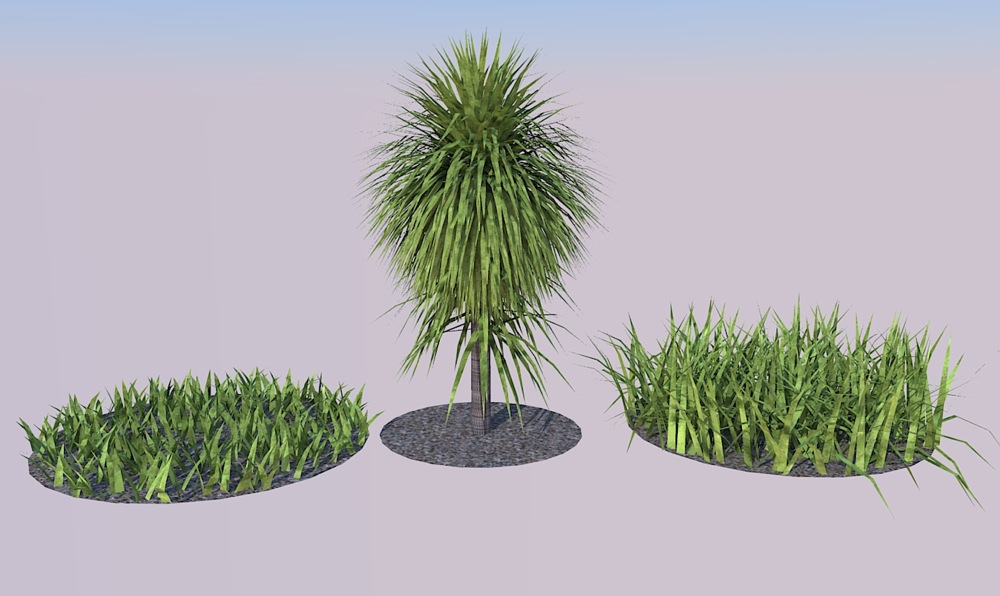

                                      Just a quick test I did... rendered in Kerkythea.

                                      Visit My ShareCG Freebie Gallery

                                      1 Reply Last reply
                                      Reply Quote 0
                                      • N
                                        Ninjamaster1470
                                        last edited by

                                        I know this will sound really dumb, but it appears that i set the plugin RB (whatever) file to google sketchup program so that when ever i click it, it opens on sketchup instead on.........um.....what it's supposed to open on--btw, what is the program its on?

                                        Help! do u know how to fix?

                                        Update: I moved it but its still a SU app instead of the supposed text doc.

                                        1 Reply Last reply
                                        Reply Quote 0
                                        • A
                                          angor2005
                                          last edited by

                                          Please Russian translation.
                                          Many Thanks to you all !

                                          1 Reply Last reply
                                          Reply Quote 0
                                          • A
                                            aiwkha
                                            last edited by

                                            So nice plugins.

                                            1 Reply Last reply
                                            Reply Quote 0

                                            Hello! It looks like you're interested in this conversation, but you don't have an account yet.

                                            Getting fed up of having to scroll through the same posts each visit? When you register for an account, you'll always come back to exactly where you were before, and choose to be notified of new replies (either via email, or push notification). You'll also be able to save bookmarks and upvote posts to show your appreciation to other community members.

                                            With your input, this post could be even better πŸ’—

                                            Register Login
                                            • 1
                                            • 2
                                            • 10
                                            • 11
                                            • 12
                                            • 13
                                            • 14
                                            • 32
                                            • 33
                                            • 12 / 33
                                            • First post
                                              Last post
                                            Buy SketchPlus
                                            Buy SUbD
                                            Buy WrapR
                                            Buy eBook
                                            Buy Modelur
                                            Buy Vertex Tools
                                            Buy SketchCuisine
                                            Buy FormFonts

                                            Advertisement