sketchucation logo sketchucation
    • 登入
    Oops, your profile's looking a bit empty! To help us tailor your experience, please fill in key details like your SketchUp version, skill level, operating system, and more. Update and save your info on your profile page today!
    🔌 Smart Spline | Fluid way to handle splines for furniture design and complex structures. Download

    [Plugin] Make Fur v.2.1.0(20140323)

    已排程 已置頂 已鎖定 已移動 Plugins
    650 貼文 255 Posters 1.1m 瀏覽 254 Watching
    正在載入更多貼文
    • 從舊到新
    • 從新到舊
    • 最多點贊
    回覆
    • 在新貼文中回覆
    登入後回覆
    此主題已被刪除。只有擁有主題管理權限的使用者可以查看。
    • JClementsJ 離線
      JClements
      最後由 編輯

      Gaieus: That's Shaga-delic.

      John | Illustrator | Beaverton, Oregon

      1 條回覆 最後回覆 回覆 引用 0
      • S 離線
        saturne45
        最後由 編輯

        Hello, very great job... make fur is very nice. thank you.

        1 條回覆 最後回覆 回覆 引用 0
        • T 離線
          tald311
          最後由 編輯

          Thank you. This is great.

          1 條回覆 最後回覆 回覆 引用 0
          • C 離線
            Click Draw
            最後由 編輯

            Been playin'....this is very cool! I hope PETA doesn't get wind of this 🤣
            Thanks very much for this!!!
            Jeff

            Have I mentioned how much of a laugh I get out of some of the Signatures on here!

            1 條回覆 最後回覆 回覆 引用 0
            • R 離線
              realist
              最後由 編輯

              Hi, I'm new to Sketchup and about to climb the learning curve.
              I saw the Fur plugin and thought it would be a cool additon to Sketchup. I clicked on the link to download it but all that does is refresh the page. It doesn't download anything. Am I missing something here? Thanks.Gary

              1 條回覆 最後回覆 回覆 引用 0
              • J 離線
                JollyFather
                最後由 編輯

                Thanks a lot!!!

                Best regards,

                JF

                1 條回覆 最後回覆 回覆 引用 0
                • P 離線
                  paulower
                  最後由 編輯

                  Hello Tak2hata.
                  I have spoken these days about the plugin, which is one of the best I've seen so far for our dear SketchUp.

                  @unknownuser said:

                  Is there a way the dialog can remember it's position on the screen? I always expect it to reopen where I put it the previous time. 😄

                  Any chance this feature soon?

                  @unknownuser said:

                  Hi,all.
                  I updated this plugin to version1.3i.

                    Webdialog sees easier.(Thanks Diego.)
                    Parameter name translates by langage text file.
                  

                  Thanks.

                  If you wish, I can provide the translation from Portuguese languaje from Make Fur

                  http://i910.photobucket.com/albums/ac301/bausketchup/MakeFUR1.jpg


                  http://i910.photobucket.com/albums/ac301/bausketchup/makefur2.jpg

                  _______________________________
                  My Blog
                  Baú SketchUp

                  Baú SketchUp
                  Visite nosso blog.. Visit our blog Baú SketchUp

                  1 條回覆 最後回覆 回覆 引用 0
                  • T 離線
                    thiloo
                    最後由 編輯

                    thank you so much, I already love this Plugin!

                    some question:

                    • what´s the "Valid Distance" for?
                      if I choose "make by Component: no"
                      and enter something different than 0,000m it´s not working.
                      if I choose "make by Component: yes"
                      it´s working, but seems to have no effect.
                    • Also, if I select "make by Component: yes" the results are looking quite different from when I select no". for example: the force values seem to have stronger impact on component:yes.
                    1 條回覆 最後回覆 回覆 引用 0
                    • T 離線
                      tak2hata
                      最後由 編輯

                      Hi, thiloo.

                      @thiloo said:

                      some question:

                      • what´s the "Valid Distance" for?
                        if I choose "make by Component: no"
                        and enter something different than 0,000m it´s not working.
                        if I choose "make by Component: yes"
                        it´s working, but seems to have no effect.
                      • Also, if I select "make by Component: yes" the results are looking quite different from when I select no". for example: the force values seem to have stronger impact on component:yes.

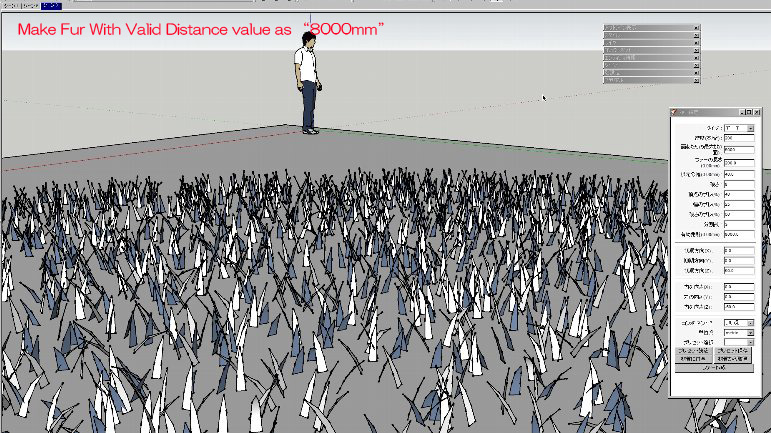
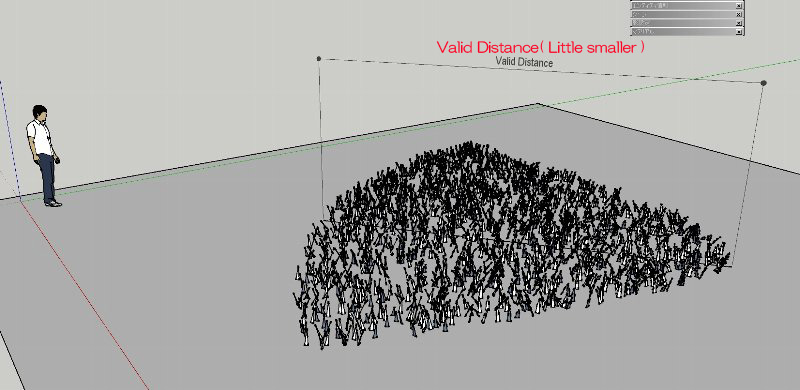
                      The Valid Distance is validate fur about distance from camera.
                      So This value is large.like 20m.
                      But 0 make all valid.it do not omits fur.
                      Example.Use valid distance = 8000mm.
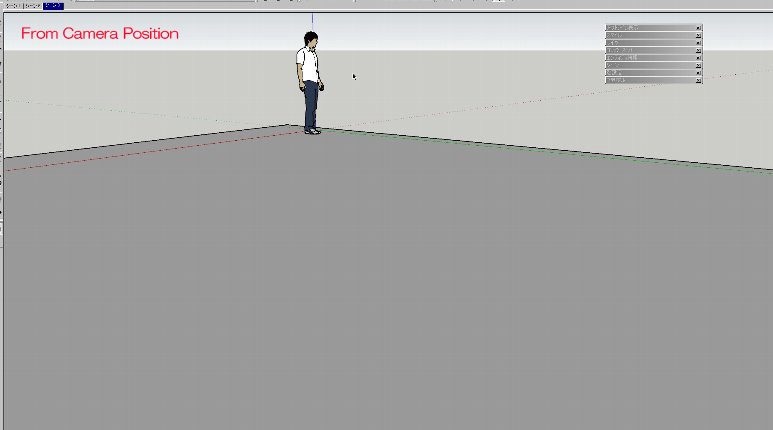
                      About Fur_Valid Distance1
                      About Fur_Valid Distance2
                      About Fur_Valid Distance3
                      Hi,paulower.
                      Sorry ,Now I examines the method to remember dialog position.
                      That demands the javascript knowledge from me.
                      I will update few day later.

                      Thanks.


                      by TAK2HATA

                      1 條回覆 最後回覆 回覆 引用 0
                      • A 離線
                        autarchos
                        最後由 編輯

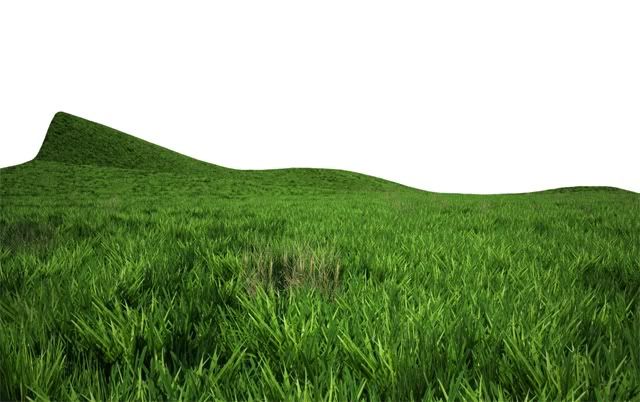
                        Dear Mr. Paulo Wer:

                        That is some fantastically lush and beautiful grass you have created! What is the probability that you would like to share your technique and component/material with the fur-worshipping masses?

                        Besten Grüßen,
                        Drazen Petrovic

                        1 條回覆 最後回覆 回覆 引用 0
                        • T 離線
                          thiloo
                          最後由 編輯

                          thanks tak2hata for the quick explanation,

                          wow, that´s also an powerful feature.
                          sadly it´s not working if I choose "make by component - yes"!
                          also, with component activated, the reaction to the force settings are quite unexpected?
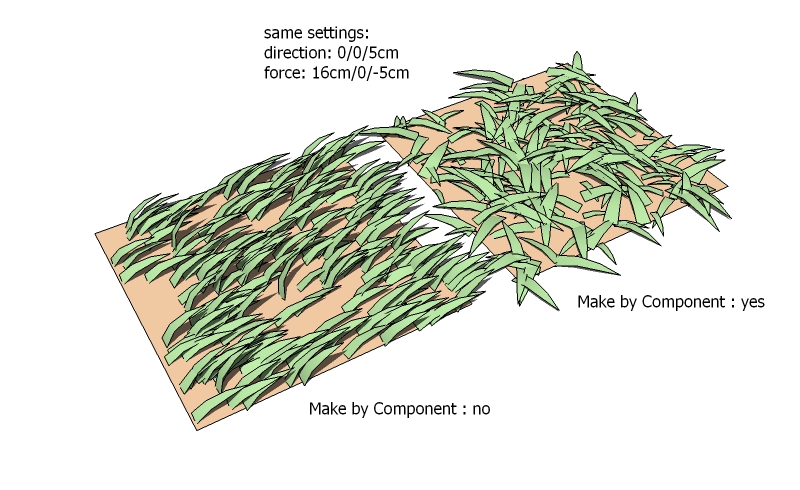
                          fur_force.jpg
                          I need the components for instancing -> rendering.

                          again, Thank You for your time and effort

                          1 條回覆 最後回覆 回覆 引用 0
                          • thomthomT 離線
                            thomthom
                            最後由 編輯

                            I see the same issue that thiloo describes.

                            Thomas Thomassen — SketchUp Monkey & Coding addict
                            List of my plugins and link to the CookieWare fund

                            1 條回覆 最後回覆 回覆 引用 0
                            • thomthomT 離線
                              thomthom
                              最後由 編輯

                              Hehe - even the Googlers play around with this: http://sketchupdate.blogspot.com/2010/05/having-spent-last-three-hours-fiddling.html

                              http://3.bp.blogspot.com/_mDRU50FpD-E/TAALyG_ckXI/AAAAAAAAAMI/geNk8IzxF7Y/s400/WithFur.png

                              Thomas Thomassen — SketchUp Monkey & Coding addict
                              List of my plugins and link to the CookieWare fund

                              1 條回覆 最後回覆 回覆 引用 0
                              • B 離線
                                bryan_gibson79
                                最後由 編輯

                                As a user of Sketchup from its inception all i can say is WOW! about this plug-in. I gotta quick question though...Is there any easy way to hide all the linework on the blades of grass in sketchup with out rendering and without turning off all linework in the model? When you get alot it all turns black due to the linework. Anyone have any ideas?

                                Thanks
                                BG

                                1 條回覆 最後回覆 回覆 引用 0
                                • A 離線
                                  autarchos
                                  最後由 編輯

                                  Didier's Hide Faces/Edges plug-in is one method:

                                  http://rhin.crai.archi.fr/RubyLibraryDepot/Ruby/hide_faces_edges.rb

                                  @bryan_gibson79 said:

                                  As a user of Sketchup from its inception all i can say is WOW! about this plug-in. I gotta quick question though...Is there any easy way to hide all the linework on the blades of grass in sketchup with out rendering and without turning off all linework in the model? When you get alot it all turns black due to the linework. Anyone have any ideas?

                                  Thanks
                                  BG

                                  1 條回覆 最後回覆 回覆 引用 0
                                  • marleusM 離線
                                    marleus
                                    最後由 編輯

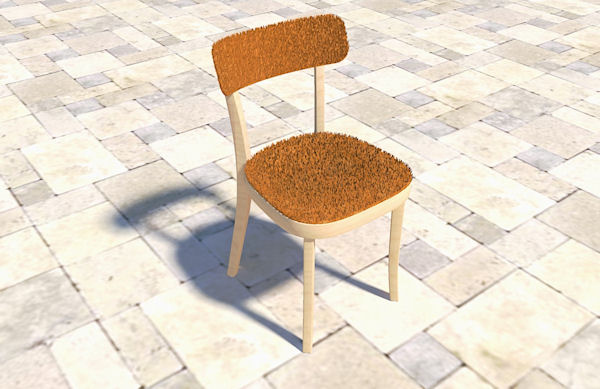
                                    Really cool plugin

                                    thanks a lot 👍 👍


                                    softchair.jpg

                                    Markus Sillander
                                    Vantaa, Finland
                                    I'm on FormFonts now
                                    http://www.formfonts.com

                                    1 條回覆 最後回覆 回覆 引用 0
                                    • N 離線
                                      notareal
                                      最後由 編輯

                                      It still amaze me what this plugin can do
                                      Perhaps later styling with hair guides? Like in Max or Blender. Not that it have to be so extensive, but in a spirit of those.

                                      Welcome to try Thea Render, Thea support | kerkythea.net -team member

                                      1 條回覆 最後回覆 回覆 引用 0
                                      • P 離線
                                        paulower
                                        最後由 編輯

                                        @autarchos said:

                                        Dear Mr. Paulo Wer: That is some fantastically lush and beautiful grass you have created! What is the probability that you would like to share your technique and component/material with the fur-worshipping masses?
                                        Besten Grüßen,
                                        Drazen Petrovic

                                        Yes, sure I can explain:
                                        1 - I created a normal plane in SketchUp and used the Sandbox tool SketchUp to create the topography of the land;
                                        2 - I used two maps (two textures) of different grass. A grass that is normal, and the other is like a bush (do not know how to say it in English).

                                        • Do not forget to apply the texture on both sides, ie, in the back and front face.

                                        **3 -**Create a component for each texture (one for the grass normal and other to grass bush);
                                        **4 -**In the Settings Window FUR, I made the adjustments and settings required, such as:

                                        • TopJitter (%): 1
                                        • Direction (X): 0mm
                                        • Direction (Y): 0mm
                                        • Direction (Z): 500m or 5000m (not mm. That in my example)
                                        • In the menu drop down "Make by Component", choose the component that you created;

                                        5 - Click on Make Fur;
                                        **6 -**I did the render in V-Ray for SketchUp. In V-Ray only applied the map Alpha in Diffuse;

                                        I still do not know for sure the function of all commands, but recommend you do the tests in Make FUR. If you want the maps are on the links below:

                                        File - Map Alpha Mask

                                        File - Map Grass

                                        _______________________________
                                        My Blog
                                        Baú SketchUp

                                        Baú SketchUp
                                        Visite nosso blog.. Visit our blog Baú SketchUp

                                        1 條回覆 最後回覆 回覆 引用 0
                                        • thomthomT 離線
                                          thomthom
                                          最後由 編輯

                                          paulower: that's a nice setup. Thanks for sharing.
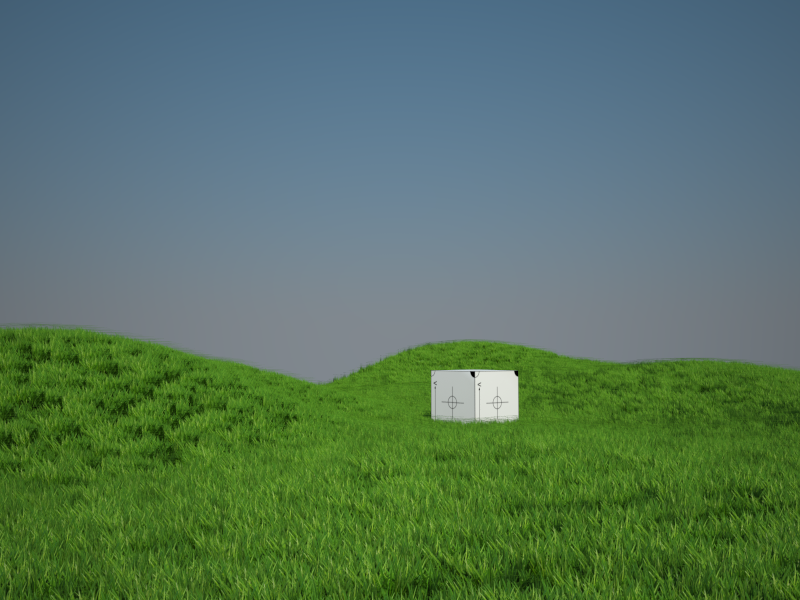
                                          Render01.png

                                          👍

                                          Thomas Thomassen — SketchUp Monkey & Coding addict
                                          List of my plugins and link to the CookieWare fund

                                          1 條回覆 最後回覆 回覆 引用 0
                                          • thomthomT 離線
                                            thomthom
                                            最後由 編輯

                                            @tak2hata said:

                                            Sorry ,Now I examines the method to remember dialog position.
                                            That demands the javascript knowledge from me.
                                            I will update few day later.

                                            No need for javasscript to remember the window's position. SU does this for you if you specify a preference key.

                                            http://code.google.com/apis/sketchup/docs/ourdoc/webdialog.html#new

                                            @unknownuser said:

                                            pref_key
                                            The registry entry where the location and size of the dialog will be saved. If preferences_key is not included, the location and size will not be stored.

                                            Thomas Thomassen — SketchUp Monkey & Coding addict
                                            List of my plugins and link to the CookieWare fund

                                            1 條回覆 最後回覆 回覆 引用 0
                                            • 1
                                            • 2
                                            • 3
                                            • 4
                                            • 5
                                            • 32
                                            • 33
                                            • 1 / 33
                                            • 第一個貼文
                                              最後的貼文
                                            Buy SketchPlus
                                            Buy SUbD
                                            Buy WrapR
                                            Buy eBook
                                            Buy Modelur
                                            Buy Vertex Tools
                                            Buy SketchCuisine
                                            Buy FormFonts

                                            Advertisement