sketchucation logo sketchucation
    • Login
    Oops, your profile's looking a bit empty! To help us tailor your experience, please fill in key details like your SketchUp version, skill level, operating system, and more. Update and save your info on your profile page today!
    Mac User? | Join the Rayscaper Beta for Mac Learn More

    [Plugin] Extrude Edges by Loft

    Scheduled Pinned Locked Moved Plugins
    70 Posts 33 Posters 75.6k Views 33 Watching
    Loading More Posts
    • Oldest to Newest
    • Newest to Oldest
    • Most Votes
    Reply
    • Reply as topic
    Log in to reply
    This topic has been deleted. Only users with topic management privileges can see it.
    • Didier BurD
      Didier Bur
      last edited by

      One more gem !

      @TIG: Here's the french lingvo file


      For TIG only

      DB

      1 Reply Last reply
      Reply Quote 0
      • Didier BurD
        Didier Bur
        last edited by

        Hi Solo,
        the debabelizer is in the Zip.
        Just in case, here it is (put it in Plugins folder)


        goes to Plugins folder

        DB

        1 Reply Last reply
        Reply Quote 0
        • Rich O BrienR
          Rich O Brien Moderator
          last edited by

          Tremendous scripting and very welcome addition to 'must have' toolset ๐Ÿ‘

          Download the free D'oh Book for SketchUp ๐Ÿ“–

          1 Reply Last reply
          Reply Quote 0
          • soloS
            solo
            last edited by

            Thanks TIG that solved that, now playtime!!

            http://www.solos-art.com

            If you see a toilet in your dreams do not use it.

            1 Reply Last reply
            Reply Quote 0
            • pilouP
              pilou
              last edited by

              You make a plug by a day! ๐Ÿ˜ฎ
              That is a good average ๐Ÿ˜„ ๐Ÿ˜‰

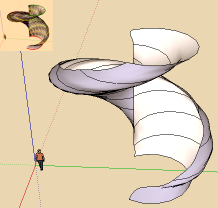
              PS An automatic order Selection curves will be fine for exemple in case of use plug like Grow by TIG? ๐Ÿ˜‰
              loft1.png

              Frenchy Pilou
              Is beautiful that please without concept!
              My Little site :)

              1 Reply Last reply
              Reply Quote 0
              • TIGT
                TIG Moderator
                last edited by

                Pilou you are cruel ๐Ÿ˜‰

                There's the 3rd update of the day here http://forums.sketchucation.com/viewtopic.php?p=231137#p231137 - new FR lingvo by Didier... โ˜€

                TIG

                1 Reply Last reply
                Reply Quote 0
                • jason_marantoJ
                  jason_maranto
                  last edited by

                  Thank-you so much TIG for the cool new tool and the pictures to go along with it.

                  Best,
                  Jason.

                  I create video tutorial series about several 2D & 3D graphics programs.

                  1 Reply Last reply
                  Reply Quote 0
                  • teufT
                    teuf
                    last edited by

                    Wow !!
                    Really a good plug. Relevant to do 3D.

                    Thanx thanx thanx

                    1 Reply Last reply
                    Reply Quote 0
                    • R
                      rv1974
                      last edited by

                      Super! Thank you TIG so much!
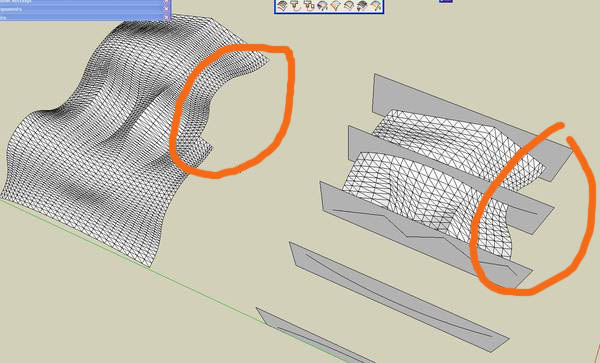
                      Though it skips segments in the very first try.

                      ScreenShot109.jpg

                      1 Reply Last reply
                      Reply Quote 0
                      • TIGT
                        TIG Moderator
                        last edited by

                        @rv1974 said:

                        Super! Thank you TIG so much!
                        Though it skips segments in the very first try.

                        Without the skp to try I'm unsure what's up...
                        Are the curves continuous - it would help it they had the same number of segments [although that IS meant to be coped with].
                        Can you post [or PM me] a skp displaying this glitch ?
                        ๐Ÿ˜•

                        TIG

                        1 Reply Last reply
                        Reply Quote 0
                        • N
                          notareal
                          last edited by

                          Nice work. Thanks!

                          Welcome to try Thea Render, Thea support | kerkythea.net -team member

                          1 Reply Last reply
                          Reply Quote 0
                          • erikBE
                            erikB
                            last edited by

                            Yet another, but very helpfull, extension of the (extrude) set.
                            Thanks very much TIG ๐Ÿ‘
                            erikB

                            1 Reply Last reply
                            Reply Quote 0
                            • R
                              rv1974
                              last edited by

                              @tig said:

                              @rv1974 said:

                              Super! Thank you TIG so much!
                              Though it skips segments in the very first try.

                              Without the skp to try I'm unsure what's up...
                              Are the curves continuous - it would help it they had the same number of segments [although that IS meant to be coped with].
                              Can you post [or PM me] a skp displaying this glitch ?
                              ๐Ÿ˜•


                              loft.skp

                              1 Reply Last reply
                              Reply Quote 0
                              • TIGT
                                TIG Moderator
                                last edited by

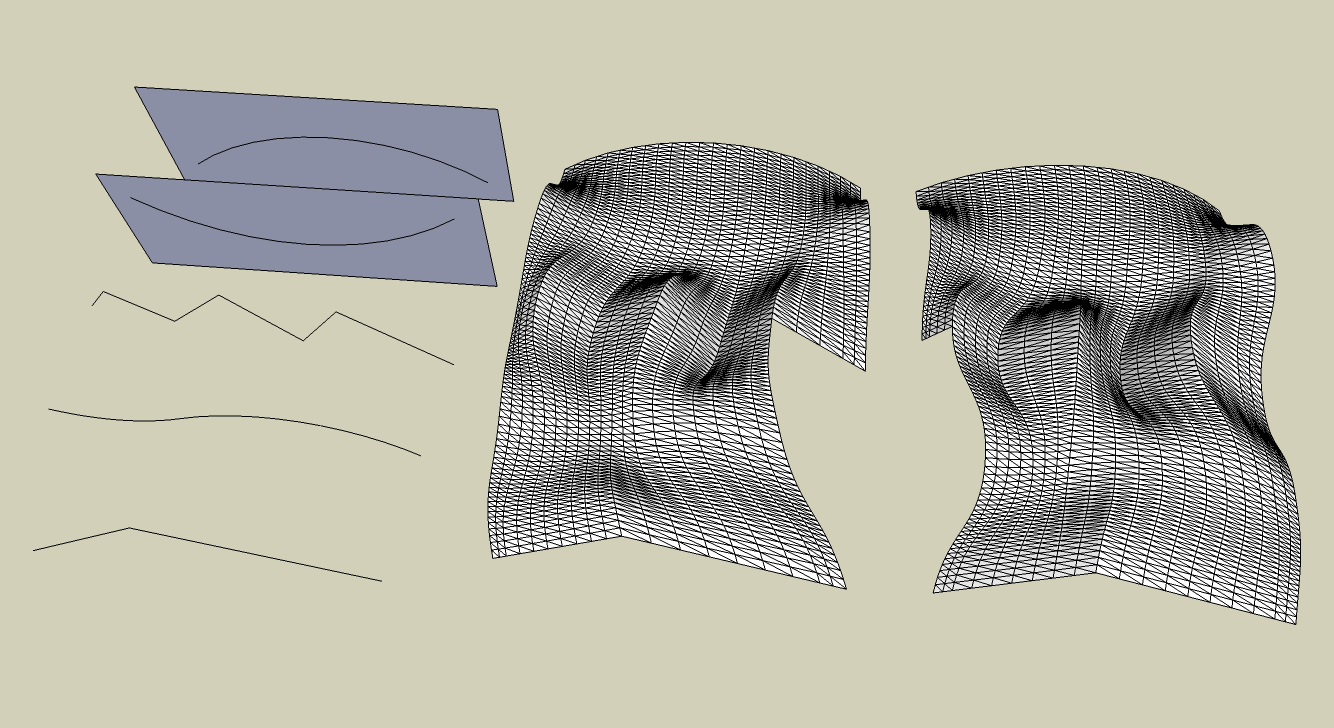
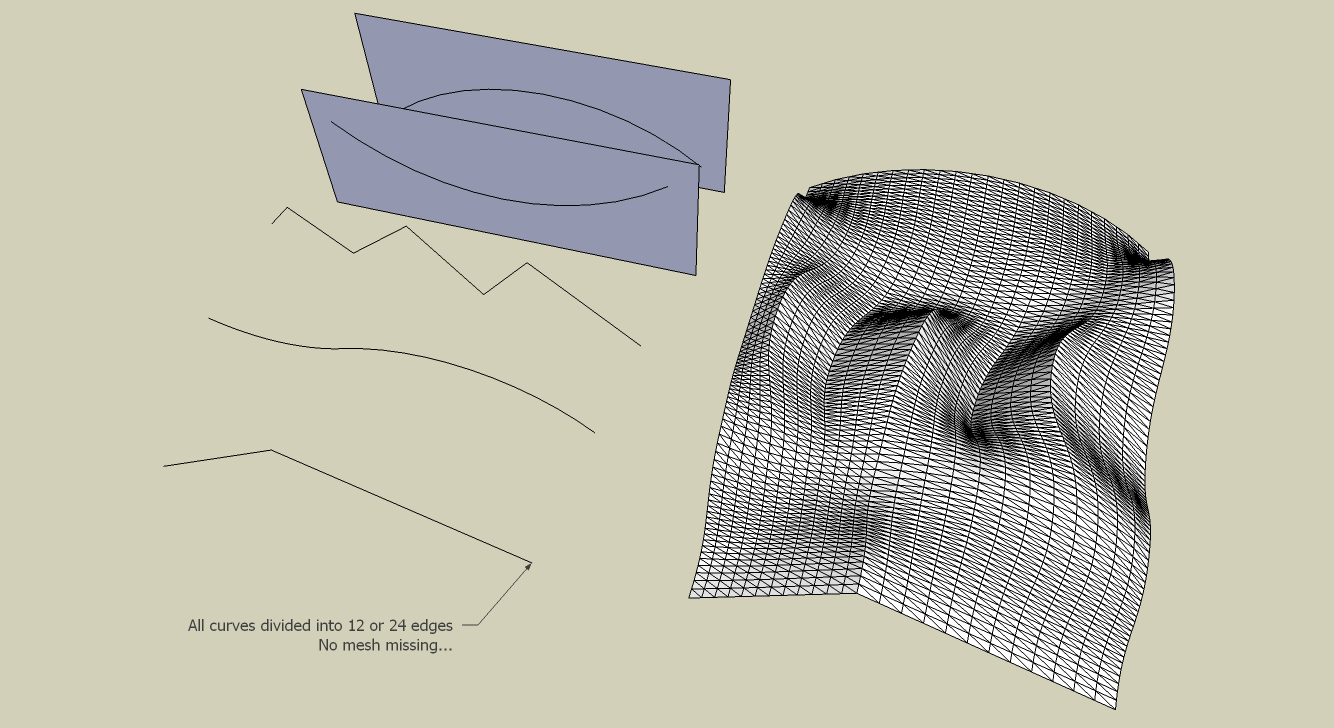
                                I've tested your skp and I agree that the tool has a glitch - for some reason it's missing out a part of the mesh in the latter/earlier stages - the two versions I first illustrate below are by picking the curves in their reverse order - different bits get missed out...
                                The original has curves with varying edge counts...
                                In the 'copy' I edited the curves so each has 12 edges [or 24 for the S one] - to make them readily sub-dividable - now it works fine - so it must be a bug in the re-division of the edges to try and get them to match each other - also used in EEbyRails incidentally
                                I'll debug and get back to you...
                                In the meanwhile please use curves with more closely related edge counts - they will work... any number SHOULD work...
                                ๐Ÿ˜’loftRAB-NETTO.pngloftRAB-NETTO - Copy.png

                                TIG

                                1 Reply Last reply
                                Reply Quote 0
                                • TIGT
                                  TIG Moderator
                                  last edited by

                                  I see that the problem is that the 6-segment zigzag is being divided into pieces of four to match the 24-segment S-curve BUT at one point it's becoming 1 piece short [3] and at another one too many [5] so that the 'apportionment' of the edges goes wrong and it fails - so at least I have the effect... but now to find the cause ๐Ÿ˜’

                                  TIG

                                  1 Reply Last reply
                                  Reply Quote 0
                                  • mitcorbM
                                    mitcorb
                                    last edited by

                                    And what logically follows in the ExtrudeTools collection?
                                    It was inevitable. Thank you, TIG

                                    I take the slow, deliberate approach in my aimless wandering.

                                    1 Reply Last reply
                                    Reply Quote 0
                                    • mitcorbM
                                      mitcorb
                                      last edited by

                                      TIG:
                                      What would it take to make the resultant mesh into a Bezier mesh? Or am I talking about another tool?
                                      In other words after generating the mesh, you could modify it by Bezier control points that would allow you to pull and stretch the mesh like a rubber sheet, and even unfold some unwanted contortions.

                                      I take the slow, deliberate approach in my aimless wandering.

                                      1 Reply Last reply
                                      Reply Quote 0
                                      • TIGT
                                        TIG Moderator
                                        last edited by

                                        Thomthom is working on a Vertex-Editor. which I think would become the basis of this editing tool ?

                                        TIG

                                        1 Reply Last reply
                                        Reply Quote 0
                                        • P
                                          Panga
                                          last edited by

                                          Thanks a lot TIG for this one !!

                                          1 Reply Last reply
                                          Reply Quote 0
                                          • TIGT
                                            TIG Moderator
                                            last edited by

                                            There's an update of EEbyLoft - see the notes here: http://forums.sketchucation.com/viewtopic.php?p=231016#p231016

                                            Get the tool in the zipped set from here http://forums.sketchucation.com/viewtopic.php?p=217663#p217663


                                            TIG

                                            1 Reply Last reply
                                            Reply Quote 0

                                            Hello! It looks like you're interested in this conversation, but you don't have an account yet.

                                            Getting fed up of having to scroll through the same posts each visit? When you register for an account, you'll always come back to exactly where you were before, and choose to be notified of new replies (either via email, or push notification). You'll also be able to save bookmarks and upvote posts to show your appreciation to other community members.

                                            With your input, this post could be even better ๐Ÿ’—

                                            Register Login
                                            • 1
                                            • 2
                                            • 3
                                            • 4
                                            • 1 / 4
                                            • First post
                                              Last post
                                            Buy SketchPlus
                                            Buy SUbD
                                            Buy WrapR
                                            Buy eBook
                                            Buy Modelur
                                            Buy Vertex Tools
                                            Buy SketchCuisine
                                            Buy FormFonts

                                            Advertisement