sketchucation logo sketchucation
    • 登入
    Oops, your profile's looking a bit empty! To help us tailor your experience, please fill in key details like your SketchUp version, skill level, operating system, and more. Update and save your info on your profile page today!
    🔌 Smart Spline | Fluid way to handle splines for furniture design and complex structures. Download

    New 2.5D+ tree set is now available...

    已排程 已置頂 已鎖定 已移動 SketchUp Components, Materials & Styles
    sketchup
    31 貼文 16 Posters 9.1k 瀏覽 16 Watching
    正在載入更多貼文
    • 從舊到新
    • 從新到舊
    • 最多點贊
    回覆
    • 在新貼文中回覆
    登入後回覆
    此主題已被刪除。只有擁有主題管理權限的使用者可以查看。
    • N 離線
      notareal
      最後由 編輯

      @tomsdesk said:

      Oli, I've just heard Thea is having troubles with png's in general and a fix is in the works...also there is a separate issue with SU's material editor changes in transparency and color, which my trees rely on heavily to work as well as they do. Sure hope this gets resolved!

      There is no "troubles with png's in general" that I know. As a format png do work just fine. But there is a workflow issue with alpha stored to png - that should be fixed soon. Actually a automatic filling of the clip channel from png alpha did work in some point, but was turned off because of a bug. It's quite critical feature to get back due popularity of 2D entourage. There is a manual workaround to use alpha from png, but it cannot be a permanent solution to this issue. Also there is a separate issue with alpha map and halos - it's been worked on. There is a manual fix for that too, just let me know if you need a help with it.

      Welcome to try Thea Render, Thea support | kerkythea.net -team member

      1 條回覆 最後回覆 回覆 引用 0
      • R 離線
        red_shift
        最後由 編輯

        I did find a workaround. I first turn off the shadow layer of Tom's trees in SU. Then, in Thea studio I set the clipping texture to the alpha image (enabling clipping and setting channel to Alpha rather than RGB). I also find that in scattering that I need to set the Index of Refraction to 1 rather to 1.5.

        1 條回覆 最後回覆 回覆 引用 0
        • T 離線
          tomsdesk
          最後由 編輯

          Oli...I am sooooo happy to hear this! Have fun!

          http://www.tomsdesk.moonfruit.com/
          2.5D Trees & Shrubs!

          1 條回覆 最後回覆 回覆 引用 0
          • soloS 離線
            solo
            最後由 編輯

            Tom, they work in Thea, just had to adjust the transparency in SU before export.

            Straight Thea output with Bloom and vignetting, no post processing.

            http://img705.imageshack.us/img705/5797/tomnprthea.jpg

            http://www.solos-art.com

            If you see a toilet in your dreams do not use it.

            1 條回覆 最後回覆 回覆 引用 0
            • T 離線
              tomsdesk
              最後由 編輯

              Well, I'm happy...thanks a bunch, Pete!

              http://www.tomsdesk.moonfruit.com/
              2.5D Trees & Shrubs!

              1 條回覆 最後回覆 回覆 引用 0
              • broomstickB 離線
                broomstick
                最後由 編輯

                Thank you very muche, great models 😄

                1 條回覆 最後回覆 回覆 引用 0
                • R 離線
                  red_shift
                  最後由 編輯

                  @solo said:

                  Tom, they work in Thea, just had to adjust the transparency in SU before export.

                  Straight Thea output with Bloom and vignetting, no post processing.

                  http://img705.imageshack.us/img705/5797/tomnprthea.jpg

                  Pete: you didn't have to do anything additional in Thea? What kind of transparency adjustment in SU?

                  1 條回覆 最後回覆 回覆 引用 0
                  • soloS 離線
                    solo
                    最後由 編輯

                    I eliminated all transparency values in SU, in Thea I clicked to enable the clip, and used the texture as a clipmap making sure it was alpha and not RGB.

                    http://www.solos-art.com

                    If you see a toilet in your dreams do not use it.

                    1 條回覆 最後回覆 回覆 引用 0
                    • R 離線
                      red_shift
                      最後由 編輯

                      Similar to my approach mentioned above. I'm glad these work in Thea.

                      1 條回覆 最後回覆 回覆 引用 0
                      • B 離線
                        buk2noy
                        最後由 編輯

                        sir, thank you! 🎉

                        seeking for peace of mind

                        1 條回覆 最後回覆 回覆 引用 0
                        • T 離線
                          tallbridgeguy
                          最後由 編輯

                          solo said
                          @unknownuser said:

                          I eliminated all transparency values in SU, in Thea I clicked to enable the clip, and used the texture as a clipmap making sure it was alpha and not RGB.

                          Thanks!

                          TBG

                          Nielsen
                          http://www.tallbridgeguy.com/

                          1 條回覆 最後回覆 回覆 引用 0
                          • S 離線
                            stevebo
                            最後由 編輯

                            Oldish topic but just want to say thank you Tom 😄. I promised I would buy it, bit late but I did 😄. They look great!

                            Edit: Some quick tests on Vray

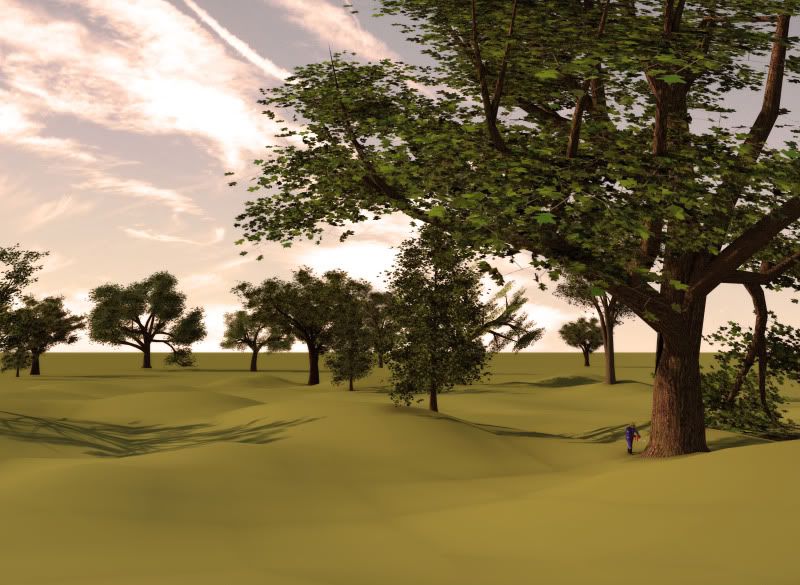
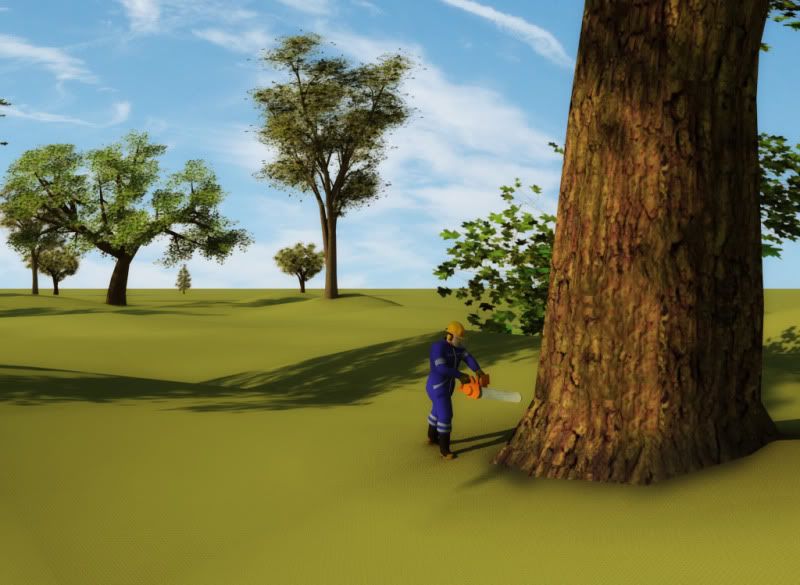
                            http://img.photobucket.com/albums/v644/stevebo37/1-8.jpg

                            http://img.photobucket.com/albums/v644/stevebo37/2-6.jpg

                            1 條回覆 最後回覆 回覆 引用 0
                            • 1
                            • 2
                            • 1 / 2
                            • 第一個貼文
                              最後的貼文
                            Buy SketchPlus
                            Buy SUbD
                            Buy WrapR
                            Buy eBook
                            Buy Modelur
                            Buy Vertex Tools
                            Buy SketchCuisine
                            Buy FormFonts

                            Advertisement