sketchucation logo sketchucation
    • 登入
    Oops, your profile's looking a bit empty! To help us tailor your experience, please fill in key details like your SketchUp version, skill level, operating system, and more. Update and save your info on your profile page today!
    🔌 Smart Spline | Fluid way to handle splines for furniture design and complex structures. Download

    [Plugin] Repeat Copy UPDATED 2-24-2010

    已排程 已置頂 已鎖定 已移動 Plugins
    62 貼文 24 Posters 60.2k 瀏覽 24 Watching
    正在載入更多貼文
    • 從舊到新
    • 從新到舊
    • 最多點贊
    回覆
    • 在新貼文中回覆
    登入後回覆
    此主題已被刪除。只有擁有主題管理權限的使用者可以查看。
    • Rich O BrienR 離線
      Rich O Brien Moderator
      最後由 編輯

      Thanks Wind-Born 👍

      Great update Chris

      @Jim

      ❓ huh ❓

      Well..........i thought i saw Jim, must be imagining things 😕

      Download the free D'oh Book for SketchUp 📖

      1 條回覆 最後回覆 回覆 引用 0
      • Chris FullmerC 離線
        Chris Fullmer
        最後由 編輯

        To upgrade, you can track down the email with the link. Or you can also install the smustard toolbar plugin

        favicon

        (www.smustard.com)

        and I think that lets you track updates easily on your smustard plugins. I think ti checks for updates and then lets you update them easily.

        Chris

        Lately you've been tan, suspicious for the winter.
        All my Plugins I've written

        1 條回覆 最後回覆 回覆 引用 0
        • utilerU 離線
          utiler
          最後由 編輯

          thanks, sweet!!!! 👍

          Just Curious...

          1 條回覆 最後回覆 回覆 引用 0
          • D 離線
            d12dozr
            最後由 編輯

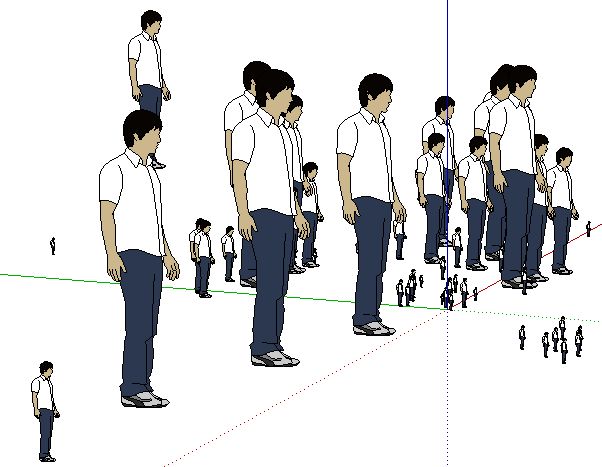
            Very cool Chris, an army of Sangs in 1 minute 😄


            Capture.JPG

            3D Printing with SketchUp Book
            http://goo.gl/f7ooYh

            1 條回覆 最後回覆 回覆 引用 0
            • Chris FullmerC 離線
              Chris Fullmer
              最後由 編輯

              @wind-borne at this time there is no built in way to move the UI. It is something that is planned and really is not terribly hard to fix. I'll look into it, but expect anything super soon.

              Chris

              Lately you've been tan, suspicious for the winter.
              All my Plugins I've written

              1 條回覆 最後回覆 回覆 引用 0
              • R 離線
                remus
                最後由 編輯

                Looking pretty sweet chris 👍 Like the look of the on-screen interface.

                http://remusrendering.wordpress.com/

                1 條回覆 最後回覆 回覆 引用 0
                • P 離線
                  Pout
                  最後由 編輯

                  Hey Chris,

                  Great plugin! A multicopy function 😄

                  What i was wondering: how did you create that interface?
                  Was it with add_note?

                  1 條回覆 最後回覆 回覆 引用 0
                  • R 離線
                    remus
                    最後由 編輯

                    I imagine its drawn in the viewport using openGL (accessible when you create a tool.) add_note only allows you to add text.

                    http://remusrendering.wordpress.com/

                    1 條回覆 最後回覆 回覆 引用 0
                    • thomthomT 離線
                      thomthom
                      最後由 編輯

                      It's done with the view.draw_* commands.

                      Thomas Thomassen — SketchUp Monkey & Coding addict
                      List of my plugins and link to the CookieWare fund

                      1 條回覆 最後回覆 回覆 引用 0
                      • P 離線
                        Pout
                        最後由 編輯

                        Thx !

                        1 條回覆 最後回覆 回覆 引用 0
                        • Chris FullmerC 離線
                          Chris Fullmer
                          最後由 編輯

                          I wanted to mention that there is yet another new version of the plugin updated to smustard, allowing the UI to be moved around and reset. Here is a quick video that shows this capability:

                          [flash=800,475:20vz13qh]http://www.youtube.com/v/ZPMMc2ESAZM&hd=1&fs=1[/flash:20vz13qh]

                          Have fun,

                          Chris

                          Lately you've been tan, suspicious for the winter.
                          All my Plugins I've written

                          1 條回覆 最後回覆 回覆 引用 0
                          • utilerU 離線
                            utiler
                            最後由 編輯

                            That's nuts, Chris!!!!!!

                            Just Curious...

                            1 條回覆 最後回覆 回覆 引用 0
                            • JClementsJ 離線
                              JClements
                              最後由 編輯

                              Chris, is there a way to add a "Pause" button which allow the user to pick a different set of components, them by clicking on it a again, it would resume with copying using the current parameters but with the new selection set.

                              John

                              John | Illustrator | Beaverton, Oregon

                              1 條回覆 最後回覆 回覆 引用 0
                              • Chris FullmerC 離線
                                Chris Fullmer
                                最後由 編輯

                                I like the idea John, but it is a bit more complex to manage. With different sets of scale and randomness. Its hard to visualize. But it could be powerful for sure.

                                Lately you've been tan, suspicious for the winter.
                                All my Plugins I've written

                                1 條回覆 最後回覆 回覆 引用 0
                                • JClementsJ 離線
                                  JClements
                                  最後由 編輯

                                  Hi Chris, not sure if I conveyed my suggestion clearly. My thought was that the "Pause Button" would replicate the process of closing the script, making a new selection, and then re-initiating the script.

                                  John

                                  John | Illustrator | Beaverton, Oregon

                                  1 條回覆 最後回覆 回覆 引用 0
                                  • Chris FullmerC 離線
                                    Chris Fullmer
                                    最後由 編輯

                                    Oh gotcha, I did think you were suggesting something a little more complicated.

                                    Yes, that had crossed my mind - the ability to add or remove components from the selection set would be nice. I could see that feature being added to this script for sure.

                                    How about just holding down shift activates this? Or I could make a button to toggle into selection mode.

                                    Chris

                                    Lately you've been tan, suspicious for the winter.
                                    All my Plugins I've written

                                    1 條回覆 最後回覆 回覆 引用 0
                                    • JClementsJ 離線
                                      JClements
                                      最後由 編輯

                                      Whatever is the easiest. Like to see key combo's close to SU's selection keys if possible; Ctrl-click to add to current selection, maybe Shift-Click to remove one at a time, and Alt-Click to start over.

                                      John | Illustrator | Beaverton, Oregon

                                      1 條回覆 最後回覆 回覆 引用 0
                                      • P 離線
                                        Panga
                                        最後由 編輯

                                        Just bought it...very usefull Chris !! Thanks.

                                        1 條回覆 最後回覆 回覆 引用 0
                                        • brookefoxB 離線
                                          brookefox
                                          最後由 編輯

                                          Yes, yes, most useful and thank you, but I must respectfully insist: where do those nice face-me trees come from which are in the page 1 tutorial? Your private collection seems not searchable from here, and a nice woods they would make should I need some place to inhabit.

                                          ~ Brooke

                                          1 條回覆 最後回覆 回覆 引用 0
                                          • Chris FullmerC 離線
                                            Chris Fullmer
                                            最後由 編輯

                                            Hey Brooke, I almost forgot to respond! The trees are just random trees I found on the 3d warehouse. I just tried to look for them again and no luck. The 3dwarehouse is really lame like that.

                                            Chris

                                            Lately you've been tan, suspicious for the winter.
                                            All my Plugins I've written

                                            1 條回覆 最後回覆 回覆 引用 0
                                            • 1
                                            • 2
                                            • 3
                                            • 4
                                            • 2 / 4
                                            • 第一個貼文
                                              最後的貼文
                                            Buy SketchPlus
                                            Buy SUbD
                                            Buy WrapR
                                            Buy eBook
                                            Buy Modelur
                                            Buy Vertex Tools
                                            Buy SketchCuisine
                                            Buy FormFonts

                                            Advertisement