sketchucation logo sketchucation
    • 登入
    Oops, your profile's looking a bit empty! To help us tailor your experience, please fill in key details like your SketchUp version, skill level, operating system, and more. Update and save your info on your profile page today!
    🔌 Smart Spline | Fluid way to handle splines for furniture design and complex structures. Download

    [Plugin] Manifold v2.2

    已排程 已置頂 已鎖定 已移動 Plugins
    126 貼文 19 Posters 63.3k 瀏覽 19 Watching
    正在載入更多貼文
    • 從舊到新
    • 從新到舊
    • 最多點贊
    回覆
    • 在新貼文中回覆
    登入後回覆
    此主題已被刪除。只有擁有主題管理權限的使用者可以查看。
    • thomthomT 離線
      thomthom
      最後由 編輯

      Just realised the cause of the error I reported earlier:

      You're calling msg=(db("Manifold: Orienting Faces")) from within the class Sketchup::Face scope, while db() is defined within the Manifold class.

      Making db() into a Class method instead of Instance method def self.db(string) and changing

      msg=(db("Manifold: Orienting Faces")) to msg=(Manifold.db("Manifold: Orienting Faces")) (line 304)
      and
      puts(db("Manifold: orient faces aborted.")) to puts(Manifold.db("Manifold: orient faces aborted.")) (line 318)
      makes it work.

      Thomas Thomassen — SketchUp Monkey & Coding addict
      List of my plugins and link to the CookieWare fund

      1 條回覆 最後回覆 回覆 引用 0
      • thomthomT 離線
        thomthom
        最後由 編輯

        The groups that it creates, is it suppose to be offset from the original group?

        Thomas Thomassen — SketchUp Monkey & Coding addict
        List of my plugins and link to the CookieWare fund

        1 條回覆 最後回覆 回覆 引用 0
        • TIGT 離線
          TIG Moderator
          最後由 編輯

          @thomthom said:

          Just noticed, when I reload your script, load 'manifold.rb' it keeps adding more menu items.

          Think it's because of the last line: file_loaded(__FILE__)
          Should it not be: file_loaded(File.basename(__FILE__)) ?

          whopops ! update in the pipeline... 😳
          I'll also fix the db() error...

          TIG

          1 條回覆 最後回覆 回覆 引用 0
          • thomthomT 離線
            thomthom
            最後由 編輯

            @thomthom said:

            On a sidenote: you can save some lines in your remove_inner_faces method by using more of Ruby's Enumerator and Array methods:

            
            > def remove_inner_faces()
            > 	faces = @gents.select { |e| e.class==Sketchup;;Face }
            > 	faces_to_go = faces.select { |face| face.outer_loop.edges.any? { |e| e.faces.length > 2  } }
            > 	faces_to_go.each{|e|
            > 		if e.valid?
            > 			clone_removed_into_error_group([e]+e.edges)
            > 			e.erase! if e.valid? 
            > 		end#if
            > 	}
            > end
            > 
            

            I just noticed them not too long ago while having another look at the Ruby docs, I realised I could cut down a number of lines in most my scripts.

            Never mind this code. Seems to have a bug in it.

            Thomas Thomassen — SketchUp Monkey & Coding addict
            List of my plugins and link to the CookieWare fund

            1 條回覆 最後回覆 回覆 引用 0
            • thomthomT 離線
              thomthom
              最後由 編輯

              Got a case where the internal faces is removing too much. See attached file. Run the script on the large cube.


              manifold tester.skp

              Thomas Thomassen — SketchUp Monkey & Coding addict
              List of my plugins and link to the CookieWare fund

              1 條回覆 最後回覆 回覆 引用 0
              • TIGT 離線
                TIG Moderator
                最後由 編輯

                Here's v1.1 with some glitch fixes http://forums.sketchucation.com/viewtopic.php?p=218691#p218691

                TIG

                1 條回覆 最後回覆 回覆 引用 0
                • TIGT 離線
                  TIG Moderator
                  最後由 編輯

                  @thomthom said:

                  Got a case where the internal faces is removing too much. See attached file. Run the script on the large cube.

                  I'll look into it...
                  EDIT: removes innermost groups of outer-faces [?] AND leaves internal-faces edges behind [that's an easy fix] ❓

                  TIG

                  1 條回覆 最後回覆 回覆 引用 0
                  • D 離線
                    driven
                    最後由 編輯

                    fantastic,

                    go out on a family errand and come back to a whole new playing field, anything I can do to help?
                    a 'test' skp, if you need something more taxing,
                    or I'll try repairing it myself when you've got the next one up...
                    or need a tester... whatever you need...
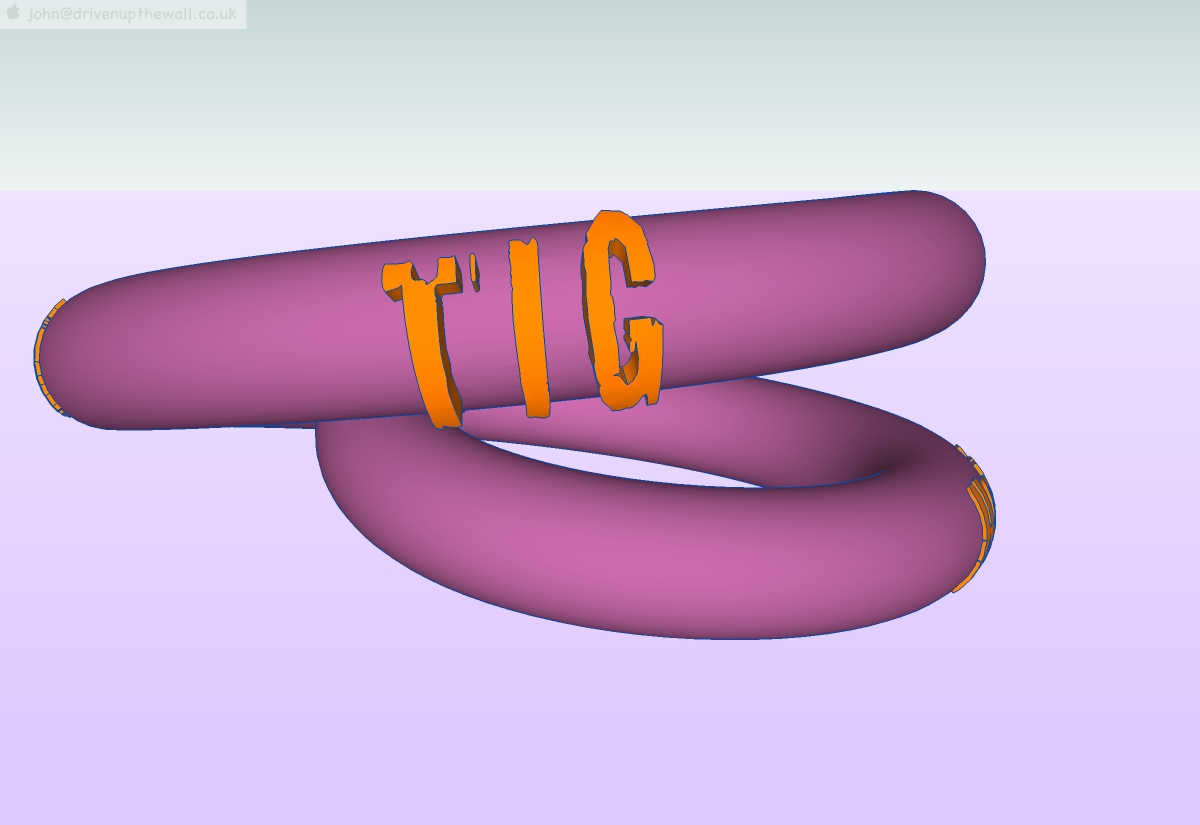
                    this slow to hand stitch example of what I'm try to do with 3D printed stainless
                    about 25% of the poly count I would normally use for this sort of thing, and not triangulated.

                    john

                    learn from the mistakes of others, you may not live long enough to make them all yourself...

                    1 條回覆 最後回覆 回覆 引用 0
                    • TIGT 離線
                      TIG Moderator
                      最後由 編輯

                      driven

                      I'll look at your problem - TT has already come up with one set of problems to fix !
                      With yours I get a non-planar points error - since there's only 3 of them it seems a bit strange... 😕
                      We're really at 'beta' testing now - I only outlined the ideas some hours ago and issued this as my first go - it WILL get better 😉

                      TIG

                      1 條回覆 最後回覆 回覆 引用 0
                      • pilouP 離線
                        pilou
                        最後由 編輯

                        Very useful for boats builders 😉

                        Frenchy Pilou
                        Is beautiful that please without concept!
                        My Little site :)

                        1 條回覆 最後回覆 回覆 引用 0
                        • D 離線
                          driven
                          最後由 編輯

                          @unknownuser said:

                          Very useful for boats builders 😉

                          and don't forget the humble Air Bed makers of the world...

                          TIG,
                          I did this simply to save you having to draw-up or look for something relevant to test on

                          the last 3 letters in watertight might contain none planer points, one had to be over-drawn with a poly-line and two unsoftened with eraser on the bottoms, before I could JPP them, oh the bottom of that A I made a real hash of.. missed it out and went back... I was in a rush...

                          I made the ring quite well, two joints (triangulated) near you name, I chose a ragged font in an attempt to create tiny voids and was surprised how well it came out. Fredo's Joint PushPull is remarkably clean, I have another test piece on file that is pilfered with bad seams if that's more useful.

                          john

                          I'll give anything a spin, it's great that your on the case...

                          learn from the mistakes of others, you may not live long enough to make them all yourself...

                          1 條回覆 最後回覆 回覆 引用 0
                          • TIGT 離線
                            TIG Moderator
                            最後由 編輯

                            Here's v1.2 http://forums.sketchucation.com/viewtopic.php?p=218691#p218691
                            Basic Ticker added. Better processing for inner faces.
                            Three-faced-edged external-faces now usually kept. [fixed TT's ball-breaker boxy mess 😄 ]
                            FR lingvo updated by Pilou. 😉

                            Still struggling with driven's monster...

                            More feedback and ideas please... 🤓

                            TIG

                            1 條回覆 最後回覆 回覆 引用 0
                            • D 離線
                              driven
                              最後由 編輯

                              @tig said:

                              Here's v1.2 http://forums.sketchucation.com/viewtopic.php?p=218691#p218691
                              Still struggling with driven's monster...

                              More feedback and ideas please... :ugeek:

                              that's the simple version, so far it's taken 2hrs 14 min and 49seconds just to explode all the groups so I can then re-group to test the plug on it (and it's only 600,000+ poly's)

                              I just fired up the other computer so I'll do some simple tests on it, while I wait

                              learn from the mistakes of others, you may not live long enough to make them all yourself...

                              1 條回覆 最後回覆 回覆 引用 0
                              • TIGT 離線
                                TIG Moderator
                                最後由 編輯

                                @driven said:

                                @tig said:

                                Here's v1.2 http://forums.sketchucation.com/viewtopic.php?p=218691#p218691
                                Still struggling with driven's monster...
                                More feedback and ideas please... 🤓

                                that's the simple version, so far it's taken 2hrs 14 min and 49seconds just to explode all the groups so I can then re-group to test the plug on it (and it's only 600,000+ poly's)
                                I just fired up the other computer so I'll do some simple tests on it, while I wait

                                I've added some more error reporting in the console to my own version so I can at least see what these errors are - seems related almost exclusively now to healing very tiny holes ?
                                I'm thinking perhaps to move these vertices to heal these tiny gaps rather than fail making edges that are too small inside a 'rescue' ? It would change the model's form, but so slightly you'd never notice...

                                Watch this space 🤓

                                TIG

                                1 條回覆 最後回覆 回覆 引用 0
                                • D 離線
                                  driven
                                  最後由 編輯

                                  Did you scale it up even more?

                                  learn from the mistakes of others, you may not live long enough to make them all yourself...

                                  1 條回覆 最後回覆 回覆 引用 0
                                  • TIGT 離線
                                    TIG Moderator
                                    最後由 編輯

                                    @driven said:

                                    Did you scale it up even more?

                                    Scaling it up x100 or so might make the tiny gaps 'face' - but I looking at pinching the nearly closed verices together so that the gap goes... without much success it has to be said ! 😞

                                    TIG

                                    1 條回覆 最後回覆 回覆 引用 0
                                    • D 離線
                                      driven
                                      最後由 編輯

                                      booled shapes, odd repair on torus

                                      works on Mac

                                      no Jade highlighting on second test, this model was coloured, 1st wasn't

                                      hole repair goes from every other vert on torus?

                                      messages

                                      2 then
                                      manifold, orienting faces then
                                      6
                                      no option dialogs, etc...(should there be?)

                                      CadSpan Style shows up no reversed faces after, GOOD

                                      I'll try more

                                      learn from the mistakes of others, you may not live long enough to make them all yourself...

                                      1 條回覆 最後回覆 回覆 引用 0
                                      • D 離線
                                        driven
                                        最後由 編輯

                                        Sorry. shows up when I click on that repair, the first was there from the top, I'm sure....
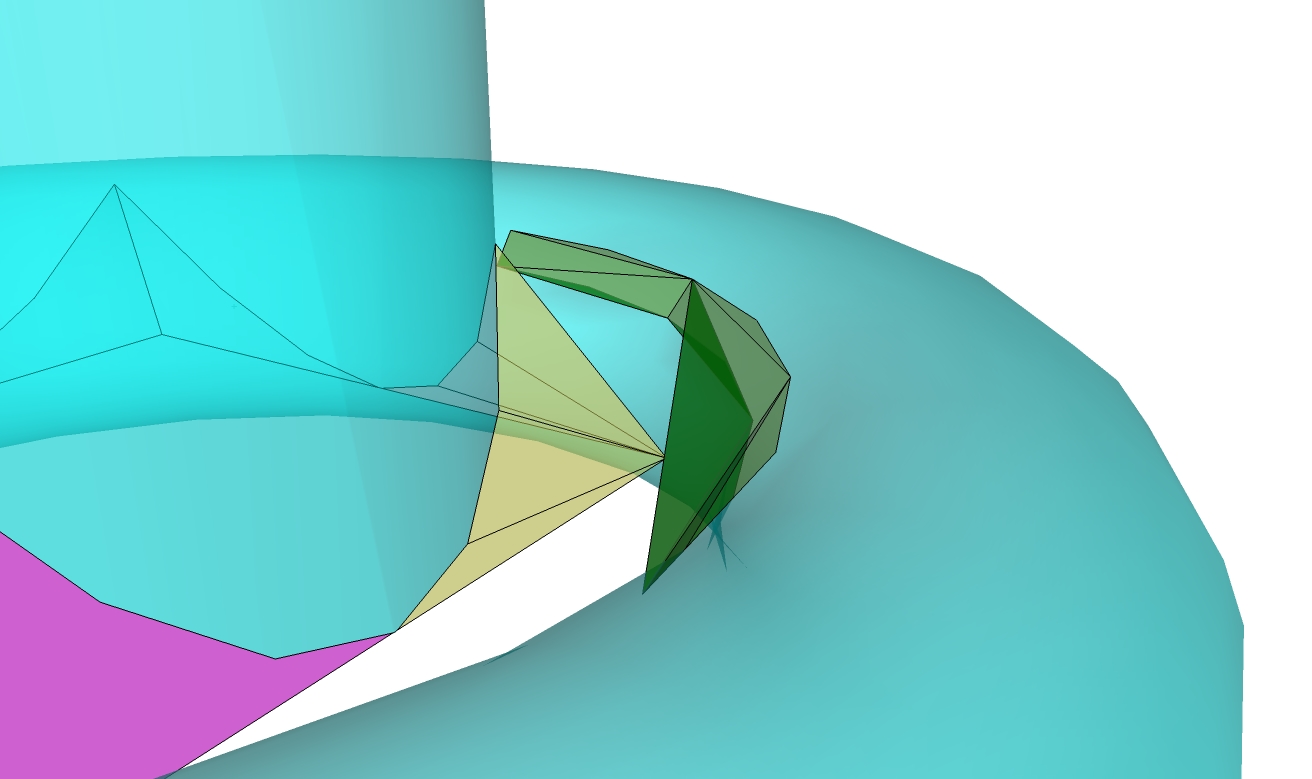
                                        highlighting is on the underside...EDIT: and it ungrouped separate geometry?

                                        learn from the mistakes of others, you may not live long enough to make them all yourself...

                                        1 條回覆 最後回覆 回覆 引用 0
                                        • D 離線
                                          driven
                                          最後由 編輯

                                          OK, am I following this a bit better now.

                                          I got a Manifold dialog-box on the comp_fish when no repairs were needed and the new group is moved to one-side, [url]/viewtopic.php?f=10&t=25473&p=218811#p218811[/url]

                                          on the other, after the repairs were done, all 3 two manifold bits stayed in place so I get the 6 meaning six manifold selection? and the box points just stay to one-side.

                                          learn from the mistakes of others, you may not live long enough to make them all yourself...

                                          1 條回覆 最後回覆 回覆 引用 0
                                          • D 離線
                                            driven
                                            最後由 編輯

                                            EDIT: CRASHED OUT SU 20 seconds no crash report, and SU restarted on a new drawing, now that has [bnever happened before, and I mean everever SU doesn't restart....[/b]]I let it cook and see the results it in the morning...

                                            how odd, so I think I'll play some more

                                            learn from the mistakes of others, you may not live long enough to make them all yourself...

                                            1 條回覆 最後回覆 回覆 引用 0
                                            • 1
                                            • 2
                                            • 3
                                            • 4
                                            • 5
                                            • 6
                                            • 7
                                            • 7 / 7
                                            • 第一個貼文
                                              最後的貼文
                                            Buy SketchPlus
                                            Buy SUbD
                                            Buy WrapR
                                            Buy eBook
                                            Buy Modelur
                                            Buy Vertex Tools
                                            Buy SketchCuisine
                                            Buy FormFonts

                                            Advertisement