sketchucation logo sketchucation
    • 登入
    Oops, your profile's looking a bit empty! To help us tailor your experience, please fill in key details like your SketchUp version, skill level, operating system, and more. Update and save your info on your profile page today!
    🔌 Smart Spline | Fluid way to handle splines for furniture design and complex structures. Download

    [Plugin] ExtrudeTools - Full Set

    已排程 已置頂 已鎖定 已移動 Plugins
    636 貼文 178 Posters 792.0k 瀏覽 175 Watching
    正在載入更多貼文
    • 從舊到新
    • 從新到舊
    • 最多點贊
    回覆
    • 在新貼文中回覆
    登入後回覆
    此主題已被刪除。只有擁有主題管理權限的使用者可以查看。
    • wind-borneW 離線
      wind-borne
      最後由 編輯

      @unknownuser said:

      @driven said:

      Cheers TIG,

      zip Combo works first time out on the Mac, great to see them altogether now, well done...

      still get the 5th button? maybe Jeff could see if it replicates on his Mac.

      Jeff, if I open SU with the toolbar off, and then open it I get 4 EEby... tool buttons, if I open SU having not turned off EEby...TB before quiting, I get a 5th button, it does nothing except changes colour, everthing works if it's there or not, would you mind checking before I fresh install everything again? it might be a Mac thing...

      john

      i can't replicate it.. i always get only 4 toolbar buttons no matter what i do.

      i've done it on a PPC/tiger/SU6 & intel/leopard/SU7.

      could there be a conflict with another plugin causing this?

      following john's scenario, I can replicate.
      Maybe a new tool on the horizon 😆 👍


      Extrusion Tools.png

      "To read between the lines was easier than to follow the text."OSX 10.11.6

      %(#BF80BF)[SU 8 pro

      1 條回覆 最後回覆 回覆 引用 0
      • jeff hammondJ 離線
        jeff hammond
        最後由 編輯

        @wind-borne said:

        following john's scenario, I can replicate.
        Maybe a new tool on the horizon 😆 👍
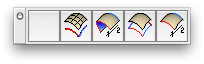
        oh wait, if i give the toolbar a horizontal orientation then i do in fact get the extra button.. i keep all of my tool bars vertically on the left side and when done like that, it's always 4 buttons.

        if i move the 5 button bar to vertical prior to restarting , only 4 will show up after the relaunch.

        dotdotdot

        1 條回覆 最後回覆 回覆 引用 0
        • D 離線
          driven
          最後由 編輯

          so it is a Mac thing, but quite harmless it seems, and I already asked TIG if it was a new tool pending (sorry no), I also stripped out all my rubies and then did a clean-instal of SU just to see if it would go-away, all to no avail. So I'm quite please it can be replicated... sort of.

          I'll try the vertical tip from Jeff and then forget all about.

          john

          learn from the mistakes of others, you may not live long enough to make them all yourself...

          1 條回覆 最後回覆 回覆 引用 0
          • TIGT 離線
            TIG Moderator
            最後由 編輯

            @driven said:

            so it is a Mac thing, but quite harmless it seems, and I already asked TIG if it was a new tool pending (sorry no), I also stripped out all my rubies and then did a clean-instal of SU just to see if it would go-away, all to no avail. So I'm quite please it can be replicated... sort of.

            I'll try the vertical tip from Jeff and then forget all about.

            john

            There MIGHT be a new tool coming... BUT it's nothing to do with that extra button !

            TIG

            1 條回覆 最後回覆 回覆 引用 0
            • ken28875K 離線
              ken28875
              最後由 編輯

              Awesome tools, TIG.

              I have been using it a lot lately and love it. But I run into a problem each time. After using it, whenever I right click on an object, most of the functions are not working and i have to restart Sketchup. I wonder if it's a bug and if anyone else has experienced it.
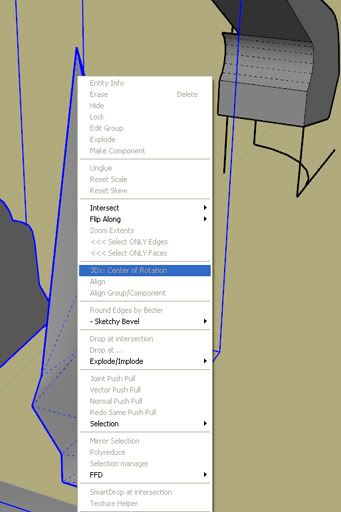
              http://i593.photobucket.com/albums/tt12/ken28875/right_click_not_working.jpg

              Thanks,

              _KN

              Follow Your Dreams.

              1 條回覆 最後回覆 回覆 引用 0
              • R 離線
                Rip Tanion
                最後由 編輯

                I've only really tried EEBR so far, but it's really cool and has a multitude of uses.

                Personally, I find a tutorial for EEBR unnecessary. I find the plug-in pretty straightforward and easy to use. Still, Arc did a good job with his vid.

                1 條回覆 最後回覆 回覆 引用 0
                • TIGT 離線
                  TIG Moderator
                  最後由 編輯

                  @ken28875 said:

                  Awesome tools, TIG.
                  I have been using it a lot lately and love it. But I run into a problem each time. After using it, whenever I right click on an object, most of the functions are not working and i have to restart Sketchup. I wonder if it's a bug and if anyone else has experienced it.
                  _KN

                  This is a known problem - BUT not related directly to any particular Plugin. The latest versions of SUp have a bug where the context-menu items can get 'grayed-out' after a number of repeated 'clicks' on objects; it might also be related to the number of plugins that you have installed.
                  I also have the problem - the Edit menu last item repeats the context-menu without a glitch - but it is still annoying having to save and restart to fix it...
                  The SUp team are onto it - hopefully a maintenance release will fix back it as it was... 😒

                  TIG

                  1 條回覆 最後回覆 回覆 引用 0
                  • ken28875K 離線
                    ken28875
                    最後由 編輯

                    Thanks, TIG.

                    Follow Your Dreams.

                    1 條回覆 最後回覆 回覆 引用 0
                    • JClementsJ 離線
                      JClements
                      最後由 編輯

                      @unknownuser said:

                      The latest versions of SUp have a bug where the context-menu items can get 'grayed-out' after a number of repeated 'clicks' on objects; it might also be related to the number of plugins that you have installed.
                      I also have the problem - the Edit menu last item repeats the context-menu without a glitch - but it is still annoying having to save and restart to fix it...
                      The SUp team are onto it - hopefully a maintenance release will fix back it as

                      And I thought I was the only one having this problem! Thanks for mentioning it.

                      John | Illustrator | Beaverton, Oregon

                      1 條回覆 最後回覆 回覆 引用 0
                      • D 離線
                        d12dozr
                        最後由 編輯

                        Thanks TIG, Just dl'd and played a bit. I like the zipped set...makes it so much easier. Cheers!

                        3D Printing with SketchUp Book
                        http://goo.gl/f7ooYh

                        1 條回覆 最後回覆 回覆 引用 0
                        • H 離線
                          haynesc
                          最後由 編輯

                          will the zipped set be updated along with each update of each individual plugin ?

                          1 條回覆 最後回覆 回覆 引用 0
                          • TIGT 離線
                            TIG Moderator
                            最後由 編輯

                            @haynesc said:

                            will the zipped set be updated along with each update of each individual plugin ?

                            The individual EEby.. tools will no longer be updated.
                            Any new or updated EEby tool[s] will be issued in this zipped set...
                            However, the 'notes' will remain in each individual tool's thread, and I shall also remove the downloads from each at the next update... [which might be next week].

                            TIG

                            1 條回覆 最後回覆 回覆 引用 0
                            • H 離線
                              haynesc
                              最後由 編輯

                              @tig said:

                              @haynesc said:

                              will the zipped set be updated along with each update of each individual plugin ?

                              The individual EEby.. tools will no longer be updated.
                              Any new or updated EEby tool[s] will be issued in this zipped set...
                              However, the 'notes' will remain in each individual tool's thread, and I shall also remove the downloads from each at the next update... [which might be next week].

                              cool ... much easier

                              1 條回覆 最後回覆 回覆 引用 0
                              • majidM 離線
                                majid
                                最後由 編輯

                                Thnak you again dear Tig 😄

                                My inspiring A, B, Sketches book: https://sketchucation.com/shop/books/intermediate/2612-alphabet-inspired-sketches--inspiring-drills-for-architects--3d-artists-and-designers-

                                1 條回覆 最後回覆 回覆 引用 0
                                • R 離線
                                  remus
                                  最後由 編輯

                                  I downloaded this a while ago and forgot to say thanks, so thanks! These are those most sacred of tools that bring entirely new functionality to SU.

                                  http://remusrendering.wordpress.com/

                                  1 條回覆 最後回覆 回覆 引用 0
                                  • TIGT 離線
                                    TIG Moderator
                                    最後由 編輯

                                    Here's today's update http://forums.sketchucation.com/viewtopic.php?p=217663#p217663
                                    Contains two new tools:
                                    EEbyFace (followme-like tool using a preselected 'flat' face with multiple paths if desired)
                                    EEbyRailsByFace (uses EEbyFace across a mesh picked by Profile/Rail1/Rail2/Melding-Profile just like EEbyRails to form a 'rib-cage')
                                    Links to their threads are in the main page... 🤓

                                    TIG

                                    1 條回覆 最後回覆 回覆 引用 0
                                    • D 離線
                                      dedmin
                                      最後由 編輯

                                      1 條回覆 最後回覆 回覆 引用 0
                                      • D 離線
                                        driven
                                        最後由 編輯

                                        Hi Tig, more toys,,, excellent

                                        EEbyRailsbyFace isn't working on my Mac, and when I looked at the code, line 632 comments out all lines through to 693 which look important to me.

                                        might this be my issue?

                                        cheers

                                        john

                                        learn from the mistakes of others, you may not live long enough to make them all yourself...

                                        1 條回覆 最後回覆 回覆 引用 0
                                        • TIGT 離線
                                          TIG Moderator
                                          最後由 編輯

                                          driven

                                          That code is legacy stiff from EEbyRails that I found I didn't ever need [yet] but I left it in but 'commented' out just in case - so that's not the problem...

                                          When you try it on your Mac what errors do you get in the in the Ruby Console ? 😕

                                          TIG

                                          1 條回覆 最後回覆 回覆 引用 0
                                          • D 離線
                                            driven
                                            最後由 編輯

                                            Error: #<NoMethodError: undefined method db' for #<Object:0x3f319f4>> /Library/Application Support/Google SketchUp 7/SketchUp/Plugins/extrudeEdgesByFace.rb:359:in extrudeEdgesByFace'
                                            /Library/Application Support/Google SketchUp 7/SketchUp/Plugins/extrudeEdgesByFace.rb:463

                                            learn from the mistakes of others, you may not live long enough to make them all yourself...

                                            1 條回覆 最後回覆 回覆 引用 0
                                            • 1
                                            • 2
                                            • 3
                                            • 4
                                            • 5
                                            • 31
                                            • 32
                                            • 3 / 32
                                            • 第一個貼文
                                              最後的貼文
                                            Buy SketchPlus
                                            Buy SUbD
                                            Buy WrapR
                                            Buy eBook
                                            Buy Modelur
                                            Buy Vertex Tools
                                            Buy SketchCuisine
                                            Buy FormFonts

                                            Advertisement




