sketchucation logo sketchucation
    • 登入
    Oops, your profile's looking a bit empty! To help us tailor your experience, please fill in key details like your SketchUp version, skill level, operating system, and more. Update and save your info on your profile page today!
    🔌 Smart Spline | Fluid way to handle splines for furniture design and complex structures. Download

    [Plugin] ExtrudeTools - Full Set

    已排程 已置頂 已鎖定 已移動 Plugins
    636 貼文 178 Posters 792.5k 瀏覽 175 Watching
    正在載入更多貼文
    • 從舊到新
    • 從新到舊
    • 最多點贊
    回覆
    • 在新貼文中回覆
    登入後回覆
    此主題已被刪除。只有擁有主題管理權限的使用者可以查看。
    • R 離線
      rock1
      最後由 編輯

      i am unable to solve this problem. what should i do ❓

      Signature removed by SCF Admin

      1 條回覆 最後回覆 回覆 引用 0
      • TIGT 離線
        TIG Moderator
        最後由 編輯

        Have you got two brain-cells to rub together 😒

        You have got two files with similar names loading, that then add the same tool twice.
        So simply look through the contents of Plugins.
        Find these two files and open/read them both with Notepad.exe
        The one called "extrudeEdgesByEdges.rb" is the one to keep - it's from the zipped set [it says 'Version 3.0' in its notes]
        The other one that's maybe 'older' and/or just has 'another similar name' needs removing.
        There are several files in Plugins with similar names but only two of the 11 [in your case 12!] are the ones you need to worry on...

        I can't do this for you - you must help yourself here - be resilient...

        TIG

        1 條回覆 最後回覆 回覆 引用 0
        • TIGT 離線
          TIG Moderator
          最後由 編輯

          Here's an update
          http://forums.sketchucation.com/viewtopic.php?p=217663#p217663

          Two tools now have 'Quad Face' options to complement thomthom's new Quad-Tool
          ExtrudeEdgesByRails http://forums.sketchucation.com/viewtopic.php?p=201286#p201286
          ExtrudeEdgesByLoft http://forums.sketchucation.com/viewtopic.php?p=231016#p231016

          The lingvo files have also been updated to suit.

          TIG

          1 條回覆 最後回覆 回覆 引用 0
          • thomthomT 離線
            thomthom
            最後由 編輯

            Sweet! More quad tools! 😄

            Thomas Thomassen — SketchUp Monkey & Coding addict
            List of my plugins and link to the CookieWare fund

            1 條回覆 最後回覆 回覆 引用 0
            • Rich O BrienR 線上
              Rich O Brien Moderator
              最後由 編輯

              Error on startup...

              Error Loading File extrudeEdgesByRails.rb
              C;/Program Files (x86)/Google/Google SketchUp 8/Plugins/extrudeEdgesByRails.rb;163; syntax error, unexpected '='
              

              Download the free D'oh Book for SketchUp 📖

              1 條回覆 最後回覆 回覆 引用 0
              • TIGT 離線
                TIG Moderator
                最後由 編輯

                @unknownuser said:

                Error on startup...

                Error Loading File extrudeEdgesByRails.rb
                > C;/Program Files (x86)/Google/Google SketchUp 8/Plugins/extrudeEdgesByRails.rb;[b]163[/b]; syntax error, unexpected '='
                

                😒 I somehow managed to duplicate a line below '=end' in the guidance notes as I saved the file...
                Here's the updated version http://forums.sketchucation.com/viewtopic.php?p=217663#p217663
                Sorry 😳 ... but the 8 of you who downloaded it so far do need to do it again 😲
                More haste, less speed... as the English proverb goes...

                TIG

                1 條回覆 最後回覆 回覆 引用 0
                • TIGT 離線
                  TIG Moderator
                  最後由 編輯

                  Here's a maintenance update which includes new ES lingvo files by deFisto with minor idiom corrections etc, and a minor 'db' correction to EEbyLathe to include the start_operation name...
                  http://forums.sketchucation.com/viewtopic.php?p=217663#p217663

                  TIG

                  1 條回覆 最後回覆 回覆 引用 0
                  • Rich O BrienR 線上
                    Rich O Brien Moderator
                    最後由 編輯

                    thank you 👍

                    Download the free D'oh Book for SketchUp 📖

                    1 條回覆 最後回覆 回覆 引用 0
                    • TIGT 離線
                      TIG Moderator
                      最後由 編輯

                      Here's another update...
                      http://forums.sketchucation.com/viewtopic.php?p=217663#p217663
                      It now only smooths mesh edges with more than one face in EEbyLathe/..Faces/..Loft and ..Rail

                      TIG

                      1 條回覆 最後回覆 回覆 引用 0
                      • srxS 離線
                        srx
                        最後由 編輯

                        Thanks! Nice to see you working as a team 😄 👍

                        www.saurus.rs

                        1 條回覆 最後回覆 回覆 引用 0
                        • TIGT 離線
                          TIG Moderator
                          最後由 編輯

                          Here's an update http://forums.sketchucation.com/viewtopic.php?p=217663#p217663
                          EEbyLathe v3.5 Fixed Picked-Angle's messy undo; Smoothed-edges now stop @90º.

                          TIG

                          1 條回覆 最後回覆 回覆 引用 0
                          • jeff hammondJ 離線
                            jeff hammond
                            最後由 編輯

                            oops 😳

                            i forgot to say thanks earlier for this update..
                            much better !
                            thank you!

                            dotdotdot

                            1 條回覆 最後回覆 回覆 引用 0
                            • TIGT 離線
                              TIG Moderator
                              最後由 編輯

                              Here's an update http://forums.sketchucation.com/viewtopic.php?p=217663#p217663
                              EEbyRails and EEbyLoft have been updated so that the 'Quad Faces' option meets Thomthom's updated spec for this type of face...

                              TIG

                              1 條回覆 最後回覆 回覆 引用 0
                              • P 離線
                                PeterF
                                最後由 編輯

                                I've just installed the collection but it isn't working properly. The toolbar doesn't appear and the EbyEdges tool doesn't work. I haven't tried the others out yet. Is this just me? I've installed it by putting the .rb files in the main plugins folder and the tigtools folder in there as well. Is that right?

                                1 條回覆 最後回覆 回覆 引用 0
                                • TIGT 離線
                                  TIG Moderator
                                  最後由 編輯

                                  Yes. 😕
                                  This is what should be in your Plugins folderCapture.PNG
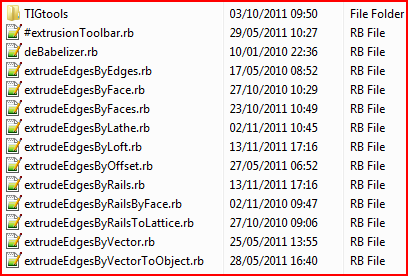
                                  The TIGtools folder contains lots of support files too.
                                  Are you sure all of the files are properly inside Plugins ?
                                  No 'Compatibility Files' issues ??
                                  The one starting with # is needed to make the toolbar etc.
                                  You must activate the toolbar from View > Toolbars the first time it's loaded...

                                  TIG

                                  1 條回覆 最後回覆 回覆 引用 0
                                  • A 離線
                                    altab
                                    最後由 編輯

                                    Hi, thanks aagain for this excellent tools

                                    Is it possible to use extrude edge by loft by using lines and curves instead of curves exclusively,
                                    If it is not possible how can I recreate the line using a curve ?

                                    1 條回覆 最後回覆 回覆 引用 0
                                    • P 離線
                                      PeterF
                                      最後由 編輯

                                      Ok, I've got the toolbar, but when I try to use the EbyEdge tool, for about 15 - 20mins nothing happens. My computer is normally quite fast - is it meant to take that long?

                                      1 條回覆 最後回覆 回覆 引用 0
                                      • TIGT 離線
                                        TIG Moderator
                                        最後由 編輯

                                        @peterf said:

                                        Ok, I've got the toolbar, but when I try to use the EbyEdge tool, for about 15 - 20mins nothing happens. My computer is normally quite fast - is it meant to take that long?

                                        Run it with the Ruby Console open and post any error messages.
                                        Are you sure you want to use this too?
                                        It has quite specific results.
                                        Perhaps EEbyRails might be what you want... 😕

                                        TIG

                                        1 條回覆 最後回覆 回覆 引用 0
                                        • TIGT 離線
                                          TIG Moderator
                                          最後由 編輯

                                          @unknownuser said:

                                          Hi, thanks aagain for this excellent tools
                                          Is it possible to use extrude edge by loft by using lines and curves instead of curves exclusively,
                                          If it is not possible how can I recreate the line using a curve ?

                                          Fredo's CurviLoft might work with plain edges... BUT most of my EEby... tools usually require 'Curves' to be selected... to make a collection of edges into a 'curve' use weld.rb, it's freely available from Smustard.com...

                                          TIG

                                          1 條回覆 最後回覆 回覆 引用 0
                                          • A 離線
                                            altab
                                            最後由 編輯

                                            I've ended using curviloft, the weld tool couldn't manage to get my lines into curves

                                            1 條回覆 最後回覆 回覆 引用 0
                                            • 1
                                            • 2
                                            • 12
                                            • 13
                                            • 14
                                            • 15
                                            • 16
                                            • 31
                                            • 32
                                            • 14 / 32
                                            • 第一個貼文
                                              最後的貼文
                                            Buy SketchPlus
                                            Buy SUbD
                                            Buy WrapR
                                            Buy eBook
                                            Buy Modelur
                                            Buy Vertex Tools
                                            Buy SketchCuisine
                                            Buy FormFonts

                                            Advertisement



