sketchucation logo sketchucation
    • 登入
    Oops, your profile's looking a bit empty! To help us tailor your experience, please fill in key details like your SketchUp version, skill level, operating system, and more. Update and save your info on your profile page today!
    🔌 Smart Spline | Fluid way to handle splines for furniture design and complex structures. Download

    [Plugin] Eclate_Deplace (fragmentation-exploded view)

    已排程 已置頂 已鎖定 已移動 Plugins
    161 貼文 51 Posters 226.4k 瀏覽 51 Watching
    正在載入更多貼文
    • 從舊到新
    • 從新到舊
    • 最多點贊
    回覆
    • 在新貼文中回覆
    登入後回覆
    此主題已被刪除。只有擁有主題管理權限的使用者可以查看。
    • BoxB 離線
      Box
      最後由 編輯

      I'm using the latest version of sketchup and I get a bug splat every time I try to use Eclate.

      Even with a simple cube. As soon as you click yes or no on the copy dialog it shuts down and goes to bug splat.

      1 條回覆 最後回覆 回覆 引用 0
      • C 離線
        c.plassais
        最後由 編輯

        @box said:

        I'm using the latest version of sketchup and I get a bug splat every time I try to use Eclate.

        Even with a simple cube. As soon as you click yes or no on the copy dialog it shuts down and goes to bug splat.

        you should only use Eclate_Deplace with components or groups

        1 條回覆 最後回覆 回覆 引用 0
        • K 離線
          kyyu
          最後由 編輯

          @unknownuser said:

          Anyone experiencing Bugsplats with SU7.1 and this plugin?

          Haven't used since last SU update now it Bugsplat everytime. I've attached the model if anyone want to see if it's just me?

          I know i have the components nested in a component but use this plugin when not nested

          It doesn't bug splat for me, but I am still using SU v7.0.10247. It doesn't do much with that file either, except add one guide point?

          I tried it on an ungrouped 3D pushpulled rectangle and also not bug splat. So could be something not compatable with the latest version of sketchup.

          1 條回覆 最後回覆 回覆 引用 0
          • Dave RD 離線
            Dave R
            最後由 編輯

            @kyyu said:

            ... It doesn't do much with that file either, except add one guide point?

            I tried it on an ungrouped 3D pushpulled rectangle and also not bug splat. So could be something not compatable with the latest version of sketchup.

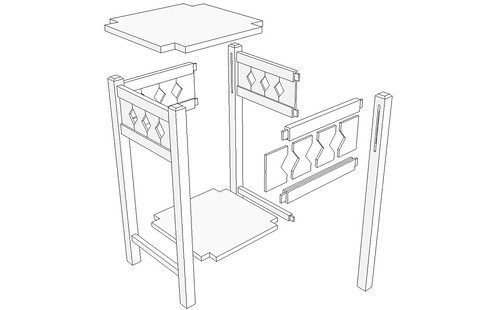
            Why would you use it on an "ungrouped 3D push/pulled rectangle"? The plugin is intended to move components away from each other to create an exploded view of this sort.
            http://farm5.static.flickr.com/4023/4628792635_15716dcc29.jpg

            Etaoin Shrdlu

            %

            (THERE'S NO PLACE LIKE)

            G28 X0.0 Y0.0 Z0.0

            M30

            %

            1 條回覆 最後回覆 回覆 引用 0
            • K 離線
              kyyu
              最後由 編輯

              @dave r said:

              @kyyu said:

              ... It doesn't do much with that file either, except add one guide point?

              I tried it on an ungrouped 3D pushpulled rectangle and also not bug splat. So could be something not compatable with the latest version of sketchup.

              Why would you use it on an "ungrouped 3D push/pulled rectangle"? The plugin is intended to move components away from each other to create an exploded view of this sort.

              http://farm5.static.flickr.com/4023/4628792635_15716dcc29.jpg

              Because a few post up, Box said he was getting bug splats on everything; even with a simple cube. So I tested it, but maybe he meant a cube made of grouped sides? Anyways, I was checking for bug splats and didn't find any. But, like I noted, I'm using v7.0 of sketchup.

              1 條回覆 最後回覆 回覆 引用 0
              • BoxB 離線
                Box
                最後由 編輯

                Yes I was using a cube of grouped faces, and at first I was getting a bug spat every time, now it is random.
                I have rebooted and added updates and a few other bits and pieces since then, sorry that's not a very useful bit of diagnostic information but I've been doing too many things at once.

                So to put it simply, It does work for me but it is unstable and I have yet to work out what, if any, conditions cause the bug splat.

                1 條回覆 最後回覆 回覆 引用 0
                • C 離線
                  c.plassais
                  最後由 編輯

                  Two versions of the plugin that can be corrected bug
                  I've written a 3.0.2 version and also a rewritten version by the genius Fredo. Thanks Fredo 👍

                  Sorry I can not insert in the original post ...

                  The limitation of this plugin is that it does not take into account the size of groups or components.
                  It moves only the elements from their center. Perhaps a future version

                  Christophe

                  Eclate_Deplace english version 3.0.2
                  version 3.0.2 rewritten by fredo ChrisP_RadialMove

                  1 條回覆 最後回覆 回覆 引用 0
                  • pilouP 離線
                    pilou
                    最後由 編輯

                    Added to the first post 😉

                    Frenchy Pilou
                    Is beautiful that please without concept!
                    My Little site :)

                    1 條回覆 最後回覆 回覆 引用 0
                    • C 離線
                      c.plassais
                      最後由 編輯

                      Thank Pilou 👍

                      1 條回覆 最後回覆 回覆 引用 0
                      • D 離線
                        dedmin
                        最後由 編輯

                        1 條回覆 最後回覆 回覆 引用 0
                        • V 離線
                          vidy
                          最後由 編輯

                          dear guys,

                          is there any possibility of this plugin have crashed with other plugin?

                          ok, here is what i did:

                          1. i copy the newest version 3.0.2
                          2. then rename it so its just Eclate_Deplace.rb
                          3. i create simple cube, and then group it
                          4. when i right click on the group and choose eclate_deplace, no dialog box showed up and i got this messages


                          http://a.imageshack.us/img829/1341/eclatedeplaceprob01.jpg

                          please,somebody help me to solved this issue, thank you.. ❓

                          regards,

                          still so much to learn..

                          1 條回覆 最後回覆 回覆 引用 0
                          • Rich O BrienR 離線
                            Rich O Brien Moderator
                            最後由 編輯

                            Finally it's back working 👍

                            Thanks Pilou....C.Plassais....TIG....Thomthom....Chris Fullmer....Fredo!

                            Hope i left no one out?

                            Download the free D'oh Book for SketchUp 📖

                            1 條回覆 最後回覆 回覆 引用 0
                            • pilouP 離線
                              pilou
                              最後由 編輯

                              Maybe cats and dogs and birds...
                              It's a big familly 😆

                              Frenchy Pilou
                              Is beautiful that please without concept!
                              My Little site :)

                              1 條回覆 最後回覆 回覆 引用 0
                              • pilouP 離線
                                pilou
                                最後由 編輯

                                About
                                Facegroup by Gavvy (seems there a is little problem with this facegroup plugin) Thomthom is look it! and seems found the error ☀

                                And I have found another one who works 😉
                                Make_components by Matt666 at Crai Ruby depot!

                                And a third solution by Tig! (face selected ---> groups)
                                Put this in the Ruby console! ☀

                                m=Sketchup.active_model;n=m.active_entities;m.selection.to_a.each{|e|n.add_group(e)if e.class==Sketchup;;Face}
                                

                                Frenchy Pilou
                                Is beautiful that please without concept!
                                My Little site :)

                                1 條回覆 最後回覆 回覆 引用 0
                                • V 離線
                                  vidy
                                  最後由 編輯

                                  thanks pilou for the fast reply, i will try it and report it soon..

                                  regards,

                                  still so much to learn..

                                  1 條回覆 最後回覆 回覆 引用 0
                                  • pilouP 離線
                                    pilou
                                    最後由 編輯

                                    With newest version 3.0.2

                                    @unknownuser said:

                                    is there any possibility of this plugin have crashed with other plugin?

                                    I don't believe that

                                    @unknownuser said:

                                    1. i create simple cube, and then group it
                                    2. when i right click on the group and choose eclate_deplace, no dialog box showed up and i got this messages

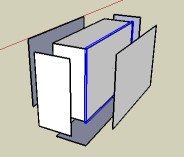
                                    Normal : a simple cube must be composed of a 6 faces themself a group!!!
                                    (so for a cube: 6 faces who are each a group) !
                                    in this image i have selected one face for you show that is a group
                                    (each face is a group)
                                    Select them then call the plug!
                                    cube.jpg
                                    If you want transform automatically each 6 faces of a simple cube on 6 groups maybe exist a plug 😉
                                    (or any faces selected)
                                    Facegroup by Gavvy (seems there a little problem with this facegroup plugin) Thomthom is look it!
                                    And I have found another one who works 😉
                                    Make_components by Matt666 at Crai Ruby depot! ☀

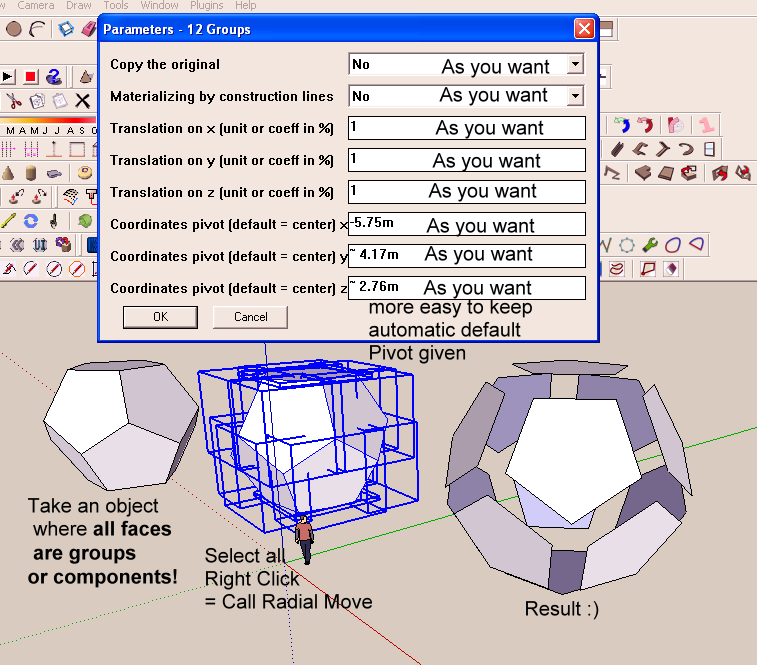
                                    Ps Menu of "Radial Move" or "Eclate_displace" Appear by Right Click on the selection of the groups or components!

                                    Frenchy Pilou
                                    Is beautiful that please without concept!
                                    My Little site :)

                                    1 條回覆 最後回覆 回覆 引用 0
                                    • Y 離線
                                      yvan79
                                      最後由 編輯

                                      How do you use the ChrisP_RadialMove_EN.rb plugin? can anyone show an example?

                                      1 條回覆 最後回覆 回覆 引用 0
                                      • pilouP 離線
                                        pilou
                                        最後由 編輯

                                        No problem 😄
                                        Radial_move.png

                                        Frenchy Pilou
                                        Is beautiful that please without concept!
                                        My Little site :)

                                        1 條回覆 最後回覆 回覆 引用 0
                                        • pilouP 離線
                                          pilou
                                          最後由 編輯

                                          I don't see your images 😮
                                          Verify that your object is composed of groups or components!!!

                                          A simple cube grouped will not works if each face is not a group!!!

                                          Frenchy Pilou
                                          Is beautiful that please without concept!
                                          My Little site :)

                                          1 條回覆 最後回覆 回覆 引用 0
                                          • Y 離線
                                            yvan79
                                            最後由 編輯

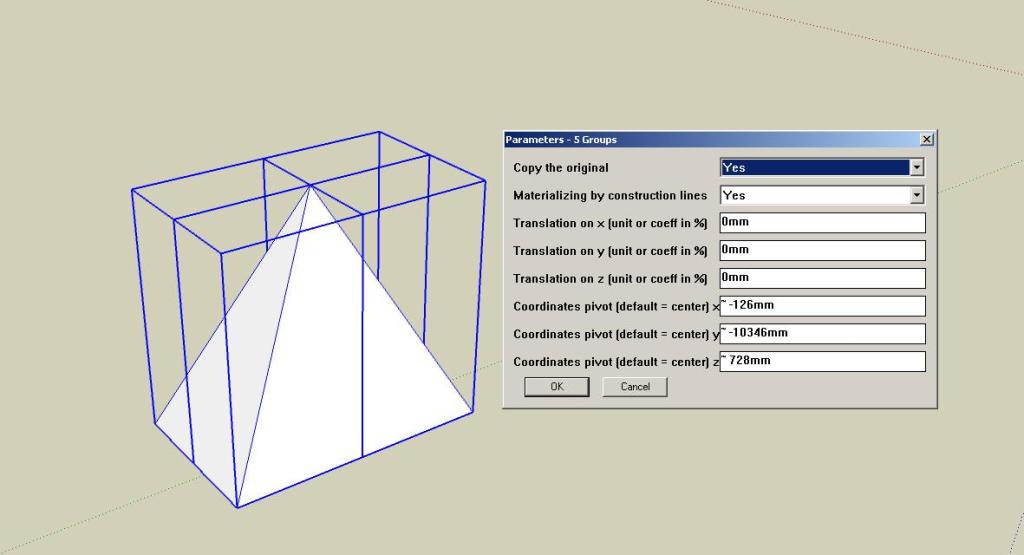
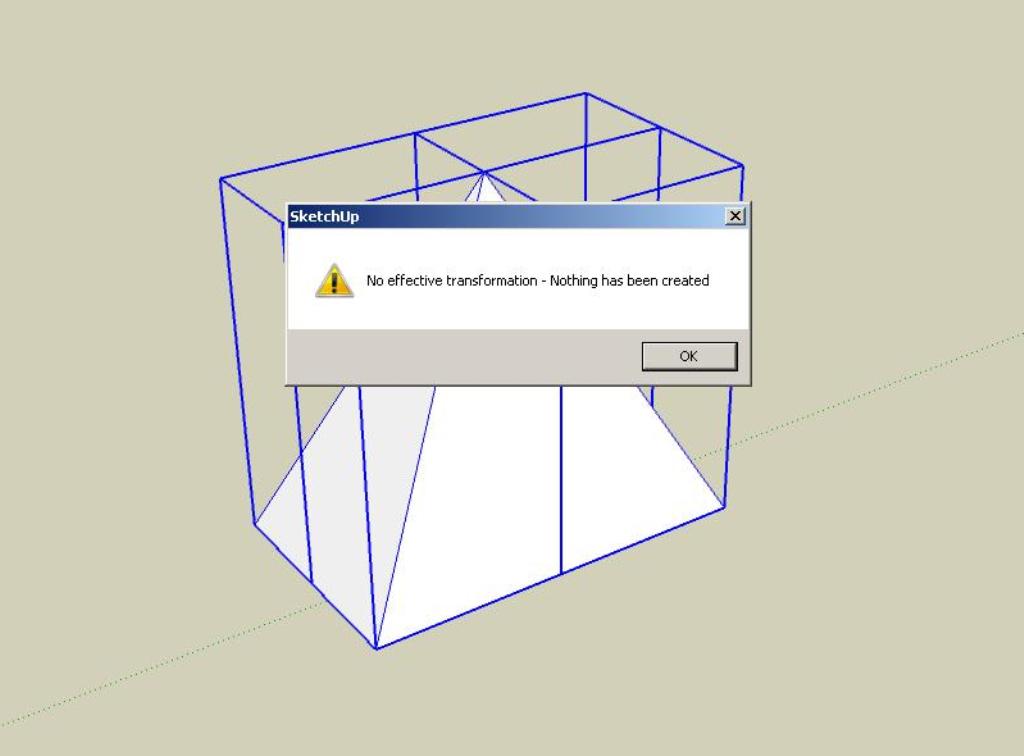
                                            Hi pilou...thanks for the instructions but i have an error of saying 'No effective transformation - nothing has been created'.

                                            radialmove1.jpg


                                            radialmove2.jpg

                                            1 條回覆 最後回覆 回覆 引用 0
                                            • 1
                                            • 2
                                            • 3
                                            • 4
                                            • 5
                                            • 8
                                            • 9
                                            • 3 / 9
                                            • 第一個貼文
                                              最後的貼文
                                            Buy SketchPlus
                                            Buy SUbD
                                            Buy WrapR
                                            Buy eBook
                                            Buy Modelur
                                            Buy Vertex Tools
                                            Buy SketchCuisine
                                            Buy FormFonts

                                            Advertisement