sketchucation logo sketchucation
    • Login
    Oops, your profile's looking a bit empty! To help us tailor your experience, please fill in key details like your SketchUp version, skill level, operating system, and more. Update and save your info on your profile page today!
    Mac User? | Join the Rayscaper Beta for Mac Learn More

    [Plugin] UVTools 0.2 Pro (Beta) (Updated for SU6)

    Scheduled Pinned Locked Moved Plugins
    198 Posts 73 Posters 187.6k Views 73 Watching
    Loading More Posts
    • Oldest to Newest
    • Newest to Oldest
    • Most Votes
    Reply
    • Reply as topic
    Log in to reply
    This topic has been deleted. Only users with topic management privileges can see it.
    • thomthomT
      thomthom
      last edited by

      @yiannosh said:

      Would u please give me a link to download the UV tool plug-in? Thanks

      At the bottom of the first post in the first page.

      Thomas Thomassen β€” SketchUp Monkey & Coding addict
      List of my plugins and link to the CookieWare fund

      1 Reply Last reply
      Reply Quote 0
      • Alan FraserA
        Alan Fraser
        last edited by

        Just an idea that stemmed from another topic on the UV mapping facilities in SU (or lack thereof). Is it possible to call an external program with Ruby, in the same way you can call an image editor in Preferences?
        If so, it would be really cool if some kind of .ini file could be added to the obj export command, so that exporting the UVs to obj automatically fired up UU3D (for example) and opened the proxy. I know that might not be possible for all UV editors as some don't open obj files, merely import them; but even if we had to write the path manually in some preference file, it would make for a much smoother workflow and effectively give SU an internal UV mapping module.
        This is a great plugin BTW. I haven't come across any glitches in it yet, in well over a year...even exporting entire people mapped from head to foot.

        maintn.jpg

        3D Figures
        Were you required to walk 500 miles? Were you advised to walk 500 more?
        You could be entitled to compensation. Call the Pro Claimers now!

        1 Reply Last reply
        Reply Quote 0
        • D
          dedmin
          last edited by

          And UU3D supports SketchUp's files directly.

          1 Reply Last reply
          Reply Quote 0
          • Alan FraserA
            Alan Fraser
            last edited by

            @dedmin said:

            And UU3D supports SketchUp's files directly.

            Ooooo!!! I must upgrade. Can it handle V8 files yet? Well somebody recognizes a gap in the market even if Google doesn't...and given the now huge list of import/export formats, there's little sense in Google limiting the export options of the free version.

            3D Figures
            Were you required to walk 500 miles? Were you advised to walk 500 more?
            You could be entitled to compensation. Call the Pro Claimers now!

            1 Reply Last reply
            Reply Quote 0
            • Rich O BrienR
              Rich O Brien Moderator
              last edited by

              I use UVLayout but after seeing this

              The resource cannot be found.

              favicon

              (www.unwrap3d.com)

              It's making me think about changing. Alan if you've any deal breaker thoughts on this I'd love to hear them?

              Download the free D'oh Book for SketchUp πŸ“–

              1 Reply Last reply
              Reply Quote 0
              • D
                dedmin
                last edited by

                @alan fraser said:

                @dedmin said:

                And UU3D supports SketchUp's files directly.

                Ooooo!!! I must upgrade. Can it handle V8 files yet? Well somebody recognizes a gap in the market even if Google doesn't...and given the now huge list of import/export formats, there's little sense in Google limiting the export options of the free version.

                @unknownuser said:

                The SketchUp plugin has been updated to import/export version 8 SketchUp files.

                The resource cannot be found.

                favicon

                (www.unwrap3d.com)

                1 Reply Last reply
                Reply Quote 0
                • Alan FraserA
                  Alan Fraser
                  last edited by

                  Thanks dedmin, that does it for me.
                  Come on Rich, you know you want to have some Far Cry characters rampaging through your next set of visuals. πŸ˜‰

                  3D Figures
                  Were you required to walk 500 miles? Were you advised to walk 500 more?
                  You could be entitled to compensation. Call the Pro Claimers now!

                  1 Reply Last reply
                  Reply Quote 0
                  • Rich O BrienR
                    Rich O Brien Moderator
                    last edited by

                    I've just purchased, now where are those Leisure Suit Larry models I had?

                    Download the free D'oh Book for SketchUp πŸ“–

                    1 Reply Last reply
                    Reply Quote 0
                    • D
                      dedmin
                      last edited by

                      I have to call them for a commission πŸ˜† 🀣

                      1 Reply Last reply
                      Reply Quote 0
                      • PixeroP
                        Pixero
                        last edited by

                        Just bought it. I havent received a download link yet though...

                        Edit: Got it now. πŸ˜„

                        1 Reply Last reply
                        Reply Quote 0
                        • GaieusG
                          Gaieus
                          last edited by

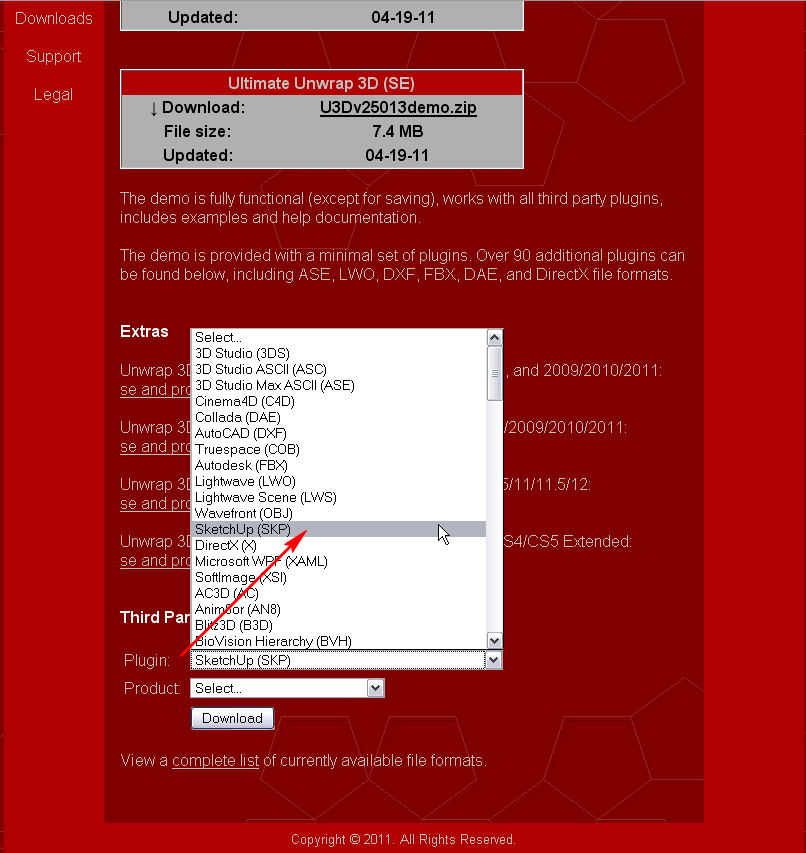
                          You may need to download the plugin for it at the bottom of this page:
                          http://www.unwrap3d.com/u3d/downloads.aspx

                          (I have not downloaded/purchased it - yet? - just browsed the site a bit so I am not sure...)

                          suplugin.png

                          Gai...

                          1 Reply Last reply
                          Reply Quote 0
                          • PixeroP
                            Pixero
                            last edited by

                            I don't know if i'm blind or simply stupid, but I can't find any SketchUp export options in Ultimate Unwrap?

                            Edit: Thanks Gaius. πŸ˜„
                            It wasnt clear that all plugins had to be downloaded separately.

                            1 Reply Last reply
                            Reply Quote 0
                            • Rich O BrienR
                              Rich O Brien Moderator
                              last edited by

                              Messing around this morning....
                              UV_SU.png

                              to this...
                              UV_UU3D.png

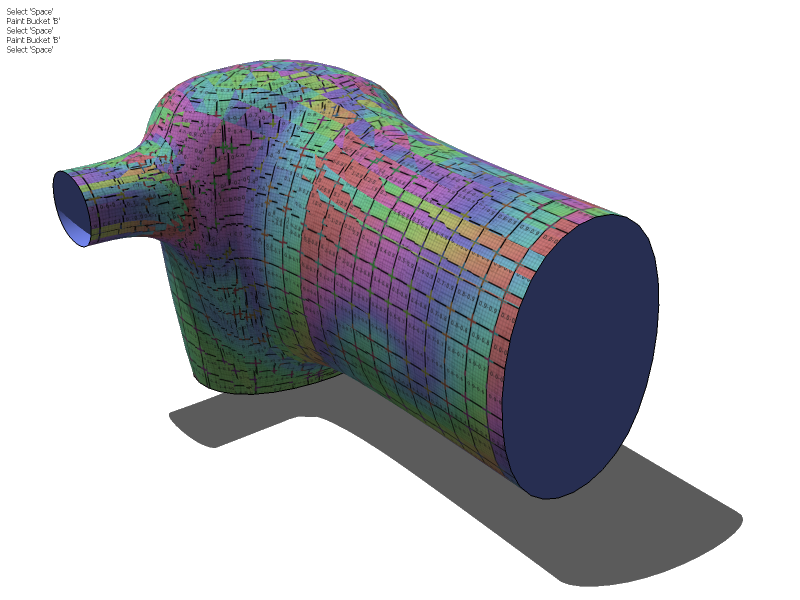
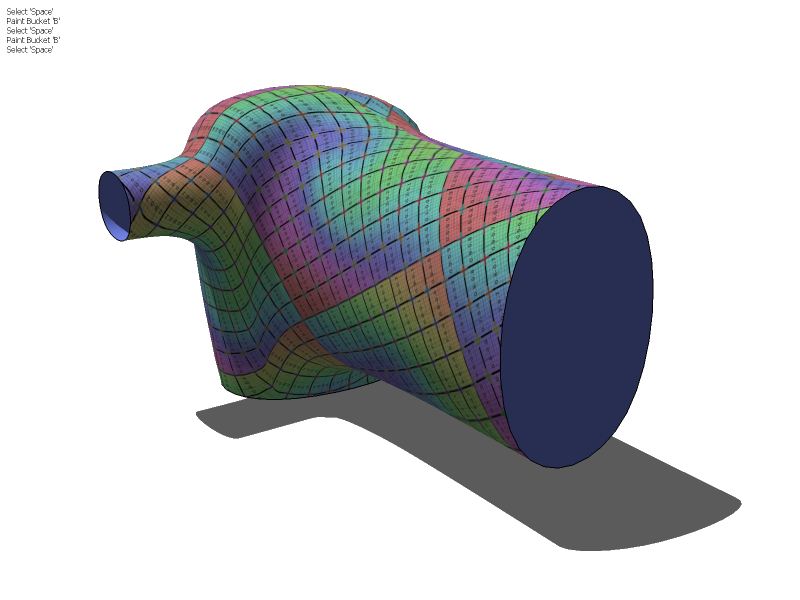
                              Lot's to get to grips with in UU3D. An extensive tutorial showing the whole process would help (from an SU point of view). Or if any knows of some good tutorials let me know.

                              Download the free D'oh Book for SketchUp πŸ“–

                              1 Reply Last reply
                              Reply Quote 0
                              • TIGT
                                TIG Moderator
                                last edited by

                                What's that small text-list of tools, top-left on your sceen-shots ?
                                [ πŸ˜‰ ]

                                TIG

                                1 Reply Last reply
                                Reply Quote 0
                                • Rich O BrienR
                                  Rich O Brien Moderator
                                  last edited by

                                  It's a plugin i'm writing called 'Visualisationizer'. It uses voice recognition also so you can leave your shortcut hand on your crotch πŸ‘

                                  It's a bit buggy because anytime a say 'Push/Pull' it says 'make up your mind'.... πŸ˜’

                                  Download the free D'oh Book for SketchUp πŸ“–

                                  1 Reply Last reply
                                  Reply Quote 0
                                  • GaieusG
                                    Gaieus
                                    last edited by

                                    @unknownuser said:

                                    It's a bit buggy because anytime a say 'Push/Pull' it says 'make up your mind'.... πŸ˜’

                                    🀣

                                    Now I am wondering what it says when you say that most frequent word you use.
                                    πŸ˜†

                                    Gai...

                                    1 Reply Last reply
                                    Reply Quote 0
                                    • TIGT
                                      TIG Moderator
                                      last edited by

                                      F
                                      E
                                      C
                                      K
                                      😲
                                      Freehand
                                      Erase
                                      Circle
                                      K???

                                      TIG

                                      1 Reply Last reply
                                      Reply Quote 0
                                      • Rich O BrienR
                                        Rich O Brien Moderator
                                        last edited by

                                        Guys,

                                        Try and keep on topic if you can? πŸ˜’

                                        F&$k sake!

                                        Download the free D'oh Book for SketchUp πŸ“–

                                        1 Reply Last reply
                                        Reply Quote 0
                                        • U
                                          umbra
                                          last edited by

                                          Well, first post, and I must say I don't speak english, so sorry for the mistakes and thanks for your understanding.

                                          The thing is after some days trying and trying this UV thing and being a noob using free software, I found this solution. I'm a happy woman now, and I want to share it πŸ˜„
                                          I hope this can be useful for someone πŸ˜‰

                                          1- paint the surface with the texture and export to .obj with UVTools
                                          2- open the .obj with MeshLab and resave it
                                          3- open it in Blender and edit the UV map (haaaaaarrrrddddddd)
                                          4- export to .obj
                                          5- open it again with MeshLab, and save it as .3ds
                                          6- impot this .3ds in sketchup

                                          I don't know what others uses this MeshLab have, but it's useful for avoiding this "Blender not importing UVTools .obj", and this issue I have with faces bad mapped importing the .obj with UVTools. It seems to handle a lot of 3d formats, but I have to say I'm learning, and doing some simple stuff as cups, apples, and so.

                                          Tested in Kerkythea and everything seems to be ok (with SU2KT 3.16, the new one don't export the simple UVMapped textures spherical or cylindrical)

                                          And thank you all people for sharing your plugins, you're doing Sketchup a great and fun app!!!

                                          1 Reply Last reply
                                          Reply Quote 0
                                          • GaieusG
                                            Gaieus
                                            last edited by

                                            Hi Marina (and welcome),

                                            I am not entirely sure if it is relevant for your case but anyway, it may be useful info for some; many rendering apps (including Kerkythea) does not like these mapped UV's unless you do the mapping on pre-triangulated surfaces (already in SU). I used to have issues in Twilight (Kerkythea engine based) as well as Thea (same developer of both the rendering engine and the plugin).

                                            Tomasz, the author of the plugin is already aware of this so hopefully there will be a solution one day but until then, triangulation is the way to go (staying mainly in native SU).

                                            Here is a plugin which will triangulate your faces in SU:
                                            http://forums.sketchucation.com/viewtopic.php?t=23638

                                            Gai...

                                            1 Reply Last reply
                                            Reply Quote 0

                                            Hello! It looks like you're interested in this conversation, but you don't have an account yet.

                                            Getting fed up of having to scroll through the same posts each visit? When you register for an account, you'll always come back to exactly where you were before, and choose to be notified of new replies (either via email, or push notification). You'll also be able to save bookmarks and upvote posts to show your appreciation to other community members.

                                            With your input, this post could be even better πŸ’—

                                            Register Login
                                            • 1
                                            • 2
                                            • 3
                                            • 4
                                            • 5
                                            • 9
                                            • 10
                                            • 2 / 10
                                            • First post
                                              Last post
                                            Buy SketchPlus
                                            Buy SUbD
                                            Buy WrapR
                                            Buy eBook
                                            Buy Modelur
                                            Buy Vertex Tools
                                            Buy SketchCuisine
                                            Buy FormFonts

                                            Advertisement