sketchucation logo sketchucation
    • Login
    Oops, your profile's looking a bit empty! To help us tailor your experience, please fill in key details like your SketchUp version, skill level, operating system, and more. Update and save your info on your profile page today!
    Mac User? | Join the Rayscaper Beta for Mac Learn More

    [Plugin] Extrude Edges by Rails

    Scheduled Pinned Locked Moved Plugins
    381 Posts 71 Posters 424.8k Views 71 Watching
    Loading More Posts
    • Oldest to Newest
    • Newest to Oldest
    • Most Votes
    Reply
    • Reply as topic
    Log in to reply
    This topic has been deleted. Only users with topic management privileges can see it.
    • CarrozzaC
      Carrozza
      last edited by

      Hi TIG and all, today I spent some quality time trying to achieve the result of this procedure with Extrude Edges by Rails plugin: http://www.youtube.com/watch?v=SUYN_Uqzvec.

      http://img18.imageshack.us/img18/9016/capturew.gif

      Any idea if and how is possible to produce this kind of result?
      Thanks in advance for the plugin and any help.

      1 Reply Last reply
      Reply Quote 0
      • plot-parisP
        plot-paris
        last edited by

        @tig said:

        I'm currently looking at updating several of my extrusion tools and putting them onto a toolbar and giving them web-dialogs were appropriate... so be patient 👿 🤓 😉

        wow, sounds exciting. I will be as patient as I can manage 🎉
        😄

        (@Gaieus**: see, with a Wave I would have been able to place this comment inline, where it belongs, instead of having to quote to make clear which post I am referring to...)**

        1 Reply Last reply
        Reply Quote 0
        • TIGT
          TIG Moderator
          last edited by

          @carrozza said:

          Hi TIG and all, today I spent some quality time trying to achieve the result of this procedure with Extrude Edges by Rails plugin: http://www.youtube.com/watch?v=SUYN_Uqzvec.

          http://img18.imageshack.us/img18/9016/capturew.gif

          Any idea if and how is possible to produce this kind of result?
          Thanks in advance for the plugin and any help.

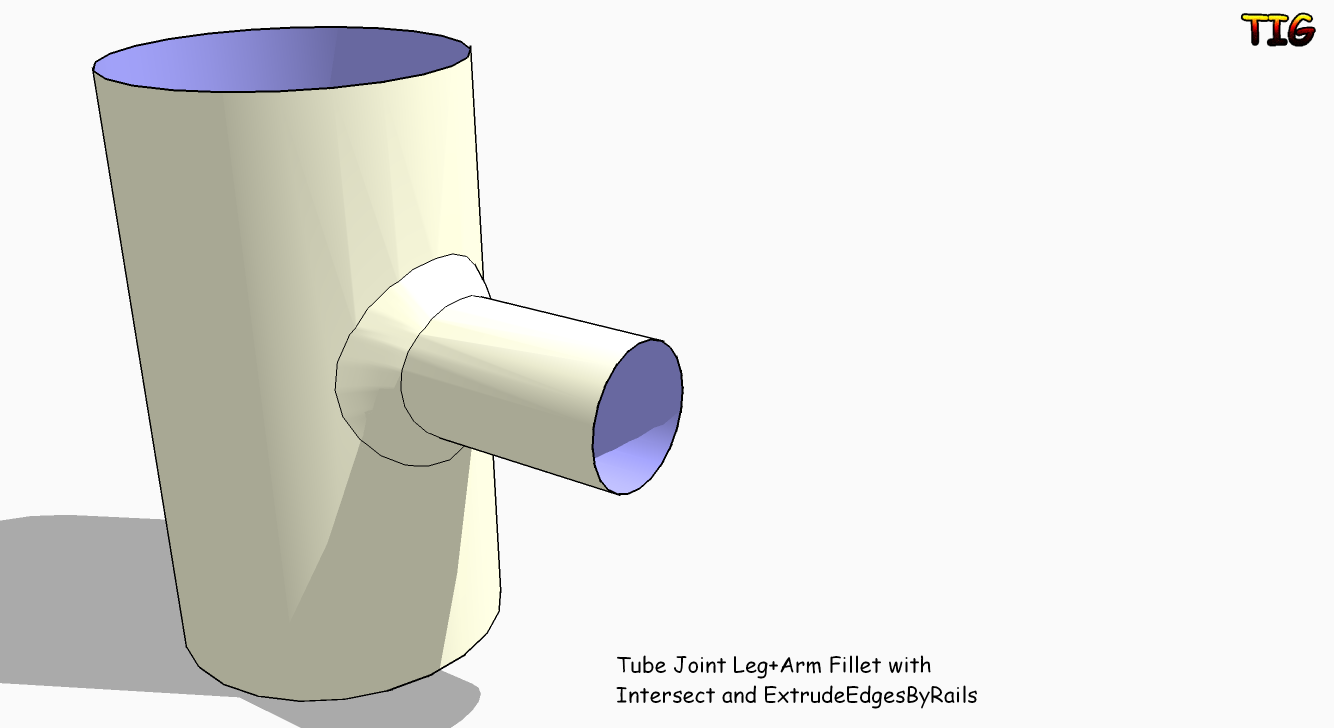
          As you found vanillas FollowMe isn't going to make a Fillet that touches the Leg and Arm properly...
          Here is away of doing it with careful pre-planning, Groups, Copy/Paste-in-Place, Intersect and EEbyRails etc - however the Fillet that's made is very poly-intensive... BUT it is accurate to suit the facets of the cylinders... depends what you want - for detailed work OK but for massing just leave out the fillets as you'll barely see them! EEbtRailsFilletWeldForm.pngEEbtRailsFilletWeldForm.skp
          TIG

          1 Reply Last reply
          Reply Quote 0
          • CarrozzaC
            Carrozza
            last edited by

            Hi TIG, thanks for your help. There's a problem with the fillet created this way, though: it doesn't revolve correctly around the "arm". See picture, taken from your kind example: on one side the arc points inward, on the other side points outward.

            http://img704.imageshack.us/img704/942/capturem.gif

            1 Reply Last reply
            Reply Quote 0
            • B
              blajnov
              last edited by

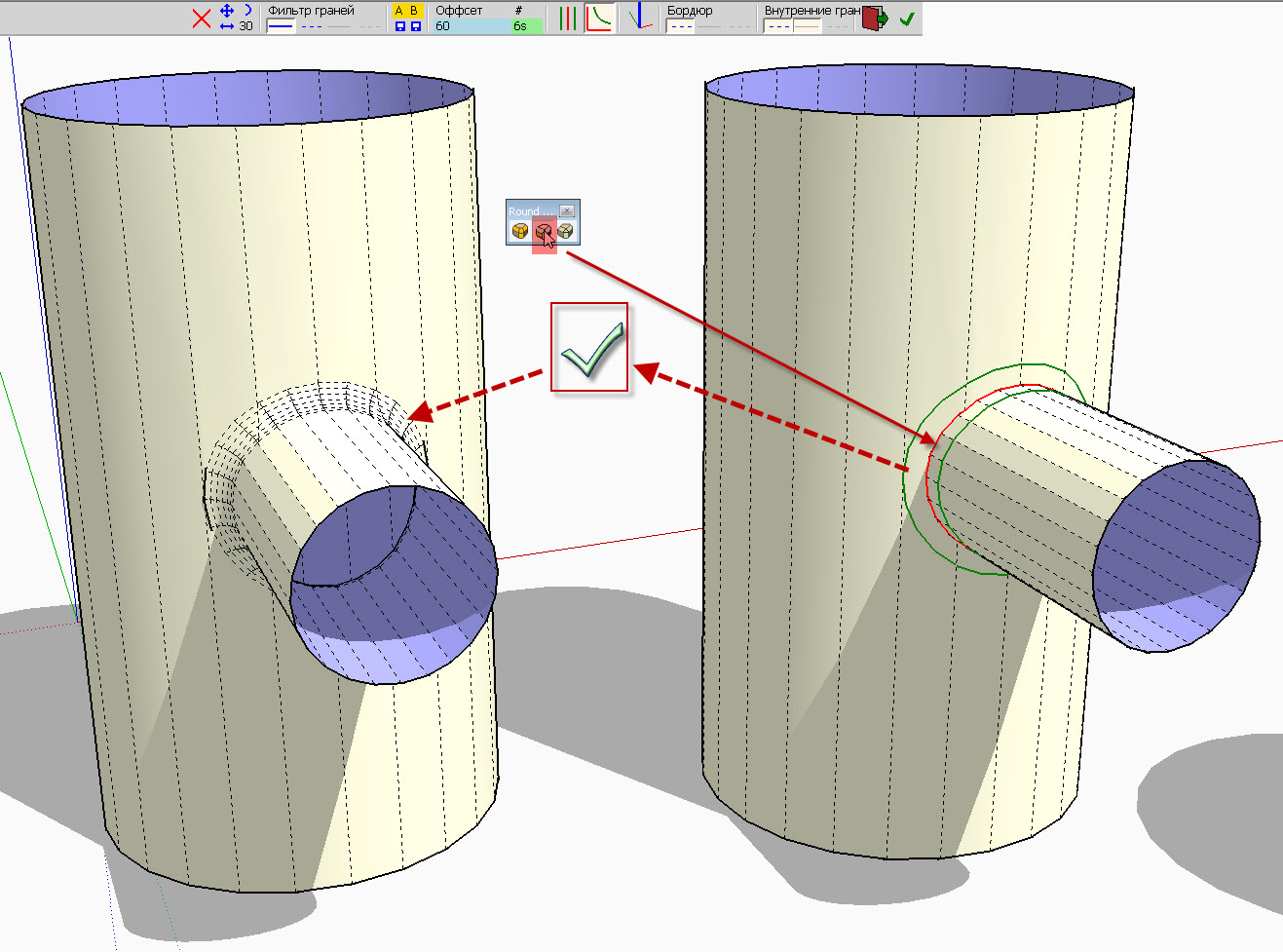
              With the plug "Round Corner" by Fredo, you can do the welding seam.

              Round Corner.jpg

              1 Reply Last reply
              Reply Quote 0
              • TIGT
                TIG Moderator
                last edited by

                @carrozza said:

                Hi TIG, thanks for your help. There's a problem with the fillet created this way, though: it doesn't revolve correctly around the "arm". See picture, taken from your kind example: on one side the arc points inward, on the other side points outward.

                http://img704.imageshack.us/img704/942/capturem.gif

                You are right !
                If you make it in 90 degree bits it's better...
                BUT it should be like that - I'll look at the cause...
                Perhaps the Fredo Rounded Option is the best ... see below ...
                Blajnov - exactly did you do that I can't reproduce it ??? 😕

                TIG

                1 Reply Last reply
                Reply Quote 0
                • D
                  d12dozr
                  last edited by

                  @tig said:

                  exactly did you do that I can't reproduce it ??? 😕

                  Top segment of horizontal pipe has to line up with a segment on the vertical pipe...look closely at his hidden geometry 🤓

                  3D Printing with SketchUp Book
                  http://goo.gl/f7ooYh

                  1 Reply Last reply
                  Reply Quote 0
                  • CarrozzaC
                    Carrozza
                    last edited by

                    Mamma mia, this is a great learning experience!
                    Thank you very much Blajinov and TIG for your help, is much appreciated! ☀

                    1 Reply Last reply
                    Reply Quote 0
                    • B
                      blajnov
                      last edited by

                      @tig said:

                      Blajnov - exactly did you do that I can't reproduce it ??? 😕

                      I enclose a file with scenes of action


                      RailsFilletWeldForm.skp

                      1 Reply Last reply
                      Reply Quote 0
                      • TIGT
                        TIG Moderator
                        last edited by

                        I see now... ☀
                        So to recap: DON'T use EEbyRails for making Fillets between Rounded Legs and Arms etc - instead USE Fredo's 'Round Corners' - it's quicker and produces better results !
                        Blajnov - it might be best if you edit / retitled your SKP without reference to EEbyR, to avoid confusion 😄

                        TIG

                        1 Reply Last reply
                        Reply Quote 0
                        • TIGT
                          TIG Moderator
                          last edited by

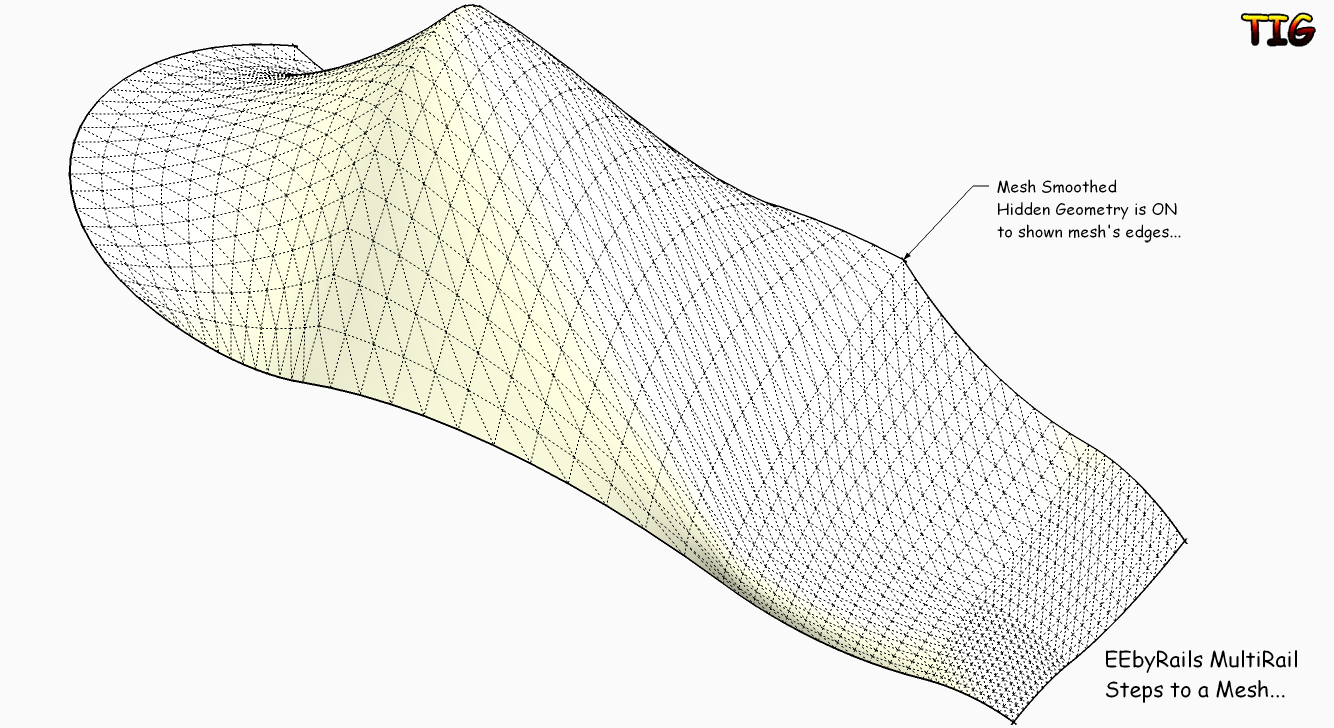
                          Here's a way to make a Multi-Railed Mesh with EEbyRails by making sub-meshes and combining them...EEbyRailsMultiRailSteps.pngEEbyRailsMultiRailSteps.skp

                          TIG

                          1 Reply Last reply
                          Reply Quote 0
                          • R
                            Rip Tanion
                            last edited by

                            Awesome plugin! Thanks!

                            Three attached curvesround_corner.pnground_corner.skp

                            1 Reply Last reply
                            Reply Quote 0
                            • TIGT
                              TIG Moderator
                              last edited by

                              I don't understand you diagram.
                              You can already do this ?
                              Are you wanting some sort of 2-face FollowMe ? Just use the faces edges [welded into a curve] as your Rails ?
                              With EEbyRv2 [that is about to be launched] you will be able to choose the Profile, Rail1 and Rail2 and then a 'Melding-Profile' that fixes the end form too - is that what you want ? It will allow a definite start and end profile location form to be predefined...
                              ❓

                              TIG

                              1 Reply Last reply
                              Reply Quote 0
                              • H
                                hsjzyangbin
                                last edited by

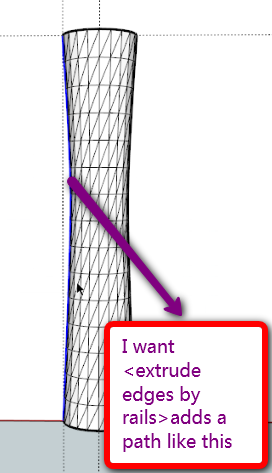
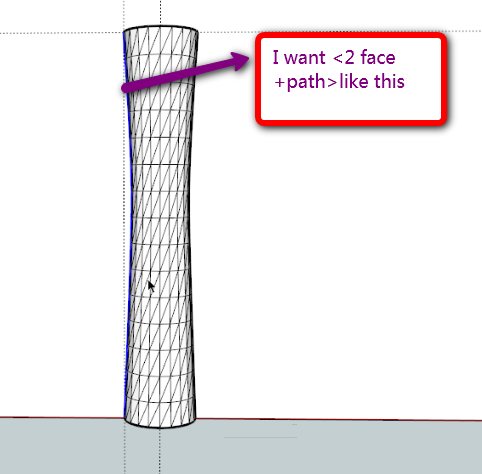
                                Hi,TIG,I have a idea that <extrude edges by rails> adds a path like this,thanks

                                next:I wish it could be add rotate and scale function

                                gogo.png


                                gg2.png

                                1 Reply Last reply
                                Reply Quote 0
                                • H
                                  hsjzyangbin
                                  last edited by

                                  @tig said:

                                  I don't understand you diagram.
                                  You can already do this ?
                                  Are you wanting some sort of 2-face FollowMe ? Just use the faces edges [welded into a curve] as your Rails ?
                                  With EEbyRv2 [that is about to be launched] you will be able to choose the Profile, Rail1 and Rail2 and then a 'Melding-Profile' that fixes the end form too - is that what you want ? It will allow a definite start and end profile location form to be predefined...
                                  ❓

                                  Yes,it could be "2-face +2-path+FollowMe" 😍
                                  I also do not have this plug-in, I use the LATHE. RB command generates images shown, as you said, the first path to the same, choose the second Rails as a control Rails
                                  "lathe" you can see it http://www.sketchupbbs.com/thread-40382-1-1.html

                                  1 Reply Last reply
                                  Reply Quote 0
                                  • charly2008C
                                    charly2008
                                    last edited by

                                    Hi,


                                    Beautiful Work.jpg

                                    He who makes no mistakes, makes nothing

                                    1 Reply Last reply
                                    Reply Quote 0
                                    • TIGT
                                      TIG Moderator
                                      last edited by

                                      @hsjzyangbin said:

                                      @tig said:

                                      I don't understand you diagram.
                                      You can already do this ?
                                      Are you wanting some sort of 2-face FollowMe ? Just use the faces edges [welded into a curve] as your Rails ?
                                      With EEbyRv2 [that is about to be launched] you will be able to choose the Profile, Rail1 and Rail2 and then a 'Melding-Profile' that fixes the end form too - is that what you want ? It will allow a definite start and end profile location form to be predefined...
                                      ❓

                                      Yes,it could be "2-face +2-path+FollowMe" 😍
                                      I also do not have this plug-in, I use the LATHE. RB command generates images shown, as you said, the first path to the same, choose the second Rails as a control Rails
                                      "lathe" you can see it http://www.sketchupbbs.com/thread-40382-1-1.html

                                      I too have a lathe.rb that is somewhat similar...

                                      TIG

                                      1 Reply Last reply
                                      Reply Quote 0
                                      • H
                                        hsjzyangbin
                                        last edited by

                                        @tig said:

                                        I too have a lathe.rb that is somewhat similar...

                                        希望我的提议对你的插件有用,谢谢!

                                        1 Reply Last reply
                                        Reply Quote 0
                                        • TIGT
                                          TIG Moderator
                                          last edited by

                                          @hsjzyangbin said:

                                          @tig said:

                                          I too have a lathe.rb that is somewhat similar...

                                          希望我的提议对你的插件有用,谢谢!

                                          Your proposal for my plug-in very useful, thank you!

                                          TIG

                                          1 Reply Last reply
                                          Reply Quote 0
                                          • david_hD
                                            david_h
                                            last edited by

                                            very fun indeed. Is there a toolbar? I get the command in my Plugins Tab, but Is there an onscreen toolbar as well?


                                            If I make it look easy...It is probably easy

                                            1 Reply Last reply
                                            Reply Quote 0

                                            Hello! It looks like you're interested in this conversation, but you don't have an account yet.

                                            Getting fed up of having to scroll through the same posts each visit? When you register for an account, you'll always come back to exactly where you were before, and choose to be notified of new replies (either via email, or push notification). You'll also be able to save bookmarks and upvote posts to show your appreciation to other community members.

                                            With your input, this post could be even better 💗

                                            Register Login
                                            • 1
                                            • 2
                                            • 10
                                            • 11
                                            • 12
                                            • 13
                                            • 14
                                            • 19
                                            • 20
                                            • 12 / 20
                                            • First post
                                              Last post
                                            Buy SketchPlus
                                            Buy SUbD
                                            Buy WrapR
                                            Buy eBook
                                            Buy Modelur
                                            Buy Vertex Tools
                                            Buy SketchCuisine
                                            Buy FormFonts

                                            Advertisement