sketchucation logo sketchucation
    • 登入
    Oops, your profile's looking a bit empty! To help us tailor your experience, please fill in key details like your SketchUp version, skill level, operating system, and more. Update and save your info on your profile page today!
    🔌 Smart Spline | Fluid way to handle splines for furniture design and complex structures. Download

    [Plugin] VisMap 2 - Improved Layer/Scene Visibility Map

    已排程 已置頂 已鎖定 已移動 Plugins
    41 貼文 21 Posters 29.8k 瀏覽 21 Watching
    正在載入更多貼文
    • 從舊到新
    • 從新到舊
    • 最多點贊
    回覆
    • 在新貼文中回覆
    登入後回覆
    此主題已被刪除。只有擁有主題管理權限的使用者可以查看。
    • M 離線
      MartinRinehart
      最後由 編輯

      http://www.martinrinehart.com/models/rubies/vismapdoc.html

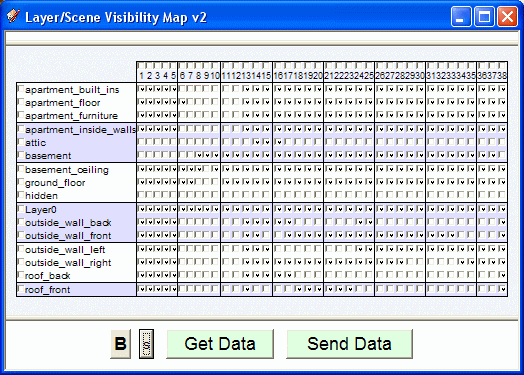
      VisMap 2 replaces both VisMap and VisMap Pro. It's a big improvement for the models that have lots of layers and scenes. Here are a couple samples:
      vismap_chci.gif

      That shows how I've added vertical lines and three-line color groups to make it easy to locate individual check boxes. (And, if you're my age, you see that I've reinvented green-bar fanfold.)

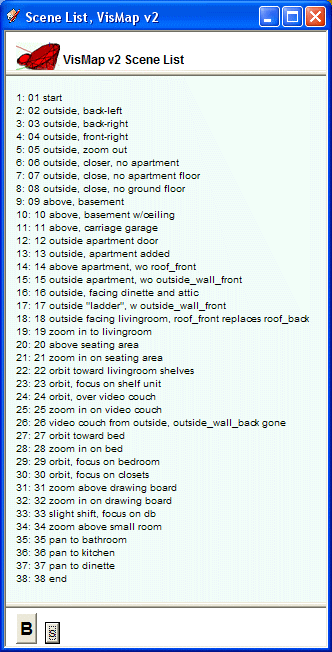
      The next shows the scenes list. It's now a separate window so you can minimize or close it to make more room for the map and your model.
      vismap_chci_scenes.gif

      Enjoy.

      http://www.martinrinehart.com/models/rubies/vismapdoc.html

      Author, Edges to Rubies - The Complete SketchUp Tutorial at http://www.MartinRinehart.com/models/tutorial.

      1 條回覆 最後回覆 回覆 引用 0
      • H 離線
        Howard leslie
        最後由 編輯

        Martin,
        I find your VisMap Script pretty useful.
        I'm currently running VisMap2.
        ......
        One model is a bit troublesome....
        174 Layers, 50 or so Scenes.

        Its probably the number of Layers that's giving it a headache.
        ........
        I can get the script to run on all the other models I've tried (some also quite big) - apart from this real monster.
        Unfortunately it won't be possible for me to post you the *.skp file.
        ........
        If you can ever get VisMap to run on even more Layers than present it would be hugely appreciated.
        .........
        Thanks once again for producing this fantastic script
        Regards

        Howard L'

        1 條回覆 最後回覆 回覆 引用 0
        • M 離線
          MartinRinehart
          最後由 編輯

          @unknownuser said:

          One model is a bit troublesome....
          174 Layers, 50 or so Scenes.

          Very interesting. As models go, that's certainly huge. But as numbers go, those are small ones. Computer programs tend to break at, for instance, integers that cross 2 billion (the maximum for twos-complement, 32-bit integers).

          What OS, and exactly what fails? How big is the model and how much RAM is available? Thanks.

          Author, Edges to Rubies - The Complete SketchUp Tutorial at http://www.MartinRinehart.com/models/tutorial.

          1 條回覆 最後回覆 回覆 引用 0
          • K 離線
            ktkoh
            最後由 編輯

            I downloaded the script and will try it on my woodworking models as I seem to use lots of scenes and layers.

            Question: In a ruby script when I know both the layer name and the scene name what would I have to do to add the layer as visible in the scene?

            Thanks
            Keith

            1 條回覆 最後回覆 回覆 引用 0
            • M 離線
              MartinRinehart
              最後由 編輯

              @ktkoh said:

              Question: In a ruby script when I know both the layer name and the scene name what would I have to do to add the layer as visible in the scene?

              Scenes are called "Pages" in the API. And just to keep you on your toes, there's a Pages.count method, not Pages.length.

              Each Page comes with a list of invisible layers. You find the layer you want in this list and delete it from the list.

              More generally, I don't encrypt my code. You might find the classes I wrote useful.

              Author, Edges to Rubies - The Complete SketchUp Tutorial at http://www.MartinRinehart.com/models/tutorial.

              1 條回覆 最後回覆 回覆 引用 0
              • P 離線
                Panga
                最後由 編輯

                Martin, happy to see progress on vismap. Can I suggest one thing that can follow your idea of having a better reading of the whole table. Could it be possible to have one scene number with the normal font and the next one with the bold font, in order to have this :

                12345678910111213141516171819...

                This way when the scene number has two digits, it'll be easier to read them. Or maybe find another way to dissociate scene numbers...just an idea...

                Anyway, thanks for this wonderfull plugin !!

                1 條回覆 最後回覆 回覆 引用 0
                • M 離線
                  MartinRinehart
                  最後由 編輯

                  @panga said:

                  ... when the scene number has two digits, it'll be easier to read them.

                  Good idea. They were all bold, but boldface is too fat. Doesn't reduce well.

                  On the other hand, if I alternated two colors, ...

                  Try this. Edit .../Plugins/vismap2/vismap2_main.js. Insert the middle line you see here, at line 83. (Other two lines shown so you can see exactly where it goes.)


                    		cell.align='center';
                  		cell.style.background = colors[ i % 2 ];
                  		cell.style.fontSize = ( size_cb + 1 ) + 'px';


                  I think we'll call this the Panga imProvement.

                  Author, Edges to Rubies - The Complete SketchUp Tutorial at http://www.MartinRinehart.com/models/tutorial.

                  1 條回覆 最後回覆 回覆 引用 0
                  • P 離線
                    Panga
                    最後由 編輯

                    Thanks 😉 . It works perfectly !! I'll give you more feedback soon.

                    1 條回覆 最後回覆 回覆 引用 0
                    • E 離線
                      Ecuadorian
                      最後由 編輯

                      Thank you, Martin. There have been some situations when I get lost among my layers/scenes, so this will be useful. 👍

                      -Miguel Lescano
                      Subscribe to my house plans YouTube channel! (30K+ subs)

                      1 條回覆 最後回覆 回覆 引用 0
                      • E 離線
                        Ecuadorian
                        最後由 編輯

                        Martin, this plug-in has now proved to be a life-saver. I now have a project with several scenes for an animation and when I added SketchyPhysics into the mix I had two options: Manually turn off the Physics Joints layer in every single scene... or do it in a couple of click with VisMap. 👍

                        -Miguel Lescano
                        Subscribe to my house plans YouTube channel! (30K+ subs)

                        1 條回覆 最後回覆 回覆 引用 0
                        • bagateloB 離線
                          bagatelo
                          最後由 編輯

                          I think this is not working in SU8. 😢

                          While the cat's away, the mice will play

                          1 條回覆 最後回覆 回覆 引用 0
                          • B 離線
                            bizmen
                            最後由 編輯

                            @bagatelo said:

                            I think this is not working in SU8. 😢

                            what do you mean its not working. Man its working perfectly.
                            This plugin is very efficient if you made your layers properly.
                            Thank you the plugin creator 🎉 🎉 🎉

                            1 條回覆 最後回覆 回覆 引用 0
                            • bagateloB 離線
                              bagatelo
                              最後由 編輯

                              not working to me....

                              While the cat's away, the mice will play

                              1 條回覆 最後回覆 回覆 引用 0
                              • S 離線
                                small08
                                最後由 編輯

                                Love organization and simplicity! Thanks Martin

                                1 條回覆 最後回覆 回覆 引用 0
                                • F 離線
                                  function
                                  最後由 編輯

                                  It's not working.
                                  (worst first post ever)

                                  1 條回覆 最後回覆 回覆 引用 0
                                  • F 離線
                                    function
                                    最後由 編輯

                                    😲 to be more helpful - 😒 the html dialog doesn't come up when accessed from the menu, no error messages or anything

                                    edit: upon having some other issues in SKP, I flushed my plugins folder; visMap now works- I will update again if I can narrow down which plugin caused the conflict 👍

                                    1 條回覆 最後回覆 回覆 引用 0
                                    • boofredlayB 離線
                                      boofredlay
                                      最後由 編輯

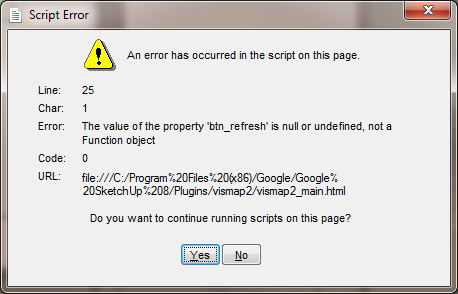
                                      Martin, I get this error when trying to run VisMap 2.
                                      The file has 44 layers and 40 scenes.

                                      ScriptError.jpg

                                      http://www.coroflot.com/boofredlay

                                      1 條回覆 最後回覆 回覆 引用 0
                                      • S 離線
                                        smb5823
                                        最後由 編輯

                                        Hi Martin
                                        Great Tool.
                                        Would it be possible to extend VisMap 2 to include 'shadows ON/OFF'?
                                        In large complex models it would be useful in particular to be able turn off shadows in one or more scenes without having to select, and then wait for the scene to be fully rendered with shadows before you can turn the shadows off.

                                        I have models and animations which in the final output need shadows on, but for working and tweaking things the wait for the scene to be fully redrawn is frustrating. What do you think? ❓

                                        1 條回覆 最後回覆 回覆 引用 0
                                        • H 離線
                                          haynesc
                                          最後由 編輯

                                          Hi can anyone help me ?

                                          For some strange reason this tolls has stopped working on my machine all of a sudden ... i activate the tool from plugins menu and nothing happens no dialog box opens nothing

                                          why would this happen ?

                                          1 條回覆 最後回覆 回覆 引用 0
                                          • H 離線
                                            haynesc
                                            最後由 編輯

                                            ok im now getting this message:

                                            Error Loading File vismap2_menu.rb
                                            can't convert nil into String

                                            1 條回覆 最後回覆 回覆 引用 0
                                            • 1
                                            • 2
                                            • 3
                                            • 1 / 3
                                            • 第一個貼文
                                              最後的貼文
                                            Buy SketchPlus
                                            Buy SUbD
                                            Buy WrapR
                                            Buy eBook
                                            Buy Modelur
                                            Buy Vertex Tools
                                            Buy SketchCuisine
                                            Buy FormFonts

                                            Advertisement
