sketchucation logo sketchucation
    • 登入
    Oops, your profile's looking a bit empty! To help us tailor your experience, please fill in key details like your SketchUp version, skill level, operating system, and more. Update and save your info on your profile page today!
    🔌 Smart Spline | Fluid way to handle splines for furniture design and complex structures. Download

    [Plugin] CleanUp

    已排程 已置頂 已鎖定 已移動 Plugins
    974 貼文 217 Posters 865.1k 瀏覽 217 Watching
    正在載入更多貼文
    • 從舊到新
    • 從新到舊
    • 最多點贊
    回覆
    • 在新貼文中回覆
    登入後回覆
    此主題已被刪除。只有擁有主題管理權限的使用者可以查看。
    • sumasterS 離線
      sumaster
      最後由 編輯

      Dear Thomthom Sir,

      here you are launch your new Cleanup (3.1.8) — 06 October 2011
      • Whats new features you are added ❓

      and one problem can you solve in new version

      I'm architectural student and import CAD drawing and lock that drawing in sketchup viewport
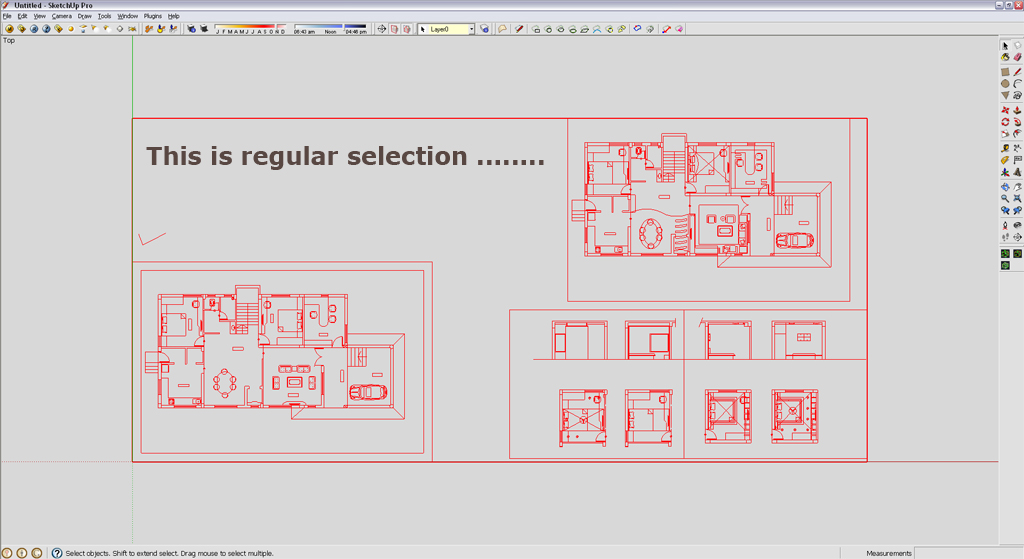
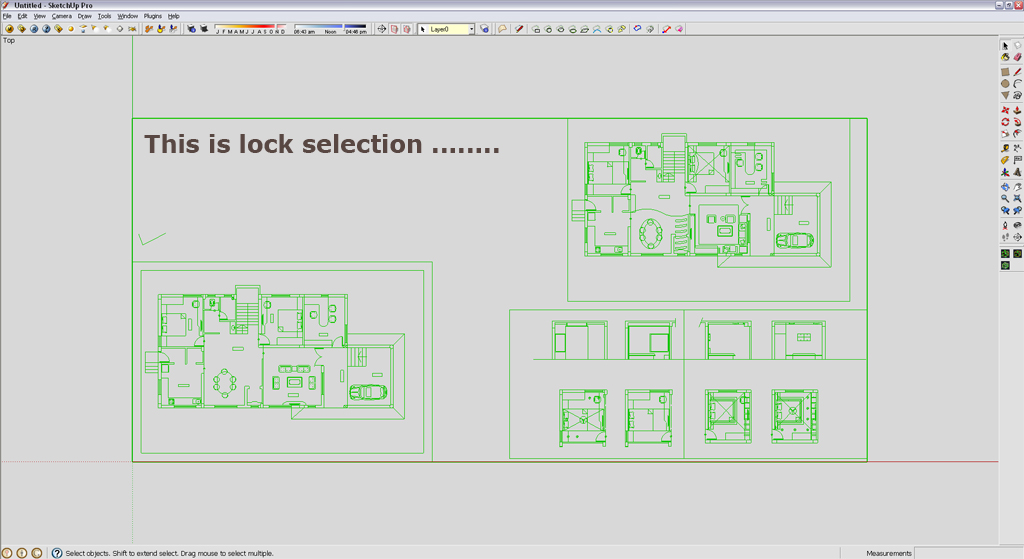
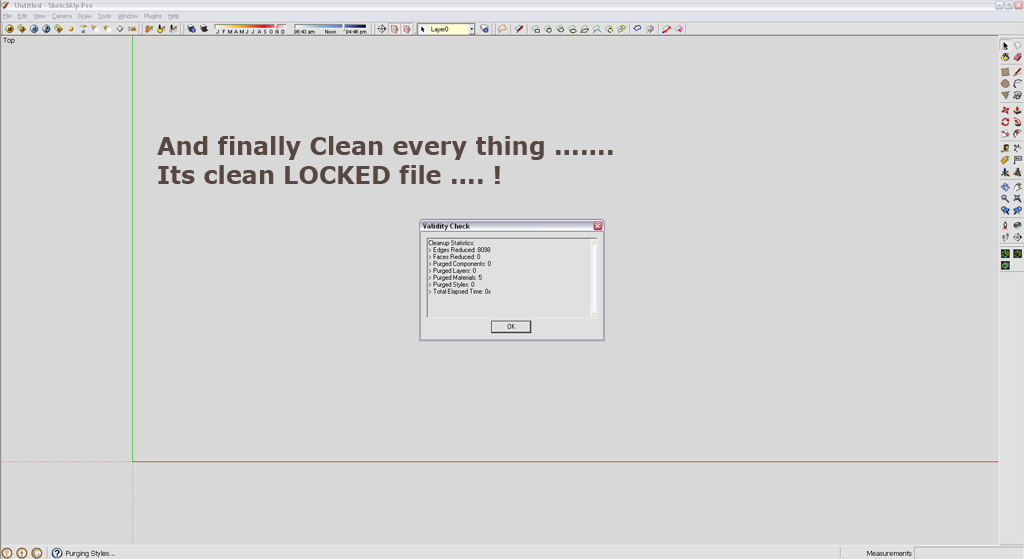
      but when i play / start " Clean With Last Setting " he also cleanup viewport with lock group/component 😮

      See here ......

      Regular selection

      Lock selection

      Finally clean every thing .....

      And thank you for this tool its very best for me or ever one ...... 😄 😉

      I'm very happy with this tool ......

      Thank you,
      SUmaster

      1 條回覆 最後回覆 回覆 引用 0
      • thomthomT 離線
        thomthom
        最後由 編輯

        The way CleanUp traverses the model it's tricky to know what is part of a locked group or not. But I'll put it down for investigation.

        Thomas Thomassen — SketchUp Monkey & Coding addict
        List of my plugins and link to the CookieWare fund

        1 條回覆 最後回覆 回覆 引用 0
        • sumasterS 離線
          sumaster
          最後由 編輯

          Yes thank you .....

          Thank you,
          SUmaster

          1 條回覆 最後回覆 回覆 引用 0
          • dereiD 離線
            derei
            最後由 編輯

            @thomthom said:

            The way CleanUp traverses the model it's tricky to know what is part of a locked group or not. But I'll put it down for investigation.

            You can use ruby to check if is locked or not
            http://code.google.com/apis/sketchup/docs/ourdoc/group.html#locked?
            http://code.google.com/apis/sketchup/docs/ourdoc/componentinstance.html#locked?

            DESIGNER AND ARTIST DEREI.UK

            1 條回覆 最後回覆 回覆 引用 0
            • thomthomT 離線
              thomthom
              最後由 編輯

              @unknownuser said:

              @thomthom said:

              The way CleanUp traverses the model it's tricky to know what is part of a locked group or not. But I'll put it down for investigation.

              You can use ruby to check if is locked or not
              http://code.google.com/apis/sketchup/docs/ourdoc/group.html#locked?
              http://code.google.com/apis/sketchup/docs/ourdoc/componentinstance.html#locked?

              I know, but, I traverse the model by model.definitions.each - which means that I do not know if the parent for the instances I traverse are locked. I could be checking a sub-group of a locked group and .locked? will return false.

              Thomas Thomassen — SketchUp Monkey & Coding addict
              List of my plugins and link to the CookieWare fund

              1 條回覆 最後回覆 回覆 引用 0
              • T 離線
                Tahesco
                最後由 編輯

                Hi ThomThom,

                We imported a 100mb model from ARCHICAD into SU (in fbx format). This goes slow but it works.

                The problem is the same material gives different uvw_sizes on my components. The same brick material is 1 cm on a component while it's neigbour component has bricks of 20 cm ?!?.

                Is there a way to reset all components to the same scale, so my bricks are uniform on all objects/ components? (like reset xform in 3dsmax)

                Thanks for all the usefull work!

                TTion

                1 條回覆 最後回覆 回覆 引用 0
                • bagateloB 離線
                  bagatelo
                  最後由 編輯

                  Another thing to do would be also interesting can recursively set all groups and components to "scale definition."

                  @tahesco said:

                  Hi ThomThom,

                  We imported a 100mb model from ARCHICAD into SU (in fbx format). This goes slow but it works.

                  The problem is the same material gives different uvw_sizes on my components. The same brick material is 1 cm on a component while it's neigbour component has bricks of 20 cm ?!?.

                  Is there a way to reset all components to the same scale, so my bricks are uniform on all objects/ components? (like reset xform in 3dsmax)

                  Thanks for all the usefull work!

                  TTion

                  While the cat's away, the mice will play

                  1 條回覆 最後回覆 回覆 引用 0
                  • thomthomT 離線
                    thomthom
                    最後由 編輯

                    @bagatelo said:

                    Another thing to do would be also interesting can recursively set all groups and components to "scale definition."

                    And how would you handle scenarios where one definition has instances of different scale... ?

                    Thomas Thomassen — SketchUp Monkey & Coding addict
                    List of my plugins and link to the CookieWare fund

                    1 條回覆 最後回覆 回覆 引用 0
                    • T 離線
                      Tahesco
                      最後由 編輯

                      @thomthom said:

                      @bagatelo said:

                      Another thing to do would be also interesting can recursively set all groups and components to "scale definition."

                      And how would you handle scenarios where one definition has instances of different scale... ?

                      In my case I don't care if I loose all instances. All scene objects may become true default geometry. (because my scene objects are build in ARCHICAD).

                      Thanks again,.

                      NB -> Maybe an object replacer-script is capable of repairing killed Insances in a SU scene,...

                      1 條回覆 最後回覆 回覆 引用 0
                      • sumasterS 離線
                        sumaster
                        最後由 編輯

                        Hello Tahesco,

                        can you CHK Unit ... when you export the file from ARCHICAD into .fbx format

                        so 1st CHK and again import that .fbx file into the sketchup same unit select ......

                        thanks

                        Thank you,
                        SUmaster

                        1 條回覆 最後回覆 回覆 引用 0
                        • sumasterS 離線
                          sumaster
                          最後由 編輯

                          @thomthom said:

                          @unknownuser said:

                          @thomthom said:

                          The way CleanUp traverses the model it's tricky to know what is part of a locked group or not. But I'll put it down for investigation.

                          You can use ruby to check if is locked or not
                          http://code.google.com/apis/sketchup/docs/ourdoc/group.html#locked?
                          http://code.google.com/apis/sketchup/docs/ourdoc/componentinstance.html#locked?

                          I know, but, I traverse the model by model.definitions.each - which means that I do not know if the parent for the instances I traverse are locked. I could be checking a sub-group of a locked group and .locked? will return false.

                          yes sir you are right .......

                          when run Cleanup last setting he CHK all group or component ..... right ...?

                          Thank you,
                          SUmaster

                          1 條回覆 最後回覆 回覆 引用 0
                          • genma saotomeG 離線
                            genma saotome
                            最後由 編輯

                            VERY useful! 😍 My thanks for producing and releasing this.

                            Might you consider adding "Remove Materials" from Backface? I know it's in another plugin but it's something I should do as part of my final cleanup but I often forget. Adding this would to Cleanup would be real handy and I would like to see the count of cleaned backfaces in the statistics too.

                            P.S.
                            Ya know, adding "Remove Untextured Faces" would be a godsend for me. Any chance of that too?

                            1 條回覆 最後回覆 回覆 引用 0
                            • 0 離線
                              0devang
                              最後由 編輯

                              It doesn't work with sketchup pro 8. what could be the reason?

                              1 條回覆 最後回覆 回覆 引用 0
                              • Dave RD 離線
                                Dave R
                                最後由 編輯

                                @0devang said:

                                It doesn't work with sketchup pro 8. what could be the reason?

                                The plugin does indeed work with SketchUp 8 Pro. If it isn't working for you, the most likely cause is that it hasn't been installed correctly. Go back to the first post and read the instructions and make sure it has been installed correctly. This includes installing TT_Lib2 as indicated under Requirements.

                                Etaoin Shrdlu

                                %

                                (THERE'S NO PLACE LIKE)

                                G28 X0.0 Y0.0 Z0.0

                                M30

                                %

                                1 條回覆 最後回覆 回覆 引用 0
                                • thomthomT 離線
                                  thomthom
                                  最後由 編輯

                                  @genma saotome said:

                                  VERY useful! 😍 My thanks for producing and releasing this.

                                  Might you consider adding "Remove Materials" from Backface? I know it's in another plugin but it's something I should do as part of my final cleanup but I often forget. Adding this would to Cleanup would be real handy and I would like to see the count of cleaned backfaces in the statistics too.

                                  P.S.
                                  Ya know, adding "Remove Untextured Faces" would be a godsend for me. Any chance of that too?

                                  I'll see what I can do for the next release. (I'm quite busy atm, can't promise anything.)

                                  Thomas Thomassen — SketchUp Monkey & Coding addict
                                  List of my plugins and link to the CookieWare fund

                                  1 條回覆 最後回覆 回覆 引用 0
                                  • dereiD 離線
                                    derei
                                    最後由 編輯

                                    Indeed, a "remove materials from back face", but applicable only to selection (or entire model if nothing selected" would be great! The current plugin that does it, removes from entire model. And I often have windows (with or without thickness), or other transparent materials and they start to look bad after removing backface material.

                                    DESIGNER AND ARTIST DEREI.UK

                                    1 條回覆 最後回覆 回覆 引用 0
                                    • O 離線
                                      oggstreamer
                                      最後由 編輯

                                      Hello thomthom,

                                      i am eager to use your CleanUp Plugin - but i've some troubles installing it - i am using Sketchup 8 under WINE

                                      I installed both CleanUp 3.1.8 and TT_Lib2 2.6.0 in the plugin-Directory. and i get the following Error:

                                      Error Loading File tt_cleanup.rb
                                      uninitialized constant TT::System

                                      do you have any Hint for me?

                                      thanks, georg

                                      1 條回覆 最後回覆 回覆 引用 0
                                      • thomthomT 離線
                                        thomthom
                                        最後由 編輯

                                        that's the whole error message?

                                        If yes, then could you open the Ruby Console in SketchUp and type load 'tt_cleanup.rb' and see if you get a more verbose error message then?

                                        Other than that, maybe a screenshot of how CleanUp and TT_Lib2 is installed in your plugins folder?

                                        Thomas Thomassen — SketchUp Monkey & Coding addict
                                        List of my plugins and link to the CookieWare fund

                                        1 條回覆 最後回覆 回覆 引用 0
                                        • jeff hammondJ 離線
                                          jeff hammond
                                          最後由 編輯

                                          .

                                          [Feature Request]

                                          Weld all lines... not sure if it's possible or maybe it will take too long but it'd be sweet to weld everything in one shot.

                                          dotdotdot

                                          1 條回覆 最後回覆 回覆 引用 0
                                          • thomthomT 離線
                                            thomthom
                                            最後由 編輯

                                            Weld all edges between junctions?

                                            That can be done with Edge Tools already if you use the Simplify Selected Curves and specify 0 deviation.


                                            Thomas Thomassen — SketchUp Monkey & Coding addict
                                            List of my plugins and link to the CookieWare fund

                                            1 條回覆 最後回覆 回覆 引用 0
                                            • 1
                                            • 2
                                            • 36
                                            • 37
                                            • 38
                                            • 39
                                            • 40
                                            • 48
                                            • 49
                                            • 38 / 49
                                            • 第一個貼文
                                              最後的貼文
                                            Buy SketchPlus
                                            Buy SUbD
                                            Buy WrapR
                                            Buy eBook
                                            Buy Modelur
                                            Buy Vertex Tools
                                            Buy SketchCuisine
                                            Buy FormFonts

                                            Advertisement