sketchucation logo sketchucation
    • 登入
    Oops, your profile's looking a bit empty! To help us tailor your experience, please fill in key details like your SketchUp version, skill level, operating system, and more. Update and save your info on your profile page today!
    🔌 Smart Spline | Fluid way to handle splines for furniture design and complex structures. Download

    [Plugin] CleanUp

    已排程 已置頂 已鎖定 已移動 Plugins
    974 貼文 217 Posters 864.6k 瀏覽 217 Watching
    正在載入更多貼文
    • 從舊到新
    • 從新到舊
    • 最多點贊
    回覆
    • 在新貼文中回覆
    登入後回覆
    此主題已被刪除。只有擁有主題管理權限的使用者可以查看。
    • thomthomT 離線
      thomthom
      最後由 編輯

      @jim said:

      Thanks, makes sense.

      Once you know it - but maybe not so intuitive when you don't... 😕

      Thomas Thomassen — SketchUp Monkey & Coding addict
      List of my plugins and link to the CookieWare fund

      1 條回覆 最後回覆 回覆 引用 0
      • R 離線
        rv1974
        最後由 編輯

        May I humbly request a close-open functionality (with custom search radius defined by user)? Just similar to closeopens.rb
        by Todd Burch.

        1 條回覆 最後回覆 回覆 引用 0
        • thomthomT 離線
          thomthom
          最後由 編輯

          @rv1974 said:

          May I humbly request a close-open functionality (with custom search radius defined by user)? Just similar to closeopens.rb
          by Todd Burch.

          Funny you should mention that. I began on a small utility today:
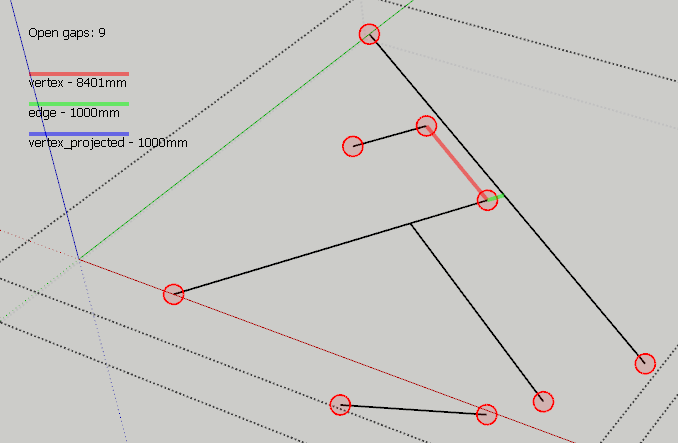
          CloseGaps.png

          Thomas Thomassen — SketchUp Monkey & Coding addict
          List of my plugins and link to the CookieWare fund

          1 條回覆 最後回覆 回覆 引用 0
          • R 離線
            rv1974
            最後由 編輯

            You are unhealthy unstoppable 🙂 But don't make it a separate tool. Insert it in the cleanup. Those rubies pullulate like cockroaches 🙂

            1 條回覆 最後回覆 回覆 引用 0
            • thomthomT 離線
              thomthom
              最後由 編輯

              @rv1974 said:

              But don't make it a separate tool. Insert it in the cleanup. Those rubies pullulate like cockroaches 🙂

              I was planning on adding it to Edge Tools. One completely automatic, one where on can inspect, like solid inspector.

              Could add the automatic version to CleanUp3.

              Thomas Thomassen — SketchUp Monkey & Coding addict
              List of my plugins and link to the CookieWare fund

              1 條回覆 最後回覆 回覆 引用 0
              • plot-parisP 離線
                plot-paris
                最後由 編輯

                @thomthom said:

                Could add the automatic version to CleanUp3.

                oh, will that be in the near future?

                1 條回覆 最後回覆 回覆 引用 0
                • thomthomT 離線
                  thomthom
                  最後由 編輯

                  @plot-paris said:

                  @thomthom said:

                  Could add the automatic version to CleanUp3.

                  oh, will that be in the near future?

                  CleanUp 3 and Edge Tools 2 will be out next week. ( And the feature of closing small caps will be in Edge Tools. )

                  Thomas Thomassen — SketchUp Monkey & Coding addict
                  List of my plugins and link to the CookieWare fund

                  1 條回覆 最後回覆 回覆 引用 0
                  • Z 離線
                    Zenhipster
                    最後由 編輯

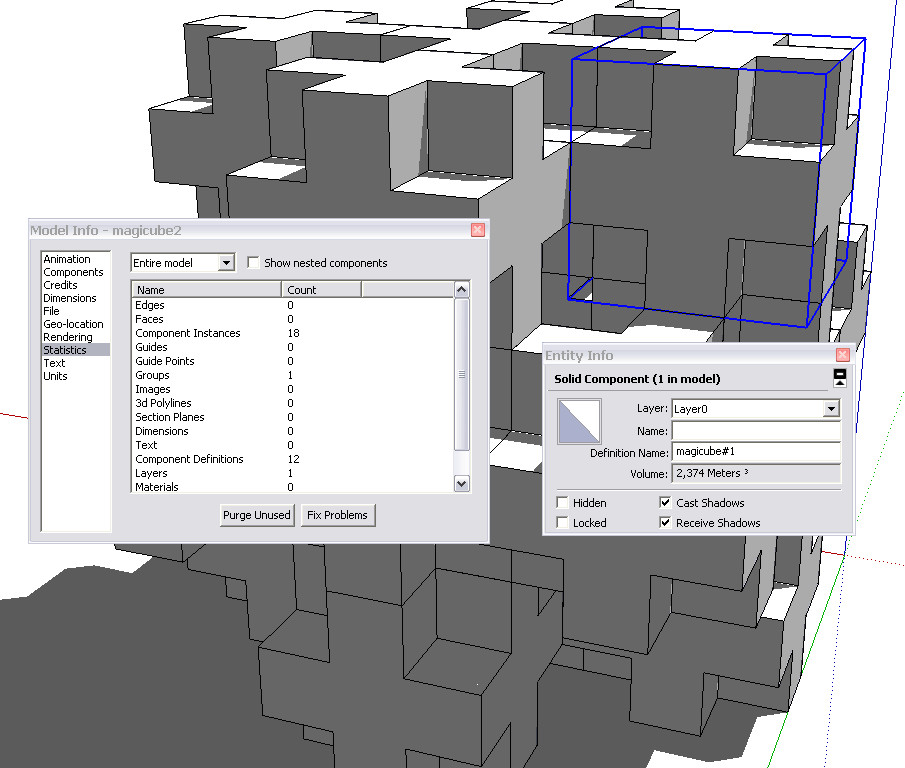
                    Tested the plug-in here on such a model. Does not work.
                    Inside a lot of extra polygons.


                    magicube

                    1 條回覆 最後回覆 回覆 引用 0
                    • GaieusG 離線
                      Gaieus
                      最後由 編輯

                      There's nothing to clean up there. There's not a single line that is not part of the components (which are all perfectly solid so cannot be any stray geometry in them).

                      If you want to get rid of the separating edges/faces, you need to explode the whole thing first and run another plugin:
                      http://forums.sketchucation.com/viewtopic.php?f=180&t=12668&p=92295#p92295

                      (Nice model, by the way!) 😉


                      Solids.jpg

                      Gai...

                      1 條回覆 最後回覆 回覆 引用 0
                      • jason_marantoJ 離線
                        jason_maranto
                        最後由 編輯

                        Or you could just use the "outer shell" command from the solid tools in Sketchup 8.

                        Best,
                        Jason.

                        I create video tutorial series about several 2D & 3D graphics programs.

                        1 條回覆 最後回覆 回覆 引用 0
                        • honoluludesktopH 離線
                          honoluludesktop
                          最後由 編輯

                          @zenhipster said:

                          ............ Inside a lot of extra polygons.
                          If you are trying to remove the polygons "out of view", this app will not do that.

                          1 條回覆 最後回覆 回覆 引用 0
                          • GaieusG 離線
                            Gaieus
                            最後由 編輯

                            @jason_maranto said:

                            Or you could just use the "outer shell" command from the solid tools in Sketchup 8.
                            👍

                            Gai...

                            1 條回覆 最後回覆 回覆 引用 0
                            • GaieusG 離線
                              Gaieus
                              最後由 編輯

                              Well, had a closer look. Neither solution will work properly as the pieces are not aligned correctly (there are extremely small but gaps)

                              Gai...

                              1 條回覆 最後回覆 回覆 引用 0
                              • Arty2A 離線
                                Arty2
                                最後由 編輯

                                Not sure if it's the proper thread for this tip, but here goes.

                                @unknownuser said:

                                Wow, it looks promising. One suggestion, though: you could use big buttons instead of radio buttons and check-boxes. Such elements need more precision to click them (because they are small) and when using such plugin several times it can come more handy.

                                This was a request about v3 in another thread, that is very easily solvable by just using some proper HTML and keeping the radio buttons / checkboxes too.

                                Just make use of the <label> tag like this:

                                
                                <label for="idname">Descriptive text here; <input type="radio" name="whatever" id="idname" /></label>


                                and that should keep everyone happy 😄

                                1 條回覆 最後回覆 回覆 引用 0
                                • thomthomT 離線
                                  thomthom
                                  最後由 編輯

                                  That it uses already, and thatæs what the initial v3 will be using. 😄

                                  Thomas Thomassen — SketchUp Monkey & Coding addict
                                  List of my plugins and link to the CookieWare fund

                                  1 條回覆 最後回覆 回覆 引用 0
                                  • Arty2A 離線
                                    Arty2
                                    最後由 編輯

                                    That's great then, you should advertise it as "click the text and the checkbox is magically selected"
                                    Keep it up mate :]

                                    1 條回覆 最後回覆 回覆 引用 0
                                    • thomthomT 離線
                                      thomthom
                                      最後由 編輯

                                      @arty2 said:

                                      That's great then, you should advertise it as "click the text and the checkbox is magically selected"
                                      Keep it up mate :]

                                      I'll be doing a video presentation.

                                      Another issue with the UI is displaying extra information. At the moment I use tooltips for each element, but I want to provide a better interface for this as well. But now I just need to get this first version out, otherwise it'll never be done.

                                      (Btw, you're a webdesigner? Scripter/programmer? Doing any SketchUp plugins?)

                                      Cheers!

                                      Thomas Thomassen — SketchUp Monkey & Coding addict
                                      List of my plugins and link to the CookieWare fund

                                      1 條回覆 最後回覆 回覆 引用 0
                                      • thomthomT 離線
                                        thomthom
                                        最後由 編輯

                                        Version 3

                                        • New UI
                                        • More cleaning

                                        Remember to update TT_Lib2

                                        Thomas Thomassen — SketchUp Monkey & Coding addict
                                        List of my plugins and link to the CookieWare fund

                                        1 條回覆 最後回覆 回覆 引用 0
                                        • Rich O BrienR 線上
                                          Rich O Brien Moderator
                                          最後由 編輯

                                          Thanks Thom

                                          Download the free D'oh Book for SketchUp 📖

                                          1 條回覆 最後回覆 回覆 引用 0
                                          • Rich O BrienR 線上
                                            Rich O Brien Moderator
                                            最後由 編輯

                                            Been playing and love the new %/Timer feature 👍

                                            Ban witheld...temporarily

                                            Download the free D'oh Book for SketchUp 📖

                                            1 條回覆 最後回覆 回覆 引用 0
                                            • 1
                                            • 2
                                            • 45
                                            • 46
                                            • 47
                                            • 48
                                            • 49
                                            • 49 / 49
                                            • 第一個貼文
                                              最後的貼文
                                            Buy SketchPlus
                                            Buy SUbD
                                            Buy WrapR
                                            Buy eBook
                                            Buy Modelur
                                            Buy Vertex Tools
                                            Buy SketchCuisine
                                            Buy FormFonts

                                            Advertisement