sketchucation logo sketchucation
    • 登入
    Oops, your profile's looking a bit empty! To help us tailor your experience, please fill in key details like your SketchUp version, skill level, operating system, and more. Update and save your info on your profile page today!
    🔌 Smart Spline | Fluid way to handle splines for furniture design and complex structures. Download

    [Plugin] 2D Tools

    已排程 已置頂 已鎖定 已移動 Plugins
    791 貼文 178 Posters 521.8k 瀏覽 177 Watching
    正在載入更多貼文
    • 從舊到新
    • 從新到舊
    • 最多點贊
    回覆
    • 在新貼文中回覆
    登入後回覆
    此主題已被刪除。只有擁有主題管理權限的使用者可以查看。
    • CadFatherC 離線
      CadFather
      最後由 編輯

      😄

      1 條回覆 最後回覆 回覆 引用 0
      • EarthMoverE 離線
        EarthMover
        最後由 編輯

        Awesome update TIG! Thanks! You've brought line weight and styles to SU!!!!! Setting the Z plane and toggling to construction lines were things I asked for initially....thanks for implementing them!!!

        3D Artist at Clearstory 3D Imaging
        Guide Tool at Winning With Sketchup
        Content Creator at Skapeup

        1 條回覆 最後回覆 回覆 引用 0
        • thomthomT 離線
          thomthom
          最後由 編輯

          Does the Z-Plane set the elevation the lines are drawn on, or is it also possible to define a plane that's different than the standard axis?

          Thomas Thomassen — SketchUp Monkey & Coding addict
          List of my plugins and link to the CookieWare fund

          1 條回覆 最後回覆 回覆 引用 0
          • TIGT 離線
            TIG Moderator
            最後由 編輯

            Only on a flat Z-plane - these are 2D Tools... 😄
            Although some like Fillet work in '3D' too...

            TIG

            1 條回覆 最後回覆 回覆 引用 1
            • thomthomT 離線
              thomthom
              最後由 編輯

              2D, yes - just wondered if you could specify the 2D work-plane arbitrary - not just top-down from the world axis.

              Thomas Thomassen — SketchUp Monkey & Coding addict
              List of my plugins and link to the CookieWare fund

              1 條回覆 最後回覆 回覆 引用 0
              • TIGT 離線
                TIG Moderator
                最後由 編輯

                Already updated with some minor fixes ! http://forums.sketchucation.com/viewtopic.php?p=185760#p185760
                🤓

                TIG

                1 條回覆 最後回覆 回覆 引用 0
                • CadFatherC 離線
                  CadFather
                  最後由 編輯

                  Thanks TIG, some alternative icons if needed..

                  2dtools.PNG


                  Icons.zip

                  1 條回覆 最後回覆 回覆 引用 0
                  • CadFatherC 離線
                    CadFather
                    最後由 編輯

                    Hi TIG, how difficult would a double click to fillet all the corners be? (or something similar)

                    also: is text tag now redundant?

                    1 條回覆 最後回覆 回覆 引用 0
                    • D 離線
                      dedmin
                      最後由 編輯

                      Couldn't get the 2d line style tool to work?

                      1 條回覆 最後回覆 回覆 引用 0
                      • halroachH 離線
                        halroach
                        最後由 編輯

                        @dedmin said:

                        Couldn't get the 2d line style tool to work?

                        can't get the line styles to work either. Would it have to do with the styles?

                        FlexTools - Super Quick Windows, Doors, Slats...

                        1 條回覆 最後回覆 回覆 引用 0
                        • R 離線
                          rv1974
                          最後由 編輯

                          Fillet tool is a nice addition. Thank you TIG!
                          P.S.I have 2 sets of the same icons on one tollbar. How to solve it?

                          1 條回覆 最後回覆 回覆 引用 0
                          • TIGT 離線
                            TIG Moderator
                            最後由 編輯

                            @cadfather said:

                            Hi TIG, how difficult would a double click to fillet all the corners be? (or something similar)

                            also: is text tag now redundant?

                            TextTag works similarly but sticks onto on 3D Faces and has a few more options like 'face_camera'...
                            The fillet tool works by picking two edges so your idea might be difficult ?

                            TIG

                            1 條回覆 最後回覆 回覆 引用 0
                            • TIGT 離線
                              TIG Moderator
                              最後由 編輯

                              @rv1974 said:

                              Fillet tool is a nice addition. Thank you TIG!
                              P.S.I have 2 sets of the same icons on one tollbar. How to solve it?

                              Please ensure that earlier folders and 2D .rbs have been removed - perhaps (re)do a 'clean' install ?

                              TIG

                              1 條回覆 最後回覆 回覆 引用 0
                              • TIGT 離線
                                TIG Moderator
                                最後由 編輯

                                @unknownuser said:

                                @dedmin said:

                                Couldn't get the 2d line style tool to work?

                                can't get the line styles to work either. Would it have to do with the styles?

                                There's aglitch on the layer creation... I'll issue an update to fix it asap...

                                TIG

                                1 條回覆 最後回覆 回覆 引用 0
                                • TIGT 離線
                                  TIG Moderator
                                  最後由 編輯

                                  v2.3 now available here http://forums.sketchucation.com/viewtopic.php?p=185760#p185760
                                  Tweaks to LineStyle Tools [layer visibility glitch etc] and now CafFather's alternative icon set included [as zip], if desired...

                                  TIG

                                  1 條回覆 最後回覆 回覆 引用 0
                                  • D 離線
                                    dedmin
                                    最後由 編輯

                                    Line styles still don't work - I can see layers are visible, but lines don't chance.

                                    1 條回覆 最後回覆 回覆 引用 0
                                    • TIGT 離線
                                      TIG Moderator
                                      最後由 編輯

                                      @dedmin said:

                                      Line styles still don't work - I can see layers are visible, but lines don't chance.

                                      Check you have materials to show mode is set 'on' - i.e. face materials show up... Check View/Hidden-Geometry is 'off'.
                                      Start the linestyle tool, right-click in empty space, in the dialog that opens set the style to a line-width you know will show up at the size of model (default=1, if the edges are very long than perhaps =6, very small =.25 ???) and then style='Dashed' and color='Red' - so it'll be clearly distinguishable from the original edge. Pick an edge - that edge should get moved onto the ...HIDN layer [and disappear as it's switched 'off'] and a new dashed styled-line 'group' should be made and appear on the ...STYL layer ? Open the Outliner to see what groups you have... Get Entity Info on the edge and new group to check what happens...
                                      Run the tool with the Windows/Ruby Console open and copy/paste us any error messages that you get, if it persists...
                                      Consider posting a small [purged] model with the problem if it's not fixed ?

                                      TIG

                                      D 1 條回覆 最後回覆 回覆 引用 0
                                      • N 離線
                                        NewOne
                                        最後由 編輯

                                        Wonderful set of tools. ☀ I'm not a McDonand's fan, but this time i must say: I'm lovin' It!
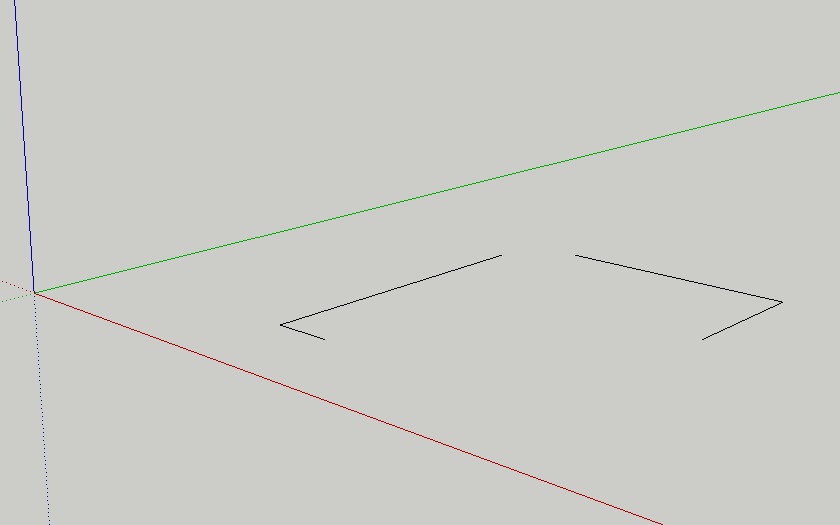
                                        However, one thing is annoying. As you can see in attached image, the line is clipped when drawing (the mouse cursor is not seen, but this img was captured while drawing with 2d rectangle tool). I think this is because the drawing gets out its boundingbox and if that boundingbox is updated on mouse move, this clipping will not occur anymore.
                                        One more thing: could Set Z-Plane tool to have inference? I'd like to be able to snap on vertexes and edges.

                                        Thanks again for all the tools you made!.

                                        untitled.jpg

                                        1 條回覆 最後回覆 回覆 引用 0
                                        • D 離線
                                          dedmin
                                          最後由 編輯

                                          @tig said:

                                          @dedmin said:

                                          Line styles still don't work - I can see layers are visible, but lines don't chance.

                                          Check you have materials to show mode is set 'on' - i.e. face materials show up... Check View/Hidden-Geometry is 'off'.
                                          Start the linestyle tool, right-click in empty space, in the dialog that opens set the style to a line-width you know will show up at the size of model (default=1, if the edges are very long than perhaps =6, very small =.25 ???) and then style='Dashed' and color='Red' - so it'll be clearly distinguishable from the original edge. Pick an edge - that edge should get moved onto the ...HIDN layer [and disappear as it's switched 'off'] and a new dashed styled-line 'group' should be made and appear on the ...STYL layer ? Open the Outliner to see what groups you have... Get Entity Info on the edge and new group to check what happens...
                                          Run the tool with the Windows/Ruby Console open and copy/paste us any error messages that you get, if it persists...
                                          Consider posting a small [purged] model with the problem if it's not fixed ?

                                          1 條回覆 最後回覆 回覆 引用 0
                                          • TIGT 離線
                                            TIG Moderator
                                            最後由 編輯

                                            dedmin

                                            I see from the video it's not working... The ...HIDN layer should turn off if you have it 'on'. I suspect it's something to do with scenes/pages... Do you get any Ruby Console Errors ?
                                            I notie the lines are only afew mm long so choose a small width - 4 = 4" ~= 100mm x10 the length of the line !


                                            TIG

                                            1 條回覆 最後回覆 回覆 引用 0
                                            • 1
                                            • 2
                                            • 3
                                            • 4
                                            • 5
                                            • 39
                                            • 40
                                            • 3 / 40
                                            • 第一個貼文
                                              最後的貼文
                                            Buy SketchPlus
                                            Buy SUbD
                                            Buy WrapR
                                            Buy eBook
                                            Buy Modelur
                                            Buy Vertex Tools
                                            Buy SketchCuisine
                                            Buy FormFonts

                                            Advertisement



