sketchucation logo sketchucation
    • Login
    Oops, your profile's looking a bit empty! To help us tailor your experience, please fill in key details like your SketchUp version, skill level, operating system, and more. Update and save your info on your profile page today!
    Mac User? | Join the Rayscaper Beta for Mac Learn More

    [Plugin] Sculpt Tools v 1.0...

    Scheduled Pinned Locked Moved Plugins
    100 Posts 51 Posters 146.8k Views 50 Watching
    Loading More Posts
    • Oldest to Newest
    • Newest to Oldest
    • Most Votes
    Reply
    • Reply as topic
    Log in to reply
    This topic has been deleted. Only users with topic management privileges can see it.
    • majidM
      majid
      last edited by

      does any one is going to make a document please?
      or does anyone knows how that "lock" feature works?

      My inspiring A, B, Sketches book: https://sketchucation.com/shop/books/intermediate/2612-alphabet-inspired-sketches--inspiring-drills-for-architects--3d-artists-and-designers-

      1 Reply Last reply
      Reply Quote 0
      • D
        dacad
        last edited by

        does anyone know how to make the "planar lock work"?
        Thanks

        David

        1 Reply Last reply
        Reply Quote 0
        • J
          Jim
          last edited by

          BTM,

          Just my opinion here, but it might be better to have a single entry in the Extensions list that toggles the tools as a set instead of having an entry for each tool in the set. Same with your Merge tools.

          Hi

          1 Reply Last reply
          Reply Quote 0
          • majidM
            majid
            last edited by

            @unknownuser said:

            does anyone know how to make the "planar lock work"?
            Thanks

            David

            me 2 😄

            My inspiring A, B, Sketches book: https://sketchucation.com/shop/books/intermediate/2612-alphabet-inspired-sketches--inspiring-drills-for-architects--3d-artists-and-designers-

            1 Reply Last reply
            Reply Quote 0
            • B
              BTM
              last edited by

              @majid said:

              @unknownuser said:

              does anyone know how to make the "planar lock work"?
              Thanks

              David

              me 2 😄

              It should work by clicking 3 times to make the face which defines the plane (an infinite face), and then when you use a sculpt tool, any vertices on that plane are 'locked' to it, and cannot move from it.

              1 Reply Last reply
              Reply Quote 0
              • C
                CPhillips
                last edited by

                Welcome back BTM! Awsome plugin.

                1 Reply Last reply
                Reply Quote 0
                • mitcorbM
                  mitcorb
                  last edited by

                  I would like to repeat an earlier post:
                  [Question-- Is the "lagline" setting in the dialog a selection of a visual cue? If it is, I have not seen it.] Meaning I could not get it to work.
                  mitcorb

                  I take the slow, deliberate approach in my aimless wandering.

                  1 Reply Last reply
                  Reply Quote 0
                  • B
                    BTM
                    last edited by

                    @mitcorb said:

                    I would like to repeat an earlier post:
                    [Question-- Is the "lagline" setting in the dialog a selection of a visual cue? If it is, I have not seen it.] Meaning I could not get it to work.
                    mitcorb

                    It's not a visual cue. It's a feature to allow sculpting even if there's a lot of lag; when you sculpt, it will affect not only the vertices around the cursor, but also around the line between the cursor and the last cursor position:
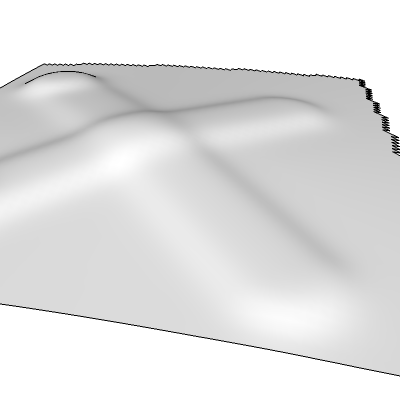
                    You can draw fast with lagline on.

                    1 Reply Last reply
                    Reply Quote 0
                    • mitcorbM
                      mitcorb
                      last edited by

                      Thanks -BTM:
                      I think I understand what you mean.
                      As for drawing fast, that would be when I get a new desktop system. My current machine has a Pentium 4 with 1.6Ghz.

                      I take the slow, deliberate approach in my aimless wandering.

                      1 Reply Last reply
                      Reply Quote 0
                      • W
                        wsms
                        last edited by

                        thanks for everybody who build this plugin!
                        i am just trying to sculpt something out~
                        the only problem is the speed of my computer...

                        1 Reply Last reply
                        Reply Quote 0
                        • B
                          BTM
                          last edited by

                          ok, I'm starting work on sculpt tools again; a new tool I'm probably going to add in the next release is flatten. I've got it working, but It's not finished yet.

                          It flattens nearby points to the plane they best fit. If you hold shift, it will keep the previous plane, so you can create a flat surface. It has a setting which allows it to not affect points on the other side of the plane, so you can sculpt somewhat hard surfaces in the model, like in this image.
                          ( though, with sketchup, it's admittedly not very useful)
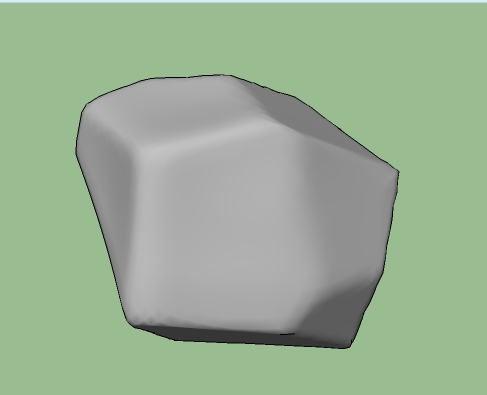
                          an 'icosphere', with flatten used in different places.

                          I'll see if I can get an inflate/ deflate tool in the next release alswell.

                          1 Reply Last reply
                          Reply Quote 0
                          • X
                            xrok1
                            last edited by

                            SWEET!
                            🤢 sorry got a little too excited 🤣

                            “There are three classes of people: those who see. Those who see when they are shown. Those who do not see.”

                            http://www.Twilightrender.com try it!

                            1 Reply Last reply
                            Reply Quote 0
                            • majidM
                              majid
                              last edited by

                              wowww it is unbelievable ...man... the only remaining thin is documenting the plugin... is there anyone here ,so experienced, to do that?

                              My inspiring A, B, Sketches book: https://sketchucation.com/shop/books/intermediate/2612-alphabet-inspired-sketches--inspiring-drills-for-architects--3d-artists-and-designers-

                              1 Reply Last reply
                              Reply Quote 0
                              • E
                                ENG. YASEEN
                                last edited by

                                Wow It's working in SU Pro7 ..... That's Great 😍

                                Thank u 👍


                                Sculpt By SU Pro7

                                My Website:

                                http://xyz4studio.blogspot.com/

                                1 Reply Last reply
                                Reply Quote 0
                                • boofredlayB
                                  boofredlay
                                  last edited by

                                  Is anybody using this in their work flow? If so how and to what success?
                                  I am surprised we have not seen a bunch of examples so far.

                                  http://www.coroflot.com/boofredlay

                                  1 Reply Last reply
                                  Reply Quote 0
                                  • majidM
                                    majid
                                    last edited by

                                    I am wondering that if it is possible to have a tool for adding detail , or even reducing the details, while keeping the surface smoothness (if it is a curved surface).
                                    maybe something like the picture
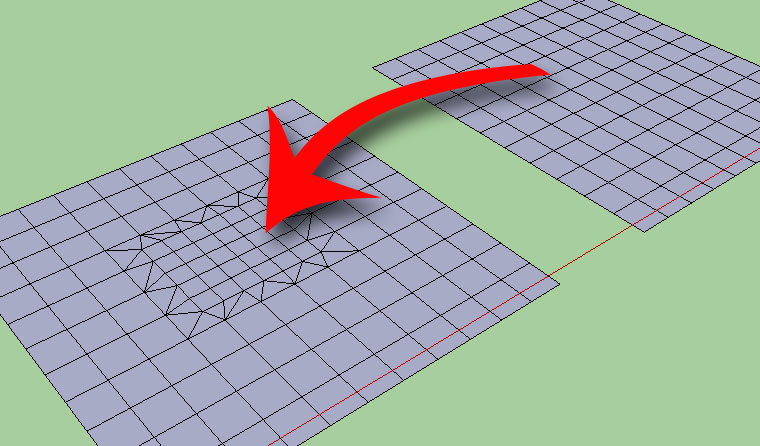

                                    add-details.jpg

                                    My inspiring A, B, Sketches book: https://sketchucation.com/shop/books/intermediate/2612-alphabet-inspired-sketches--inspiring-drills-for-architects--3d-artists-and-designers-

                                    1 Reply Last reply
                                    Reply Quote 0
                                    • thomthomT
                                      thomthom
                                      last edited by

                                      Sandbox Tool->Add Details

                                      Thomas Thomassen — SketchUp Monkey & Coding addict
                                      List of my plugins and link to the CookieWare fund

                                      1 Reply Last reply
                                      Reply Quote 0
                                      • troyhomeT
                                        troyhome
                                        last edited by

                                        I wish sandbox did more thank only triangulation

                                        IOviz.com
                                        SU Pro 2024 PC

                                        1 Reply Last reply
                                        Reply Quote 0
                                        • majidM
                                          majid
                                          last edited by

                                          sand box is not so smart tohave i.e. .6 size, rectangles, it just triangulates

                                          My inspiring A, B, Sketches book: https://sketchucation.com/shop/books/intermediate/2612-alphabet-inspired-sketches--inspiring-drills-for-architects--3d-artists-and-designers-

                                          1 Reply Last reply
                                          Reply Quote 0
                                          • A
                                            aea
                                            last edited by

                                            Missing a tutorial to sculpt tools .

                                            1 Reply Last reply
                                            Reply Quote 0

                                            Hello! It looks like you're interested in this conversation, but you don't have an account yet.

                                            Getting fed up of having to scroll through the same posts each visit? When you register for an account, you'll always come back to exactly where you were before, and choose to be notified of new replies (either via email, or push notification). You'll also be able to save bookmarks and upvote posts to show your appreciation to other community members.

                                            With your input, this post could be even better 💗

                                            Register Login
                                            • 1
                                            • 2
                                            • 3
                                            • 4
                                            • 5
                                            • 3 / 5
                                            • First post
                                              Last post
                                            Buy SketchPlus
                                            Buy SUbD
                                            Buy WrapR
                                            Buy eBook
                                            Buy Modelur
                                            Buy Vertex Tools
                                            Buy SketchCuisine
                                            Buy FormFonts

                                            Advertisement