sketchucation logo sketchucation
    • Login
    Oops, your profile's looking a bit empty! To help us tailor your experience, please fill in key details like your SketchUp version, skill level, operating system, and more. Update and save your info on your profile page today!
    ⚠️ Important | Libfredo 15.6a introduces important bugfixes for Fredo's Extensions Update

    Lines cannot be intersected?

    Scheduled Pinned Locked Moved SketchUp Discussions
    sketchup
    15 Posts 6 Posters 1.1k Views 6 Watching
    Loading More Posts
    • Oldest to Newest
    • Newest to Oldest
    • Most Votes
    Reply
    • Reply as topic
    Log in to reply
    This topic has been deleted. Only users with topic management privileges can see it.
    • EdsonE Offline
      Edson
      last edited by

      @dmatho said:

      Hi Edson,
      The lines need to be turned into surfaces, for which I'd suggest the quickest way is to use the Sandbox' From Scratch... thereafter you can trim away.

      Cheers,

      • Diego -

      hi dmatho,
      i do not understand what you suggest. how can i apply from scratch to 3D lines? would care to tell me which steps to take?

      edson mahfuz, architect| porto alegre β€’ brasil
      http://www.mahfuz.arq.br

      1 Reply Last reply Reply Quote 0
      • D Offline
        dmatho
        last edited by

        Sorry Edson, I was distracted and it's my mistake: it's From Contours (not from scratch).

        Cheers,

        • Diego -
        1 Reply Last reply Reply Quote 0
        • boofredlayB Offline
          boofredlay
          last edited by

          I would just take a couple min. and "connect the dots" as it were. Go around your mass and draw the lines where they intersect. It will be faster than trying to find some plugin or closing in your contours.

          http://www.coroflot.com/boofredlay

          1 Reply Last reply Reply Quote 0
          • D Offline
            dmatho
            last edited by

            The process is actually easier done than explained πŸ˜‰

            See attached.

            Cheers,

            • Diego -

            Erase_extra_contourlines.skp

            1 Reply Last reply Reply Quote 0
            • EdsonE Offline
              Edson
              last edited by

              @diego: i already have a surface generated from the contours. intersecting the box and the TIN is a piece of cake. what i really wanted is to extract a part of the contour lines with the box.

              @elisei: zorro 2 did the trick. i got what i wanted with it. thanks.

              @eric: as as said above, zorro 2 solved this problem but i will keep ypur method for future situations.

              edson mahfuz, architect| porto alegre β€’ brasil
              http://www.mahfuz.arq.br

              1 Reply Last reply Reply Quote 0
              • ely862meE Offline
                ely862me
                last edited by

                I used whaat s knife subdivide from Subdivide&Smooth but i think zorro works too πŸ˜‰

                OK is good u did it πŸ‘

                Elisei

                Elisei (sketchupper)


                Before no life was done on Earth it was THE LIFE ITSELF...GOD
                Come and See EliseiDesign

                1 Reply Last reply Reply Quote 0
                • EdsonE Offline
                  Edson
                  last edited by

                  @dmatho said:

                  The process is actually easier done than explained πŸ˜‰

                  See attached.

                  Cheers,

                  • Diego -

                  i got you now. after you run from contours and intersect it with a cutter shape the contour lines get trimmed, whereas if you try to do it without the surface it does not happen. thanks for the help.

                  edson mahfuz, architect| porto alegre β€’ brasil
                  http://www.mahfuz.arq.br

                  1 Reply Last reply Reply Quote 0
                  • daleD Offline
                    dale
                    last edited by

                    Could you not use the Sandbox stamp tool?

                    Just monkeying around....like Monsanto

                    1 Reply Last reply Reply Quote 0
                    • Dave RD Offline
                      Dave R
                      last edited by

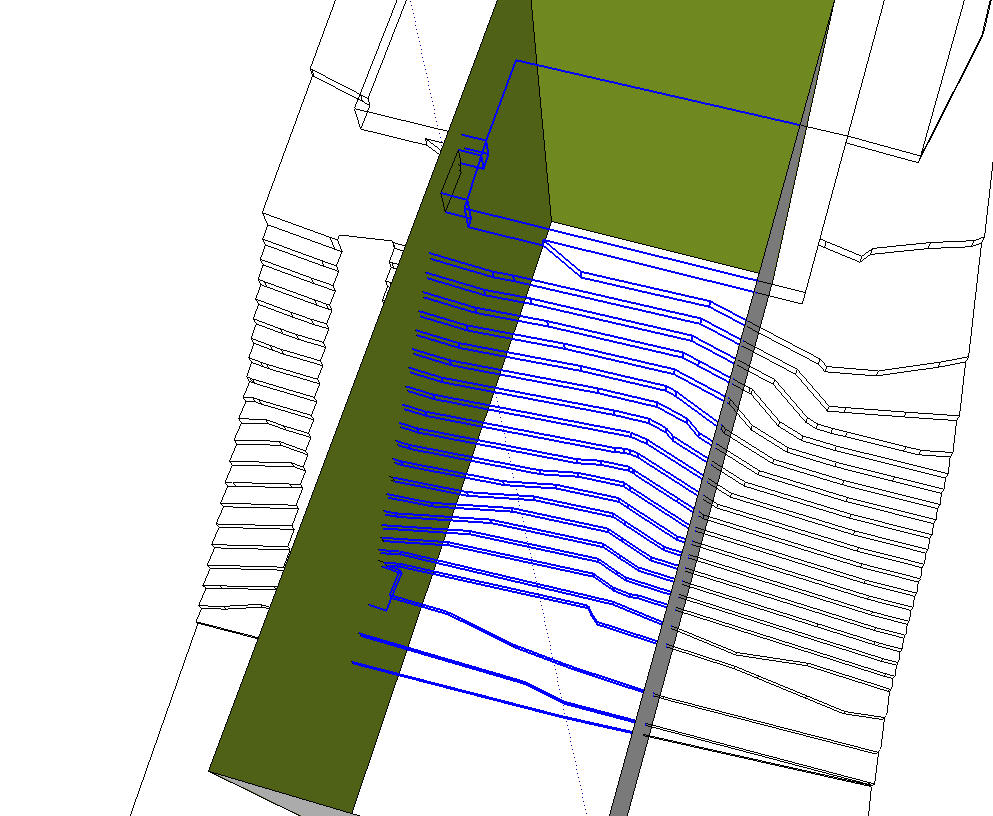
                      EDson, I just tried intersecting contours with the sides of a box like you showed in the beginning. I selected the contours and the box and then used Intersect>Intersect Selected. For the example, I had no groups or components. If your contours are inside either a group or component, put the box inside with the contours before doing the intersect.
                      contours.jpg

                      Etaoin Shrdlu

                      %

                      (THERE'S NO PLACE LIKE)

                      G28 X0.0 Y0.0 Z0.0

                      M30

                      %

                      1 Reply Last reply Reply Quote 0
                      • EdsonE Offline
                        Edson
                        last edited by

                        @dale said:

                        Could you not use the Sandbox stamp tool?

                        as i understand it, the stamp tool works only on surfaces.

                        edson mahfuz, architect| porto alegre β€’ brasil
                        http://www.mahfuz.arq.br

                        1 Reply Last reply Reply Quote 0
                        • EdsonE Offline
                          Edson
                          last edited by

                          @dave r said:

                          EDson, I just tried intersecting contours with the sides of a box like you showed in the beginning. I selected the contours and the box and then used Intersect>Intersect Selected. For the example, I had no groups or components. If your contours are inside either a group or component, put the box inside with the contours before doing the intersect.

                          strange, because this exactly what i did (or al least I think i did). perhaps one of the two elements was still a group. thanks anyway.


                          edson mahfuz, architect| porto alegre β€’ brasil
                          http://www.mahfuz.arq.br

                          1 Reply Last reply Reply Quote 0
                          • 1 / 1
                          • First post
                            Last post
                          Buy SketchPlus
                          Buy SUbD
                          Buy WrapR
                          Buy eBook
                          Buy Modelur
                          Buy Vertex Tools
                          Buy SketchCuisine
                          Buy FormFonts

                          Advertisement


