sketchucation logo sketchucation
    • 登入
    Oops, your profile's looking a bit empty! To help us tailor your experience, please fill in key details like your SketchUp version, skill level, operating system, and more. Update and save your info on your profile page today!
    🔌 Smart Spline | Fluid way to handle splines for furniture design and complex structures. Download

    [Plugin] Import OBJ with Materials v2.1 20131118

    已排程 已置頂 已鎖定 已移動 Plugins
    279 貼文 87 Posters 391.6k 瀏覽 87 Watching
    正在載入更多貼文
    • 從舊到新
    • 從新到舊
    • 最多點贊
    回覆
    • 在新貼文中回覆
    登入後回覆
    此主題已被刪除。只有擁有主題管理權限的使用者可以查看。
    • TIGT 離線
      TIG Moderator
      最後由 編輯

      No!
      A GOOD OBJ exporter typically makes copies all of the linked image-files either in the same folder as the OBJ, OR better in a subfolder called Images or XXX_Images or XXX_Textures, where XXX is the name of the OBJ file - OR it just fails to export them like 'tree3d.exe'.
      The OBJ file says which MTL file it's using in the first few lines of code - typically it's just a name and the MTL is a file in the same folder as the OBJ, with a matching name but the .mtl suffix.
      Then for each collection of faces defined in the OBJ it sets the material 'by name' that it'll be used for those faces, and there's a list of materials 'by name' defined within the MTL file - each with its own color, transparency, texture etc.
      The MTL file sets the path to an image-file, if any, because an MTL can just be a 'color'.
      That path as I said is typically to a file in a subfolder, kept with the OBJ/MTL, that holds jpg/png files, named exactly as specified in the MTL file...

      An OBJ importer looks for the MTL file... and if it exists then it applies the materials in it to the appropriate face-sets... it looks for the specified image-file [if any] for each material and if it's found it then uses that too...

      If you have the image-files it's a simple matter of putting them in the path specified in the MTL - in my experience I have never seen anything other than a list of file names [i.e. the image-files are in the same folder as the MTL file OR more commonly the image-files are in a subfolder kept with the MTL file 😕

      IF the MTL file is 'messed up' then manually edit it to repath each of the image-files defined in the lines starting 'map_Kd ' thus:
      map_Kd Images/image1.png
      and where 'image1.png' id the name of the file you have that should be used...
      and where you have made a new folder called 'Images' kept with the MTL file and you have put all of the image-files in there!

      TIG

      1 條回覆 最後回覆 回覆 引用 0
      • A 離線
        Arzka007
        最後由 編輯

        "A GOOD OBJ exporter typically makes copies all of the linked image-files either in the same folder as the OBJ, OR better in a subfolder called Images or XXX_Images or XXX_Textures, where XXX is the name of the OBJ file"

        I couldn't agree more that that's the way is SHOULD be done. However, many programs, for example popular 3ds Max, don't do it that way by default. (Why not, I have no idea.)

        When you save an object from 3ds Max in OBJ format (using default settings), linked image-files are NOT copied to the folder where OBJ and MTL files are saved. MTL file only contains links to original texture folder.

        And when people try to open these files (in other computers) they can't see textures... And they keep filling forums with questions like "missing textures when opening OBJ file" (as seen in this thread also).

        But hey, who cares, let's forget the whole thing! 💚

        1 條回覆 最後回覆 回覆 引用 0
        • TIGT 離線
          TIG Moderator
          最後由 編輯

          http://forums.sketchucation.com/viewtopic.php?p=284378#p284378
          explains how OBJ should be exported from 3dsMax...

          Because an MTL is a text file it not that hard to find every image file in the list and remove all but the file name from the path, the replace the first part with a folder path
          So
          map_Kd SomeFolder/SomeOtherFolder/YetAnotherFolder/Images/image1.png
          becomes [if the folder path is always the same a bulk Find+Replace edit is possible]
          map_Kd image1.png
          then you use a bulk Find+Replace ' map_Kd' >>> ' map_Kd Images/'
          so you have
          map_Kd Images/image1.png
          etc for all of the image-files...
          Then move all of the image-files into an 'Images' folder with the MTL...
          It should work fine...

          TIG

          1 條回覆 最後回覆 回覆 引用 0
          • thomthomT 離線
            thomthom
            最後由 編輯

            Got a feature request: Make it use the Importer class: http://code.google.com/apis/sketchup/docs/ourdoc/importer.html

            That way it can be found under the native importer options.

            Thomas Thomassen — SketchUp Monkey & Coding addict
            List of my plugins and link to the CookieWare fund

            1 條回覆 最後回覆 回覆 引用 0
            • thomthomT 離線
              thomthom
              最後由 編輯

              hm...

              Importing a OBJ file now, I'm getting lots of Error: 666 in the Ruby Console. 😕

              Thomas Thomassen — SketchUp Monkey & Coding addict
              List of my plugins and link to the CookieWare fund

              1 條回覆 最後回覆 回覆 引用 0
              • TIGT 離線
                TIG Moderator
                最後由 編輯

                Sometimes OBJ files throw an error [I suspect that it depends how they were 'written' originally - there are several different 'formats' - e.g. define some vertices then related faces per group... or define all vertices then all faces en mass; which is more difficult to read 'manually' too] - the geometry for the face is invalid - the three points are perhaps colinear or [effectively] coincident - so I get it to put up an error instead of crashing... The 666 is a longstanding joke with Rich 😒 http://forums.sketchucation.com/viewtopic.php?p=316402#p316402
                Although it throws the errors up it usually seems to make the expected geometry - so it's difficult to see what's 'gone wrong' 😕
                You can of course easily tweak the 666 rescue message to include the Exception - but frankly I found that little use either...
                My importer is not [always] as good as the compiled dll version that is available.
                For MAC it is the only option.

                TIG

                1 條回覆 最後回覆 回覆 引用 0
                • thomthomT 離線
                  thomthom
                  最後由 編輯

                  There is a compiled version?

                  Thomas Thomassen — SketchUp Monkey & Coding addict
                  List of my plugins and link to the CookieWare fund

                  1 條回覆 最後回覆 回覆 引用 0
                  • TIGT 離線
                    TIG Moderator
                    最後由 編輯

                    @thomthom said:

                    There is a compiled version?

                    Here http://forums.sketchucation.com/viewtopic.php?p=316470#p316470
                    Fluid's free OBJ importer [PC only]...

                    TIG

                    1 條回覆 最後回覆 回覆 引用 0
                    • Rich O BrienR 離線
                      Rich O Brien Moderator
                      最後由 編輯

                      Fluid obj importer in the extensions forum.

                      Download the free D'oh Book for SketchUp 📖

                      1 條回覆 最後回覆 回覆 引用 0
                      • Rich O BrienR 離線
                        Rich O Brien Moderator
                        最後由 編輯

                        Sorry, I posted this earlier but lost web connection.

                        Download the free D'oh Book for SketchUp 📖

                        1 條回覆 最後回覆 回覆 引用 0
                        • N 離線
                          niks
                          最後由 編輯

                          hi Tig..thank you for this ama 😍 ing...plugin

                          1 條回覆 最後回覆 回覆 引用 0
                          • C 離線
                            capsssa
                            最後由 編輯

                            Please,
                            i need help.
                            I've got the version 7 pro, i am on a mac, but when i installed this plugin it doesn't work.
                            I am on a mac. When i poen sketchup the plugin is absent.
                            Can you help me, please ?

                            1 條回覆 最後回覆 回覆 引用 0
                            • TIGT 離線
                              TIG Moderator
                              最後由 編輯

                              You have probably installed it in the wrong folder - check where your MAC Plugins folder is and ensure you put it in there...
                              It is accessed off the Plugins menu.
                              I would recommend the FluidImporter but I think it's PC only...

                              TIG

                              1 條回覆 最後回覆 回覆 引用 0
                              • chippwaltersC 離線
                                chippwalters
                                最後由 編輯

                                Hey TIG,

                                How come this file (simple) won't import with map? I created it using UV Mapper Pro, which is pretty standard IMO. Any insight you might have would help greatly!!!

                                Link Preview Image
                                Dropbox - 404

                                favicon

                                (dl.dropbox.com)

                                Currently working with Cross-Reality technologies

                                1 條回覆 最後回覆 回覆 引用 0
                                • TIGT 離線
                                  TIG Moderator
                                  最後由 編輯

                                  Chipp

                                  This tool is now plenty old and there's a much better/faster [free, PC only] one available here...
                                  http://forums.sketchucation.com/viewtopic.php?p=316470#p316470
                                  [follow the link to the download page here
                                  http://www.fluidray.com/downloads]
                                  I recommend you try that.
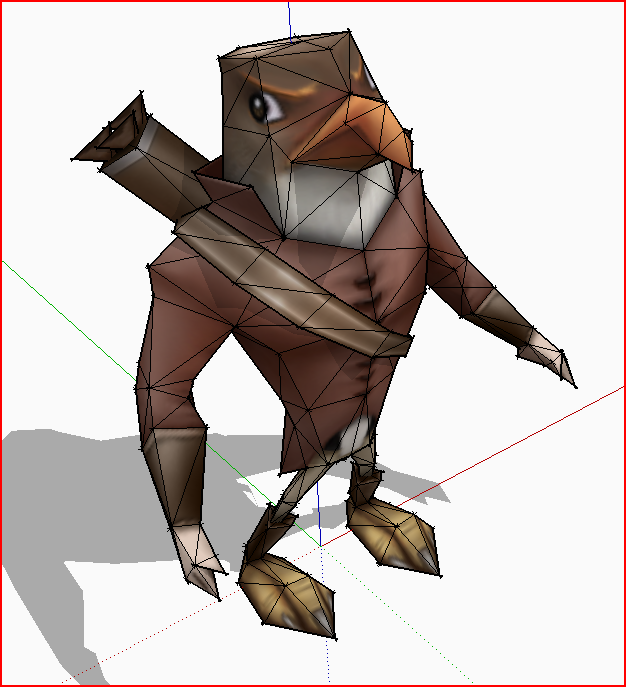
                                  Here's its result, which I take is what you want ?Capture.PNG
                                  TIG

                                  1 條回覆 最後回覆 回覆 引用 0
                                  • chippwaltersC 離線
                                    chippwalters
                                    最後由 編輯

                                    @tig said:

                                    Chipp

                                    This tool is now plenty old and there's a much better/faster [free, PC only] one available here...
                                    http://forums.sketchucation.com/viewtopic.php?p=316470#p316470
                                    [follow the link to the download page here
                                    http://www.fluidray.com/downloads]
                                    I recommend you try that.
                                    Here's its result, which I take is what you want ?[attachment=0:2wlcddqw]<!-- ia0 -->Capture.PNG<!-- ia0 -->[/attachment:2wlcddqw]

                                    Thanks TIG. Just what the doctor ordered 😄
                                    I'm using a Mac these days, but I've got a Virtual Win version of SketchUp. I'll check it out!

                                    Currently working with Cross-Reality technologies

                                    1 條回覆 最後回覆 回覆 引用 0
                                    • W 離線
                                      wootwoots
                                      最後由 編輯

                                      I tried your plugin, and saddly it didnt import anything.

                                      I tried the fluid obj importer, and for a single cube google sketchup just crash 😞

                                      1 條回覆 最後回覆 回覆 引用 0
                                      • O 離線
                                        oldman-pit
                                        最後由 編輯

                                        well done TIG, thanks a lot! 👍

                                        1 條回覆 最後回覆 回覆 引用 0
                                        • Rich O BrienR 離線
                                          Rich O Brien Moderator
                                          最後由 編輯

                                          @wootwoots said:

                                          I tried your plugin, and saddly it didnt import anything.

                                          I tried the fluid obj importer, and for a single cube google sketchup just crash 😞

                                          A bit more info would mean that we could help.

                                          Download the free D'oh Book for SketchUp 📖

                                          1 條回覆 最後回覆 回覆 引用 0
                                          • LanaL 離線
                                            Lana
                                            最後由 編輯

                                            Thanks Tig.You are good. 😍

                                            1 條回覆 最後回覆 回覆 引用 0
                                            • 1
                                            • 2
                                            • 7
                                            • 8
                                            • 9
                                            • 10
                                            • 11
                                            • 12
                                            • 13
                                            • 14
                                            • 9 / 14
                                            • 第一個貼文
                                              最後的貼文
                                            Buy SketchPlus
                                            Buy SUbD
                                            Buy WrapR
                                            Buy eBook
                                            Buy Modelur
                                            Buy Vertex Tools
                                            Buy SketchCuisine
                                            Buy FormFonts

                                            Advertisement