sketchucation logo sketchucation
    • 登入
    Oops, your profile's looking a bit empty! To help us tailor your experience, please fill in key details like your SketchUp version, skill level, operating system, and more. Update and save your info on your profile page today!
    🔌 Smart Spline | Fluid way to handle splines for furniture design and complex structures. Download

    [Plugin] SectionCutFace

    已排程 已置頂 已鎖定 已移動 Plugins
    565 貼文 170 Posters 375.8k 瀏覽 169 Watching
    正在載入更多貼文
    • 從舊到新
    • 從新到舊
    • 最多點贊
    回覆
    • 在新貼文中回覆
    登入後回覆
    此主題已被刪除。只有擁有主題管理權限的使用者可以查看。
    • simon le bonS 離線
      simon le bon
      最後由 編輯

      Dear TIG,

      The white sheet becomes black with the thanks we give you at each new script you offer to the community!!

      I had used this one with a total pleasure here: Modeling] A PoorFlatEllipsoidIndian Bowl into this video: SketchUp/PotterSC_S&S_Quarter2(sorry to advertise this way my own products: I have presently nothing better done with SectionCutFace to show)

      +++simon

      1 條回覆 最後回覆 回覆 引用 0
      • broomstickB 離線
        broomstick
        最後由 編輯

        I absolutely looooove this plugin 😄

        1 條回覆 最後回覆 回覆 引用 0
        • A 離線
          AcesHigh
          最後由 編輯

          I am sorry, what exactly does this plugin do? Its like a Zorro?

          1 條回覆 最後回覆 回覆 引用 0
          • TIGT 離線
            TIG Moderator
            最後由 編輯

            @aceshigh said:

            I am sorry, what exactly does this plugin do? Its like a Zorro?

            No.
            To see what most scripts do you can download them and if they don't have a separate readme or pdf then open the .rb file with a plain text editor (NotePad.exe etc) and read the first part which is almost always a description and helpful notes...
            Basically SectionCutFace is a tool that lets you fill in the faces of a section cut, coloured etc as desired...

            SectionCutFace adds a right-click context-menu item 'Add Section-Cut Face' that becomes available if you have selected one (active) section-plane. It opens a dialog and you can then set options - the cut's face colour, the section-cut's colour+width, the cut's layer, if its un-faced edges are kept and if all its edges are finally hidden etc... On 'OK' it adds a group to the model that is placed on* the section-cut plane (*actually it's 0.2mm inside so you still see it !). This group contains faces on what should be the solid parts of the section: it is coloured and setup as you've specified, put on its own layer as you might want it 'switched-off' in other views... It isn't foolproof - you can invent a section with ambiguous areas of solid/void but if it guesses the faced/unfaced areas wrongly then you can simply edit the group and fix them.

            TIG

            1 條回覆 最後回覆 回覆 引用 0
            • C 離線
              cyan.archnet
              最後由 編輯

              really GREAT plugin, THANKS A LOT!

              1 條回覆 最後回覆 回覆 引用 0
              • I 離線
                ideas_arte
                最後由 編輯

                Thank you very much....!

                1 條回覆 最後回覆 回覆 引用 0
                • D 離線
                  drewpoeppel
                  最後由 編輯

                  Thank you so much for this! I just had a project where I spent half the day trying to create what your .rb did in 5 secs. Essential for all architects.

                  1 條回覆 最後回覆 回覆 引用 0
                  • utilerU 離線
                    utiler
                    最後由 編輯

                    TIG, I have a request for this great little script.
                    Generally when i as a section cut, I only want it in the current scene; I assume most others would also.

                    Is it possible to edit the script to view the cut layer active only in the current scene?
                    [Just like Jim's [Add hidden Layer" does]
                    👍

                    Just Curious...

                    1 條回覆 最後回覆 回覆 引用 0
                    • TIGT 離線
                      TIG Moderator
                      最後由 編輯

                      Here's v2.3 28/07/09 CUT-x's layer now only 'on' in current page/scene.
                      http://forums.sketchucation.com/viewtopic.php?p=172583#p172583

                      TIG

                      1 條回覆 最後回覆 回覆 引用 0
                      • utilerU 離線
                        utiler
                        最後由 編輯

                        You're the man, TIG!!!!
                        Thank you sooo much....

                        Just Curious...

                        1 條回覆 最後回覆 回覆 引用 0
                        • R 離線
                          rhankc
                          最後由 編輯

                          Many thanks Tig. Have a great day!

                          Hank

                          1 條回覆 最後回覆 回覆 引用 0
                          • massimoM 離線
                            massimo Moderator
                            最後由 編輯

                            Sorry TIG, I got this error with the 2.3 version with a simple box model
                            Error: #<NoMethodError: undefined methodset_visibility' for nil:NilClass>
                            C:/Programmi/Google/Google SketchUp 6/Plugins/SectionCutFace.rb:383:in face' C:/Programmi/Google/Google SketchUp 6/Plugins/SectionCutFace.rb:451 C:/Programmi/Google/Google SketchUp 6/Plugins/SectionCutFace.rb:451:in call'`
                            and i don't understand how the plug works with the scene/page transition. Draw a cube, add two scenes, in second scene make a section and add "section cut face". Is the below result the expected one?
                            Thanks.
                            Massimo.
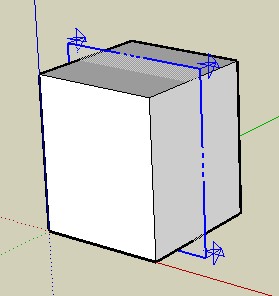

                            scene 1


                            scene 2

                            1 條回覆 最後回覆 回覆 引用 0
                            • TIGT 離線
                              TIG Moderator
                              最後由 編輯

                              Here's v2.4

                              http://forums.sketchucation.com/viewtopic.php?p=172583#p172583

                              Trapped layer visibility setting error if no pages/scenes set...

                              TIG

                              1 條回覆 最後回覆 回覆 引用 0
                              • TIGT 離線
                                TIG Moderator
                                最後由 編輯

                                @massimo said:

                                Sorry TIG, I got this error with the 2.3 version with a simple box model
                                Error: #<NoMethodError: undefined methodset_visibility' for nil:NilClass>
                                C:/Programmi/Google/Google SketchUp 6/Plugins/SectionCutFace.rb:383:in face' C:/Programmi/Google/Google SketchUp 6/Plugins/SectionCutFace.rb:451 C:/Programmi/Google/Google SketchUp 6/Plugins/SectionCutFace.rb:451:in call'`
                                and i don't understand how the plug works with the scene/page transition. Draw a cube, add two scenes, in second scene make a section and add "section cut face". Is the below result the expected one?
                                Thanks.
                                Massimo.
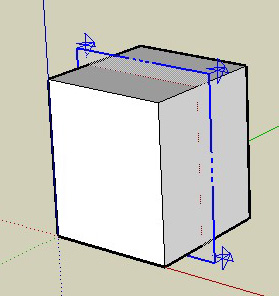
                                Do you have any 'Pages' [Scenes] ?
                                EDIT: see next message for fixing update...

                                TIG

                                1 條回覆 最後回覆 回覆 引用 0
                                • massimoM 離線
                                  massimo Moderator
                                  最後由 編輯

                                  No error now, thanks. Real time plugins... 😄 But about the result?

                                  1 條回覆 最後回覆 回覆 引用 0
                                  • massimoM 離線
                                    massimo Moderator
                                    最後由 編輯

                                    This is the situation after the cut with no scenes added, but if i add a scene before the cut no error occurs.
                                    EDIT: TIG answered with the 2.4 version before my reply 😄
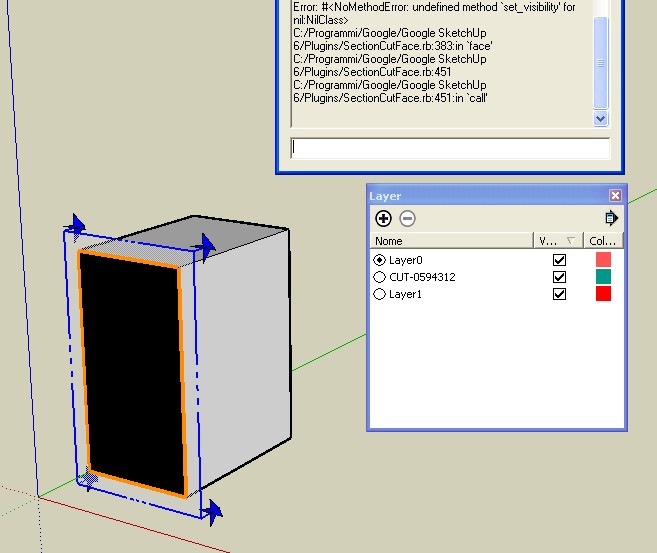

                                    ScreenHunter_03 Aug. 18 13.20.jpg

                                    1 條回覆 最後回覆 回覆 引用 0
                                    • D 離線
                                      dimario
                                      最後由 編輯

                                      this is just a fab plugin.
                                      thank you a lot. very helpful!!! saves a lot of time...

                                      kind regards...

                                      1 條回覆 最後回覆 回覆 引用 0
                                      • GaieusG 離線
                                        Gaieus
                                        最後由 編輯

                                        Works really cool, thanks, TIG! 👍

                                        (And now... If only the section cut face would also move when I make a section animation/transition between two scenes! But sigh... I know, I know...) 😉

                                        Gai...

                                        1 條回覆 最後回覆 回覆 引用 0
                                        • massimoM 離線
                                          massimo Moderator
                                          最後由 編輯

                                          @unknownuser said:

                                          If only the section cut face would also move when I make a section animation/transition between two scenes! But sigh... I know, I know...

                                          That's exactly the result I was looking for, Gaieus. 😄

                                          1 條回覆 最後回覆 回覆 引用 0
                                          • GaieusG 離線
                                            Gaieus
                                            最後由 編輯

                                            😮

                                            I didn't even expect it to be possible at all!
                                            Fingers crossed however (and now all the exporter scripters for external renderers should start thinking about how to export these animated section cuts! 😄 )

                                            Gai...

                                            1 條回覆 最後回覆 回覆 引用 0
                                            • 1
                                            • 2
                                            • 8
                                            • 9
                                            • 10
                                            • 11
                                            • 12
                                            • 28
                                            • 29
                                            • 10 / 29
                                            • 第一個貼文
                                              最後的貼文
                                            Buy SketchPlus
                                            Buy SUbD
                                            Buy WrapR
                                            Buy eBook
                                            Buy Modelur
                                            Buy Vertex Tools
                                            Buy SketchCuisine
                                            Buy FormFonts

                                            Advertisement




