sketchucation logo sketchucation
    • Login
    Oops, your profile's looking a bit empty! To help us tailor your experience, please fill in key details like your SketchUp version, skill level, operating system, and more. Update and save your info on your profile page today!
    ⚠️ Update | Sketchucation Tools 5.0.8 released with licensing improvements and bugfixes Download

    [Plugin][$] RoundCorner - v3.4a - 31 Mar 24


    Scheduled Pinned Locked Moved Plugins
    1.5k Posts 477 Posters 4.1m Views 477 Watching
    Loading More Posts
    • Oldest to Newest
    • Newest to Oldest
    • Most Votes
    Reply
    • Reply as topic
    Log in to reply
    This topic has been deleted. Only users with topic management privileges can see it.
    • A
      AcesHigh
      last edited by

      RedFoxy, do you still have 2014 installed?

      You can just open 2015 and 2014. Open your file first in 2015. Then in 2014 (it will say it will have to open as read only). Then round corner the objects you want in 2014 and copy to the main file in 2015 (saving once in a while in 2015).

      1 Reply Last reply
      Reply Quote 0
      • D
        define
        last edited by

        Hello Fredo,

        can't thank you enough for all your plugins!!! Donate folks!! At the end of the day
        we will have to open our refrigerators door - isn't it?

        I have a question:

        When inspecting the icons for 'RoundCorner' I stumbled upon one which is labeled 'CustomProfile'.

        It however don't seem to be implemented. Did you work on this as well?

        ...absolutely amazed by your work and with maximum respect

        Klaus

        1 Reply Last reply
        Reply Quote 0
        • fredo6F
          fredo6
          last edited by

          @define said:

          When inspecting the icons for 'RoundCorner' I stumbled upon one which is labeled 'CustomProfile'.

          It however don't seem to be implemented. Did you work on this as well?

          Klaus,

          Custom profiles (based on a quarter definition of profile) is something that I have included in the code, but I would need to build a kind of GUI to activate it in the script.

          see http://sketchucation.com/forums/viewtopic.php?f=323%26amp;t=20485%26amp;start=30#p172163

          Fredo
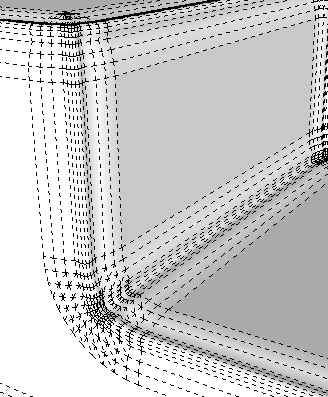
          RoundCorner custom profiles detail.jpg

          RoundCorner custom profiles detail 2.jpg

          1 Reply Last reply
          Reply Quote 0
          • PixeroP
            Pixero
            last edited by

            @unknownuser said:

            Custom profiles (based on a quarter definition of profile) is something that I have included in the code, but I would need to build a kind of GUI to activate it in the script.

            Please do. 😉

            Another small request.
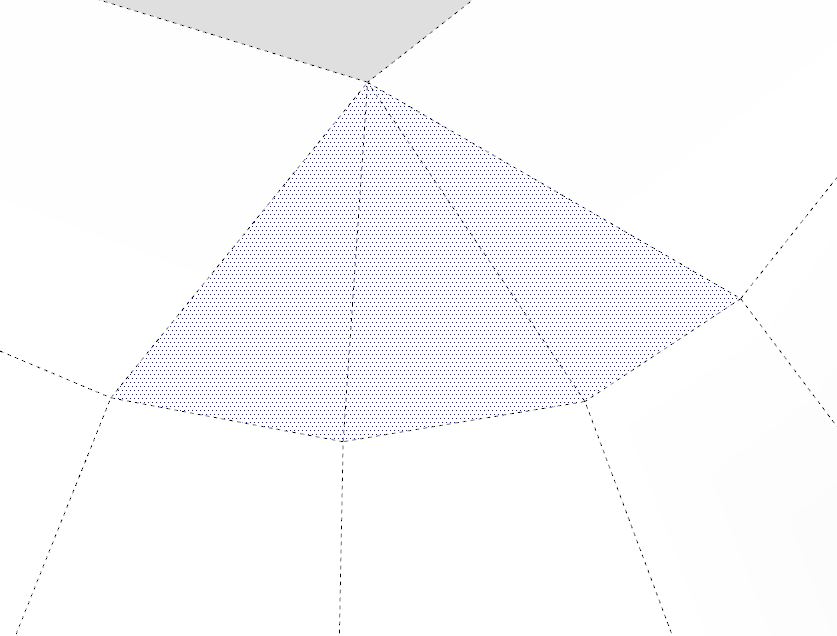
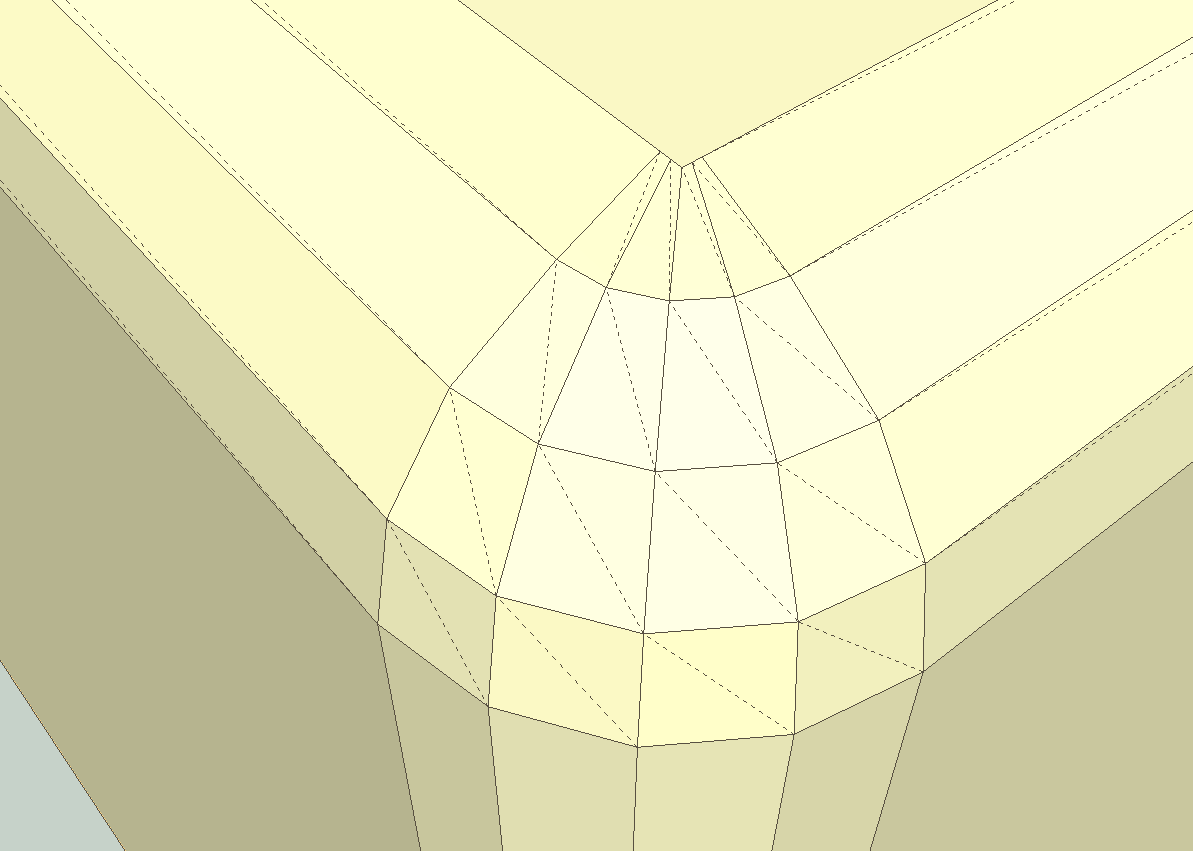
            Would it be possible to make the scripts create quads only? As it is now it also creates triangles.

            triangles.JPG

            1 Reply Last reply
            Reply Quote 0
            • thomthomT
              thomthom
              last edited by

              @pixero said:

              Another small request.
              Would it be possible to make the scripts create quads only? As it is now it also creates triangles.

              How would you expect the result would be in quads for that example you posted?

              Thomas Thomassen — SketchUp Monkey & Coding addict
              List of my plugins and link to the CookieWare fund

              1 Reply Last reply
              Reply Quote 0
              • fredo6F
                fredo6
                last edited by

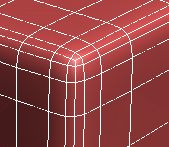
                I think it is rather something like this:

                Quad round corner.png

                Coincidentally, I was just giving an other look at RoundCorner using subdivisions techniques, essentially to generalize usage to complex situations where a pure geometrical construction is not possible.

                Fredo

                1 Reply Last reply
                Reply Quote 0
                • pbacotP
                  pbacot
                  last edited by

                  Would it be something like this?

                  EDIT --oh no, the other faces get ruined for quads--I tried applying texture and just realized this and came back to find your post below, Fredo!


                  Screen Shot 2015-01-10 at 8.54.27 AM.png

                  MacOSX MojaveSketchUp Pro v19 Twilight v2 Thea v3 PowerCADD

                  1 Reply Last reply
                  Reply Quote 0
                  • thomthomT
                    thomthom
                    last edited by

                    @fredo6 said:

                    I think it is rather something like this:

                    [attachment=0:2nffscfk]<!-- ia0 -->Quad round corner.png<!-- ia0 -->[/attachment:2nffscfk]

                    Yea, that type of rounding would be great!

                    @fredo6 said:

                    Coincidentally, I was just giving an other look at RoundCorner using subdivisions techniques, essentially to generalize usage to complex situations where a pure geometrical construction is not possible.

                    👍 👍

                    Thomas Thomassen — SketchUp Monkey & Coding addict
                    List of my plugins and link to the CookieWare fund

                    1 Reply Last reply
                    Reply Quote 0
                    • fredo6F
                      fredo6
                      last edited by

                      @thomthom said:

                      👍 👍

                      I am not so familar with subdivision. But I think you are, as you work on your SubDivide plugin!

                      Fredo

                      1 Reply Last reply
                      Reply Quote 0
                      • fredo6F
                        fredo6
                        last edited by

                        @pixero said:

                        Another small request.
                        Would it be possible to make the scripts create quads only? As it is now it also creates triangles.

                        [attachment=4:1tjc0skc]<!-- ia4 -->triangles.JPG<!-- ia4 -->[/attachment:1tjc0skc]

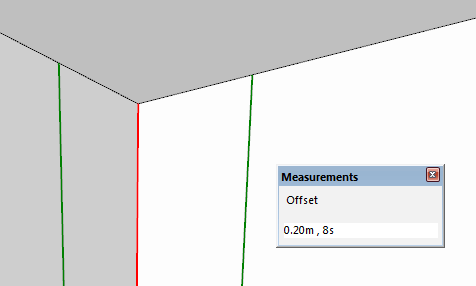
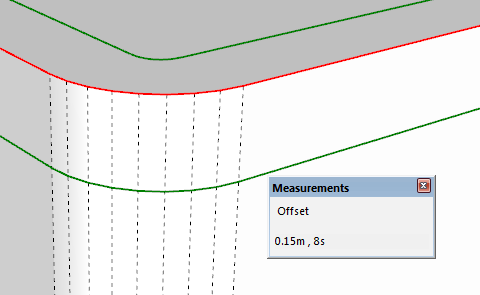
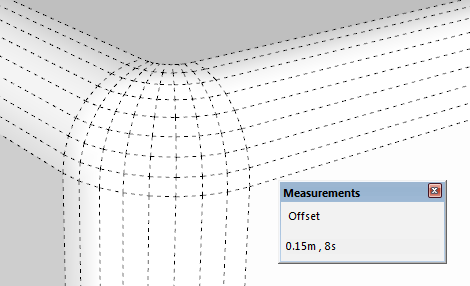
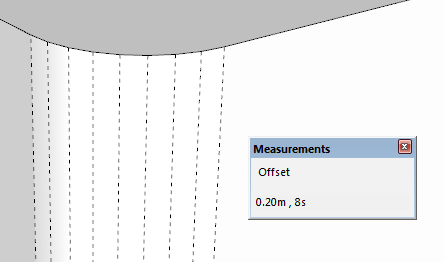
                        Another possibility is the double rounding

                        Basically you proceed in 2 steps:

                        1. Round the vertical edge by an offset A (here A = 0.2m)
                          [attachment=3:1tjc0skc]<!-- ia3 -->Double Rounding 1.png<!-- ia3 -->[/attachment:1tjc0skc][attachment=0:1tjc0skc]<!-- ia0 -->Double Rounding 11.png<!-- ia0 -->[/attachment:1tjc0skc]

                        2. Then Round the top edges by an offset B, such as B is lower than A (here B = 0.15 m)
                          [attachment=2:1tjc0skc]<!-- ia2 -->Double rounding 2.png<!-- ia2 -->[/attachment:1tjc0skc][attachment=1:1tjc0skc]<!-- ia1 -->Double Rounding 3.png<!-- ia1 -->[/attachment:1tjc0skc]

                        I can maybe automate this type of double rounding in the Plugin

                        Fredo


                        Double Rounding 1.png


                        Double rounding 2.png


                        Double Rounding 3.png


                        Double Rounding 11.png

                        1 Reply Last reply
                        Reply Quote 0
                        • Dave RD
                          Dave R
                          last edited by

                          Fredo, it would be very nice if you could implement double rounding. That's essentially the way the real corners would get rounded on the models I draw.

                          Etaoin Shrdlu

                          %

                          (THERE'S NO PLACE LIKE)

                          G28 X0.0 Y0.0 Z0.0

                          M30

                          %

                          1 Reply Last reply
                          Reply Quote 0
                          • D
                            define
                            last edited by

                            @fredo6 said:

                            @define said:

                            When inspecting the icons for 'RoundCorner' I stumbled upon one which is labeled 'CustomProfile'.

                            It however don't seem to be implemented. Did you work on this as well?

                            Klaus,

                            Custom profiles (based on a quarter definition of profile) is something that I have included in the code, but I would need to build a kind of GUI to activate it in the script.

                            see http://sketchucation.com/forums/viewtopic.php?f=323%26amp;t=20485%26amp;start=30#p172163

                            Fredo
                            =======================================================================================================
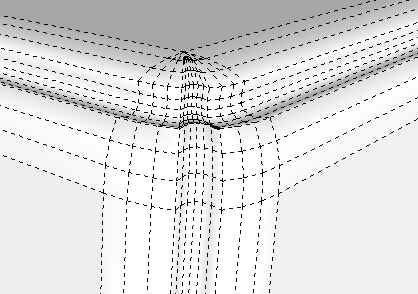
                            Thanks for your answer Fredo. A custom profile-option could come in handy when having situations like thick peripheral seams like on leather sofas or cushions made from 'heavy duty' textiles. It's very special though - might be to tricky to use in the end, if it has to many special options, conditions and constraints.

                            thx again for your phantastic work!

                            Klaus

                            1 Reply Last reply
                            Reply Quote 0
                            • H
                              HirokaMatsuiko2015
                              last edited by

                              Hello thank you for your plugin its very convenient to use

                              i have an idea similar to blender bevel
                              if you choose inner loopcut or Lines then bevel it it will do this effect

                              http://i.imgur.com/AZWBKVP.png

                              1 Reply Last reply
                              Reply Quote 0
                              • PixeroP
                                Pixero
                                last edited by

                                Maybe this can give you some ideas: http://www.mariussilaghi.com/products/quad-chamfer

                                1 Reply Last reply
                                Reply Quote 0
                                • C
                                  cdubea
                                  last edited by

                                  Fredo, thanks for this crucial tool that is missing in Sketchup.

                                  I have a question/request. I'm using SketchUp on Dell XPS 13 laptop (Win 8.1). The problem I'm having is the toolbar is compressed in size making it very difficult to use:

                                  http://www.dubea.com/fotos/roundcorner.jpg

                                  Is there any way to expand the toolbar?

                                  Thanks again

                                  Chris

                                  http://www.dubea.org/chris_small.jpg

                                  1 Reply Last reply
                                  Reply Quote 0
                                  • PixeroP
                                    Pixero
                                    last edited by

                                    I have the same problem on my Macbook Pro with Bootcamp and Windows 8.1.
                                    A way of setting the size to fit a certain resolution would be great.

                                    1 Reply Last reply
                                    Reply Quote 0
                                    • M
                                      mrjumpmanv2
                                      last edited by

                                      Hey,

                                      I'm trying to download Roundcorner for sketchup 2015 on windows
                                      I've tried downloading it on sketchucation's plugin downloader
                                      and everytime i try and find it it doesn't show up anywhere. I've
                                      checked the toolbars menu and the extensions tab under preferences
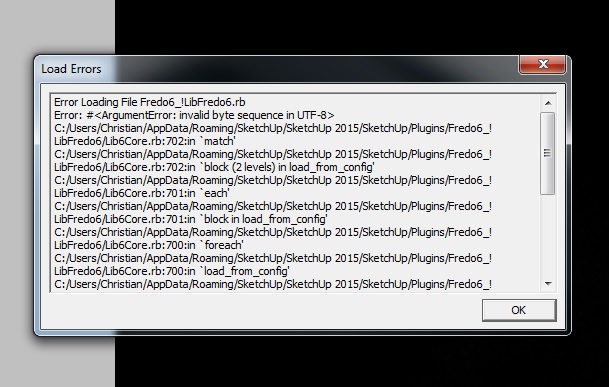
                                      and it's not there. Every time I start up sketchup it gives me this error.
                                      Is this plugin supposed to work with sketchup 2015? Let me know if there's
                                      any more information i can add to help you help me.

                                      Regards,

                                      Christian S.


                                      example 21.jpg

                                      %(#000040)["Anyone who has never made a mistake has never tried anything new."

                                      Albert Einstein]

                                      1 Reply Last reply
                                      Reply Quote 0
                                      • TIGT
                                        TIG Moderator
                                        last edited by

                                        All of Fredo's tools should work with v2015, but you need to install the latest versions from the PluginStore.
                                        AND you must have the latest version of LibFredo installed also available there...
                                        http://sketchucation.com/pluginstore?pln=LibFredo6
                                        The invalid byte UTF-8 suggests an older file version.
                                        It also sometimes occurs with file-paths including weird accented characters etc [although your user-path looks innocuous enough !]

                                        Another issue might be if you have copied over lots of files from an earlier SketchUp version's Plugins folder - you might have copied some old files across which are incompatible/unwanted - wherever possible you should always install fresh/latest copies when setting up your new SketchUp version...

                                        If getting the LibFredo etc doesn't fix things, then please provide screenshot[s] of your Plugins folder's contents, so we can see if you have any old/wrong files that need removing... 🤓

                                        TIG

                                        1 Reply Last reply
                                        Reply Quote 0
                                        • N
                                          NicholasElliott
                                          last edited by

                                          How do you download the file in the first place!?
                                          I need the link to the file in order to install… there used to be a clear button that said ‘DOWNLOAD’!
                                          Where has that gone!?

                                          1 Reply Last reply
                                          Reply Quote 0
                                          • Dave RD
                                            Dave R
                                            last edited by

                                            @nicholaselliott said:

                                            How do you download the file in the first place!?
                                            I need the link to the file in order to install… there used to be a clear button that said ‘DOWNLOAD’!
                                            Where has that gone!?

                                            From the first post in this thread:
                                            Screenshot - 1_17_2015 , 9_47_48 AM.png

                                            It seems pretty clear to me. Do you need more help than that?

                                            Etaoin Shrdlu

                                            %

                                            (THERE'S NO PLACE LIKE)

                                            G28 X0.0 Y0.0 Z0.0

                                            M30

                                            %

                                            1 Reply Last reply
                                            Reply Quote 0

                                            Hello! It looks like you're interested in this conversation, but you don't have an account yet.

                                            Getting fed up of having to scroll through the same posts each visit? When you register for an account, you'll always come back to exactly where you were before, and choose to be notified of new replies (either via email, or push notification). You'll also be able to save bookmarks and upvote posts to show your appreciation to other community members.

                                            With your input, this post could be even better 💗

                                            Register Login
                                            • 1
                                            • 2
                                            • 48
                                            • 49
                                            • 50
                                            • 51
                                            • 52
                                            • 74
                                            • 75
                                            • 50 / 75
                                            • First post
                                              Last post
                                            Buy SketchPlus
                                            Buy SUbD
                                            Buy WrapR
                                            Buy eBook
                                            Buy Modelur
                                            Buy Vertex Tools
                                            Buy SketchCuisine
                                            Buy FormFonts

                                            Advertisement